
CyberPanel Community

ClosedManually add context /.well-known/acme-challenge to all sites?

do
dotcomUNDERGROUND #1

I was having ssl issues and after following your SSL troubleshooting guide at How to fix SSL issues in CyberPanel - Docs - CyberPanel Community I see none of my sites have context /.well-known/acme-challenge under vhost config

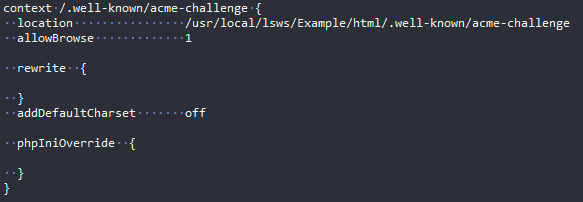
full code:

context /.well-known/acme-challenge {
  location                /usr/local/lsws/Example/html/.well-known/acme-challenge
  allowBrowse             1

  rewrite  {

  }
  addDefaultCharset       off

  phpIniOverride  {

  }
}

Should I manually add that to vhost config of every site hosted?

If that’s the case, an automated tool would be great.
6 replies
tb
tbaldur #2

Yes you need to add manually.
Cyberpanel team changed it on the installer but i think they never updated the upgrade script regarding that.

sh
shoaibkk #3

For the old sites if it is not getting after update you have to add that in you host manually

tb
tbaldur #4

sh <(curl https://raw.githubusercontent.com/tbaldur/cyberpanel-mods/main/fix_ssl_missing_context.sh || wget -O - https://raw.githubusercontent.com/tbaldur/cyberpanel-mods/main/fix_ssl_missing_context.sh)

There. If it can’t find “/usr/local/lsws/Example/html/.well-known/acme-challenge” on the vhost config, it will write all the required context.
imagem

It will fix ALL vhosts.

pw
pwz2000 #5

jhdjhddjhs

Mines is empty, is that a normal output?

tb
tbaldur #6

There’s no output. It just adds the context if it is missing.

Sign in to reply
