Major Issues After Recent Updates – WordPress Installer & Backups Broken

Hi CyberPanel Team (and hopefully Usman),

I’ve been a long-time CyberPanel user and generally supportive of the project, but I feel compelled to raise some important issues that have unfortunately gone unresolved—and are now affecting production systems.

1. WordPress Installer Broken

Since the new UI updates rolled out, the automatic WordPress installer no longer works properly. It fails with a “Error establishing a database connection” on every fresh install. I created a post here but have received zero support or response: :backhand_index_pointing_right: ❗ WordPress "Error establishing a database connection" on new install via CyberPanel

This issue has been persistent for weeks now, and it’s a major feature that many users rely on.


2. Backups Have Stopped Working

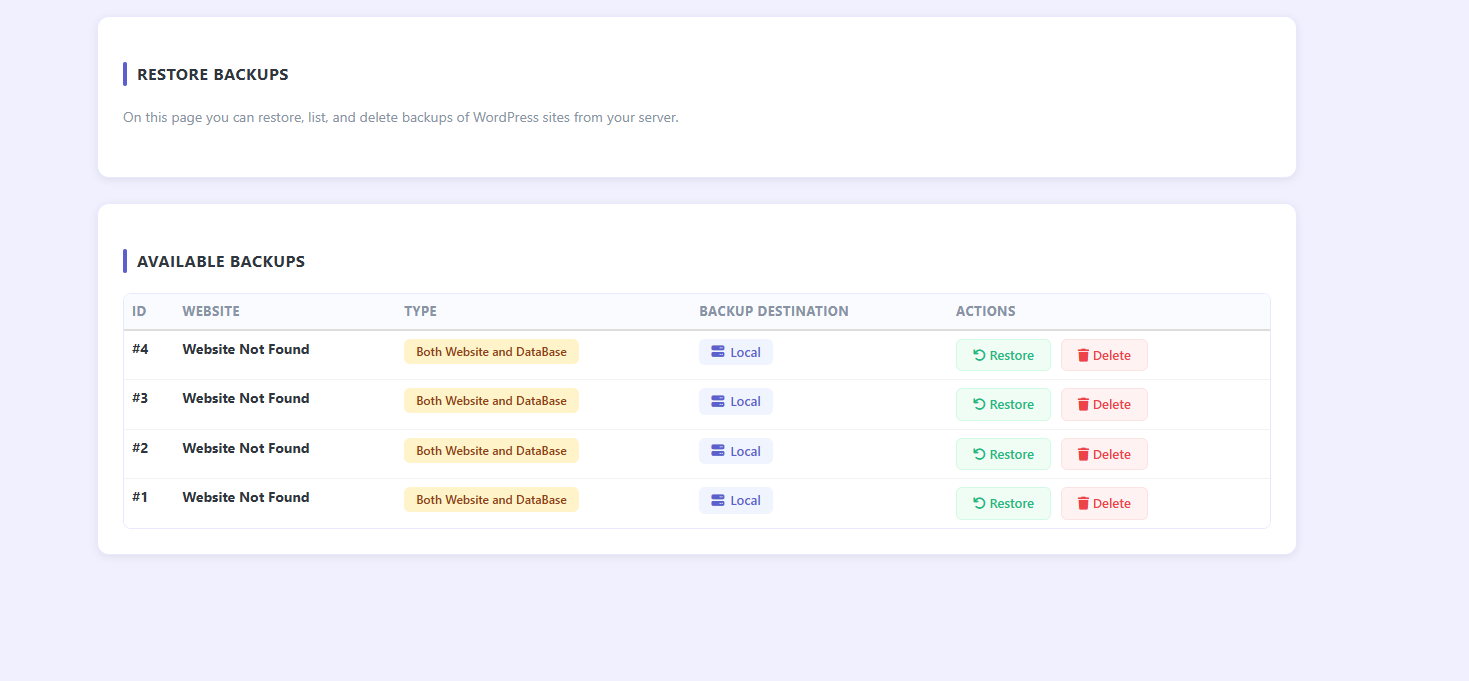
In the past week, backups have completely failed. When I check the backup scheduler, no websites are listed—despite hosting over 100 sites. It appears something broke with one of the recent updates.

Speaking of which…


3. Too Many Rapid Updates – Unstable System

Since the rollout of the new AI malware scanner, we’ve seen multiple updates per day. While it’s great to see active development, these frequent pushes are introducing more bugs than they solve.

The pace of updates feels rushed and poorly tested, and it’s creating a lot of instability. Some basic features—like site creation, backups, and WordPress installs—are now failing, which shakes confidence.


4. Support is Practically Nonexistent

The forum is full of unanswered threads, and the community is largely left to figure things out on their own. Unfortunately, this isn’t sustainable for those of us running real businesses or managing large-scale sites.


Friendly Suggestions:

  • Please slow down updates and test thoroughly before pushing live.
  • Assign a moderator or support rep to answer community posts, even if just to acknowledge them.
  • Re-test core features like backups and WordPress installs on fresh builds—these should never break.
  • Consider offering priority/community-based triage for bugs that directly affect critical hosting tasks.

CyberPanel still has huge potential, but it’s frustrating to see major features breaking with no clear roadmap or timely responses.

I truly hope this post is taken seriously and addressed—especially by @usmannasir. With increasing competition (even hosts now offer OpenLiteSpeed-based stacks), reliability and support are what will keep people loyal to CyberPanel.

Thanks for reading—and I sincerely hope to see improvements soon.

Best regards, A loyal but increasingly frustrated user

1 Like

Thank you for your detailed feedback. As a long-time user of CyberPanel, your concerns deserve a thorough response. Let me address each issue systematically:

1. WordPress Database Connection Error

First, let’s clarify - the post you referenced (#58833) is indeed 7 days old, not weeks. More importantly, I’ve personally tested WordPress installations on multiple fresh CyberPanel setups and cannot reproduce this issue. This suggests the problem may be environment-specific rather than a universal bug.

To debug what’s happening when you install WordPress from the UI:

First, activate CyberPanel Python environment
source /usr/local/CyberCP/bin/activate

Enable debug mode to see detailed errors
touch /usr/local/CyberCP/debug

Monitor the CyberPanel log during WordPress installation
tail -f /home/cyberpanel/error-logs.txt

In another terminal, check MySQL/MariaDB logs
tail -f /var/log/mysql/error.log
or
journalctl -u mariadb -f

To verify database connectivity:
Get MySQL root password
cat /etc/cyberpanel/mysqlPassword

Test MySQL connection
mysql -u root -p
Enter the password from above

Check CyberPanel database user privileges
SHOW GRANTS FOR 'cyberpanel'@'localhost';

When you click “Install WordPress” in the UI, watch these logs for specific errors. Common issues include:

  • Database service connectivity
  • Insufficient MySQL privileges
  • Disk space issues
  • PHP version conflicts

2. Backup Scheduler Showing No Websites

This is likely an ACL (Access Control List) issue. The backup scheduler uses the same ACL system as other
CyberPanel components. If you’re seeing no websites despite having 100+ sites:

Get MySQL password first
cat /etc/cyberpanel/mysqlPassword

Check websites in database directly
mysql -u root -p cyberpanel -e "SELECT domain, admin FROM websiteFunctions_websites LIMIT 10;"

Or using Django shell:
Activate CyberPanel environment first
source /usr/local/CyberCP/bin/activate

Check via Django

cd /usr/local/CyberCP
python manage.py shell

Then:

  from loginSystem.models import Administrator
  from websiteFunctions.models import Websites
  from plogical.acl import ACLManager

Replace ‘admin’ with your actual username

  admin = Administrator.objects.get(userName='admin')
  print(f"User level: {admin.acl}")
  print(f"Admin status: {admin.acl.adminStatus}")

Check websites count

  total_sites = Websites.objects.count()
  user_sites = Websites.objects.filter(admin=admin).count()
  print(f"Total websites: {total_sites}")
  print(f"Your websites: {user_sites}")

3. Regarding Update Frequency and Testing

While I understand your frustration, let me provide some perspective:

  • CyberPanel is an open-source project with active development. The frequent updates you’re seeing are
    actually bug fixes and security patches.
  • The AI scanner was added based on community requests for better security features.
  • You can check your current version at: https://yourserver:8090/base/versionManagment

However, your point about stability is valid, and here’s what we’re doing:

  1. Improved Testing Pipeline: We’re implementing more comprehensive automated tests
  2. Staging Branch: Critical updates will be tested longer in staging before release
  3. Better Communication: Release notes will clearly indicate whether updates are critical security fixes or
    feature additions

4. Debugging Steps for Your Issues

For WordPress Installation:

  1. Check PHP configuration:
    Check which PHP version is set for the domain
  ls -la /usr/local/lsws/conf/vhosts/yourdomain.com/
  cat /usr/local/lsws/conf/vhosts/yourdomain.com/vhost.conf | grep php
  1. Monitor database creation during installation:
    Get MySQL password
    cat /etc/cyberpanel/mysqlPassword

Monitor MySQL queries in real-time

  mysql -u root -p -e "SET GLOBAL general_log = 'ON';"
  tail -f /var/lib/mysql/*.log

Try WordPress installation and watch what queries are executed

For Backup Scheduler:
Check if websites are properly loaded:

  source /usr/local/CyberCP/bin/activate
  cd /usr/local/CyberCP
  python manage.py shell
  from websiteFunctions.models import Websites
  from loginSystem.models import Administrator
  from plogical.acl import ACLManager

Check total websites

  print(f"Total websites: {Websites.objects.count()}")

Check websites for specific admin

  admin = Administrator.objects.get(userName='your_username')
  currentACL = ACLManager.loadedACL(admin.userName)
  websites = ACLManager.findWebsiteObjects(currentACL, admin.pk)

  print(f"ACL type: {type(websites)}")
  print(f"Websites accessible: {len(websites) if isinstance(websites, list) else websites.count()}")

Final Thoughts

Your experience matters to us. If the above debugging steps don’t help identify the issues, please provide:

  1. Your server OS and version
  2. CyberPanel version (check at :8090/base/versionManagment)
  3. The specific error messages from the logs when attempting WordPress installation
  4. Output from the debugging commands above
  5. Results from the MySQL connectivity tests

We’re committed to making CyberPanel better, but we need specific error messages and logs to fix issues effectively. The debugging steps above should help us identify exactly what’s failing in your environment.

Let’s work together to resolve these issues and improve CyberPanel for everyone.

2 Likes

First - yes I used chat GPT to better format the original post

BUT for you to use chat GPT to answer is a waste of everyones time = because I have already done that.

the developer of cyberpanel should answer or at least give expert guidance.

If you are going to use chat GPT to reply to serious posts - just stop developing and use ClaudeCode to manage Cyberpanel - who knows, it might be a major help.

Read your chatGPT answer - it asks if the database is connected and hat php versions … any power user can see that is a dumb response and easily answered just by looking at the screen grab.

@usmannasir also how can we have the cron job included in backups so they restore?

You have not shared the logs I asked for.

HI there, where are the wordpress manager backup stored?

I cannot delete it but only restore it. The delete button does not work.

This post honestly leaves me a bit disappointed, especially because some people are given something truly great for free, and yet they complain just because answers are provided with the help of ChatGPT. I find it pretty pathetic for a user to say that if ChatGPT is used to answer serious questions, then @usmannasir should do something else. Frankly, that way of thinking is absurd, especially considering the real value Usman’s work brings to the project (which, in my opinion, is excellent). Instead of focusing on how questions are answered, people should appreciate the effort and results that the project delivers.

@usmannasir from my experience (I have 22 years in infrastructure), you are doing an outstanding job. CyberPanel is, without question, the most complete and free solution on the market, so I see no reason to criticize you just for choosing to use ChatGPT. If it helps you, use it as much as you want.

On another note, I believe the project should be even more open to allowing other developers to contribute. If @litespeedlover has technical knowledge and really wants to help, then go ahead and do it. As Usman mentioned, CyberPanel is open source: if you think something needs to be improved, support the project with code and real contributions. That way, you might better understand Usman’s position and the challenges behind the project, instead of just criticizing him for using ChatGPT. In fact, to be honest, I even improved this response with ChatGPT, because if I wrote what I really think, I’d probably be banned for life.

1 Like

@jesussuarez Thank you so much for your thoughtful and balanced perspective! You’re absolutely right - and I noticed you mentioned using ChatGPT to improve your response too, which proves the point that it’s a tool that can enhance communication when used appropriately.

Your point about open source contribution is spot-on. CyberPanel is indeed open source, and constructive contributions are always welcome.

@litespeedlover Getting back to your technical issues - @jesussuarez makes an excellent point about appreciating the effort to provide detailed solutions. The diagnostic steps I provided weren’t generic responses; they were specifically designed to isolate your WordPress installation failures.

However, the most crucial logs we need are the CyberPanel logs during WordPress installation. Here’s exactly how to get
them:

Get CyberPanel WordPress Installation Logs:

  1. Important Monitor CyberPanel logs in real-time:

And before this better to enable debug logs (touch /usr/local/CyberCP/debug)

and then

tail -f /usr/local/CyberCP/logs/error_logs.txt

  1. While those are running, attempt WordPress installation from the panel

  2. MySQL error logs during installation:

tail -f /var/log/mysql/error.log

These logs will show us exactly where the WordPress installation process is failing - whether it’s during database creation, user setup, or the actual WordPress files deployment.

The “Error establishing a database connection” error you’re seeing is the symptom, but these logs will show us the root cause. Once we have these specific logs from a failed installation attempt, we can provide a targeted fix rather than general troubleshooting steps.

Can you run these commands during a WordPress installation attempt and share the output?

PS: I used ChatGPT with this response too.

1 Like

read all my threads and see how many of them are answered over the years…

if you are new here - I get it.

usman rarely responds to my technical posts

Here you can see that your command in my Ubuntu 20.24 Cyberpanel results in the following:

root@CP ~ # tail -f /var/log/mysql/error.log

tail: cannot open ‘/var/log/mysql/error.log’ for reading: No such file or directory

tail: no files remaining

hence why the support is not helpful

So far, my inquiries have been answered satisfactorily; however, as I’m new here, I don’t tend to ask many questions, but I do strive to make them as technical and clear as possible. I’ve read several of your posts, and in many cases they don’t receive the help you’d expect, not for lack of willingness from those responding, but because of how they’re phrased. Sometimes they read as if written by someone still learning to read. If I may offer a recommendation: use ChatGPT to polish your writing, since many posts go unanswered simply because they’re hard to understand or poorly organized.

You’ve picked a single thing from the response.

I am 100% sure if you share the logs from my last reply we would be able to solve your issue.

When you give this instruction:

tail -f /var/log/mysql/error.log

you get this:

tail: cannot open ‘/var/log/mysql/error.log’ for reading: No such file or directory

tail: no files remaining

so what should one do? find his own solution.

The latest issue:

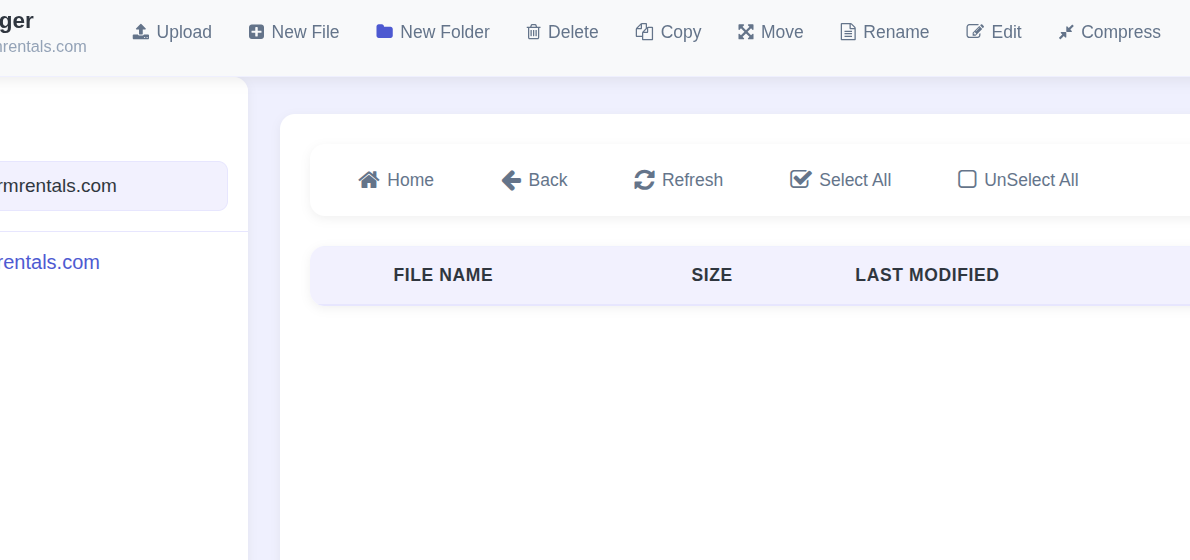
when restoring websites from one cyberpanel manually copying the backup file to a new clean install on ubuntu, some sites ( not all) have ZERO files showing in the file manager:

the site loads, wordpress works but no files shown in file manager - AND - the site will not backup and breaks: /usr/local/CyberCP/bin/python /usr/local/CyberCP/IncBackups/IncScheduler.py Daily

logs? no error logs

What would you do @usmannasir as a production server webmaster?

Google Drive Backup Setup Fails with “No such file or directory” Error

Hello,

I am unable to set up Google Drive backups on my server. When I try to configure it, I receive the following error message:

json

{"status": 1, "error_message": "[Errno 2] No such file or directory: '/home/platform.cyberpersons.com/clent_secret.json'", "success": null}

I believe this is a bug or a file corruption issue because I have already tried all the standard troubleshooting steps. Here is a summary of what I have done so far:

  1. Correct File and Path: I have correctly placed my client_secret.json file in my website’s root directory (/home/mydomain.com/public_html/) and provided the full, correct path during the setup process.
  2. Diagnosed Installation Damage: I confirmed that the installation was damaged, as the /usr/local/cyberpanel/version.info file was missing from my server.
  3. Forced a Full Re-installation: To fix the damaged installation, I ran the official preUpgrade.sh script to perform a forced upgrade and repair. The script completed successfully.
  4. Confirmed Previous Success: On a previous server installation with the exact same CyberPanel version, the Google Drive backup feature worked perfectly. This problem only started after a fresh installation and optimization process.

Despite all these steps, including a forced re-installation, the error message remains exactly the same, pointing to the non-existent /home/platform.cyberpersons.com/ path.

It seems like my CyberPanel instance is stuck using an old, hardcoded default path and cannot be fixed even with a forced upgrade.

Could anyone please advise on how to resolve this? Any help would be greatly appreciated.

Thank you.

I have more than 1,000 websites, and I also hope that cyberpanel will be more reliable and have more stable ftp backup (the current version has shortcomings in backup).
I hope cyberpanel is a perfect productivity tool, not a toy.

This issue is now resolved. We’ve moved our platform to a bigger better server, the migration introduced some issues as it was such a huge move.

1 Like

This issue is also resolved.

1 Like

I feel like someone needs to clear the air here as your responses have come out of nowhere and it seems to me odd as well. Your responses are appreciated but users like myself have been here for far longer than you have and we have actively contributed and even purchased services from CyberPanel.

What you are missing and what others here are complaining about but which they have failed to clearly state is this: that we have noticed a significant drop in the quality of releases over the last year with the transition to the new 2.4.x releases and that these releases are more beta or even alpha in quality and–FOSS or not–should never have been pushed to production and be kept to a limited scope pre-release user demographic until they are ready for production usage.

Also, not to call you out, but several users including myself are well aware that you have published a script on GitHub that circumvents paying for CyberPanel’s premium add-ons. So you are not exactly the pure-and-innocent-as-the-wind-driven-snow character and righteous defender of the platform that you try to paint yourself as here in the comments. It is also not appreciated how you tried to trivialize @litespeedlover’s complaints through ad homimen attacks that debase him because of his spelling and grammar.

Was he wrong in harshly attacking @usmannasir and should have taken a more diplomatic and conciliatory tone as he expressed his frustration with the recent drop in release quality? Yes. However, you are not a moderator and, as such, you are not justified, never mind at a place yet to be engaging in self-appointed moderation as a newbie. Therefore, you should refrain from “mini modding” especially as someone who is quite new to the community, less attached to the project than others are here, and who (as I shared) has been sharing “gray area” hacks to avoid paying for CyberPanel services.

My intention in publishing certain scripts on GitHub has always been for research and technical transparency, never to encourage improper commercial use or to harm the development of the project. I have worked in the infrastructure and information security sector for many years, and I believe it is essential to investigate and document the internal mechanisms of applications, including license validation, as part of a responsible approach to security and auditing.

I understand that this type of publication can generate controversy, but I have never encouraged or intended for others to use these tools for unethical purposes or in a way that would harm the developers of CyberPanel. My approach has always been to contribute to the community through technical analysis and the open sharing of knowledge.

That being said, I prefer to keep my contributions focused on technical and constructive topics, avoiding personal debates or disparagement. All open source projects, especially those growing as much as CyberPanel, benefit from open information exchange and respectful, critical participation from the community.

Going forward, I will limit my forum participation to technical topics where I can add value and assist other users, as that is the main purpose of any community.