
CyberPanel Community

ClosedHow to get Cloudfare SSL?

rb
rounak baheti #1

How do i get a valid cloudfare ssl for my website?

I tried getting a certificate from Cloudfare instead of Let’s Encrypt,

On my Manage section on Cyberpanel it is showing as
"… HAS SSL FROM CLOUDFLARE, INC…

Your SSL will expire in 5474 days."

But when i open my website in new tab, by using preview button it is still showing unsecure.

Plus i tried checking it on ssl checker, following error is shown -

The certificate is not trusted in all web browsers. You may need to install an Intermediate/chain certificate to link it to a trusted root certificate. [Learn more about this error]. The fastest way to fix this problem is to contact your SSL provider.
35 replies
Dr
Dreamer #2

Start looking tutorial here

jo
josephgodwinke #9

Your domain is managed by cloudflare therefore change your question to help the community. Thank you

jo
josephgodwinke #10

Remove CloudFlare SSL on https://dash.cloudflare.com/ in favor of SSL issued by CyberPanel.

To issue SSL with CyberPanel use your SSH terminal to access your server as a sudo user or root.

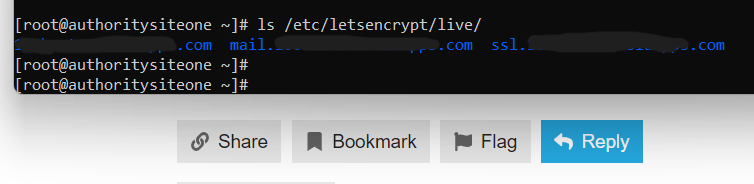
Run the following command so that we see the ssl certificates you have already:

ls /etc/letsencrypt/live/

Post the result of that commans here

jo
josephgodwinke #12

Hoping you deleted SSL from CloudFlare as advised here How to get Cloudfare SSL? - #10 by josephgodwinke

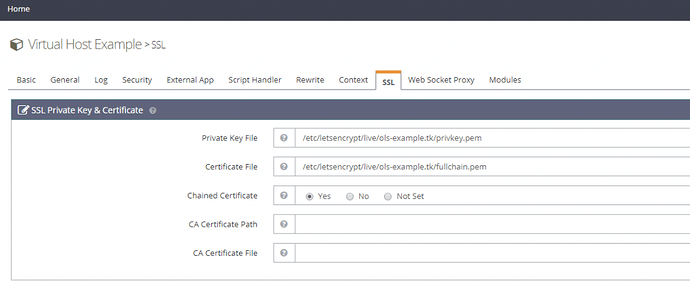
You need to remove private keys and certificates at the Virtual Host Level

Go to OLS WebAdmin Console of your server i.e https://SERVER_URL:7080 use admin and password you chose for CyberPanel admin panel

If you cannot log in. Using SSH Terminal run adminPass add new password


Then you delete all private keys and certificates for respective website and hostname from server:

$ rm -f /etc/letsencrypt/live/mydomain.net/privkey.pem && rm -f /etc/letsencrypt/live/mydomain.net/fullchain.pem

$ rm -f /etc/letsencrypt/live/mail.mydomain.net/privkey.pem && rm -f /etc/letsencrypt/live/mail.mydomain.net/fullchain.pem

$ rm -f /etc/letsencrypt/live/ssl.mydomain.net/privkey.pem && rm -f /etc/letsencrypt/live/ssl.mydomain.net/fullchain.pem

Then resissue hostname SSL the CyberPanel way:

  1. Go to https://server.mydomain.net:8090/manageSSL/sslForHostName
  2. Choose mydomain.net
  3. Click on Issue SSL

If its not hostname domain

  1. Go to https://server.mydomain.net:8090/manageSSL/manageSSL
  2. Choose mydomain.net
  3. Click on Issue SSL
rb
rounak baheti #13

How to do this?

rb
rounak baheti #15

Tried loggin in. It showed invalid. Then successfully changed Cyberpanel password. Tried logging it with new password. Yet showing invalid credentials

jo
josephgodwinke #16

The password you are changin for is https://SERVER_URL:7080

username: admin

password: the password you used in the adminPass command

rb
rounak baheti #17

Password problem is solved. I have deleted private keys and cert at virtual host level. I tried deleted private keys and cert for website by using command you provided.

It is showing= -bash: $: command not found (For all the 3 commands). Shall i proceed to next step?

jo
josephgodwinke #18

rm -f /etc/letsencrypt/live/mydomain.net/privkey.pem && rm -f /etc/letsencrypt/live/mydomain.net/fullchain.pem

rm -f /etc/letsencrypt/live/mail.mydomain.net/privkey.pem && rm -f /etc/letsencrypt/live/mail.mydomain.net/fullchain.pem

rm -f /etc/letsencrypt/live/ssl.mydomain.net/privkey.pem && rm -f /etc/letsencrypt/live/ssl.mydomain.net/fullchain.pem

Run them line by line replace mydomain.net with your own domain

rb
rounak baheti #19

okay will it show any result? like i ran them line by line by adding my domain in the command. but when i enter. it just shows next line of command starting with #

jo
josephgodwinke #20

No the command removes all the certificates and keychains

jo
josephgodwinke #22

Are you accesing your CyberPanel admin panel with server url instead of a domain name?

The domain in question is being used to access admin panel?

rb
rounak baheti #23

See in this regard what i know is. I use Hostinger VPS. And they have given me a cyberpanel control url link which is : https://someipaddress:8090

So i dont think domain name is used anywhere in this. Like its an ip address being used to access Cyberpanel

rb
rounak baheti #28

In the yellow sign it is showing as “1 warning”

Action recommended

Root installed on the server.

For best practices, remove the self-signed root from the server.

jo
josephgodwinke #29

There is inherent issue with CyberPanel way of issuing SSL Certificates. I know this is tasking but can you remove all SSL certificates on your account. I mean all of them doesnt matter what certificate does what just remove them all.

And reissue one this way

/root/.acme.sh/acme.sh --issue -d somedomain.com --cert-file /etc/letsencrypt/live/somedomain.com/cert.pem --key-file /etc/letsencrypt/live/somedomain.com/privkey.pem --fullchain-file /etc/letsencrypt/live/somedomain.com/fullchain.pem -w /usr/local/lsws/Example/html --force --debug
rb
rounak baheti #30

i used this command and also replaced with my domain. but it is not issuing ssl. it is showing some long result. which i am unable to understand

rb
rounak baheti #33

[Tue Nov 8 10:29:14 UTC 2022] Lets find script dir.
[Tue Nov 8 10:29:14 UTC 2022] SCRIPT=‘/root/.acme.sh/acme.sh’
[Tue Nov 8 10:29:14 UTC 2022] _script=‘/root/.acme.sh/acme.sh’
[Tue Nov 8 10:29:14 UTC 2022] _script_home=‘/root/.acme.sh’
[Tue Nov 8 10:29:14 UTC 2022] Using config home:/root/.acme.sh

v3.0.5
[Tue Nov 8 10:29:14 UTC 2022] Running cmd: issue
[Tue Nov 8 10:29:14 UTC 2022] _main_domain=‘mysite.com
[Tue Nov 8 10:29:14 UTC 2022] _alt_domains=‘no’
[Tue Nov 8 10:29:14 UTC 2022] Using config home:/root/.acme.sh
[Tue Nov 8 10:29:14 UTC 2022] default_acme_server=‘https://acme-v02.api.letsencrypt.org/directory
[Tue Nov 8 10:29:14 UTC 2022] ACME_DIRECTORY=‘https://acme-v02.api.letsencrypt.org/directory
[Tue Nov 8 10:29:14 UTC 2022] DOMAIN_PATH=‘/root/.acme.sh/mysite.com’
[Tue Nov 8 10:29:14 UTC 2022] Le_NextRenewTime
[Tue Nov 8 10:29:14 UTC 2022] Using ACME_DIRECTORY: https://acme-v02.api.letsencrypt.org/directory
[Tue Nov 8 10:29:14 UTC 2022] _init api for server: https://acme-v02.api.letsencrypt.org/directory
[Tue Nov 8 10:29:14 UTC 2022] GET
[Tue Nov 8 10:29:14 UTC 2022] url=‘https://acme-v02.api.letsencrypt.org/directory
[Tue Nov 8 10:29:14 UTC 2022] timeout=
[Tue Nov 8 10:29:14 UTC 2022] _CURL=‘curl --silent --dump-header /root/.acme.sh/http.header -L -g ’
[Tue Nov 8 10:29:15 UTC 2022] ret=‘0’
[Tue Nov 8 10:29:15 UTC 2022] ACME_KEY_CHANGE=‘https://acme-v02.api.letsencrypt.org/acme/key-change
[Tue Nov 8 10:29:15 UTC 2022] ACME_NEW_AUTHZ
[Tue Nov 8 10:29:15 UTC 2022] ACME_NEW_ORDER=‘https://acme-v02.api.letsencrypt.org/acme/new-order
[Tue Nov 8 10:29:15 UTC 2022] ACME_NEW_ACCOUNT=‘https://acme-v02.api.letsencrypt.org/acme/new-acct
[Tue Nov 8 10:29:15 UTC 2022] ACME_REVOKE_CERT=‘https://acme-v02.api.letsencrypt.org/acme/revoke-cert
[Tue Nov 8 10:29:15 UTC 2022] ACME_AGREEMENT=‘https://letsencrypt.org/documents/LE-SA-v1.3-September-21-2022.pdf
[Tue Nov 8 10:29:15 UTC 2022] ACME_NEW_NONCE=‘https://acme-v02.api.letsencrypt.org/acme/new-nonce
[Tue Nov 8 10:29:15 UTC 2022] Using CA: https://acme-v02.api.letsencrypt.org/directory
[Tue Nov 8 10:29:15 UTC 2022] _on_before_issue
[Tue Nov 8 10:29:15 UTC 2022] _chk_main_domain=‘mysite.com
[Tue Nov 8 10:29:15 UTC 2022] _chk_alt_domains
[Tue Nov 8 10:29:15 UTC 2022] Le_LocalAddress
[Tue Nov 8 10:29:15 UTC 2022] d=‘mysite.com
[Tue Nov 8 10:29:15 UTC 2022] Check for domain=‘mysite.com
[Tue Nov 8 10:29:15 UTC 2022] _currentRoot=’/usr/local/lsws/Example/html’
[Tue Nov 8 10:29:15 UTC 2022] d
[Tue Nov 8 10:29:15 UTC 2022] _saved_account_key_hash is not changed, skip register account.
[Tue Nov 8 10:29:15 UTC 2022] Read key length:2048
[Tue Nov 8 10:29:15 UTC 2022] _createcsr
[Tue Nov 8 10:29:15 UTC 2022] Single domain=‘mysite.com
[Tue Nov 8 10:29:15 UTC 2022] Getting domain auth token for each domain
[Tue Nov 8 10:29:15 UTC 2022] d
[Tue Nov 8 10:29:15 UTC 2022] url=‘https://acme-v02.api.letsencrypt.org/acme/new-order
[Tue Nov 8 10:29:15 UTC 2022] payload=‘{“identifiers”: [{“type”:“dns”,“value”:“mysite.com”}]}’
[Tue Nov 8 10:29:15 UTC 2022] RSA key
[Tue Nov 8 10:29:15 UTC 2022] HEAD
[Tue Nov 8 10:29:15 UTC 2022] _post_url=‘https://acme-v02.api.letsencrypt.org/acme/new-nonce
[Tue Nov 8 10:29:15 UTC 2022] _CURL=‘curl --silent --dump-header /root/.acme.sh/http.header -L -g -I ’
[Tue Nov 8 10:29:15 UTC 2022] _ret=‘0’
[Tue Nov 8 10:29:15 UTC 2022] POST
[Tue Nov 8 10:29:15 UTC 2022] _post_url=‘https://acme-v02.api.letsencrypt.org/acme/new-order
[Tue Nov 8 10:29:15 UTC 2022] _CURL=‘curl --silent --dump-header /root/.acme.sh/http.header -L -g ’
[Tue Nov 8 10:29:16 UTC 2022] _ret=‘0’
[Tue Nov 8 10:29:16 UTC 2022] code=‘201’
[Tue Nov 8 10:29:16 UTC 2022] Le_LinkOrder=‘https://acme-v02.api.letsencrypt.org/acme/order/805287587/142085257667
[Tue Nov 8 10:29:16 UTC 2022] Le_OrderFinalize=‘https://acme-v02.api.letsencrypt.org/acme/finalize/805287587/142085257667
[Tue Nov 8 10:29:16 UTC 2022] url=‘https://acme-v02.api.letsencrypt.org/acme/authz-v3/173780418457
[Tue Nov 8 10:29:16 UTC 2022] payload
[Tue Nov 8 10:29:16 UTC 2022] POST
[Tue Nov 8 10:29:16 UTC 2022] _post_url=‘https://acme-v02.api.letsencrypt.org/acme/authz-v3/173780418457
[Tue Nov 8 10:29:16 UTC 2022] _CURL=‘curl --silent --dump-header /root/.acme.sh/http.header -L -g ’
[Tue Nov 8 10:29:16 UTC 2022] _ret=‘0’
[Tue Nov 8 10:29:16 UTC 2022] code=‘200’
[Tue Nov 8 10:29:16 UTC 2022] d=‘mysite.com
[Tue Nov 8 10:29:16 UTC 2022] Getting webroot for domain=‘mysite.com
[Tue Nov 8 10:29:16 UTC 2022] _w=’/usr/local/lsws/Example/html’
[Tue Nov 8 10:29:16 UTC 2022] _currentRoot=’/usr/local/lsws/Example/html’
[Tue Nov 8 10:29:16 UTC 2022] entry=‘“type”:“http-01”,“status”:“pending”,“url”:“https://acme-v02.api.letsencrypt.org/acme/chall-v3/173780418457/MNV6qg",“token”:"PD7JbFmwGS0yEL7OLdLsjW31AprrzewbytYJJqZvMj4”’
[Tue Nov 8 10:29:16 UTC 2022] token=‘PD7JbFmwGS0yEL7OLdLsjW31AprrzewbytYJJqZvMj4’
[Tue Nov 8 10:29:16 UTC 2022] uri=‘https://acme-v02.api.letsencrypt.org/acme/chall-v3/173780418457/MNV6qg
[Tue Nov 8 10:29:16 UTC 2022] keyauthorization=‘PD7JbFmwGS0yEL7OLdLsjW31AprrzewbytYJJqZvMj4.TGD9fZfxnuLs–cxe4cs603i7DJXO0z9eROCivBK49U’
[Tue Nov 8 10:29:16 UTC 2022] dvlist=‘mysite.com#PD7JbFmwGS0yEL7OLdLsjW31AprrzewbytYJJqZvMj4.TGD9fZfxnuLs--cxe4cs603i7DJXO0z9eROCivBK49U#https://acme-v02.api.letsencrypt.org/acme/chall-v3/173780418457/MNV6qg#http-01#/usr/local/lsws/Example/html
[Tue Nov 8 10:29:16 UTC 2022] d
[Tue Nov 8 10:29:16 UTC 2022] vlist=‘mysite.com#PD7JbFmwGS0yEL7OLdLsjW31AprrzewbytYJJqZvMj4.TGD9fZfxnuLs--cxe4cs603i7DJXO0z9eROCivBK49U#https://acme-v02.api.letsencrypt.org/acme/chall-v3/173780418457/MNV6qg#http-01#/usr/local/lsws/Example/html,
[Tue Nov 8 10:29:16 UTC 2022] d=‘mysite.com
[Tue Nov 8 10:29:16 UTC 2022] ok, let’s start to verify
[Tue Nov 8 10:29:16 UTC 2022] Verifying: mysite.com
[Tue Nov 8 10:29:16 UTC 2022] d=‘mysite.com
[Tue Nov 8 10:29:16 UTC 2022] keyauthorization=‘PD7JbFmwGS0yEL7OLdLsjW31AprrzewbytYJJqZvMj4.TGD9fZfxnuLs–cxe4cs603i7DJXO0z9eROCivBK49U’
[Tue Nov 8 10:29:16 UTC 2022] uri=‘https://acme-v02.api.letsencrypt.org/acme/chall-v3/173780418457/MNV6qg
[Tue Nov 8 10:29:16 UTC 2022] _currentRoot=‘/usr/local/lsws/Example/html’
[Tue Nov 8 10:29:16 UTC 2022] wellknown_path=‘/usr/local/lsws/Example/html/.well-known/acme-challenge’
[Tue Nov 8 10:29:16 UTC 2022] writing token:PD7JbFmwGS0yEL7OLdLsjW31AprrzewbytYJJqZvMj4 to /usr/local/lsws/Example/html/.well-known/acme-challenge/PD7JbFmwGS0yEL7OLdLsjW31AprrzewbytYJJqZvMj4
[Tue Nov 8 10:29:16 UTC 2022] Changing owner/group of .well-known to root:root
[Tue Nov 8 10:29:16 UTC 2022] url=‘https://acme-v02.api.letsencrypt.org/acme/chall-v3/173780418457/MNV6qg
[Tue Nov 8 10:29:16 UTC 2022] payload=‘{}’
[Tue Nov 8 10:29:16 UTC 2022] POST
[Tue Nov 8 10:29:16 UTC 2022] _post_url=‘https://acme-v02.api.letsencrypt.org/acme/chall-v3/173780418457/MNV6qg
[Tue Nov 8 10:29:16 UTC 2022] _CURL='curl --silent --dump-header /root/.acme.sh/http.header -L -g ’
[Tue Nov 8 10:29:17 UTC 2022] _ret=‘0’
[Tue Nov 8 10:29:17 UTC 2022] code=‘200’
[Tue Nov 8 10:29:17 UTC 2022] trigger validation code: 200
[Tue Nov 8 10:29:17 UTC 2022] Pending, The CA is processing your order, please just wait. (1/30)
[Tue Nov 8 10:29:17 UTC 2022] sleep 2 secs to verify again
[Tue Nov 8 10:29:20 UTC 2022] checking
[Tue Nov 8 10:29:20 UTC 2022] url=‘https://acme-v02.api.letsencrypt.org/acme/chall-v3/173780418457/MNV6qg
[Tue Nov 8 10:29:20 UTC 2022] payload
[Tue Nov 8 10:29:20 UTC 2022] POST
[Tue Nov 8 10:29:20 UTC 2022] _post_url=‘https://acme-v02.api.letsencrypt.org/acme/chall-v3/173780418457/MNV6qg
[Tue Nov 8 10:29:20 UTC 2022] _CURL='curl --silent --dump-header /root/.acme.sh/http.header -L -g ’
[Tue Nov 8 10:29:20 UTC 2022] _ret=‘0’
[Tue Nov 8 10:29:20 UTC 2022] code=‘200’
[Tue Nov 8 10:29:20 UTC 2022] mysite.com:Verify error:2a02:4780:b:656:0:1e54:68bb:3: Invalid response from http://mysite.com/.well-known/acme-challenge/PD7JbFmwGS0yEL7OLdLsjW31AprrzewbytYJJqZvMj4: 404
[Tue Nov 8 10:29:20 UTC 2022] Debug: get token url.
[Tue Nov 8 10:29:20 UTC 2022] GET
[Tue Nov 8 10:29:20 UTC 2022] url=‘http://mysite.com/.well-known/acme-challenge/PD7JbFmwGS0yEL7OLdLsjW31AprrzewbytYJJqZvMj4
[Tue Nov 8 10:29:20 UTC 2022] timeout=1
[Tue Nov 8 10:29:20 UTC 2022] _CURL=‘curl --silent --dump-header /root/.acme.sh/http.header -L -g --connect-timeout 1’

404 Not Found

404 Not Found


openresty [root@authoritysiteone ~]# [Tue Nov 8 10:29:20 UTC 2022] ret='0' [Tue Nov 8 10:29:20 UTC 2022] Debugging, skip removing: /usr/local/lsws/Example/html/.well-known/acme-challenge/PD7JbFmwGS0yEL7OLdLsjW31AprrzewbytYJJqZvMj4 [Tue Nov 8 10:29:20 UTC 2022] pid [root@authoritysiteone ~]# [Tue Nov 8 10:29:21 UTC 2022] _clearupdns [Tue Nov 8 10:29:21 UTC 2022] dns_entries [Tue Nov 8 10:29:21 UTC 2022] skip dns. [Tue Nov 8 10:29:21 UTC 2022] _on_issue_err [Tue Nov 8 10:29:21 UTC 2022] Please add '--debug' or '--log' to check more details. [Tue Nov 8 10:29:21 UTC 2022] See: https://github.com/acmesh-official/acme.sh/wiki/How-to-debug-acme.sh [Tue Nov 8 10:29:21 UTC 2022] url='https://acme-v02.api.letsencrypt.org/acme/chall-v3/173780418457/MNV6qg' [Tue Nov 8 10:29:21 UTC 2022] payload='{}' [Tue Nov 8 10:29:21 UTC 2022] POST [Tue Nov 8 10:29:21 UTC 2022] _post_url='https://acme-v02.api.letsencrypt.org/acme/chall-v3/173780418457/MNV6qg' [Tue Nov 8 10:29:21 UTC 2022] _CURL='curl --silent --dump-header /root/.acme.sh/http.header -L -g ' [Tue Nov 8 10:29:21 UTC 2022] _ret='0' [Tue Nov 8 10:29:21 UTC 2022] code='400' [Tue Nov 8 10:29:21 UTC 2022] Diagnosis versions: openssl:openssl OpenSSL 1.0.2k-fips 26 Jan 2017 apache: apache doesn't exist. nginx: nginx doesn't exist. socat: socat by Gerhard Rieger and contributors - see www.dest-unreach.org socat version 1.7.3.2 on Jun 23 2017 10:19:11 running on Linux version #1 SMP Thu Apr 22 16:18:59 MSK 2021, release 3.10.0, machine x86_64 features: #define WITH_STDIO 1 #define WITH_FDNUM 1 #define WITH_FILE 1 #define WITH_CREAT 1 #define WITH_GOPEN 1 #define WITH_TERMIOS 1 #define WITH_PIPE 1 #define WITH_UNIX 1 #define WITH_ABSTRACT_UNIXSOCKET 1 #define WITH_IP4 1 #define WITH_IP6 1 #define WITH_RAWIP 1 #define WITH_GENERICSOCKET 1 #define WITH_INTERFACE 1 #define WITH_TCP 1 #define WITH_UDP 1 #define WITH_SCTP 1 #define WITH_LISTEN 1 #define WITH_SOCKS4 1 #define WITH_SOCKS4A 1 #define WITH_PROXY 1 #define WITH_SYSTEM 1 #define WITH_EXEC 1 #define WITH_READLINE 1 #define WITH_TUN 1 #define WITH_PTY 1 #define WITH_OPENSSL 1 #undef WITH_FIPS #define WITH_LIBWRAP 1 #define WITH_SYCLS 1 #define WITH_FILAN 1 #define WITH_RETRY 1 #define WITH_MSGLEVEL 0 /*debug*/ [root@authoritysiteone ~]#
rb
rounak baheti #35

here are the latest logs:

[11.09.2022_02-00-07] Status Code: 404 for: http://mysite.com/.well-known/acme-challenge/mysite.com. Error:

404 Not Found

404 Not Found


openresty

[11.09.2022_02-00-20] [Failed to obtain SSL. [obtainSSLForADomain]]

[11.09.2022_02-00-20] Self signed SSL issued for mysite.com.

[11.09.2022_02-00-24] Checking SSL for ssl.mysite.com.

[11.09.2022_02-00-24] SSL does not exist for ssl.mysite.com. Obtaining now…

[11.09.2022_02-00-24] Status Code: 200 for: http://www.ssl.mysite.com/.well-known/acme-challenge/ssl.mysite.com

[11.09.2022_02-00-24] Status Code: 200 for: http://ssl.mysite.com/.well-known/acme-challenge/ssl.mysite.com

[11.09.2022_02-00-38] [Failed to obtain SSL. [obtainSSLForADomain]]

[11.09.2022_02-00-39] Self signed SSL issued for ssl.mysite.com.

[11.09.2022_02-00-43] Restarting mail services for them to see new SSL.

[11.09.2022_02-00-43] [Errno 2] No such file or directory: ‘postmap’: ‘postmap’. [ProcessUtilities.normalExecutioner.Base]

jo
josephgodwinke #37

The ssl certificate do not exist for that domain.

  1. First upgrade your CyberPanel copy
sh <(curl https://raw.githubusercontent.com/usmannasir/cyberpanel/stable/preUpgrade.sh || wget -O - https://raw.githubusercontent.com/usmannasir/cyberpanel/stable/preUpgrade.sh)
  1. update the ACME client to the latest version run the following command

wget -O - https://get.acme.sh | sh

  1. try and fix permissions: Go to WebsitesList WebsitesFile Manager and Fix Permissions

  2. Turn off ModSecurity by going to SecurityModSecurity Conf then go to SSLManage SSL

rb
rounak baheti #38

did all the steps as you mentioned

still it is showing - HAS SELF-SIGNED SSL.

Your SSL will expire in 3649 days.

Note that i have created two websites - mysite. com and ssl.mysite .com

and have issued ssl for both of them

And as far as ModSecurity Conf is concerned, it is not even installed so im assuming its off

rb
rounak baheti #41

it shows my this result in red color: Unknown parameter : mysite .com

@josephgodwinke

jo
josephgodwinke #44

Follow this tutorial if you need any help PM me

Sign in to reply
