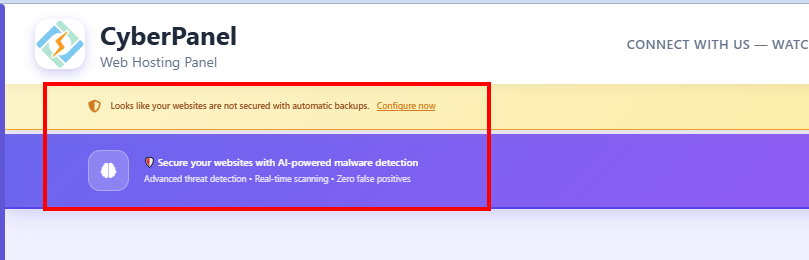
Hide Annoying CyberPanel Notifications (The Easy Way)

Tired of seeing backup or AI scanner popups every time you open CyberPanel?
Here’s the quick fix using Tampermonkey :backhand_index_pointing_down:

Step 1 — Install Tampermonkey

  • Get the Tampermonkey extension from the Chrome Web Store.
  • Make sure the developer mode is enabled if your browser asks for it.

Step 2 — Add the script

  • Open Tampermonkey → Create a new script (or use Import from URL).
  • Paste this link and save:
    https://raw.githubusercontent.com/bcat95/Note/refs/heads/master/tampermonkey_cyberpanel_hide_notifications.js
  • Enable the script — done!

:light_bulb: Note: CyberPanel does have a “Theme” option, but it doesn’t affect these notifications.
Tampermonkey is faster, simpler, and it just works.

Pro tip:
The script only runs on :8090 (CyberPanel’s default port), so it won’t affect your other websites.
If you ever want the notifications back, just disable the script in Tampermonkey.

1 Like
// ==UserScript==
// @name         Hide CyberPanel Notifications
// @namespace    http://tampermonkey.net/
// @version      2025.11.03
// @description  Hide #backup-notification and #ai-scanner-notification on CyberPanel (port 8090)
// @author       You
// @include      /^https?:\/\/[^\/]+:8090\/.*/
// @run-at       document-start
// @grant        none
// ==/UserScript==

(function () {
    "use strict";

    const style = document.createElement("style");
    style.textContent = `
        #backup-notification,
        #ai-scanner-notification {
            display: none !important;
            visibility: hidden !important;
            opacity: 0 !important;
            pointer-events: none !important;
        }
    `;
    document.documentElement.appendChild(style);
})();

2 Likes

thank you very much, but even after run this code there is annoying blank spaces in the top .. i wish in the next update they give us the option to shut down these notifications at least