CyberPanel Community

Filtering Spam in RainLoop, AutoReply and Email Filters with Sieve

RM
Rana Muhammad Usman Nasir #1

So far in CyberPanel, we have succesfully set up DKIM and have achieved 10/10 score for outbound emails. We have also installed SpamAssassin and configured it with our mail system so that we can differentiate the spammy emails with genuine emails. But what ifyou receive 100’s of emails every day? What if your email ID is a support or technical ID for an eCommerce website or a blog which has hundreds or thousands of views every day? Naturally, the queries in those email addresses will increase as well.

Also, it is not good if all those spam emails keep coming in the main inbox as [SPAM]. We need them to automatically move to the spam folder. We can also make some custom filters according to our needs. We can filter emails with “Order” in the subject automatically to the order folder in our mailbox, or move emails containing a “Complaint” subject to the complaints folder in the mailbox.

This is what we can achieve by email filtering! We will also be able to set up an autoreply feature by the end of this article.

The Need for Autoreply

One of the most requested and liked features among every email management system or hosting control panel is vacation autoreply.

What if an employee of a company is on vacation and is unable to see his/her emails? With this feature, they can set an autoreply for their mailer. This way, if someone send emails to that employee’s email ID, the mailer will get an automatic reply with the prewritten message.

This feature is used in almost every corporate environment. It can be also used to reply back to a support query made at a support@yourdomain.com e-mail ID, telling the mailer that their query has been received.

Getting Started

To enable the features discussed above, we first have to install and enable Sieve, which is, per its wiki, a language for filtering email messages. With Sieve, we will be able to do many things with our mail server.

Step 1 : Installing Sieve for Dovecot

By the following command, we can install the Sieve plugin for Dovecot:

Centos 7 or 8

sudo yum install–enablerepo=gf-plus install dovecot23-pigeonhole -y`

Ubuntu 18 or 20

sudo apt-get install dovecot-sieve dovecot-managesieved dovecot-lmtpd -y

That will install the Sieve plugin. After that we need to configure it so that it starts its daemon.

Step 2 : Configuring Sieve

Once that is installed, lets go to the Dovecot’s configuration folder and edit the Config file:

nano /etc/dovecot/dovecot.conf

Append “sieve” after ‘lmtp’ in protocols on the first line:

protocols = imap pop3 lmtp sieve

After that, add the following lines at the end of the config file and save the file:

service auth {
    unix_listener auth-client {
        group = postfix
        mode = 0660
        user = postfix
    }

    unix_listener auth-master {
        group = vmail
        mode = 0660
        user = vmail
    }

    user = root
}

service managesieve-login {
  inet_listener sieve {
    port = 4190
  }
}
service managesieve {
}
protocol sieve {
    managesieve_max_line_length = 65536
    managesieve_implementation_string = dovecot
    log_path = /var/log/dovecot-sieve-errors.log
    info_log_path = /var/log/dovecot-sieve.log
}
plugin {
    sieve = /home/vmail/dovecot.sieve
    sieve_global_path = /etc/dovecot/sieve/default.sieve
    sieve_dir = /home/vmail/sieve
    sieve_global_dir = /etc/dovecot/sieve/global/
}
lda_mailbox_autocreate = yes
lda_mailbox_autosubscribe = yes
protocol lda {
    mail_plugins = $mail_plugins autocreate sieve quota
    postmaster_address = postmaster@mydomain.com
    hostname = mail.mydomain.com
    auth_socket_path = /var/run/dovecot/auth-master
    log_path = /var/log/dovecot-lda-errors.log
    info_log_path = /var/log/dovecot-lda.log
}
protocol lmtp {
    mail_plugins = $mail_plugins autocreate sieve quota
    log_path = /var/log/dovecot-lmtp-errors.log
    info_log_path = /var/log/dovecot-lmtp.log
}

Now, to set up some necessary stuff and permission fixes, run these commands from the command line:

touch /var/log/{dovecot-lda-errors.log,dovecot-lda.log}
touch /var/log/{dovecot-sieve-errors.log,dovecot-sieve.log}
touch /var/log/{dovecot-lmtp-errors.log,dovecot-lmtp.log}
mkdir -p /etc/dovecot/sieve/global
chown vmail: -R /etc/dovecot/sieve
chown vmail:mail /var/log/dovecot-*

Restart the Dovecot service after that via:

systemctl restart dovecot

Step 3 : Verifying Whether Sieve is Running

Now that we have done some configuration and restarted the Dovecot service, Sieve should be running on port 4190. To verify that we can use:

netstat -tunlp | grep :4190

It will give us the following output, which confirms that the Dovecot service is using Port 4190, which means Sieve is UP!

netstat is a command-line network utility tool that displays network connections for the TCP protocol, routing tables, and a number of network interface and network protocol statistics. If you are unable to run the netstat command, you can install the same by following:

sudo yum install net-tools -y

Step 4 : Setting up Postfix Delivery

For automatic email filtering to work, we need to edit the Postfix configuration file.

Let’s edit the master.cf file with :

nano /etc/postfix/master.cf

Now, add the following to the end of the file:

dovecot   unix  -       n       n       -       -       pipe
  flags=DRhu user=vmail:vmail argv=/usr/libexec/dovecot/deliver -f ${sender} -d ${recipient}

Important note: Looks like some things have changed and the path /usr/libexec/dovecot/deliver is no longer valid, so if you are not able to get this to work then please use this, ref.

dovecot   unix  -       n       n       -       -       pipe
  flags=DRhu user=vmail:vmail argv=/usr/libexec/dovecot/deliver -f ${sender} -d ${recipient}

Restart the Postfix service by:

systemctl restart postfix

By the end of this step, we have finished the hardest part of command line and configuration file tweaking, have ensured our Dovecot-Sieve service is running on port 4190 as well, and configured Postfix for our autoreply feature.

Step 5 : Log in to the RainLoop Panel (Added info for SnappyMail Login below)

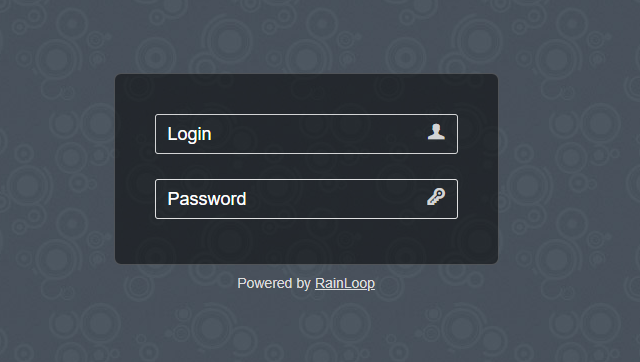
We need to go to our RainLoop’s admin panel, which is located in the /?admin path of our RainLoop’s installation directory.

You can access it by https://yourdomain.com:8090/rainloop/?admin (Replace yourdomain.com with your domain), and the Rainloop admin will open up.
rainloop

The Default Password is :

username : admin

password : 12345

(We Highly Recommend you change your RainLoop admin password after you log in, on the Security tab).

SnappyMail Admin access

Access URL: https://:8090/snappymail/?admin

username: admin
Password is located at this file → “/usr/local/lscp/cyberpanel/rainloop/data/data/default/admin_password.txt”

Step 6 : Enabling Sieve Scripts for your Domain

After you are inside the RainLoop admin, click on the Domains tab in the left sidebar, and click on your domain for which you wish to enable this feature.
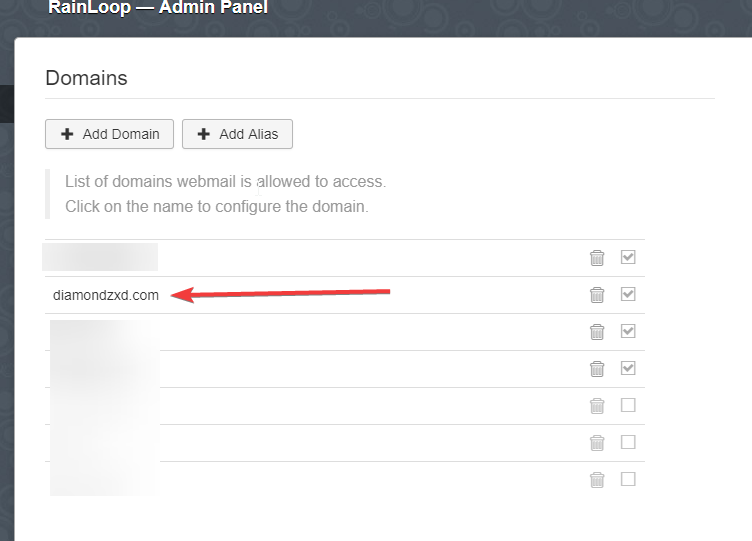
We are using diamondzxd.com in this case.

After opening the domain, open the Sieve Configuration section and check the “Allow User Scripts” and “Allow custom user script” also if you want your users to set up their own email filters. Enter localhost in the Server field and ensure the port is set to 4190. If you want to test the connection to Dovecot Sieve, then click the Test button. If the connection is successful, the SIEVE will turn to a GREEN colour.
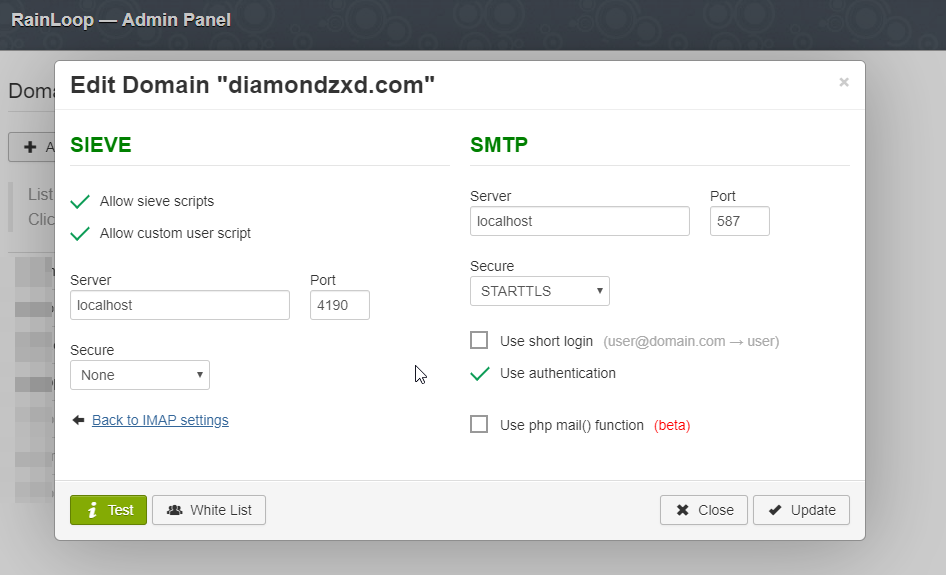
Then click the Update button, and our work is done in the RainLoop’s admin panel.

Step 7 : Detecting Whether the Email to Move is SPAM

We need to create a filter to move the email which is marked as SPAM by SpamAssassin to the spam folder in our mailbox.

Before doing that, let us understand how the mail can be differentiated as SPAM.

  1. By Detecting its Subject. i.e. While configuring SpamAssassin in CyberPanel, we have an option to prefix the SPAM mail’s subject according to our choice. But since that option is configurable, we cannot make it the primary key for differentiating the SPAM emails.
  2. By looking for the “X-Spam-Flag” Header
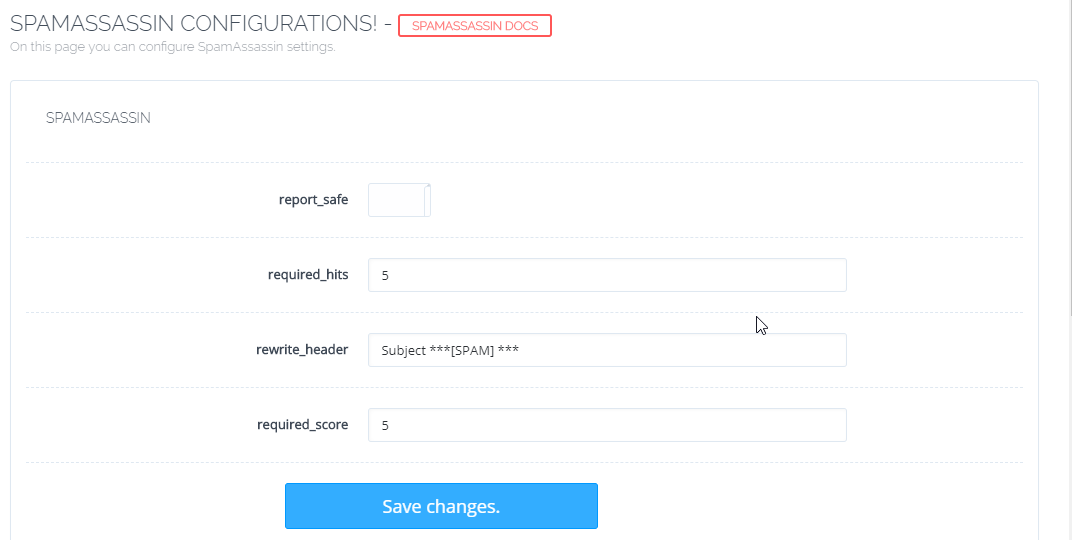
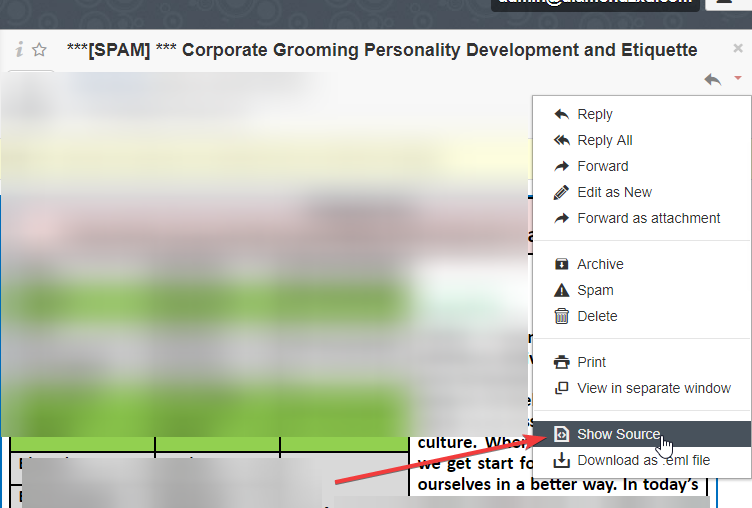
Let us have a look at the headers of a SPAM email received in our installation. We can do so by clicking on the “Show Source” option in our email.
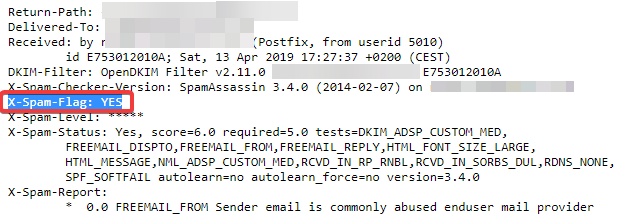
We can see the Source to Be:
chrome JEn70qy6vE

As you can see, the “X-Spam-Flag”: YES header is present. We can use this header to differentiate it as a SPAM email and do our filtering with it.

Step 8 : Applying Sieve Filter to Move Spam Email to Spam Folder

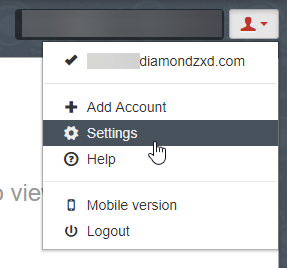
To get to the main part you were waiting for, log in with your email account to RainLoop and go to the Settings.
chrome FmBlgQeKfh

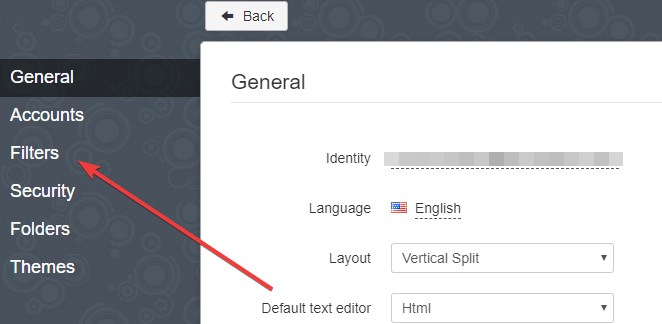
On the left hand sidebar, you will see a new tab called Filters. This tab is visible due to the filters we enabled for this domain in the RainLoop admin. Open the Filters tab.
chrome HCHe6R0g0I

In the Next screen, you’ll see 1 or 2 options for adding scripts. It depends on whether you checked the “Allow Customer User script” option in the RainLoop admin panel while enabling Sieve scripts for the domain in Step 6.

Now, click the “Add a Filter” Button.

Enter spam in the Name, and fill the details as shown in the image below. Click Done, and then click Save.
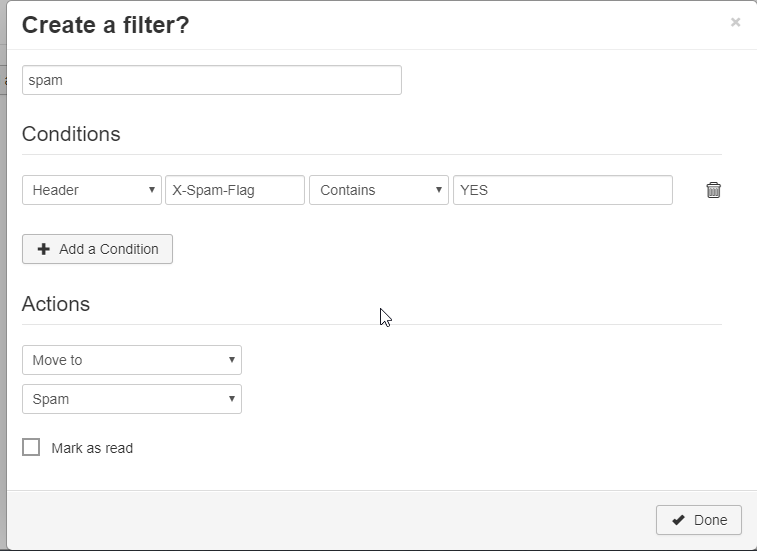
This filter will now move all of the SPAM emails marked by SpamAssassin by default to Spam folder in our mailbox.

Step 8 : Testing the Spam Filter

Now that the filter is active, let’s test it.

We can send an email to our email ID with the following Test string in the body and SpamAssassin will mark it as Spam:

XJS*C4JDBQADN1.NSBN3*2IDNEN*GTUBE-STANDARD-ANTI-UBE-TEST-EMAIL*C.34X

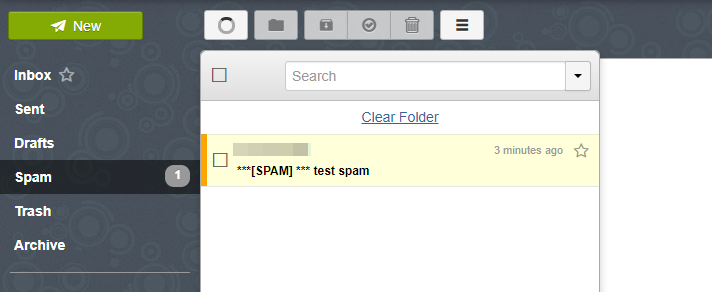
You can now see that the mail received automatically appears in Spam.
Step 9 : Setting up Vacation Auto Reply

Similar to the above method, now let’s create another autoreply filter.

This time, don’t add any conditions, and it’ll be applied to all incoming messages. In the Actions, select Vacation message, the Reply Intervals in days*, any Recipients you want to assign your work to in your absence, the Subject, and Message. Click Done, and then save it.
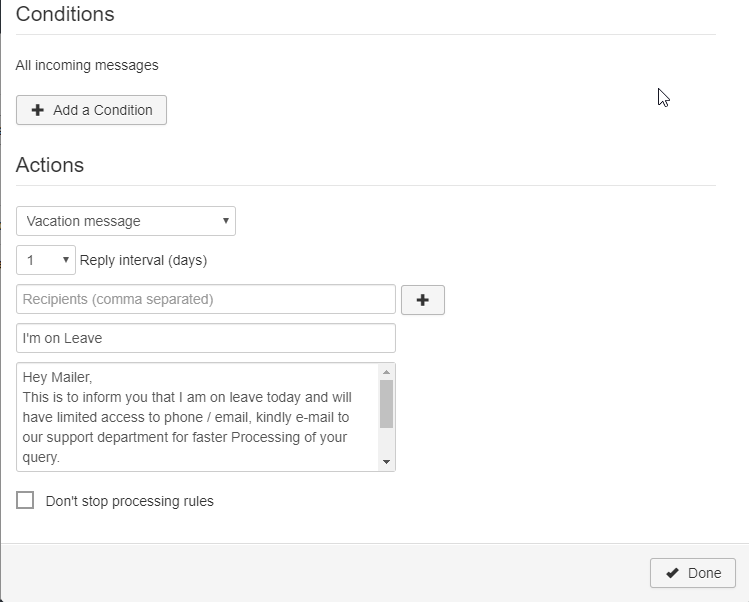
*The Reply Interval in days setting will again email the Sender after the specified period in case he sends more than 1 email after the given interval. In general, this is set to 1 (day).

Now, lets check the AutoReply filter by sending an email to the given address:

VOILA!

Conclusion!

Hence, it can be seen in the image above that both the autoreply feature and the automatic move to SPAM feature work flawlessly now, and similarly we can configure them using the filters, as per our requirements. For example, we can create more folders and sort the emails according the subject:

Like, if the subject contains “Order”, “Payment”, “Invoice”: Move it to the Orders folder. Likewise, If the Subject contains “Help”, “Issue”, “Support”: Then move it to the Support folder.

You get the basic idea. The use cases can be many according to your needs. Happy Spam Filtering!

We hope the above article helped you, and if you face any issues in any of the above mentioned steps or if you want to share your self-made Sieve scripts, you can do so at CyberPanel’s Discord server, or you can also ask for help on our community forum!

62 replies
st
stainlesscomputers #3

I followed the steps but cannot login at step5. Authentication failed (admin/12345)

st
stainlesscomputers #4

You can find your rainloop admin password here : /usr/local/CyberCP/public/rainloop.php

sh
shoaibkk #5

using command
cat /usr/local/CyberCP/public/rainloop.php
you can see and use rainloop admin password

NK
Nitesh Kunnath #7

There are many changes needs to be done to revert. I would rather suggest to reset your mailserver. Try connecting to cloud.cyberpanel.net and use the Email debugger function there. If its not showing for you, you can create support ticket and request access for email debugger and the team will enable it for you.

st
stainlesscomputers #8

@usmannasir Can you update this tutorial to include AlmaLinux centos command seem not working for sieve plugin install

TB
Tiago B Faustino #9

Spamassassin is deleting the spam, it doesn’t arrive in the inbox. I wish it arrived, because it could be fake. And I wanted to use sieve to send them to the spam box.

I recently installed cyberpanel and sent that standard message to test spamassasin and it got deleted: XJSC4JDBQADN1.NSBN32IDNENGTUBE-STANDARD-ANTI-UBE-TEST-EMAILC.34X

How do I get this message to the inbox?

The “” journalctl -f | grep postfix “” shows the following:

“”" Feb 10 19:07:04 cloud postfix/smtpd[2252]: connect from sonic316-55.consmr.mail.gq1.yahoo.com[98.137.69.31]
Feb 10 19:07:05 cloud postfix/smtpd[2252]: 8797A1C146E: client=sonic316-55.consmr.mail.gq1.yahoo.com[98.137.69.31]
Feb 10 19:07:05 cloud postfix/smtpd[2252]: warning: connect to /var/log/policyServerSocket: No such file or directory
Feb 10 19:07:06 cloud postfix/smtpd[2252]: warning: connect to /var/log/policyServerSocket: No such file or directory
Feb 10 19:07:06 cloud postfix/smtpd[2252]: warning: problem talking to server /var/log/policyServerSocket: No such file or directory
Feb 10 19:07:06 cloud postfix/cleanup[2256]: 8797A1C146E: hold: header Received: from sonic316-55.consmr.mail.gq1.yahoo.com (sonic316-55.consmr.mail.gq1.yahoo.com [98.137.69.31])??by hostspot.tech (Postfix) with ESMTPS id 8797A1C146E??for xxxxxx@hostspot.tech; Thu, 10 from sonic316-55.consmr.mail.gq1.yahoo.com[98.137.69.31]; from=yyyyyyyy@yahoo.com to=xxxxxx@hostspot.tech proto=ESMTP helo=<sonic316-55.consmr.mail.gq1.yahoo.com>
Feb 10 19:07:06 cloud postfix/cleanup[2256]: 8797A1C146E: message-id=1795373450.989386.1644530823268@mail.yahoo.com
Feb 10 19:07:06 cloud postfix/smtpd[2252]: disconnect from sonic316-55.consmr.mail.gq1.yahoo.com[98.137.69.31] ehlo=2 starttls=1 mail=1 rcpt=1 data=1 quit=1 commands=7 “”“”

NK
Nitesh Kunnath #10

Adjust the spam level settings under spamassasin to make the required level of security

TB
Tiago B Faustino #11

I increased the required_hits and required_score values. The default is 5. I put 10, then 20, 1000… and it didn’t work!

NK
Nitesh Kunnath #12

Have you gone through this article? This may help

ma
mauamolat #13

Hi, what is required hits vs required score?

vp
vpsingh #14

Mails remain working after implementing this article.
Filtering options are now showing up.
Problem is filter created in rainloop login of any particular email account but that filter rule gets applied globally to all Email accounts of all domains running on server.
This is a bug. Please suggest the fix.
Thank you.

Ma
Master3395 #15

I just tried my method again, and now it’s not working on a clean install.
I also tried this method and the same result Any suggestions @die2mrw007

Ma
Master3395 #16

Got any advice on the issue i posted over? @usmannasir @die2mrw007

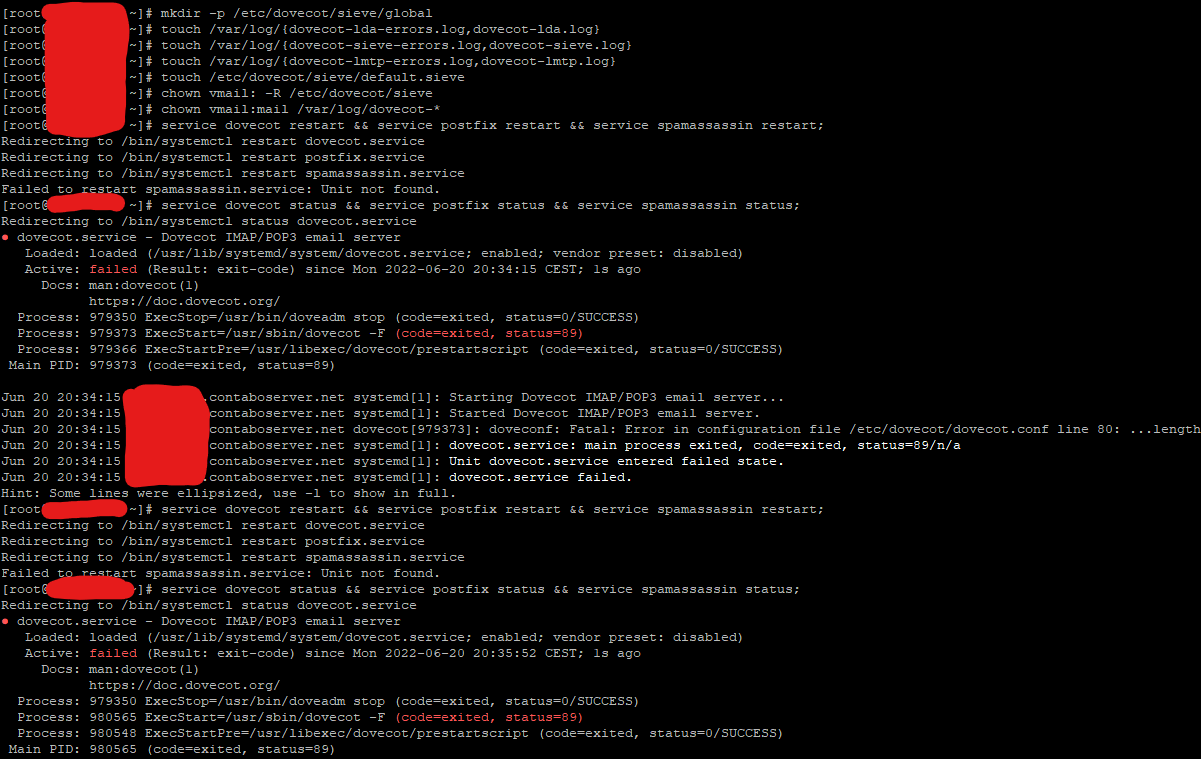
I run CyberPanel using Almalinux 8, and I’ve tried every dovecot.conf I can find.
Every dovecot.conf file fails except the default without a sieve.

I have also tried on 2.3.3-dev, same issue there.
I am clueless on what I can do to get it working.

Operating System: AlmaLinux 8.6 (Sky Tiger)
CPE OS Name: cpe:/o:almalinux:almalinux:8::baseos
Kernel: Linux 4.18.0-372.16.1.el8_6.x86_64
daemon started -- version 3.7.2, configuration /etc/postfix
dovecot --version: 2.3.19.1 (9b53102964)
Al
Alex #20

I didn’t ask for the file, I ask what is the full error that dovecot gave, because that’s all that matters.

Ma
Master3395 #21

That is the full error.
There’s no cutoff that I could do.

Al
Alex #22

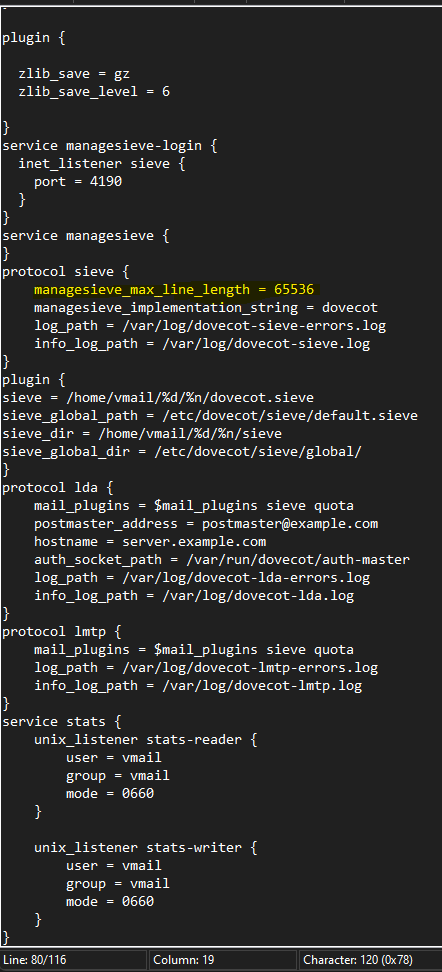
What? I see it, right it’s in the log, dovecot is saying : Fatal: Error in configuration file blabla line 80 … length

What is the full error, we can’t just debug this on “…length”, you cropped that screenshot.

Al
Alex #23

I took the time to send a screenshot of it, I don’t want the config, or that you think it’s right, just the full error message that dovecot printed out. It’s logged somewhere anyway, nothing else matters, dovecot will never start if it has a Fatal Error

Ma
Master3395 #24

I just ran this dovocot error log checker.

doveadm log find

doveconf: Fatal: Error in configuration file /etc/dovecot/dovecot.conf line 80: Unknown setting: managesieve_max_line_length

Al
Alex #25

good, progress.

So I don’t know, install dovecot-pigeonhole? Not sure where managesieve belongs to.

Ma
Master3395 #26

Tried this, and get an error.
Not sure why it’s in conflict.

Summary
## Install dovecot-pigeonhole on AlmaLinux 8 Using dnf

Update yum database with `dnf` using the following command.

sudo dnf makecache --refresh


Copy

After updating yum database, We can install `dovecot-pigeonhole` using `dnf` by running the following command:

sudo dnf -y install dovecot-pigeonhole


Copy

## Install dovecot-pigeonhole on AlmaLinux 8 Using yum

Update yum database with `yum` using the following command.

sudo yum makecache --refresh


Copy

After updating yum database, We can install `dovecot-pigeonhole` using `yum` by running the following command:

sudo yum -y install dovecot-pigeonhole

Did not run the uninstaller.


Copy

## How To Uninstall dovecot-pigeonhole on AlmaLinux 8

To uninstall only the `dovecot-pigeonhole` package we can use the following command:

sudo dnf remove dovecot-pigeonhole

Al
Alex #27

that makes sense because dovecot comes with it and those sieve are version specific to dovecot

So remove that line? Does it continue complaining? I’d be surprised that almalinux dovecot is completely broken. what does journalctl -f | grep dovecot says? Any issue loading libraries?

Ma
Master3395 #28

Doing journalctl -f | grep
Outputs nothing.
I pressed enter a few times, but nothing shows.

image

Al
Alex #29

yeah that’s normal because -f is to follow, like you send that to the background and launch dovecot…

anyway just remove lines in the config until you get some errors that makes sense. yum reinstall dovecot? yum -y install dovecot-pigeonhole dovecot-mysql? Just look on the internet, try stuff. My dovecot isn’t broken so can’t really help.

cl
clickadmingr #30

Hello everyone.

On Centos 7, clean installation with latest Cyberpanel this tutorial doesn’t even make it to Step 1.

Anyone got any new instructions?

Followed EVERY single suggestion on this post, on other posts, and on the internet also.

The most crucial question is: Has ANYONE implemented the above on the latest Cyberpanel and latest Openlitespeed (downloaded today?). Does ANYONE on this community have implemented sieve management and sents their spam mail into their Junk folder right now as we speak? Instructions like “Do this obvious thing”, or “Why don’t you try that” are no use if the commenter have NOT implemented this in your devices successfully also.

It seems weird that all around the internet there is no proper instruction for this. Everyone is giving false or limited instructions. As a company, we had to outsource it and post a Job Request on the famous sites, because it’s been over a month that we try to implement it without any luck.

Best regards!

Al
Alex #31

Oh right, I never solved that thing since I was so pissed off at that guy who refused to post his error, I hate those people.

Anyway, that problem was solved by this guy on centos 7 : HELP me: Email not receiveing after setting up filtering spam in rainLoop - #17 by 73Hn

Which is you have to add dovecot repo at https://repo.dovecot.org/ since the centos 7 repo has conflicting dovecot and dovecot-pigeonhole packages and you’ll never be able to install matching dovecot/pigeonhole otherwise, the two has to match, or it won’t work. My solution of just installing pigeonhole was always the solution, just you need to add the dovecot repo.

Hopefully the outsource to famous sites wasn’t too expensive!

Al
Alex #32

Damn I never seen people that need so much handholding

If you want to use ghettoforge ( what cyberpanel use )

yum --enablerepo=gf-plus -y install dovecot23-pigeonhole

for the official repo, after adding the dovecot repo

yum remove dovecot23 dovecot23-mysql
yum install dovecot dovecot-mysql dovecot-pigeonhole

the dovecot.conf will be dovecot.confrpmsave or something similar, or just copy one in this thread.

Dr
Dreamer #33

Is this forum purpose is ask help from community? Or did I get something wrong…

Al
Alex #34

Yeah I’ve been thinking about it, it’s mostly because I disagree with the ghettoforge path, I feel it’ll just repeat itself next security update versus the official repo, it’s the state of centos repo, try to find a yum repo for imagick for lsphp. So naturally, I prefer to answer other path, until I get 10+ dm of endless text from people adamant they’ll never ever try official repos, then I give up.

It’s like your solution to OWASP issues "This domain does not exists" error - #10 by Dreamer which is “disable 949-BLOCKING-EVALUATION”, this remove any blocking and evaluation, makes the whole ruleset useless. It’s useful in a way, like you can fix any firewall issues if you just open all the ports. This is appalling to me, but I guess super useful if you don’t know.

Dr
Dreamer #35

What is your point to even be here?
To be arrogant, rude, try make people feel idiot whith your god tier knowledge?
You don’t need to be arrogant when helping people on forums, if you get annoyed from people asking maybe better not even try

Al
Alex #36

Exactly the question I ask you, what you contribute to this discussion? Are you having an issue with sieve? Something to contribute to fix the problem? I answered everything and fixed the issue, I think I can be frustrated when people refuse to send their errors or even try to install a package themselves and instead send me endless messages non technical message like you do

Dr
Dreamer #37

So sorry if I hurt your feelings. :cry:

Al
Alex #38

Yeah we know you have no solution, or nothing to contribute to the discussion, some might say you just join to complain about me… almost attack…

Like I mentioned, I don’t like the solution, because to remind you, I found the solution. I think it’s better to move to official repo than expecting ghettoforge long term to not mess up, but people disagree, so I presented both solution ( after much DM and much pushing because people apparently hate dovecot official repo ), let people pick. It’s like I disagree to your solution that any OWASP issues can be fixed by removing the one file that actually do any rejecting making the whole thing useless, but it works, just like removing reject in firewalls. It’s related to the solution. I personally don’t care how people run their server, or if they listen to you, more money for me when things breaks! Maybe next time I’ll be inspired by you and just teach people to downgrade, it used to work!

Ma
Master3395 #39

You are “bragging” and complaining in the same post.

You brag that you found a solution that does NOT work.

You also complain about people posting blurred/painted-over photos, where NOTHING was capped out of the image, except for unneeded commands done over the line posted.

Al
Alex #40

damn the drama on this thread…

What doesn’t work about it? Like mentioned many times, you need to install dovecot-pigeonhole to go over your error message it was so secretive I had to ask many time for you to send it. I did the whole handholding since “install dovecot-pigeonhole” was too cryptic.

Either ghettoforge or official dovecot, up to you.

Hi
Hifihedgehog #41

For CentOS 8 and AlmaLinux, the correct way is actually yum install --enablerepo=gf-plus dovecot23-pigeonhole -y.

AT
Abdelhadi Touil #42

Hi!
I followed all steps in a test fresh installed CentOS 7 server, first I was unable to install Sieve using the command in the post:

sudo yum install –enablerepo=gf-plus install dovecot23-pigeonhole -y

But I was able to install it using the following command, thanks to @entoutcas :

yum --enablerepo=gf-plus -y install dovecot23-pigeonhole

But after I finished all steps except adding the Sieve filter as the interface is different and complicated, I tried to check if email is still working as normal, but the server is no more receiving emails, and when checked logs and googled a lot, I came to the following error in dovecot-lda-errors.log file:

2022-10-28 09:54:12 lda(2098): Fatal: Plugin 'autocreate' not found from directory /usr/lib64/dovecot

Googling about it clarify that the latest version of dovecot is no more using autocreate plugin, but it is using namespace instead, but I can’t modify the dovecot config file to use the new syntax:
https://doc.dovecot.org/settings/plugin/autocreate-plugin/
Any help please?

BS
Brad Shaw #43

Magento 2 Payment Restrictions limits additionally make use of superior catalog alternatives and coupon codes. You can restrict fee alternatives while a purchaser makes use of a chit code or a product is sure with the aid of using sure catalog policies. For example, you may save your, clients, from the usage of “coins on transport” or “loose transport” as a fee alternative while making use of a sure coupon code.

DR
Dick Rempfer #44

I cannot execute this step due to the following error. Could someone please help?

root@debian9mail:~# chown vmail: -R /etc/dovecot/sieve
chown: invalid spec: ‘vmail:’
root@debian9mail:~# 

MF
Mihai Florin #46

Here is a problem when i use this i don’t recive mails :slight_smile:

service auth {
unix_listener auth-client {
group = postfix
mode = 0660
user = postfix
}

unix_listener auth-master {
    group = vmail
    mode = 0660
    user = vmail
}

user = root

}

service managesieve-login {
inet_listener sieve {
port = 4190
}
}
service managesieve {
}
protocol sieve {
managesieve_max_line_length = 65536
managesieve_implementation_string = dovecot
log_path = /var/log/dovecot-sieve-errors.log
info_log_path = /var/log/dovecot-sieve.log
}
plugin {
sieve = /home/vmail/dovecot.sieve
sieve_global_path = /etc/dovecot/sieve/default.sieve
sieve_dir = /home/vmail/sieve
sieve_global_dir = /etc/dovecot/sieve/global/
}
lda_mailbox_autocreate = yes
lda_mailbox_autosubscribe = yes
protocol lda {
mail_plugins = $mail_plugins autocreate sieve quota
postmaster_address = postmaster@mydomain.com
hostname = mail.mydomain.com
auth_socket_path = /var/run/dovecot/auth-master
log_path = /var/log/dovecot-lda-errors.log
info_log_path = /var/log/dovecot-lda.log
}
protocol lmtp {
mail_plugins = $mail_plugins autocreate sieve quota
log_path = /var/log/dovecot-lmtp-errors.log
info_log_path = /var/log/dovecot-lmtp.log
}[quote=“crazy92, post:46, topic:30637, full:true”]
service auth {
unix_listener auth-client {
group = postfix
mode = 0660
user = postfix
}

unix_listener auth-master {
    group = vmail
    mode = 0660
    user = vmail
}

user = root

}

service managesieve-login {
inet_listener sieve {
port = 4190
}
}
service managesieve {
}
protocol sieve {
managesieve_max_line_length = 65536
managesieve_implementation_string = dovecot
log_path = /var/log/dovecot-sieve-errors.log
info_log_path = /var/log/dovecot-sieve.log
}
plugin {
sieve = /home/vmail/dovecot.sieve
sieve_global_path = /etc/dovecot/sieve/default.sieve
sieve_dir = /home/vmail/sieve
sieve_global_dir = /etc/dovecot/sieve/global/
}
lda_mailbox_autocreate = yes
lda_mailbox_autosubscribe = yes
protocol lda {
mail_plugins = $mail_plugins autocreate sieve quota
postmaster_address = postmaster@mydomain.com
hostname = mail.mydomain.com
auth_socket_path = /var/run/dovecot/auth-master
log_path = /var/log/dovecot-lda-errors.log
info_log_path = /var/log/dovecot-lda.log
}
protocol lmtp {
mail_plugins = $mail_plugins autocreate sieve quota
log_path = /var/log/dovecot-lmtp-errors.log
info_log_path = /var/log/dovecot-lmtp.log
}

jo
josephys #47

Hi,
My mailserver is working and a testing score 10/10. Now want to implement this feature. But have some doubt on it. I will point out my setting before implementing.

  1. Protocols are imap & pop3. It just says add sieve, but seems need to add lmtp and sieve as protocol.

  2. In the instructions says to add the config at the end of dovecot, but some settings have been set up before:

unix_listener auth-master {
mode = 0660
user = vmail
}
Do I need to add the group? as:
unix_listener auth-master {
group = vmail
mode = 0660
user = vmail
}

  1. auth-client wasn’t there and it authenticated. Is it necessary to add the following?
    unix_listener auth-client {
    group = postfix
    mode = 0660
    user = postfix
    }

  2. The protocol lda block was set. I suppose I need to merge it with your provided lines rather than add another block.
    protocol lda {
    mail_plugins = $mail_plugins autocreate sieve quota

    log_path = /var/log/dovecot-lda-errors.log
    info_log_path = /var/log/dovecot-lda.log
    }

That’s it, thankyou!


Append “sieve” after ‘lmtp’ in protocols on the first line:

protocols = imap pop3 lmtp sieve

After that, add the following lines at the end of the config file and save the file:

service auth {
    unix_listener auth-client {
        group = postfix
        mode = 0660
        user = postfix
    }

    unix_listener auth-master {
        group = vmail
        mode = 0660
        user = vmail
    }

    user = root
}

service managesieve-login {
  inet_listener sieve {
    port = 4190
  }
}
service managesieve {
}
protocol sieve {
    managesieve_max_line_length = 65536
    managesieve_implementation_string = dovecot
    log_path = /var/log/dovecot-sieve-errors.log
    info_log_path = /var/log/dovecot-sieve.log
}
plugin {
    sieve = /home/vmail/dovecot.sieve
    sieve_global_path = /etc/dovecot/sieve/default.sieve
    sieve_dir = /home/vmail/sieve
    sieve_global_dir = /etc/dovecot/sieve/global/
}
lda_mailbox_autocreate = yes
lda_mailbox_autosubscribe = yes
protocol lda {
    mail_plugins = $mail_plugins autocreate sieve quota
    postmaster_address = postmaster@mydomain.com
    hostname = mail.mydomain.com
    auth_socket_path = /var/run/dovecot/auth-master
    log_path = /var/log/dovecot-lda-errors.log
    info_log_path = /var/log/dovecot-lda.log
}
protocol lmtp {
    mail_plugins = $mail_plugins autocreate sieve quota
    log_path = /var/log/dovecot-lmtp-errors.log
    info_log_path = /var/log/dovecot-lmtp.log
}
MB
Miguel Blanco #49

Are filters applied to all accounts? Doesn’t it matter if they are from different domains?

Ma
Master3395 #50

Filter is managed on every email.
They do not work with other emails.
Unless you have already forwarded the other emails to 1 email.
Then you can use that filter on 1 email to move emails forwarded from another email.

Pi
Piradoxlanieve #51

Same here.
Ubuntu server 22.04

Nov 30 11:35:35 localhost postfix/qmgr[77609]: 25018129E8D: from=xxxxx@gmail.com, size=8031, nrcpt=1 (queue active)
Nov 30 11:35:35 localhost postfix/pipe[77613]: 25018129E8D: to=info@xxxxxxx.com, relay=dovecot, delay=0.05, delays=0.03/0/0/0.02, dsn=4.3.0, status=deferred (temporary failure)

EJ
Esko Junnila #52

I had same problem with ubuntu 22.04, it seems like there is no more autocreate plugin on latest dovecot version. autocreate plugin — Dovecot documentation

you can just remove all autocreate from mail_plugins.

I still have one error:
lda(user@mydomain.com)<124352>: Error: User user@mydomain.com doesn’t have home dir set, disabling duplicate database

sending and receiving is working after removing autocreate plugin from config.

T2
T21 #53

I’m facing a problem where the vacation day interval isn’t being honored. I checked if it’s actually in the sieve script and it is :days 3

Any ideas? Thanks.

gu
gustaf #54

I can confirm the original post is working on Ubuntu 22.04 LTS with the following fixes and caveats:

  1. Always run sudo apt-get update or equivalent before making changes to CyperPanel and its components. Otherwise you risk mismatch in component versions.

  2. In step 2, append “sieve” AND ‘lmtp’ in protocols on the first line of /etc/dovecot/dovecot.conf:

protocols = imap pop3 lmtp sieve

  1. Again in dovecot.conf pay attention to these lines and replace with your domain:
postmaster_address = postmaster@mydomain.com
hostname = mail.mydomain.com

@usmannasir it would be nice to point this out in the guide, since the code snippet is long and it’s not immediately apparent that changes should be made to it.

  1. Again in dovecot.conf: the autocreate plugin has been deprecated for a long time and is no more included in dovecot. So remove it from the list of active plugins in this line:
    mail_plugins = $mail_plugins autocreate sieve quota
    THE LINE APPEARS TWICE, under protocol lda { and protocol lmtp {
    it should then read:
    mail_plugins = $mail_plugins sieve quota
    I did NOT remove the line lda_mailbox_autocreate = yes

  2. The fixed line in Step 4, when doing nano /etc/postfix/master.cf is wrong, as it is identical to the outdated one. The correct one is available in the linked reference and reads:

dovecot   unix  -       n       n       -       -       pipe
  flags=DRhu user=vmail:vmail argv=/usr/lib/dovecot/deliver -f ${sender} -d ${recipient}

It should already be in master.cf though, so check before adding it.

I’m waiting for expiration of a vacation day interval to check if I get the same problem as @T21 . I installed Sieve today, so it will take some time.

This post summarizes various threads and comments, that I cannot recall and credit. But I’d like to thank all the users whose posts helped me to get Sieve working.

Have a nice day

MB
Miguel Blanco #55

In my case, the filter applies to all accounts and domains equally, what would be the problem?

[root@MYSERVER /home] # locate .sieve
/home/vmail/dovecot.sieve
/home/vmail/sieve/SPAM-TEST.sieve
/home/vmail/sieve/rainloop.user.sieve

Support snappymail
" Just what i thought. Somehow your configuration has a fault.
Sieve should be configured per user."

I share the solution to my problem

plugin {
    sieve = /home/vmail/%d/dovecot.sieve
    sieve_global_path = /etc/dovecot/sieve/default.sieve
    sieve_dir = /home/vmail/%d/sieve
    sieve_global_dir = /etc/dovecot/sieve/global/
}

create a configuration for each domain

T2
T21 #56

Anyone got the reply interval to work? My filter spits out an ‘out of office’ message on every e-mail.

DC
Daniel Collins #57

Hi Anyone else having issues getting this to work now. everything seems to be installed correctly and no issues with emails, it just doesn’t filter and yes the header is there.
followed the install at the top and made the alterations gustaf said on Feb 3 i think post 51
no log entries.

Any ideas
Cyberpanel V2.3 Build 8
Ubuntu 22
1Click install on Vultr about 2 months ago.

Ma
Master3395 #58

Sieve has always been an issue with CyberPanel because the devs haven’t integrated it by default :frowning:
I wish they would do so so that we do not have to add it every time.

Ma
Master3395 #60

Sorry, didn’t see your reply before now, it seems like you already got help with this in that channel :slight_smile:

Mr
MrDollar2017 #61

Managed it to work, but autoreply function does not respect interval, it replies to every message in receives, leading permanent to machine to machine spam and ofc ban.

Does anyone solve problem with time interval not respected?

DC
Daniel Collins #63

Has anyone found a fix the the filters not working correctly, mine for some reason does sort some to spam but not all. the X-SPAM headings is set to yes on all.

I get around 10 spam emails a day and it filters 1 maybe 2 but the others just land in my inbox.

VN
Vinicius Nogueira #64

I’m having a problem with the filters. I’ve noticed that the sieve configuration on the chosen domain simply deactivates itself and I have to reactivate it again. What could be causing this? In this case the checkbox: Allow sieve scripts, deactivates itself.

Em
Emre #66

Has anyone managed to install this on Alma Linux 9? When I try to install the pigeonhole package, I get an error due to a version difference. It says I downloaded dovecot from the CyberPanel repo, but pigeonhole from the Almalinux repo is not compatible with my installed version of dovecot. Could you please share a tutorial for Almalinux 9 that I can access? @usmannasir If I uninstall my Dovecot version and install it from another source, will it affect CyberPanel?

Ma
Master3395 #67

There are currently issues with Dovocot. If you uninstall and reinstall, I would not suggest doing that.
I am trying to fix this in 2.5.5-dev atm, so it installs the latest version, including the filter setup.

Sign in to reply