AQ
Abdul Qadir
#1
 Community
who is your domain provider?
Are you using cyberpanel DNS?
yes i am using cyberpanel dns
domain provider is godaddy
Welcome @AQADIR11 Happy New Year
Did you create private namservers on GoDaddy by adding new nameservers under DNS Manager?
Also try dns lookup on ssh terminal dig goddaddydomain.com @ns1.goddaddydomain.com
On cyberpanel you should also set up default nameservers as private nameservers and makesure all your domains point to those nameservers 1 - Manage DNS
i am alredy done all steps but not working
Are you added Gluerecord for cyberpanel nameservers
No. Where to find this
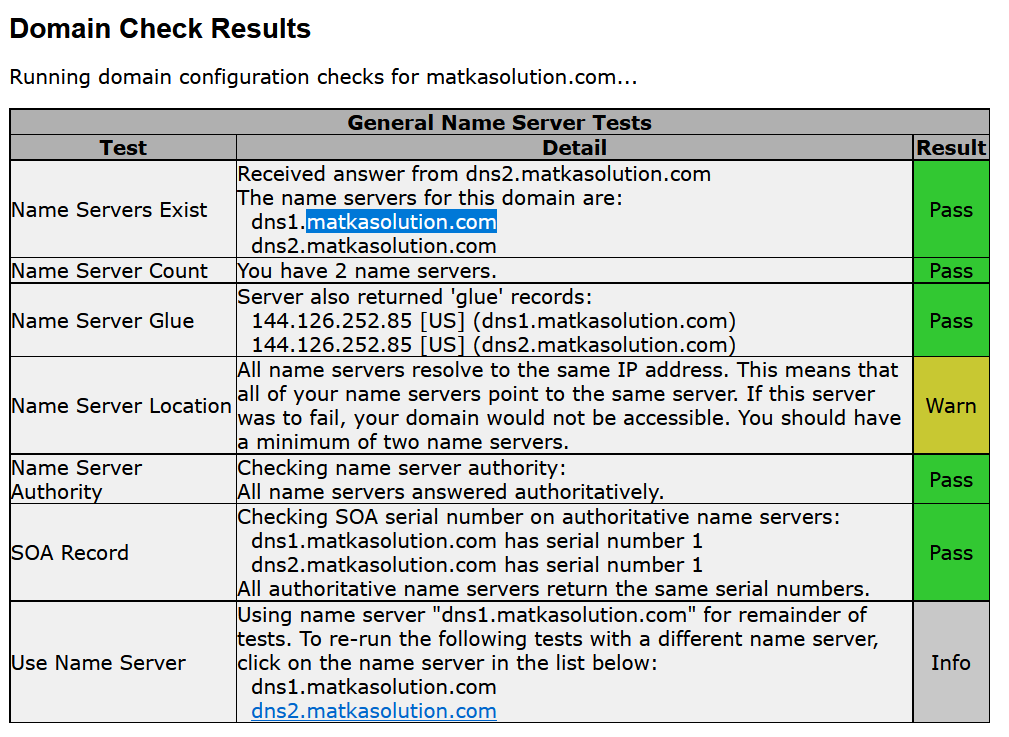
Exactly the issue of glue records takes us back to Godaddy this is where the parent nameservers are so contact your name registrar, as the glue records need to be created on the parent name servers. Check glue records here DNS Tools - Domain Configuration Check
Does this depict the correct nameservers ?
Mind sharing the domain name?
Does this depict the correct nameservers ? Yes
Mind sharing the domain name? Yes
Looks like the domain has not propagated on multiple nameservers. You will have to wait till dns “propagates” everywhere
kalyanresult.live
It’s been 3 days since I pointed this domain on these nameserver
The issue you have is ns1.matkasolution.com is not listed as a primary nameserver at your parent nameserver i.e. dns1.matkasolution.com confirm this from SOA record
Your TTL for your nameservers is set to 172800 (48hrs) try this
Windows Os: ipconfig /flushdns

Ubuntu: sudo service network-manager restart

mac: sudo dscacheutil -flushcache
then run the command sudo killall -HUP mDNSResponder
what happend sir didi’nt answer
You run these command on client not server. On your PC/Laptop which os do you have?
If its macOs use these set of commands
$ sudo dscacheutil -flushcache
$ sudo killall -HUP mDNSResponder
windows run on command prompt ipconfig /flushdns
I spoke to Godaddy customer care today morning they said that the nameservers are not responding
Did you set the correct ip addresses ? for both ns records
When I created a new server, immediately added nameservers to 10 domains, they are running fine, but after that the domain is not pointing to the nameservers.
I have 48 domains. I left cpanel and shifted to cyberpanel
Which domain ? the primary domain of the server ?
Did you create private nameservers for the primary domain ?
primary domain matkasolution.com
This domain is ok it points to 64.227.xxx is this your server where cyberpanel is installed ?
but sir other domain is not getting point on this server
Did you setup these domains with correct ns records ?
Shall I give you the login details of my server so that you can check that I have done everything correctly