CyberPanel Community

🚀 Be the First to Try CyberPanel's New Design – v2.4.2-dev Now Available!

RM
Rana Muhammad Usman Nasir #1

Hey CyberPanel Community,

The wait is over…

Our brand-new design is finally ready for you to try! :tada:

After months of hard work, listening to your feedback, and refining every detail — we’re excited to announce that the development version of CyberPanel (v2.4.2-dev) featuring the all-new UI is now available for testing!

:glowing_star: Why You Should Try It

This isn’t just a facelift — it’s a whole new CyberPanel experience:

  • :sparkles: Sleek New Interface – Say hello to a modern, purple-themed design that’s clean, intuitive, and delightful to use.
  • :high_voltage: Lightning-Fast Navigation – Redesigned menus and sidebar to help you find everything faster.
  • :mobile_phone: Fully Responsive – Looks amazing across all devices, from desktops to tablets to phones.
  • :bullseye: Smarter Layouts – Optimized dashboards and forms that make server management a breeze.

This is your chance to be part of the future of CyberPanel — and shape it with your feedback.

:hammer_and_wrench: How to Install CyberPanel v2.4.2-dev

You can install the development version by visiting this link.

:warning: We recommend using this version on non-production environments for testing.

:megaphone: We Want Your Feedback!

Try it out, explore the new design, and let us know what you think. Your input helps us make CyberPanel better for everyone.

You can share your thoughts here:

Thank you for being part of the CyberPanel journey.

We’re building something amazing — and it starts with you.
Let’s shape the future of web hosting. Together.

The CyberPanel Team

40 replies
de
deirbhile #2

I only see links to the regular version and install process (which is odd as already past that process to even be invited?)

I see only talk of v2.4.2-dev here, no links I can see get you to that.

“Be the First to Try”? I can see why that may be accurate if no upgrade to it.

RM
Rana Muhammad Usman Nasir #3

Instructions for installing dev and production version is same, just need to enter the dev version number during install.

ka
kamal amer #5

I saw the new form, it is very professional + it has a small problem in the corn api. A new addition is not available. Please add it, please.

de
deirbhile #6

I’ll take a look, thanks.

Ma
Master3395 #7

Even if i click the X on the notifications, they keep returning on another page, or refresh?

image

Ma
Master3395 #8

I really wish there were an option to automatically configure firewall ban rules, especially in response to failed login attempts or other security triggers.

It would also be very helpful to have the ability to define a custom whitelist, so that we don’t risk getting our own IP banned during the SSH Security Analysis.

Right now, we’re forced to manually run commands like this over SSH:

firewall-cmd --permanent --add-rich-rule="rule family=ipv4 source address=220.80.197.180 drop" && firewall-cmd --reload

An integrated solution with whitelist support and auto-blocking features would greatly improve security and ease of use.

li
litespeedlover #11

:8090/websites/listWebsites - right click open or open in new window!

to manage anything takes too many clicks.

please make your UX allow to open any links especially the ‘manage’ site link from :8090/websites/listWebsites to open a new window.

li
litespeedlover #13

that is true - and one site - no problem.

Current Cron Job Navigation

  1. Go to: :8090/websites/listWebsites
  2. Click “Manage” on the domain (no right-click support)
  3. Go to: :8090/websites/domain.tld/
  4. Click through to: :8090/websites/listCron?domain=domain.tld/

Repeat that every single time — no shortcuts, no multi-tab support, no global cron view, no batch import, nothing.

when cyberpanel has to be rebuilt or sites migrated or restored from backup - no cron job

so its not 2 clicks, its 100 sites x 4 clicks = 400 clicks just to set the required wordpress cron for each site.

li
litespeedlover #15

right, but its avoidable if you allow right click to open new tabs.

imagine the 100 sites on one page of :8090/websites/listWebsites

manage button you can right click and open site to manage cron.

this way at least you save clicks back and even more productive you can see easily which site you are managing. So when the phone rings and people come to your desk you can easily remember where you are.

What is the reason/use case to have or not have right click open new tab on any link vs forced one dimensional stay in GUI?

platforms that dont limit always are far more productive and experience growth than platforms that limit productivity.

i’ve been on cyberpanel since 2019

RM
Rana Muhammad Usman Nasir #16

I’ve enabled right-click functionality for the website management buttons on the websites list page (/websites/listWebsites).

The links work exactly the same with left-click but now also support:
- Right-click → “Open in new tab”

Mr
MrDollar2017 #18

There is a problem with pagination for list websites, i used temp solution to see more on page.

Cannot list websites. Error message: invalid literal for int() with base 10: ‘Page 2’

Ma
Mayank #21

Previously I had authenticator 2fa enabled, after update it is not asking for the 2fa and i am unable to login now, kindly help

Ma
Mayank #23

I have tried that already, even tried with different browsers, different computer and also mobile divices

Ma
Mayank #24

when clicking on signin it directly tries to login there is no 2fa input field coming up

Ma
Mayank #25

Shall I downgrade to v2.4.1, till the issue is fixed ???

dS
dSign3r #26

I am having the same issue. Had 2FA setup now getting the same issue when trying to login. Page refreshes after clicking sign in. 2FA field doesn’t pop up

I am also unable to login via ssh. Were you able to resolve?

Ma
Mayank #27

I downgraded to 2.4.1, do the same till the issue is fixed.

RM
Rana Muhammad Usman Nasir #28
  1. Fixed the 2FA login bug in /Users/cyberpersons/cyberpanel/loginSystem/views.py:104-115:
    • Changed request.session[‘twofa’] to use .get(‘twofa’, 1) to handle missing session data
    • Used data.get(‘twofa’, ‘’) to safely get the 2FA code without crashing
    • Moved del request.session[‘twofa’] to AFTER successful verification (line 115)
    • Added string conversion for comparison to ensure type compatibility
  2. Created emergency bypass script at /usr/local/CyberCP/plogical/emergency_2fa_disable.py:
    - Run as root: /usr/local/CyberCP/bin/python /usr/local/CyberCP/plogical/emergency_2fa_disable.py
    - This will temporarily disable 2FA so you can login
    - Remember to re-enable 2FA after logging in
Ma
Mayank #30

updated again disabled 2fa, even without 2fa unable to login, the page just refreshed and get back to login screen.

  1. Fixed the 2FA login bug in /Users/cyberpersons/cyberpanel/loginSystem/views.py:104-115:
  • Changed request.session[‘twofa’] to use .get(‘twofa’, 1) to handle missing session data
  • Used data.get(‘twofa’, ‘’) to safely get the 2FA code without crashing
  • Moved del request.session[‘twofa’] to AFTER successful verification (line 115)
  • Added string conversion for comparison to ensure type compatibility
  1. Created emergency bypass script at /usr/local/CyberCP/plogical/emergency_2fa_disable.py:
  • Run as root: /usr/local/CyberCP/bin/python /usr/local/CyberCP/plogical/emergency_2fa_disable.py
  • This will temporarily disable 2FA so you can login
  • Remember to re-enable 2FA after logging in

how to implement this ??
version management shows from already logedin session:
v.2.4 build 2 and commit: 3e458c635eec765770521572ac92ccbb03e1bdfa

Ch
Chris #32

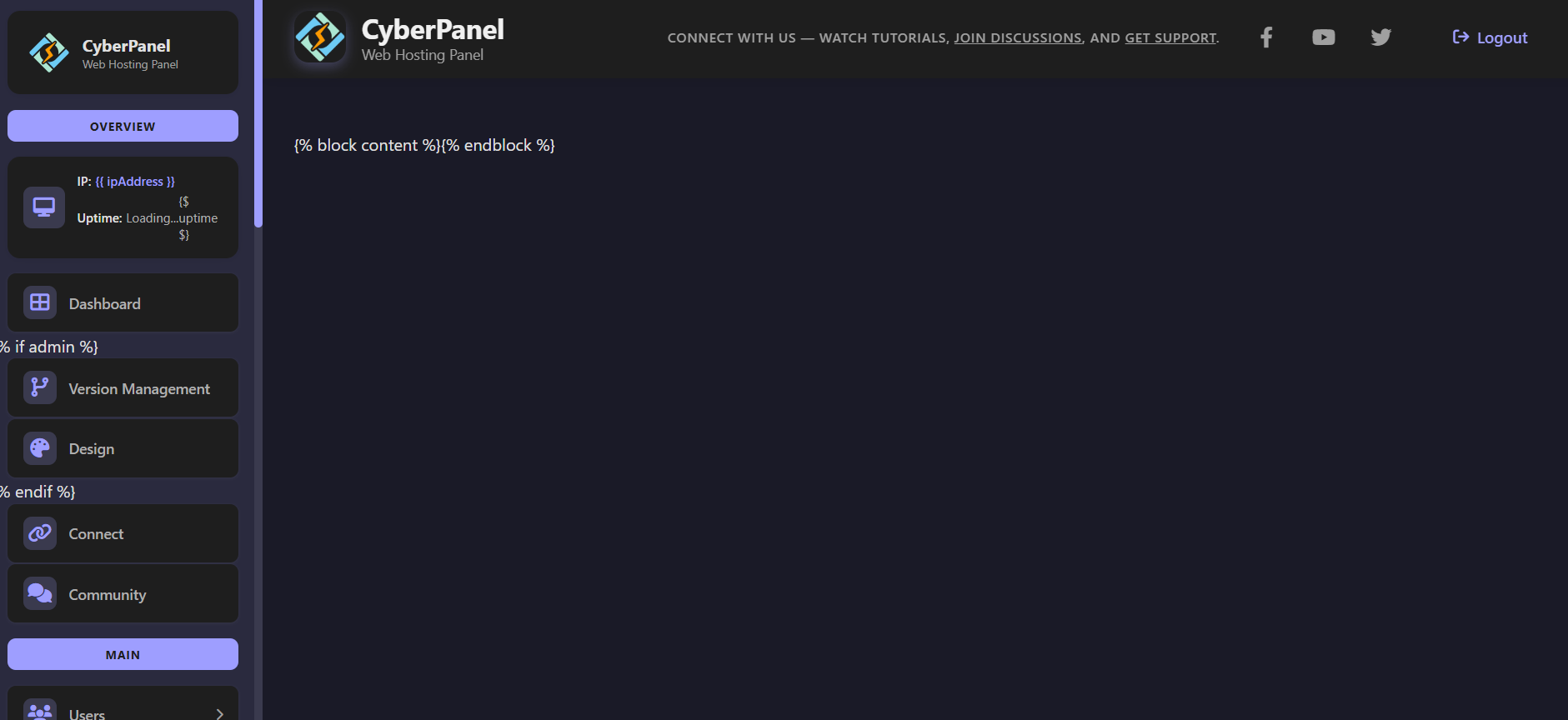
Please add a dark mode. Custom css module is also deactivated. so im helpless with the light theme

li
litespeedlover #33

Thank you very very much.

anyplace we can open a new tab is a tiem saver just to manage the panel settings everywhere.

JS
Jesus Suarez #34

I just encountered a lot of issues with this new version. Honestly, it is a terrible idea to update to this release right now. I used the official upgrade script and found many problems and bugs right away.

I have already opened a topic here asking how to revert back to the previous UI, but so far no one has replied:
https://community.cyberpanel.net/t/how-can-i-revert-to-the-old-ui-after-upgrading-to-cyberpanel-new-ui-has-many-bugs/

I can’t reinstall the entire server to get back on track. So I need to do it without reinstalling.

@usmannasir Do you think you can help me a little? :pensive_face:

Thanks in advance.

RM
Rana Muhammad Usman Nasir #35

There is already a guide that you can use to revert to old versions in our install/upgrade guide. You just have to input the version number during install/upgrade.

dS
dSign3r #36

after updating to 2.4.2 I am unable to login via ssh and I am unable to login via the ui. I had 2fa enabled as well. I have contacted support, they are saying they are unable to login also, so at this point its almost like a loss. I will have to try creating a brand new vps and try migrating my Wordpress sites to the new server using wp admin. i’ll take the blame though for not backing up prior.

Ma
Mayank #37

Thank god, I am handling my own baremetal server, updating to v2.4.2 is not at all reccomended, it is a buggy version

RM
Rana Muhammad Usman Nasir #38

100s of users already upgraded and using just fine, since its a complex piece of software issues can happen.

Ma
Mayank #39

I found what exactly bug is, if the password contains any special character like $ etc.. then the user cant login, 2fa enabled or not doesnt matter, kindly fix that @usmannasir
Anyone who has special character in their password from earlier version can not be able to login to v2.4.2

@usmannasir passwords should have special characters, thats what make the passwords strong.

also there is one more bug, csf.allow and csf.ignore gets rests after update, one has to manualy update and then reload by csf -r to generate updated iptables.

kind regards

Ma
Mayank #40

@dsign3r if you have access to database, directly access it and change the password(without any special char) there, the bug is, if password has any special character then you’ll not be able to login

here is the django password hash generator

li
litespeedlover #41

@usmannasir

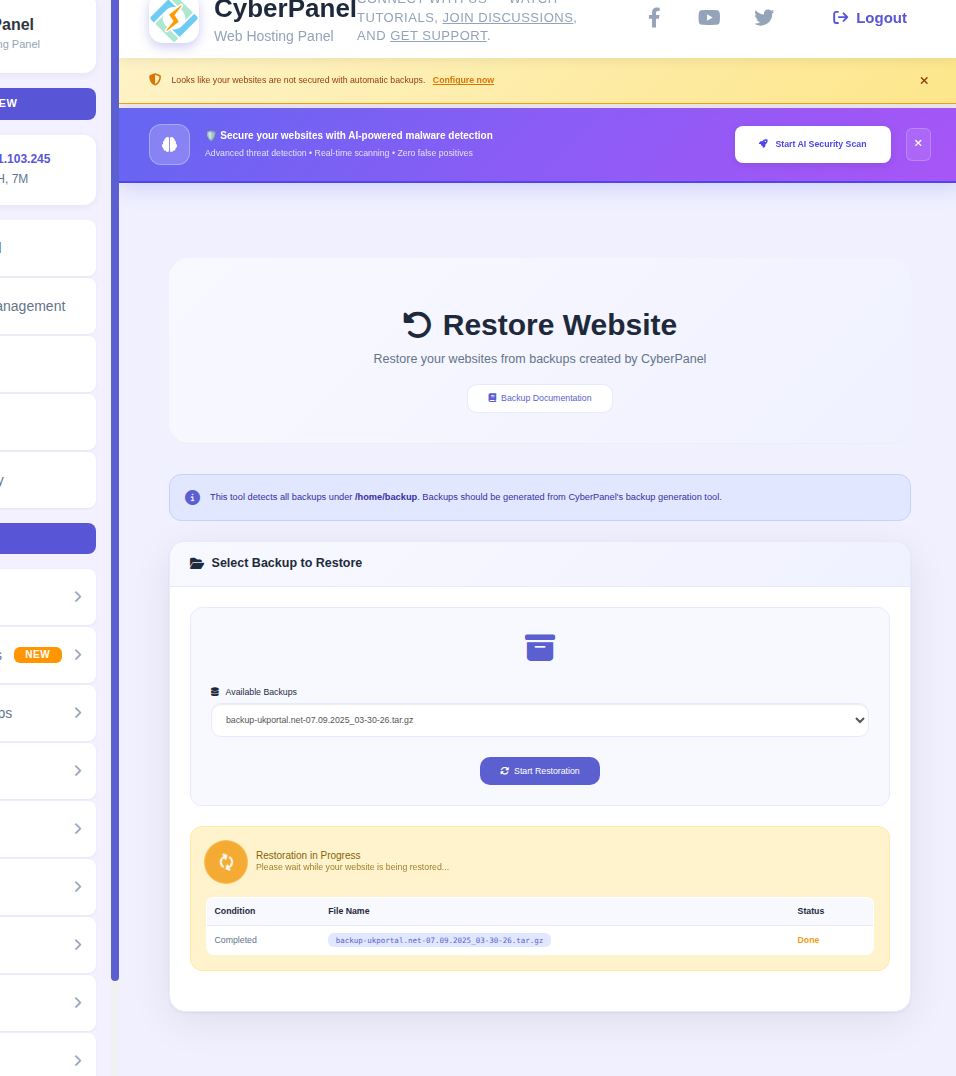
AI-powered malware detection
Looks like your websites are not secured with automatic backups. [Configure now]

please be kind with your banners:

every single time the page loads so do these.

if you feel you must have them there, at least give them 24 hours to disable when we click the X

nobody likes to have spam or annoying banners on their workspace

thank you for seeing things as a USER vs Business

li
litespeedlover #42

Two things here:

First you see the EXTREMELY LARGE spacing/padding

get rid of it - this is a utility page not a sales page - we know what it does

#2 THE FONT in the center main box for all these screens is TOOOOOOOOOO SMALLLLLL - its half the size of the font everywhere else on the page - cant see the text without zooming the page.

CSS wont over write this - please fix it or tell us where to edit it

Thank you

Ch
Chris #43

was that so hard to create a dark theme like that ?
this is created with an ai in seconds.. :man_facepalming:

Sign in to reply