I have tried that already, even tried with different browsers, different computer and also mobile divices
when clicking on signin it directly tries to login there is no 2fa input field coming up
Shall I downgrade to v2.4.1, till the issue is fixed ???
I am having the same issue. Had 2FA setup now getting the same issue when trying to login. Page refreshes after clicking sign in. 2FA field doesn’t pop up
I am also unable to login via ssh. Were you able to resolve?
I downgraded to 2.4.1, do the same till the issue is fixed.
- Fixed the 2FA login bug in /Users/cyberpersons/cyberpanel/loginSystem/views.py:104-115:
- Changed request.session[‘twofa’] to use .get(‘twofa’, 1) to handle missing session data
- Used data.get(‘twofa’, ‘’) to safely get the 2FA code without crashing
- Moved del request.session[‘twofa’] to AFTER successful verification (line 115)
- Added string conversion for comparison to ensure type compatibility
- Created emergency bypass script at /usr/local/CyberCP/plogical/emergency_2fa_disable.py:
- Run as root: /usr/local/CyberCP/bin/python /usr/local/CyberCP/plogical/emergency_2fa_disable.py
- This will temporarily disable 2FA so you can login
- Remember to re-enable 2FA after logging in
so can i upgrade now again ?? with sh <(curl https://raw.githubusercontent.com/usmannasir/cyberpanel/stable/preUpgrade.sh || wget -O - https://raw.githubusercontent.com/usmannasir/cyberpanel/stable/preUpgrade.sh)
??
I really like the new look, you have done a great work 
updated again disabled 2fa, even without 2fa unable to login, the page just refreshed and get back to login screen.
- Fixed the 2FA login bug in /Users/cyberpersons/cyberpanel/loginSystem/views.py:104-115:
- Changed request.session[‘twofa’] to use .get(‘twofa’, 1) to handle missing session data
- Used data.get(‘twofa’, ‘’) to safely get the 2FA code without crashing
- Moved del request.session[‘twofa’] to AFTER successful verification (line 115)
- Added string conversion for comparison to ensure type compatibility
- Created emergency bypass script at /usr/local/CyberCP/plogical/emergency_2fa_disable.py:
- Run as root: /usr/local/CyberCP/bin/python /usr/local/CyberCP/plogical/emergency_2fa_disable.py
- This will temporarily disable 2FA so you can login
- Remember to re-enable 2FA after logging in
how to implement this ??
version management shows from already logedin session:
v.2.4 build 2 and commit: 3e458c635eec765770521572ac92ccbb03e1bdfa
Please contact us via here: https://platform.cyberpersons.com/
Please add a dark mode. Custom css module is also deactivated. so im helpless with the light theme
Thank you very very much.
anyplace we can open a new tab is a tiem saver just to manage the panel settings everywhere.
I just encountered a lot of issues with this new version. Honestly, it is a terrible idea to update to this release right now. I used the official upgrade script and found many problems and bugs right away.
I have already opened a topic here asking how to revert back to the previous UI, but so far no one has replied:
https://community.cyberpanel.net/t/how-can-i-revert-to-the-old-ui-after-upgrading-to-cyberpanel-new-ui-has-many-bugs/
I can’t reinstall the entire server to get back on track. So I need to do it without reinstalling.
@usmannasir Do you think you can help me a little? 
Thanks in advance.
There is already a guide that you can use to revert to old versions in our install/upgrade guide. You just have to input the version number during install/upgrade.
after updating to 2.4.2 I am unable to login via ssh and I am unable to login via the ui. I had 2fa enabled as well. I have contacted support, they are saying they are unable to login also, so at this point its almost like a loss. I will have to try creating a brand new vps and try migrating my Wordpress sites to the new server using wp admin. i’ll take the blame though for not backing up prior.
Thank god, I am handling my own baremetal server, updating to v2.4.2 is not at all reccomended, it is a buggy version
100s of users already upgraded and using just fine, since its a complex piece of software issues can happen.
I found what exactly bug is, if the password contains any special character like $ etc.. then the user cant login, 2fa enabled or not doesnt matter, kindly fix that @usmannasir
Anyone who has special character in their password from earlier version can not be able to login to v2.4.2
@usmannasir passwords should have special characters, thats what make the passwords strong.
also there is one more bug, csf.allow and csf.ignore gets rests after update, one has to manualy update and then reload by csf -r to generate updated iptables.
kind regards
@dsign3r if you have access to database, directly access it and change the password(without any special char) there, the bug is, if password has any special character then you’ll not be able to login
here is the django password hash generator
AI-powered malware detection
Looks like your websites are not secured with automatic backups. [Configure now]
please be kind with your banners:

every single time the page loads so do these.
if you feel you must have them there, at least give them 24 hours to disable when we click the X
nobody likes to have spam or annoying banners on their workspace
thank you for seeing things as a USER vs Business
Two things here:
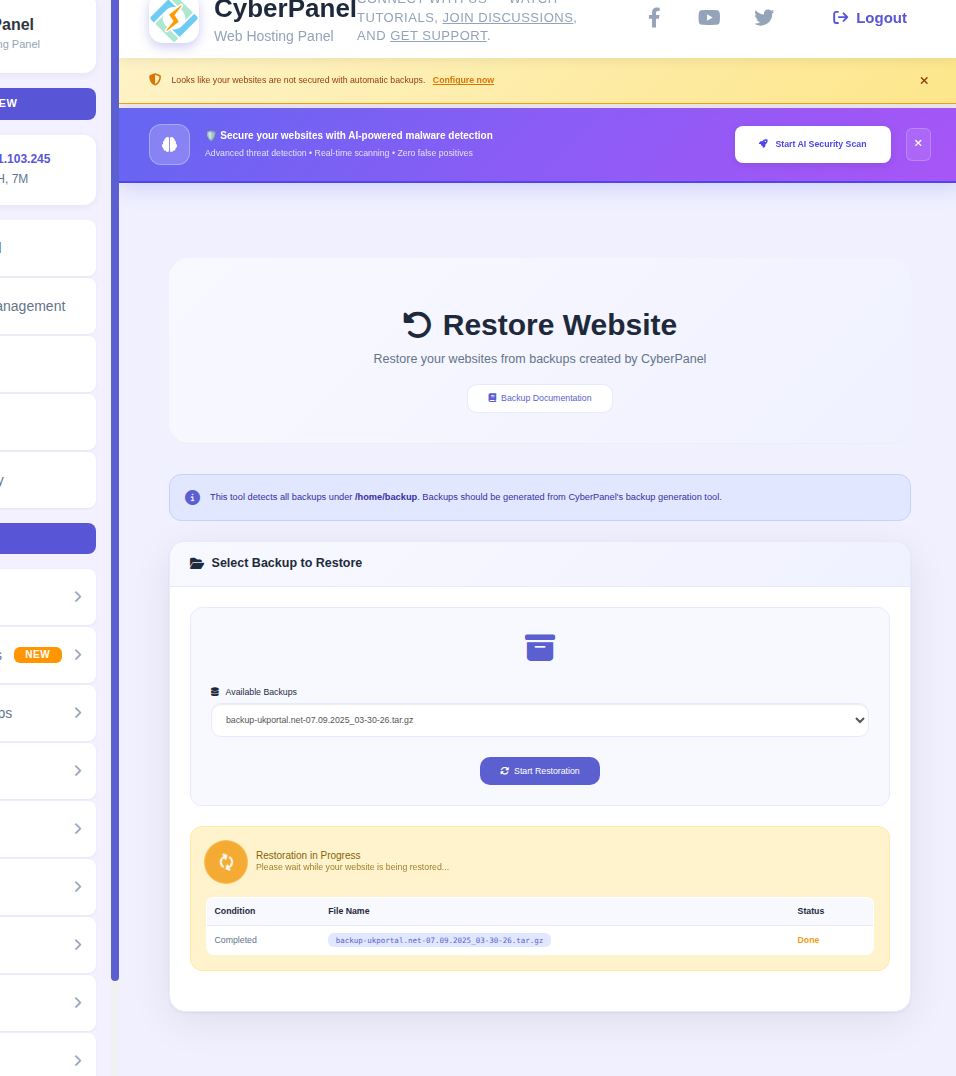
First you see the EXTREMELY LARGE spacing/padding
get rid of it - this is a utility page not a sales page - we know what it does
#2 THE FONT in the center main box for all these screens is TOOOOOOOOOO SMALLLLLL - its half the size of the font everywhere else on the page - cant see the text without zooming the page.
CSS wont over write this - please fix it or tell us where to edit it
Thank you