CA
Cyber Addict
#1
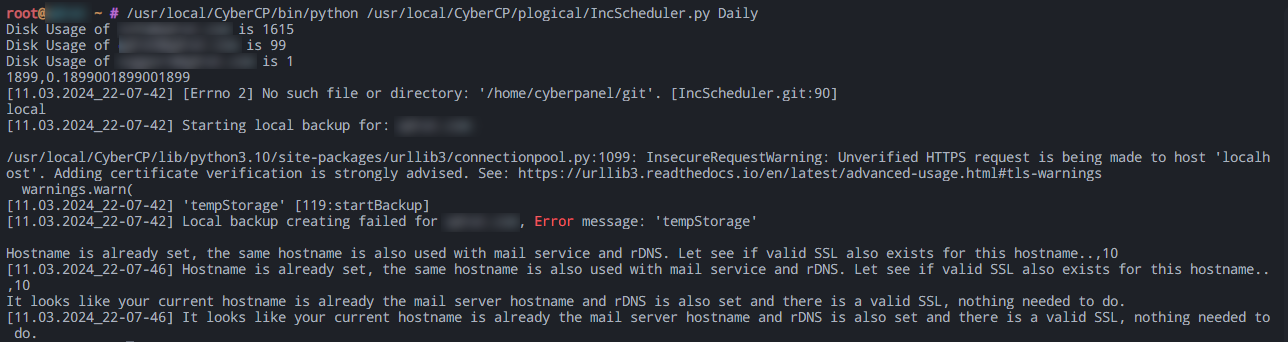
After the CyberPanel update, the Automatic Backup is not working. I also tried to do it manually by using this command /usr/local/CyberCP/bin/python /usr/local/CyberCP/plogical/IncScheduler.py Daily
Still not working.
Any fix?
After the last few days hack I really need this feature to be working. Thank you!
root@Ubuntu-2204-jammy-amd64-base ~ # /usr/local/CyberCP/bin/python /usr/local/CyberCP/plogical/IncScheduler.py Daily
950,0.095000095000095
8466,0.8466008466008467
11343,1.1343011343011342
1123,0.1123001123001123
2,0.0002000002000002
1978,0.1978001978001978
2315,0.2315002315002315
4342,0.4342004342004342
896,0.0896000896000896
[11.02.2024_09-18-58] Starting local backup for: (here would be the website.com)

/usr/local/CyberCP/lib/python3.10/site-packages/urllib3/connectionpool.py:1099: InsecureRequestWarning: Unverified HTTPS request is being made to host 'localhost'. Adding certificate verification is strongly advised. See: https://urllib3.readthedocs.io/en/latest/advanced-usage.html#tls-warnings
  warnings.warn(
[11.02.2024_09-18-58] 'tempStorage' [119:startBackup]
[11.02.2024_09-18-58] Local backup creating failed for (here would be the website.com), Error message: 'tempStorage'

[11.02.2024_09-18-58] Starting local backup for: (here would be the website.com)

/usr/local/CyberCP/lib/python3.10/site-packages/urllib3/connectionpool.py:1099: InsecureRequestWarning: Unverified HTTPS request is being made to host 'localhost'. Adding certificate verification is strongly advised. See: https://urllib3.readthedocs.io/en/latest/advanced-usage.html#tls-warnings
  warnings.warn(
[11.02.2024_09-18-58] 'tempStorage' [119:startBackup]
[11.02.2024_09-18-58] Local backup creating failed for (here would be the website.com), Error message: 'tempStorage'

[11.02.2024_09-18-58] Starting local backup for: (here would be the website.com)

/usr/local/CyberCP/lib/python3.10/site-packages/urllib3/connectionpool.py:1099: InsecureRequestWarning: Unverified HTTPS request is being made to host 'localhost'. Adding certificate verification is strongly advised. See: https://urllib3.readthedocs.io/en/latest/advanced-usage.html#tls-warnings
  warnings.warn(
[11.02.2024_09-18-59] 'tempStorage' [119:startBackup]
[11.02.2024_09-18-59] Local backup creating failed for (here would be the website.com), Error message: 'tempStorage'

job com[leted
[11.02.2024_09-18-59] [Errno 2] No such file or directory: '/home/cyberpanel/git'. [IncScheduler.git:90]
local
[11.02.2024_09-18-59] Starting local backup for: (here would be the website.com)

/usr/local/CyberCP/lib/python3.10/site-packages/urllib3/connectionpool.py:1099: InsecureRequestWarning: Unverified HTTPS request is being made to host 'localhost'. Adding certificate verification is strongly advised. See: https://urllib3.readthedocs.io/en/latest/advanced-usage.html#tls-warnings
  warnings.warn(
[11.02.2024_09-18-59] 'tempStorage' [119:startBackup]
[11.02.2024_09-18-59] Local backup creating failed for (here would be the website.com), Error message: 'tempStorage'

Traceback (most recent call last):
  File "/usr/local/CyberCP/plogical/IncScheduler.py", line 1707, in <module>
    main()
  File "/usr/local/CyberCP/plogical/IncScheduler.py", line 1698, in main
    IncScheduler.startNormalBackups(args.function)
  File "/usr/local/CyberCP/plogical/IncScheduler.py", line 599, in startNormalBackups
    adminEmail = open(adminEmailPath, 'r').read().rstrip('\n')
FileNotFoundError: [Errno 2] No such file or directory: '/home/cyberpanel/adminEmail'