Community

Closed Nodejs app cant force http to https

AA
Afandi Azmi #1

Before i deploy the nodejs app, forcing http to https is working (tested just for index.html)…

Now i deploy nodejs app in cyberpanel, all work well, but force http to https is not working,

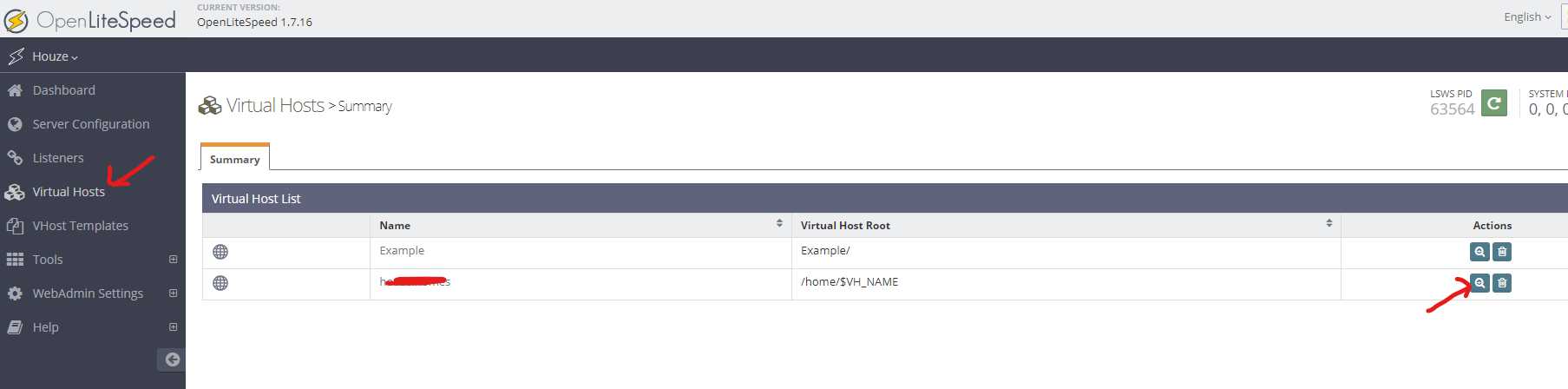
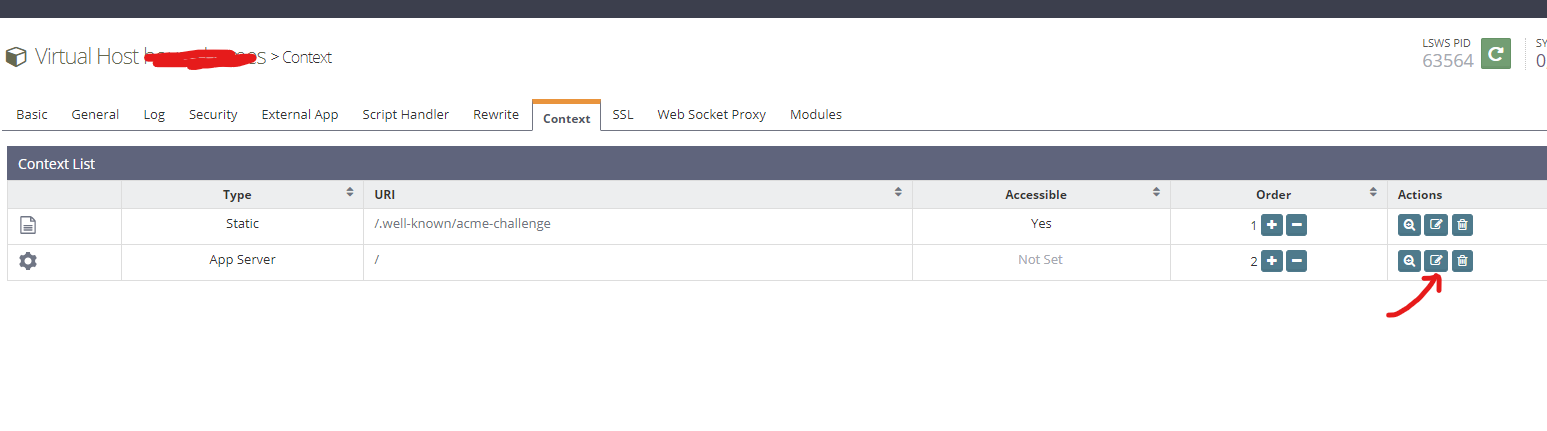
i already added this to vHost Conf

context / {
  type                    appserver
  location                /home/houze.homes/public_html
  binPath                 /usr/bin/node
  startupFile             server.js
  appType                 node
  maxConns                100
 
  rewrite  {
 
  }
  addDefaultCharset       off
}

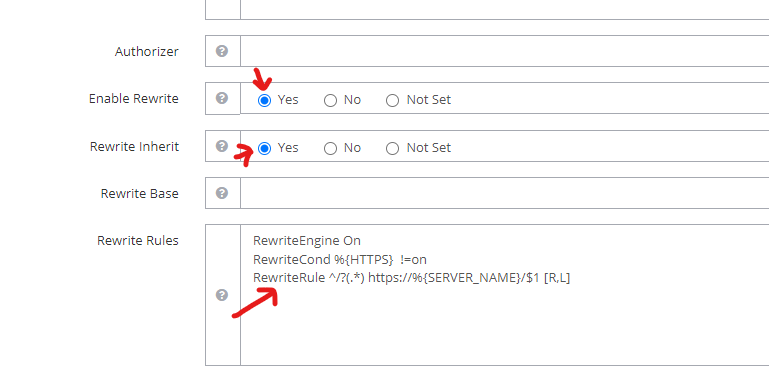
i already add this to .htaccess

RewriteEngine On
RewriteCond %{HTTPS}  !=on
RewriteRule ^/?(.*) https://%{SERVER_NAME}/$1 [R,L]

but its not working force http to https, why?

jo
josephgodwinke #2

Welcome @afandiazmi Happy you are here

Try

# the nodejs app port consumed
RewriteCond %{SERVER_PORT} ^3000$
RewriteRule .* https://%{SERVER_NAME}%{REQUEST_URI} [R=301,L]
AA
Afandi Azmi #3

Thanks for the reply, but still not working

jo
josephgodwinke #4

Did you check your code ? You might be bypassing secure routes

AA
Afandi Azmi #5

this is my server.js file


const mongoose = require('mongoose');
const dotenv = require('dotenv');

dotenv.config({ path: './config.env' });

const app = require('./app');


const port = process.env.PORT || 3000;
const server = app.listen(port, () => {
  console.log(`App running on port ${port}...`);
});

process.on('unhandledRejection', (err) => {
  console.log('UNHANDLED REJECTION! 💥 Shutting down...');
  console.log(err.name, err.message);
  server.close(() => {
    process.exit(1);
  });
});

and this is my app.js file


const path = require('path');
const express = require('express');
const helmet = require('helmet');
const xss = require('xss-clean');
const hpp = require('hpp');
const cookieParser = require('cookie-parser');
const compression = require('compression');
const myRouter = require('./routes/myRoutes');

const app = express();

app.set('view engine', 'pug');
app.set('views', path.join(__dirname, 'views'));

app.use(express.static(path.join(__dirname, 'public')));

app.use(
  helmet.contentSecurityPolicy({
    useDefaults: true,
    directives: {
      'img-src': ["'self'", 'https: data:'],
      'frame-src': ["'self'", 'https: data:'],
      defaultSrc: ["'self'", 'data:', 'blob:'],
    },
  })
);

// Development logging
if (process.env.NODE_ENV === 'development') {
 // do something here
}
// console.log(process.env.NODE_ENV);

// Limit request from same API
const limiter = rateLimit({
  windowMs: 60 * 60 * 1000, // 15 minutes
  max: 100,
  message: 'Too many request from this IP, please try again in an hour',
});
app.use('/api', limiter);

app.use(express.json({ limit: '20kb' }));
app.use(express.urlencoded({ extended: true, limit: '20kb' }));
app.use(cookieParser());
app.use(xss());
app.use(compression());

app.use('/', myRouter);
app.all('*', (req, res, next) => {
  next(new AppError(`Can't find ${req.originalUrl} on this server!`, 404));
});
app.use(globalErrorHandler);

module.exports = app;

jo
josephgodwinke #6

You can use native https.createServer() function and pass ssl key and certificate in your app.js or your entry file/point

AA
Afandi Azmi #7

ok i will try that later, btw can i know how to change NODE_ENV to production?

jo
josephgodwinke #8
var https = require("https");
app.get("/", function (req, res) {
  res.send("hello world");
});

https
  .createServer(
    {
      key: fs.readFileSync("server.key"),
      cert: fs.readFileSync("server.cert"),
    },
    app
  )
  .listen(3000, function () {
    console.log(
      "ExpressJS App is running on port 3000 using SSL"
    );
  });
jo
josephgodwinke #9

You can access environment variable like this

var env = process.env.NODE_ENV
// or
app.get('env')

To set it using SSH

export NODE_ENV=production
AA
Afandi Azmi #11

i will try this too

This topic is closed to new replies.