na
nawaze
#1
 Community
Hello @nawaze
See /usr/local/lsws/conf/httpd_config.conf or /usr/local/lsws/conf/httpd_config.xml for litespeed if port is still there
Use firewalld-cmd to open the port permanently
firewall-cmd --permanent --zone=public --add-port=7171/tcp
firewall-cmd --complete-reload
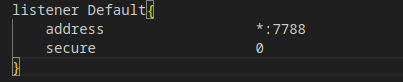
is it ok if i want to add the port 7788 to httpd_config.conf?
Why do you feel you need to add a port there for your website ?
To work with open ports in your existing websites you just need to add a context to vHost config that is recommended way. You website should handle which port it wishes to use
a python application running on the server.
Have you seen this How to setup DJANGO application on CyberPanel/OpenLiteSpeed
Yes
Is there any way to just open a port?
Port is not blocked by cyberpanel only firewall and security softwares can do this. Review your security protocols. Maybe ask your server provider if they block that port for any reason and I hardly doubt they do.
Now 7788 port is closed, if i change the login port to 7788 then it become open. So i think port Isn’t blocked from the provider
Manually add port in firewall or CSF page.
Hello, still not open port with this tutorial.
what can do?