CyberPanel Community

Cannot login via FTP using FileZilla: 530 Login authentication failed

Ep
Epic #1

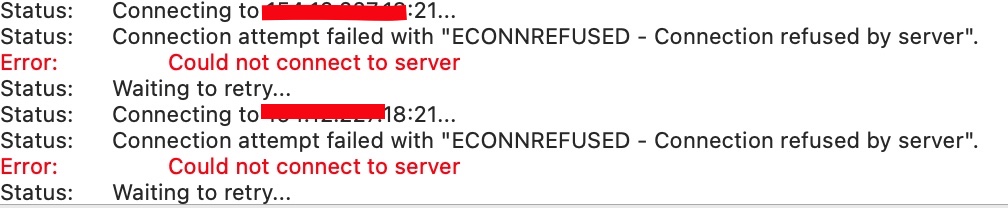
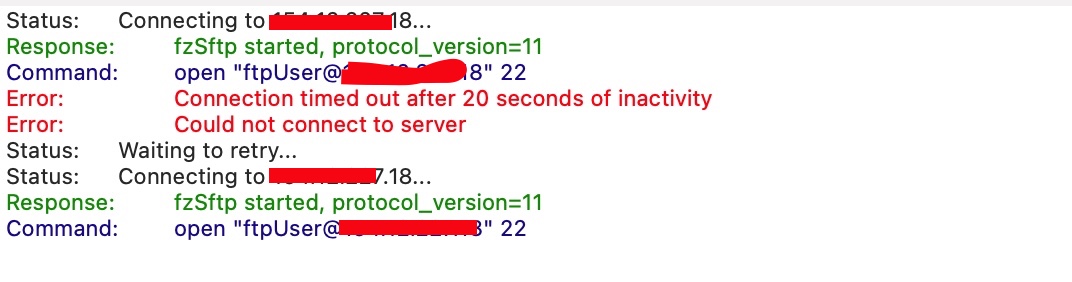
I keep getting the 530 Login authentication failed error. I can’t seem to solve it.

I tried the following:

  • Ensured port 21 is open.
  • Tried with/without the Cyberpanel firewall
  • Recreated the FTP account multiple times with different passwords to iron out user error

Error (Redacted sensitive info):

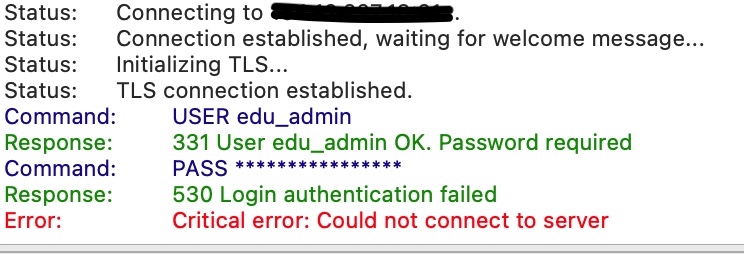
Status: Resolving address of my.website
Status: Connecting to xxx.xxx.xxx.xxx…
Status: Connection established, waiting for welcome message…
Status: Initializing TLS…
Status: TLS connection established.
Command: USER myuser
Response: 331 User myuser OK. Password required
Command: PASS *****************
Response: 530 Login authentication failed
Error: Critical error: Could not connect to server

Any help would be much appreciated.

52 replies
jo
josephgodwinke #2

Welcome @Epic Happy you are here

530 Login authentication failed occurs when you are using either a wrong username, password, port or hostname

Go to https://SERVER_URL:8090/ftp/listFTPAccounts change password and confirm username

A crude workaround is go to the settings in the “Encryption” section and set “Use simple FTP” .

Also try another client see if you will find any success

FInally if all fails contact service provider to check whether you are limited to some degree see this FTP issues on DigitalOcean - #20 by ljchuello

Ep
Epic #3

No luck, unfortunately. I tried many times with new users, changing pass etc. The username and pass matches.

A crude workaround is go to the settings in the “Encryption” section and set “Use simple FTP” .

Where would I find this?.

FInally if all fails contact service provider to check whether they block port 20 or something else see this FTP issues on DigitalOcean - #20 by ljchuello

I can telnet my server on port 21, and it responds fine as OPEN. Also, I would have thought then I would get a different error. I am provisioning a VM on GCP and installing it on there to see if the issue persists. Will allow port 21 via the firewall.

jo
josephgodwinke #4

Share https://SERVER_IP:8090/serverlogs/ftplogs

Ep
Epic #5

Redacted sensitive info.

Dec 7 20:48:01 localhost CRON[188058]: (root) CMD (if ! find /home/*/public_html/ -maxdepth 2 -type f -newer /usr/local/lsws/cgid -name ‘.htaccess’ -exec false {} +; then systemctl restart lsws; fi)
Dec 7 20:49:27 localhost pdns_server[40143]: Not validating response for security status update, this is a non-release version
Dec 7 20:50:28 localhost pure-ftpd: (?@149.28.48.43.vultrusercontent.com) [INFO] New connection from 149.28.48.43.vultrusercontent.com
Dec 7 20:50:29 localhost pure-ftpd: (?@149.28.48.43.vultrusercontent.com) [INFO] TLS: Enabled TLSv1.3 with TLS_AES_256_GCM_SHA384, 256 secret bits cipher
Dec 7 20:50:33 localhost pure-ftpd: (?@149.28.48.43.vultrusercontent.com) [WARNING] Authentication failed for user [someuser_ftp]

This implies it is just an auth issue but I’m not convinced it is from me. I’ve tried multiple accounts, copying and pasting the username/password etc. For some reason, I feel like the UI username/pass doesn’t match what is stored. Is there a way I can view the ACTUAL db to see the stored content isn’t corrupted.

Ep
Epic #7

No, I’m using Ubuntu 22

jo
josephgodwinke #8

@Epic

RUn this to remove pure-ftpd software package and reinstall it again just to eliminate any package and conf corruptions:

# create a snapshot of your server
# stop the service
systemctl stop pure-ftpd
# remove package and leftovers
sudo apt-get purge --auto-remove pure-ftpd
sudo apt install pure-ftpd -y
groupadd -g 2001 ftpgroup
useradd -u 2001 -s /bin/false -d /bin/null -c "pureftpd user" -g ftpgroup ftpuser
systemctl start pure-ftpd
mkdir /etc/ssl/private
openssl req -newkey rsa:1024 -new -nodes -x509 -days 3650 -subj "/C=US/ST=Denial/L=Springfield/O=Dis/CN=www.example.com" -keyout /etc/ssl/private/pure-ftpd.pem -out /etc/ssl/private/pure-ftpd.pem
rm -R /etc/pure-ftpd
mkdir /etc/pure-ftpd
cp /usr/local/CyberCP/install/pure-ftpd-one/* /etc/pure-ftpd/
systemctl restart pure-ftpd

If you get an error that Access denied for user ('cyberpanel' @ 'localhost' ... run the following command nano pureftpd-mysql.conf and change the password to correct cyberpanel user password you can find it here /usr/local/CyberCP/CyberCP/settings.py under DATABASES =

Ep
Epic #9

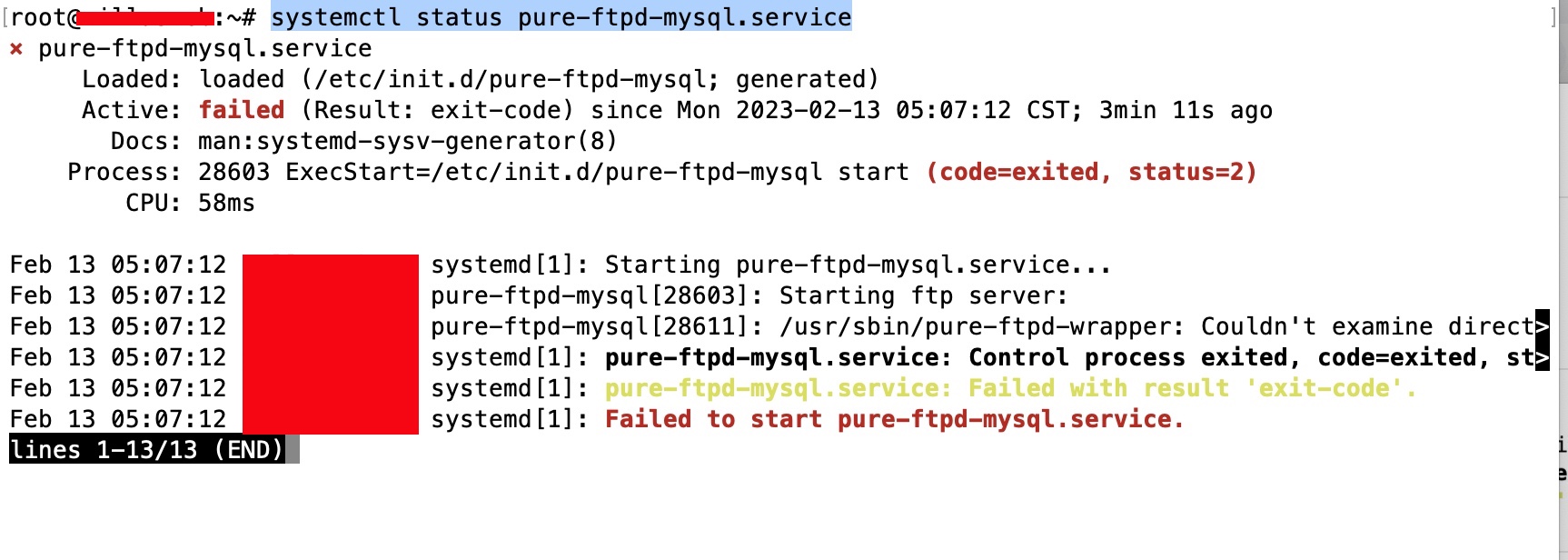
Tried that but I now get the following when trying to restart ftpd. Logs indicate:
/usr/sbin/pure-ftpd-wrapper: Couldn’t examine directory /etc/pure-ftpd/conf: No such file or directory

➜ ~ ls -la /etc/pure-ftpd/
total 32
drwxr-xr-x 2 root root 4096 Dec 7 23:00 .
drwxr-xr-x 126 root root 12288 Dec 7 23:00 …
-rw-r–r-- 1 root root 1092 Dec 7 23:01 pure-ftpd.conf
-rw-r–r-- 1 root root 2009 Dec 7 23:01 pureftpd-ldap.conf
-rw-r–r-- 1 root root 375 Dec 7 23:01 pureftpd-mysql.conf
-rw-r–r-- 1 root root 2966 Dec 7 23:01 pureftpd-pgsql.conf

Should pure-ftpd.conf be renamed?

Ep
Epic #10

@josephgodwinke

Fixed by not deleting the ftpd dir but just overwriting the files from CP. However, still no luck even with a new user and pass, only difference I see in FileZilla is: Status: Insecure server, it does not support FTP over TLS.

Only other thing I can think of is that I haven’t updated the DNS for the “website” yet. Does that matter?. It shouldn’t do?. I am connecting Host via FileZilla directly via the IP and not the domain name anyway.

Or possibly because I am using Ubuntu 22. The install only says up to Ubuntu 20. Ya looks like Ubuntu 22 is not support as Stable release yet. CyberPanel support for Ubuntu 22

I will see if Ubuntu 20 works without any issues.

jo
josephgodwinke #11
jo
josephgodwinke #13

@villasweb @Epic sorry to hear you have issues with authentication.

530 Login authentication failed error on cyberpanel seems to always be a password database corruption.

Yes you have to reinstall although it should work on ubuntu 20 new installation without any issues.

However, the only way to fix this is reinstall pureftpd or install CyberPanel without ftp.

Run this to remove pure-ftpd software package and reinstall it again just to eliminate any package and conf corruptions:

# create a snapshot of your server
# stop the service
systemctl stop pure-ftpd
# remove package and leftovers
sudo apt-get remove --purge pure-ftpd pure-ftpd-common
sudo apt autoremove
sudo killall -u ftpuser
sudo userdel -f ftpuser
sudo groupdel ftpgroup
sudo apt install pure-ftpd -y
groupadd -g 2001 ftpgroup
useradd -u 2001 -s /bin/false -d /bin/null -c "pureftpd user" -g ftpgroup ftpuser
systemctl start pure-ftpd
mkdir /etc/ssl/private
openssl req -newkey rsa:1024 -new -nodes -x509 -days 3650 -subj "/C=US/ST=Denial/L=Springfield/O=Dis/CN=www.example.com" -keyout /etc/ssl/private/pure-ftpd.pem -out /etc/ssl/private/pure-ftpd.pem
rm -R /etc/pure-ftpd
mkdir /etc/pure-ftpd
cp /usr/local/CyberCP/install/pure-ftpd-one/* /etc/pure-ftpd/
systemctl restart pure-ftpd

If you get an error that Access denied for user ('cyberpanel' @ 'localhost' ... run the following command nano pureftpd-mysql.conf and change the password to correct cyberpanel user password you can find it here /usr/local/CyberCP/CyberCP/settings.py under DATABASES =

OR

sudo service pure-ftpd stop
sudo apt-get autoremove pure-ftpd
sudo apt-get purge pure-ftpd
sudo rm -r /etc/pure-ftpd
sudo killall -u ftpuser
sudo userdel -f ftpuser
sudo groupdel ftpgroup
sh <(curl https://raw.githubusercontent.com/usmannasir/cyberpanel/stable/preUpgrade.sh || wget -O - https://raw.githubusercontent.com/usmannasir/cyberpanel/stable/preUpgrade.sh)

OR

Just install vsftp for a secure ftp if you dont care about managing users on a dashboard

sh <(curl https://raw.githubusercontent.com/josephgodwinkimani/cyberpanel-mods/main/install_vsftpd.sh || wget -O - https://raw.githubusercontent.com/josephgodwinkimani/cyberpanel-mods/main/install_vsftpd.sh)

You will access ftp with user your choose during the installation process and the password you create during the process. This user will access the home directory you choose (note the script will not create the user home directory)

You can create other users by running:

# usercreatedoncyberP managed mydomain.com
sudo usermod -d /home/mydomain.com usercreatedoncyberP
sudo chown usercreatedoncyberP:usercreatedoncyberP /home/mydomain.com/public_html

I use this method on several servers with similar issues in the past and it works. Good luck

jo
josephgodwinke #15

I have updated the script and tested it.

It will uninstall vsfptd and pureftpd before running. Note this will not work for any other os other than ubuntu

jo
josephgodwinke #17

You are talking about pureftpd I was talking about vsftpd. The script remove pureftpd completely and then installs vsftpd for you to use as you wish off cyberpanel

vi
villasweb #18

Anyone who works, I accept

jo
josephgodwinke #19

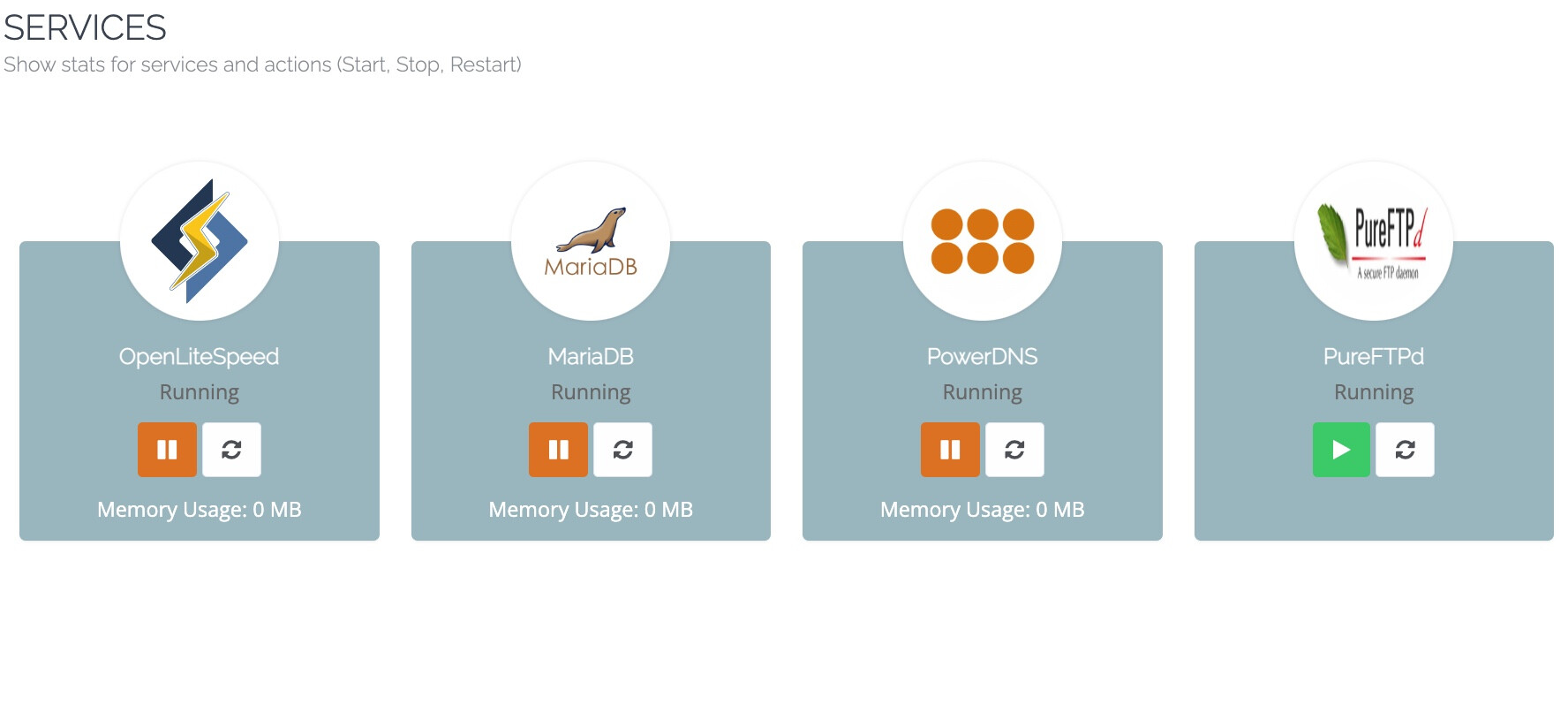
Just press the play button under pureFTPd to start the service then check if pureftpd is running

vi
villasweb #20

already pressed. Still shows the green play button but with the “Running” on PureFTPd …

To
Toby #21

OP, did you ever find a solution?

I have the same problem.

ol
olaf #22

Same probleme here on my ubuntu 22.04

and there is definitively a display bug in service panel. Always saying running with the green start button
image

As I can see in the other discussion it seem a problem with ubuntu 22.04

jo
josephgodwinke #24

Hello @av_admin

Uninstalling in the first place was not a recommended move for many. Which os are you using?

jo
josephgodwinke #27

Yes you need to try fix pureftpd.

You can try fix with this script -

sh <(curl https://raw.githubusercontent.com/josephgodwinkimani/cyberpanel-mods/main/install_pureftpd.sh || wget -O - https://raw.githubusercontent.com/josephgodwinkimani/cyberpanel-mods/main/install_pureftpd.sh)
jo
josephgodwinke #29

I fixed a check that didnt make sense. Please try again

jo
josephgodwinke #31

It appears that the dpkg package database has become corrupted. If you encounter this issue, you may attempt to fix it by resetting the dpkg database or by reinstalling the affected package. However, if this is a new installation, it may be more appropriate to perform a clean install.

an
antivirusadmin #32

It is not new installation, this server was installed in 2021 and updated with command, but had issue with ftp and I read your documentation and start it, then it show me this error

even with update of “apt upgrade -y” I see this error again

jo
josephgodwinke #33

The apt upgrade -y command serves as a means to facilitate the updating of installed packages on a system therefore do not ever use it on cyberpanel server.

Seems redis setup is a broken installation. You must have upgraded some packages that’s why the conflict.

sudo deluser redis
sudo find / -name "redis*" -exec rm -rf {} \;
## remove the reference to theredis user
sudo nano /var/lib/dpkg/statoverride
sudo apt update
an
antivirusadmin #34

Thank you dude for replying me

root postdrop 2555 /usr/sbin/postqueue
root root 700 /etc/dovecot/private
postfix postdrop 2710 /var/spool/postfix/public
root root 1733 /usr/local/lsws/lsphp73/var/lib/php/sessions
root crontab 2755 /usr/bin/crontab
root root 1733 /var/lib/php/sessions
root ssl-cert 710 /etc/ssl/private
root root 1733 /usr/local/lsws/lsphp72/var/lib/php/sessions
root messagebus 4754 /usr/lib/dbus-1.0/dbus-daemon-launch-helper
root postdrop 2555 /usr/sbin/postdrop
redis redis 640 /etc/redis/redis.conf
/usr/sbin/deluser: The user `redis' does not exist.```
jo
josephgodwinke #35

Remove this

an
antivirusadmin #36

don.
It shows me this error

Can't exec "/tmp/apparmor.config.7HGVf2": Permission denied at /usr/share/perl/5.30/IPC/Open3.pm line 281.
open2: exec of /tmp/apparmor.config.7HGVf2 configure 2.13.3-7ubuntu5.2 failed: Permission denied at /usr/share/perl5/Debconf/ConfModule.pm line 59.

but in this time, updated the package and fixed the issue,
thanks for throes commands

jo
josephgodwinke #37

Just a guess can you run this chmod a=rwx,o+t /tmp and run update command again. It will give permissions to access tmp/ and sets the sticky bit for others on that directory

an
antivirusadmin #38

it worked

 Install pure-ftpd ...

Reading package lists... Done
Building dependency tree
Reading state information... Done
pure-ftpd is already the newest version (1.0.49-4).
0 upgraded, 0 newly installed, 0 to remove and 0 not upgraded.
groupadd: group 'ftpgroup' already exists
failed

Now in ftp, I change the password and still telling me the password is wrong

an
antivirusadmin #39

the log of ftp

Dec 20 22:01:40 localhost multipathd[630765]: sda: add missing path
Dec 20 22:01:40 localhost multipathd[630765]: sda: failed to get udev uid: Invalid argument
Dec 20 22:01:40 localhost multipathd[630765]: sda: failed to get sysfs uid: Invalid argument
Dec 20 22:01:40 localhost multipathd[630765]: sda: failed to get sgio uid: No such file or directory
Dec 20 22:01:45 localhost multipathd[630765]: sda: add missing path
Dec 20 22:01:45 localhost multipathd[630765]: sda: failed to get udev uid: Invalid argument
Dec 20 22:01:45 localhost multipathd[630765]: sda: failed to get sysfs uid: Invalid argument
Dec 20 22:01:45 localhost multipathd[630765]: sda: failed to get sgio uid: No such file or directory
Dec 20 22:01:50 localhost multipathd[630765]: sda: add missing path
Dec 20 22:01:50 localhost multipathd[630765]: sda: failed to get udev uid: Invalid argument
Dec 20 22:01:50 localhost multipathd[630765]: sda: failed to get sysfs uid: Invalid argument
Dec 20 22:01:50 localhost multipathd[630765]: sda: failed to get sgio uid: No such file or directory
Dec 20 22:01:52 localhost kernel: [243471.232236] Firewall: *TCP_IN Blocked* IN=ens160 OUT= MAC=00:0c:29:0d:fc:77:f0:f7:55:7d:d5:80:08:00 SRC=103.109.180.112 DST=94.182.153.5 LEN=40 TOS=0x00 PREC=0x00 TTL=233 ID=46783 PROTO=TCP SPT=57374 DPT=1278 WINDOW=1024 RES=0x00 SYN URGP=0 
Dec 20 22:01:55 localhost multipathd[630765]: sda: add missing path
Dec 20 22:01:55 localhost multipathd[630765]: sda: failed to get udev uid: Invalid argument
Dec 20 22:01:55 localhost multipathd[630765]: sda: failed to get sysfs uid: Invalid argument
Dec 20 22:01:55 localhost multipathd[630765]: sda: failed to get sgio uid: No such file or directory
Dec 20 22:02:00 localhost multipathd[630765]: sda: add missing path
Dec 20 22:02:00 localhost multipathd[630765]: sda: failed to get udev uid: Invalid argument
Dec 20 22:02:00 localhost multipathd[630765]: sda: failed to get sysfs uid: Invalid argument
Dec 20 22:02:00 localhost multipathd[630765]: sda: failed to get sgio uid: No such file or directory
Dec 20 22:02:05 localhost multipathd[630765]: sda: add missing path
Dec 20 22:02:05 localhost multipathd[630765]: sda: failed to get udev uid: Invalid argument
Dec 20 22:02:05 localhost multipathd[630765]: sda: failed to get sysfs uid: Invalid argument
Dec 20 22:02:05 localhost multipathd[630765]: sda: failed to get sgio uid: No such file or directory
Dec 20 22:02:06 localhost kernel: [243484.593589] Firewall: *TCP_IN Blocked* IN=ens160 OUT= MAC=00:0c:29:0d:fc:77:f0:f7:55:7d:d5:80:08:00 SRC=94.102.61.40 DST=94.182.153.5 LEN=40 TOS=0x00 PREC=0x00 TTL=240 ID=54321 PROTO=TCP SPT=43476 DPT=8030 WINDOW=65535 RES=0x00 SYN URGP=0 
Dec 20 22:02:10 localhost multipathd[630765]: sda: add missing path
Dec 20 22:02:10 localhost multipathd[630765]: sda: failed to get udev uid: Invalid argument
Dec 20 22:02:10 localhost multipathd[630765]: sda: failed to get sysfs uid: Invalid argument
Dec 20 22:02:10 localhost multipathd[630765]: sda: failed to get sgio uid: No such file or directory
Dec 20 22:02:11 localhost kernel: [243490.172274] Firewall: *TCP_IN Blocked* IN=ens160 OUT= MAC=00:0c:29:0d:fc:77:f0:f7:55:7d:d5:80:08:00 SRC=92.234.175.93 DST=94.182.153.5 LEN=44 TOS=0x00 PREC=0x00 TTL=42 ID=13731 PROTO=TCP SPT=6534 DPT=37215 WINDOW=30182 RES=0x00 SYN URGP=0 
Dec 20 22:02:12 localhost pure-ftpd: (?@188.253.66.142) [INFO] New connection from 188.253.66.142
Dec 20 22:02:13 localhost kernel: [243491.580029] Firewall: *ICMP_IN Blocked* IN=ens160 OUT= MAC=00:0c:29:0d:fc:77:f0:f7:55:7d:d5:80:08:00 SRC=148.153.82.18 DST=94.182.153.5 LEN=60 TOS=0x00 PREC=0x00 TTL=51 ID=7406 DF PROTO=ICMP TYPE=8 CODE=0 ID=4411 SEQ=134 
Dec 20 22:02:14 localhost kernel: [243493.113550] Firewall: *TCP_IN Blocked* IN=ens160 OUT= MAC=00:0c:29:0d:fc:77:f0:f7:55:7d:d5:80:08:00 SRC=94.182.250.139 DST=94.182.153.5 LEN=44 TOS=0x00 PREC=0x00 TTL=249 ID=23749 DF PROTO=TCP SPT=34864 DPT=8291 WINDOW=14600 RES=0x00 SYN URGP=0 
Dec 20 22:02:15 localhost kernel: [243493.572500] Firewall: *TCP_IN Blocked* IN=ens160 OUT= MAC=00:0c:29:0d:fc:77:f0:f7:55:7d:d5:80:08:00 SRC=91.191.209.198 DST=94.182.153.5 LEN=40 TOS=0x00 PREC=0x00 TTL=244 ID=45136 PROTO=TCP SPT=53343 DPT=3266 WINDOW=1024 RES=0x00 SYN URGP=0 
Dec 20 22:02:15 localhost multipathd[630765]: sda: add missing path
Dec 20 22:02:15 localhost multipathd[630765]: sda: failed to get udev uid: Invalid argument
Dec 20 22:02:15 localhost multipathd[630765]: sda: failed to get sysfs uid: Invalid argument
Dec 20 22:02:15 localhost multipathd[630765]: sda: failed to get sgio uid: No such file or directory
Dec 20 22:02:16 localhost kernel: [243494.576213] Firewall: *TCP_IN Blocked* IN=ens160 OUT= MAC=00:0c:29:0d:fc:77:f0:f7:55:7d:d5:80:08:00 SRC=208.115.193.36 DST=94.182.153.5 LEN=40 TOS=0x00 PREC=0x00 TTL=237 ID=40632 PROTO=TCP SPT=57055 DPT=53154 WINDOW=1024 RES=0x00 SYN URGP=0 
Dec 20 22:02:20 localhost multipathd[630765]: sda: add missing path
Dec 20 22:02:20 localhost multipathd[630765]: sda: failed to get udev uid: Invalid argument
Dec 20 22:02:20 localhost multipathd[630765]: sda: failed to get sysfs uid: Invalid argument
Dec 20 22:02:20 localhost multipathd[630765]: sda: failed to get sgio uid: No such file or directory
Dec 20 22:02:20 localhost pure-ftpd: (?@188.253.66.142) [WARNING] Authentication failed for user [admin_brain]
Dec 20 22:02:22 localhost pure-ftpd: (?@188.253.66.142) [INFO] Logout.
Dec 20 22:02:25 localhost multipathd[630765]: sda: add missing path
Dec 20 22:02:25 localhost multipathd[630765]: sda: failed to get udev uid: Invalid argument
Dec 20 22:02:25 localhost multipathd[630765]: sda: failed to get sysfs uid: Invalid argument
Dec 20 22:02:25 localhost multipathd[630765]: sda: failed to get sgio uid: No such file or directory

I want to explode my brain

jo
josephgodwinke #40

Did you restart the service ? You also want to create a new ftp user to be sure

an
antivirusadmin #41

Yes, I restart the server, then crated another user account and now it shows me Access denied

jo
josephgodwinke #42

Run the cyberpanel upgrade script

an
antivirusadmin #43

the same, nothing changed
but upgrading ended with this error


Enjoy your accelerated Internet by CyberPanel.

  % Total    % Received % Xferd  Average Speed   Time    Time     Time  Current
                                 Dload  Upload   Total   Spent    Left  Speed
100   396  100   396    0     0    507      0 --:--:-- --:--:-- --:--:--   507

Fetching latest data from CyberPanel server...

This may take few seconds...

Checking root privileges...

You are running as root...

Checking server location...

System: Ubuntu 20 detected...


Press the Enter key to continue with latest version, or enter specific version such as: 1.9.4 , 1.9.5 ...etc

If nothing is input in 10 seconds, script will proceed with the latest stable version.

Please press the Enter key or specify a version number, or wait for 10 seconds:
Branch name set to v2.3.4
Ign:1 http://rpms.litespeedtech.com/debian focal InRelease
Hit:2 http://archive.ubuntu.com/ubuntu focal InRelease
Hit:3 http://rpms.litespeedtech.com/debian focal Release
Get:4 http://archive.ubuntu.com/ubuntu focal-updates InRelease [114 kB]
Hit:6 http://archive.ubuntu.com/ubuntu focal-backports InRelease
Hit:7 http://archive.ubuntu.com/ubuntu focal-security InRelease
Fetched 114 kB in 3s (43.9 kB/s)
Reading package lists... Done
Building dependency tree
Reading state information... Done
All packages are up to date.
Reading package lists... Done
Building dependency tree
Reading state information... Done
Calculating upgrade... Done
Get more security updates through Ubuntu Pro with 'esm-apps' enabled:
  libmagickcore-6.q16-6-extra libopenexr-dev libmagickwand-6.q16-6
  libmagickwand-6-headers libmagickcore-6-headers libmagickcore-6-arch-config
  libmagickwand-6.q16-dev libopenexr24 libmagickcore-6.q16-6 libmagickwand-dev
  libmagickcore-6.q16-dev imagemagick-6-common
Learn more about Ubuntu Pro at https://ubuntu.com/pro
0 upgraded, 0 newly installed, 0 to remove and 0 not upgraded.
Reading package lists... Done
Building dependency tree
Reading state information... Done
htop is already the newest version (2.2.0-2build1).
libattr1 is already the newest version (1:2.4.48-5).
libattr1-dev is already the newest version (1:2.4.48-5).
libidn2-0-dev is already the newest version (2.2.0-2).
libidn2-dev is already the newest version (2.2.0-2).
libpsl-dev is already the newest version (0.21.0-1ubuntu1).
librtmp-dev is already the newest version (2.4+20151223.gitfa8646d.1-2build1).
telnet is already the newest version (0.17-41.2build1).
idn2 is already the newest version (2.2.0-2).
git is already the newest version (1:2.25.1-1ubuntu3.11).
libcomerr2 is already the newest version (1.45.5-2ubuntu1.1).
libcurl4-gnutls-dev is already the newest version (7.68.0-1ubuntu2.21).
libgcrypt20-dev is already the newest version (1.8.5-5ubuntu1.1).
libgnutls28-dev is already the newest version (3.6.13-2ubuntu1.9).
libgpgme-dev is already the newest version (1.13.1-7ubuntu2.1).
libgssapi-krb5-2 is already the newest version (1.17-6ubuntu4.4).
libk5crypto3 is already the newest version (1.17-6ubuntu4.4).
libkrb5-dev is already the newest version (1.17-6ubuntu4.4).
libldap2-dev is already the newest version (2.4.49+dfsg-2ubuntu1.9).
liblzma-dev is already the newest version (5.2.4-1ubuntu1.1).
libnghttp2-dev is already the newest version (1.40.0-1ubuntu0.2).
libssl-dev is already the newest version (1.1.1f-1ubuntu2.20).
nettle-dev is already the newest version (3.5.1+really3.5.1-2ubuntu0.2).
dnsutils is already the newest version (1:9.16.1-0ubuntu2.16).
libmariadbclient-dev is already the newest version (1:10.3.38-0ubuntu0.20.04.1).
nghttp2 is already the newest version (1.40.0-1ubuntu0.2).
virtualenv is already the newest version (20.0.17-1ubuntu0.4).
0 upgraded, 0 newly installed, 0 to remove and 0 not upgraded.
Reading package lists... Done
Building dependency tree
Reading state information... Done
python3-pip is already the newest version (20.0.2-5ubuntu1.10).
0 upgraded, 0 newly installed, 0 to remove and 0 not upgraded.
Reading package lists... Done
Building dependency tree
Reading state information... Done
libffi-dev is already the newest version (3.3-4).
python3-dev is already the newest version (3.8.2-0ubuntu2).
build-essential is already the newest version (12.8ubuntu1.1).
libssl-dev is already the newest version (1.1.1f-1ubuntu2.20).
0 upgraded, 0 newly installed, 0 to remove and 0 not upgraded.
Reading package lists... Done
Building dependency tree
Reading state information... Done
python3-venv is already the newest version (3.8.2-0ubuntu2).
0 upgraded, 0 newly installed, 0 to remove and 0 not upgraded.
Hit:1 http://archive.ubuntu.com/ubuntu focal InRelease
Ign:2 http://rpms.litespeedtech.com/debian focal InRelease
Hit:3 http://archive.ubuntu.com/ubuntu focal-updates InRelease
Hit:4 http://rpms.litespeedtech.com/debian focal Release
Hit:5 http://archive.ubuntu.com/ubuntu focal-backports InRelease
Hit:6 http://archive.ubuntu.com/ubuntu focal-security InRelease
Reading package lists... Done
Building dependency tree
Reading state information... Done
All packages are up to date.
Reading package lists... Done
Building dependency tree
Reading state information... Done
Calculating upgrade... Done
Get more security updates through Ubuntu Pro with 'esm-apps' enabled:
  libmagickcore-6.q16-6-extra libopenexr-dev libmagickwand-6.q16-6
  libmagickwand-6-headers libmagickcore-6-headers libmagickcore-6-arch-config
  libmagickwand-6.q16-dev libopenexr24 libmagickcore-6.q16-6 libmagickwand-dev
  libmagickcore-6.q16-dev imagemagick-6-common
Learn more about Ubuntu Pro at https://ubuntu.com/pro
0 upgraded, 0 newly installed, 0 to remove and 0 not upgraded.
Requirement already satisfied: virtualenv==16.7.9 in /usr/local/lib/python3.8/dist-packages (16.7.9)

No need to re-setup virtualenv at /usr/local/CyberPanel...

--2023-12-20 22:45:15--  https://raw.githubusercontent.com/usmannasir/cyberpanel/v2.3.4/requirments.txt
Resolving raw.githubusercontent.com (raw.githubusercontent.com)... 69.197.146.180
Connecting to raw.githubusercontent.com (raw.githubusercontent.com)|69.197.146.180|:443... connected.
HTTP request sent, awaiting response... 200 OK
Length: 1461 (1.4K) [text/plain]
Saving to: ‘/usr/local/requirments.txt’

/usr/local/requirments.txt               100%[==================================================================================>]   1.43K  --.-KB/s    in 0s

2023-12-20 22:45:16 (9.87 MB/s) - ‘/usr/local/requirments.txt’ saved [1461/1461]

Traceback (most recent call last):
  File "/usr/local/CyberPanel/bin/pip3", line 8, in <module>
    sys.exit(main())
  File "/usr/local/CyberPanel/lib/python3.8/site-packages/pip/_internal/cli/main.py", line 68, in main
    command = create_command(cmd_name, isolated=("--isolated" in cmd_args))
  File "/usr/local/CyberPanel/lib/python3.8/site-packages/pip/_internal/commands/__init__.py", line 114, in create_command
    module = importlib.import_module(module_path)
  File "/usr/local/CyberPanel/lib/python3.8/importlib/__init__.py", line 127, in import_module
    return _bootstrap._gcd_import(name[level:], package, level)
  File "<frozen importlib._bootstrap>", line 1014, in _gcd_import
  File "<frozen importlib._bootstrap>", line 991, in _find_and_load
  File "<frozen importlib._bootstrap>", line 975, in _find_and_load_unlocked
  File "<frozen importlib._bootstrap>", line 671, in _load_unlocked
  File "<frozen importlib._bootstrap_external>", line 848, in exec_module
  File "<frozen importlib._bootstrap>", line 219, in _call_with_frames_removed
  File "/usr/local/CyberPanel/lib/python3.8/site-packages/pip/_internal/commands/install.py", line 16, in <module>
    from pip._internal.cli.req_command import (
  File "/usr/local/CyberPanel/lib/python3.8/site-packages/pip/_internal/cli/req_command.py", line 20, in <module>
    from pip._internal.index.collector import LinkCollector
  File "/usr/local/CyberPanel/lib/python3.8/site-packages/pip/_internal/index/collector.py", line 37, in <module>
    from pip._internal.network.session import PipSession
  File "/usr/local/CyberPanel/lib/python3.8/site-packages/pip/_internal/network/session.py", line 44, in <module>
    from pip._internal.network.cache import SafeFileCache
  File "/usr/local/CyberPanel/lib/python3.8/site-packages/pip/_internal/network/cache.py", line 9, in <module>
    from pip._vendor.cachecontrol.caches import FileCache
  File "/usr/local/CyberPanel/lib/python3.8/site-packages/pip/_vendor/cachecontrol/caches/__init__.py", line 6, in <module>
    from .redis_cache import RedisCache
ModuleNotFoundError: No module named 'pip._vendor.cachecontrol.caches.redis_cache'
above command failed...

jo
josephgodwinke #44

On the cyberpanel dashboard go to Manage Applications section, find the Redis option and click on Install

jo
josephgodwinke #46

What error do you see on SSH terminal

an
antivirusadmin #47

from .redis_cache import RedisCache
ModuleNotFoundError: No module named ‘pip._vendor.cachecontrol.caches.redis_cache’
above command failed…

jo
josephgodwinke #48

I was avoiding the installation of python modules since cyberpanel should handle this through its update scripts etc. Run this

pip3 install redis
an
antivirusadmin #49

Thanks for helping me :heart_eyes: :kissing_heart: :smiling_face_with_three_hearts:

Install the redis with that command, restart the ubuntu and run update of cyberpanel agin but this is happen

ModuleNotFoundError: No module named 'pip._vendor.cachecontrol.caches.redis_cache'
above command failed...

an
antivirusadmin #51

Yes

root@secondserverhpe:~# pip install redis
Collecting redis
  Downloading redis-5.0.1-py3-none-any.whl (250 kB)
     |████████████████████████████████| 250 kB 160 kB/s
Collecting async-timeout>=4.0.2; python_full_version <= "3.11.2"
  Downloading async_timeout-4.0.3-py3-none-any.whl (5.7 kB)
Installing collected packages: async-timeout, redis
Successfully installed async-timeout-4.0.3 redis-5.0.1

Then I used this

sudo apt update && sudo apt upgrade -y

then

sudo sh sh <(curl https://raw.githubusercontent.com/usmannasir/cyberpanel/stable/preUpgrade.sh || wget -O - https://raw.githubusercontent.com/usmannasir/cyberpanel/stable/preUpgrade.sh)
jo
josephgodwinke #52

That is not pip3

an
antivirusadmin #53
root@secondserverhpe:~# pip3 install redis
Requirement already satisfied: redis in /usr/local/lib/python3.8/dist-packages (5.0.1)
Requirement already satisfied: async-timeout>=4.0.2; python_full_version <= "3.11.2" in /usr/local/lib/python3.8/dist-packages (from redis) (4.0.3)
root@secondserverhpe:~#

Is that right now?

Sign in to reply