Ma
Master3395
#1
 Community
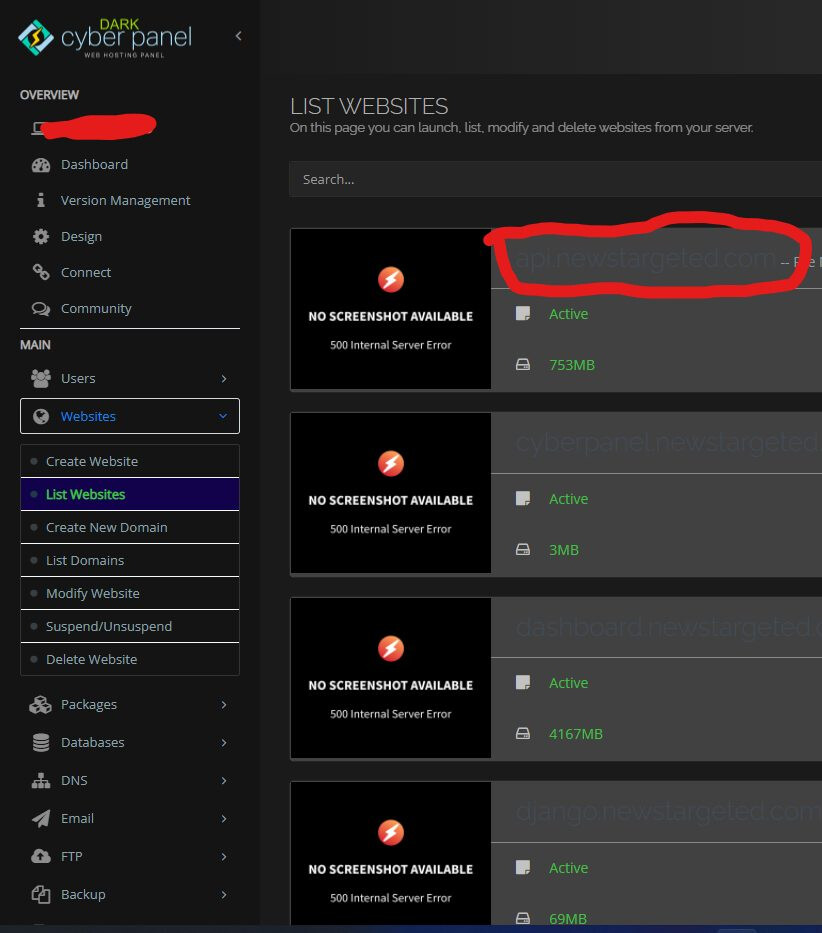
it’s only screenshoot. not the system.
So basically, because statically.io is broken, images won’t show.
I sent a dm to the owner on twitter.
Not sure if it will be resolved.
Even their own “Demo” won’t show.
https://cdn.statically.io/screenshot/full=true/wikipedia.org

as far as i know, statically.io is not maintenance their free services anymore
these screenshot come from statically and from a few days statically have some issues more over if you don’t have static IP this issue happened
sorry to bumps
i use static ip… but i get this issue too
why cyberpanel not put an option
enable thumbsnail ?
and the thumbnail hosted to our server  with crontab or manual [submit/refresh]
My website only has 1 static IP.
But it also does not generate the image.
As mentioned earlier, The screenshots are just a fancy thing to display your website and has nothing to do with your server’s functionality or website performance.
The screenshots are created and served using the opensource statically which is currently down or have some issues. You can ignore it and concentrate on your website more.
There isn’t really any other alternative than the free statically as of now.
as i mention at other thread… one of developer is from indonesia and i know him.
they are now rarely update/manage free services…
they focus on paid program and…one of their CDN provider are overlimit the free account for almost 6 month
I heard similar news from other groups and forums too that statically is down and they are not much bothering to update or correct it. Lets wait for few more days and if there is no hope from statically then we can remove this altogether from cyberpanel (website thumbnail will be removed then).
Sorry if I’m missing something but why does this actually need to use a CDN service, rather than just storing screenshots in a folder on the server?
That will not be a good practice as there will be multiple variations of the image for the same website and its all a wastage of resources for a feature which has no practical benefit beyond the aesthetic UI design benefit.
I don’t think there need to be multiple variations of each image, just one or possibly two different size thumbnail images for each site. A new version fetched daily, weekly, or whatever frequency and the previous one replaced by it.
Seems like it would be very minimal storage space and resource usage to me. If resource usage is a concern there could be a setting to disable it.
I actually also disagree that the feature has no practical benefit, it makes it much easier to visually identify sites in the list while scrolling, etc.
it can be still at cyberpanel with opt…
Use Thumbnails ? (this will use your server’s storage and server’s resources)
Maybe a stupid suggestion but why not just remove this completely, seems after 3 years it will not fixed by statically.io, so why keep it in the build? If it does work sometimes then if error-500.png just be icon.
It makes CyberPanel feel buggy
minor priority
and mr. usman already said, he will remove that asap
btw you can put some css syntax to hide that image if you know about css
As my South Indian boss would say “why is that looking shoddy”
and my boss said…
because a ugly picture then you throw away the diamond
I don’t have any free time right now, but when I do in the next few weeks I am going to take a look at this and come up with a way to implement screenshots without using statically.io, because I really think that it has a lot more use than just ‘aesthetic appeal’ and it would be a shame for it to go away permanently.
I’ll put together a PR on GitHub when I’ve looked into it.
agree
actually mr @usmannasir can change it to local storage for the snapshot