sl
slidero
#1
I get “503 Service Unavailable” on GCP after one-week work on customizing a site…
I have no access to the panel, no idea where phi.ini is, don’t know where to look.
WTF?
 Community
I get “503 Service Unavailable” on GCP after one-week work on customizing a site…
I have no access to the panel, no idea where phi.ini is, don’t know where to look.
WTF?
Look in the files
PHP ini would be in one of these locations with the paths slightly different depending on version
/usr/local/lsws/lsphp73/etc/php.ini
/usr/local/lsws/lsphp73/etc/php/7.3/litespeed/php.ini
Other information See
https://docs.cyberpanel.net/doku.php?id=start
https://www.litespeedtech.com/support/wiki/doku.php/litespeed_wiki:php:503-errors
Config files:
grep log /usr/local/lsws/conf/httpd_config.xml
Services
Restart Powerdns
service pdns restart
systemcl restart pdns
Restart Mysql/Mariadb
service mysql restart
systemcl restart mysql
Restart Cyberpanel control daemon
service lscpd restart
service gunicorn restart
Restart webserver
service lsws restart
systemctl restart lsws
/home/cyberpanel/error-logs.txt
/usr/local/lscp/cyberpanel/logs/error.log
/usr/local/lscp/cyberpanel/logs/access.log
/usr/local/lscp/cyberpanel/logs/stderr.log
/usr/local/lsws/logs/error.log
/usr/local/lsws/logs/access.log
/usr/local/lsws/logs/auditmodsec.log
Thanks for your reply, I tried everything but I’m still down:
-increased disk space, cleared error logs, increased mem _limit in php, even upgraded the cpanel to 1.9 and restarted everything
I am still at the same point, 503 error, could be DNS related - will look into that, but I think it still has to do with the resources on server.
Got the Cyberpanel back up, and it’s showing disk over capacity (!?)
I increased disk size and cleared all logs in /usr/local/lscp/cyberpanel/logs/ what else can I do here?
this is due to the cyberpanel default package you will want to modify it
https://cyberpanel.net/docs/create-delete-and-modify-package/
Thanks for your support @whattheserver.
I was able to restore the site through a combinations of tweaks and using a backup.
Still couldn’t figure what exactly caused the 503, but at least I gained more insight in using Cyberpanel.
My pleasure. Glad to hear you got things working.
If you run into issues in the future tailing the error logs for the control panel or litespeed/openlitespeed is the best way to debug.
For example:
tail -f /usr/local/lscp/cyberpanel/logs/error.log
or
tail -f /usr/local/lsws/logs/error.log
More helpful log files details.
Cyberpanel Control Panel Accesslog
/usr/local/lscp/cyberpanel/logs/access.log
Cyberpanel Control Panel errorlog
/usr/local/lscp/cyberpanel/logs/error.log
Cyberpanel Control Panel stderr.log
/usr/local/lscp/cyberpanel/logs/stderr.log
Cyberpanel Control Panel logs and rotated logs.
/usr/local/lscp/logs/
/usr/local/lsws/logs/error.log
/usr/local/lsws/logs/access.log
/usr/local/lsws/logs/auditmodsec.log
See
https://www.litespeedtech.com/support/wiki/doku.php/litespeed_wiki:php:503-errors
https://openlitespeed.org/kb/troubleshooting-php-503-errors/
Hello.
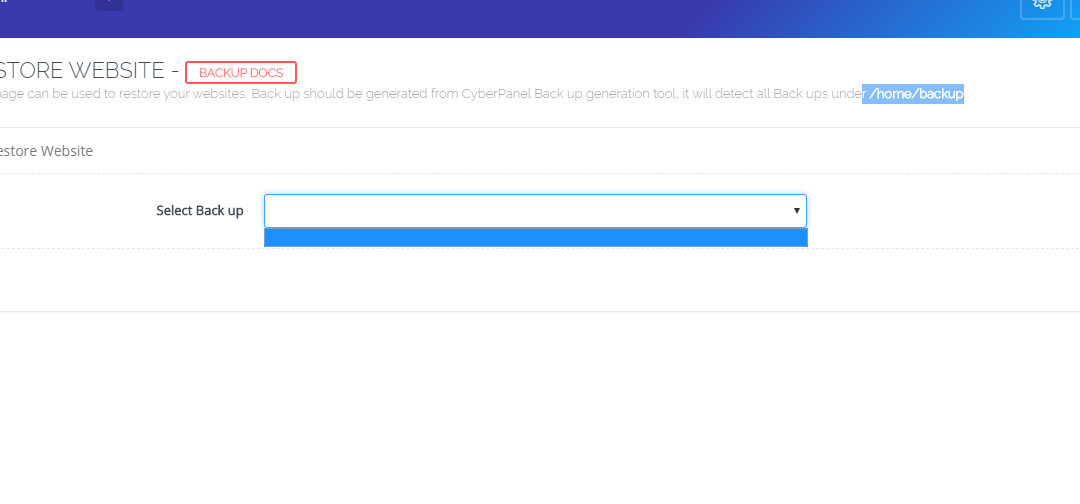
in CyberPanel 2.0, I no longer can use/restore backups.
Any suggestions would be greatly appreciated.
Thanks.
Are your backups in /home/backup/?
Yes.
Backup function works and produces current backups, file manager also works and I can upload old backups, however nothing shows in cyberpanel when I try to do restore.
Fresh install, cyberpanel 2.0, I haven’t done any change or mod on it.
hi im getting error 503 to
how can i reise max children process limit? im using open lite speed & cyberpanel