CyberPanel Community

[Tutorial]How to add 2nd IP for websites

qt
qtwrk #1

For LiteSpeed Enterprise , please check this

This is quick guide how to add another IP for websites.

  1. enable webadmin console by this guide

  2. go into webadmin , on listener, add 2 more with 2nd IP (I don’t have multiple IP machine at moment, so in this case I will use an IPv6 to mimic second IP)

first one is for port 80 ,select IP you wish to use for this site , disable secure since it is not SSL , binding is optional to how many CPU you have on your server.

second one is for port 443 , same as above , but enable secure,

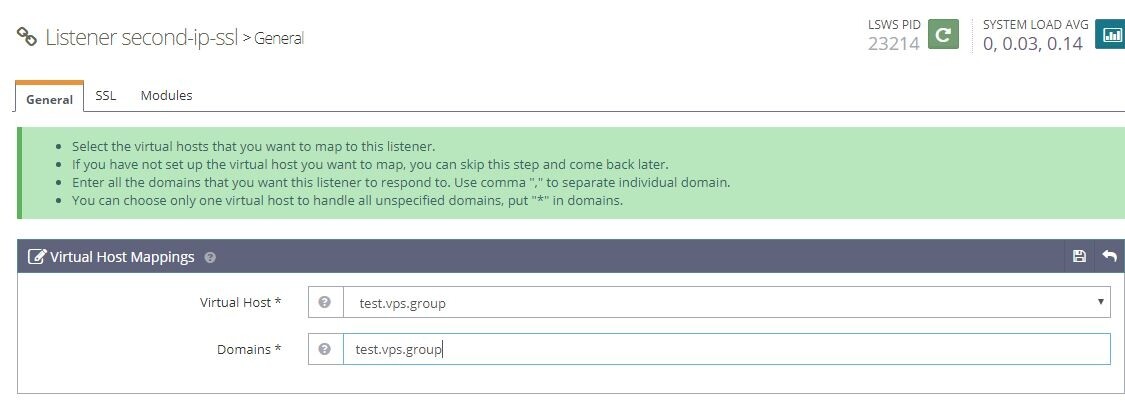
since this is SSL listener, so you must set a default SSL cert and key, as screenshots , you can grab the sites you wish to place on this IP.
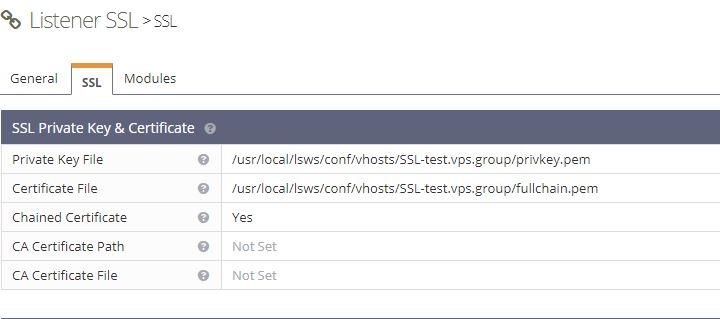
  1. now we need to map vhost to both listener
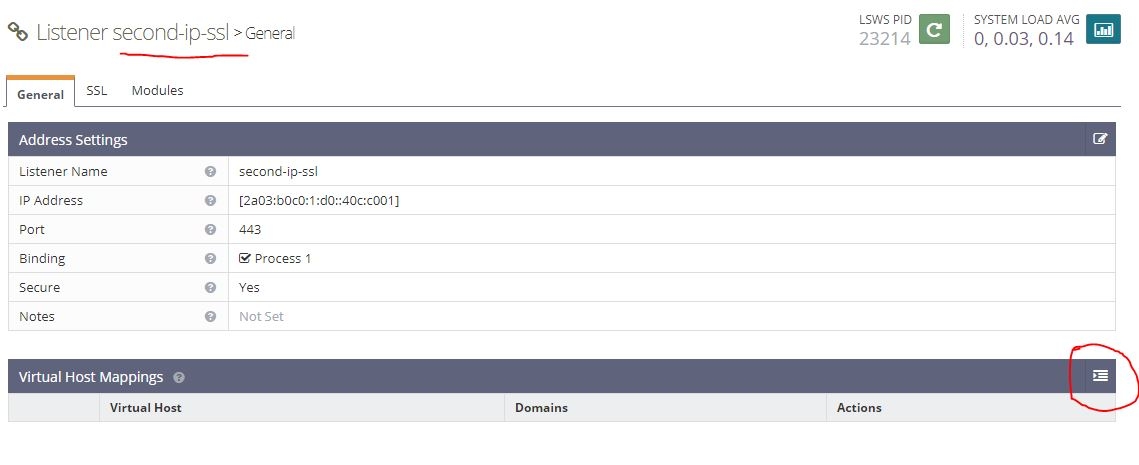
  1. now click save , and don’t forget graceful restart to take effect.
43 replies
hm
hmate783 #2

Ok but how to select ip address of website while creating website? There is no option to choose ip address while creating domain.

qt
qtwrk #3
Ok but how to select ip address of website while creating website? There is no option to choose ip address while creating domain.

no for now , you have to create it in panel , then manually change it in listener

hm
hmate783 #4

i want one ip for one website, and another ip for another website. So is it possible or not? Or just possible one ip for all websites?

qt
qtwrk #5

yes, create 4 listener for 2 web site

IP1 80 port , IP1 443 port for domain1

IP2 80 port , IP2 443 port for domain2

443 port listeners need to configure SSL cert

hm
hmate783 #6

Ok, thanks for the answers.
But how to choose domain while seting up listeners? i can not see any domain coloumn to enter or to choose.
How will i assign listener(ip) to specified domain?

hm
hmate783 #7

Ok, in last image there is a domain column. And what will i enter for virtual host? Same text in the image?

qt
qtwrk #8

you will have vhost after you create website in panel

Ni
Niall #9

When I try to create a new listener following this tutorial, the only IP address from the drop down list is the main server IP. My 16 additional IP addresses haven’t been mapped to the server, apparently.

Is there a guide showing how to configure the additional IP addresses and make them available for use with additional listeners?

qt
qtwrk #10

from what I know , it reads from system config

what is result when you run commands like ip -a ?

Ru
Ruby89 #11

I try to create a new listener following this tutorial, the only IP address from the drop down list is the main server IP. My 16 additional IP addresses haven’t been mapped to the server, apparently.

qt
qtwrk #12
I try to create a new listener following this tutorial, the only IP address from the drop down list is the main server IP. My 16 additional IP addresses haven't been mapped to the server, apparently.

Please run a ip a command and see if all IPs are mapped there

sp
spirog #13

@usmannasir will this be available in cyberpanel anytime soon ?

SP
Sibi Paul #14

But from where we can get IPs?

from Digital Ocean?

But, DO is supposed to add only one IP to aq Droplet…

Then how?

qt
qtwrk #15

you should contact DO support for how to add more IPs to the droplet , and then follow this guide.

ja
jaisingh1006 #17

I added listener for dedicated IP and added vhost to it. But when I open IP it shows me 404. But when I open website it shows fine. Also when I set IP to main cyberpanel IP in my local DNS it still opens the website. It means IP is not dedicated. I have latest Cyberpanel V2.

cr
cristian #18

Will the cyberpanel team add a quick IP selection without having to configure the ports in the webadmin?

ad
adamedge #19

Hi, I can’t able to assign a separate IP for each website on a single server.
How to sort out this problem?
I can’t even know what should done?
please me out or send tutorials.

vi
vinchter #20

Alright however how to choose ip address of site while making site? There is no choice to pick ip address while making area.

na
navi #21

I am stuck and don’t know what’s wrong. Here is what I have done so far:

Added IPs in Linux
Graceful restart in Webadmin → IPs showed up
Created a new website in Cyberpanel
Created listeners in Webadmin for both port 80 and 443
For the 443 listener, added
/usr/local/lsws/conf/vhosts/MYDOMAIN/privkey.pem
/usr/local/lsws/conf/vhosts/MYDOMAIN/fullchain.pem
Graceful restart in Webadmin
Installed Wordpress in Cyberpanel

When I visit the IP, I get a 404 page, so it looks to me like it’s not routed properly. A Wordpress site should show up. Am I missing something?

na
navi #22

Type your comment> @navi said:

I am stuck and don’t know what’s wrong. Here is what I have done so far:

Added IPs in Linux
Graceful restart in Webadmin → IPs showed up
Created a new website in Cyberpanel
Created listeners in Webadmin for both port 80 and 443
For the 443 listener, added
/usr/local/lsws/conf/vhosts/MYDOMAIN/privkey.pem
/usr/local/lsws/conf/vhosts/MYDOMAIN/fullchain.pem
Graceful restart in Webadmin
Installed Wordpress in Cyberpanel

When I visit the IP, I get a 404 page, so it looks to me like it’s not routed properly. A Wordpress site should show up. Am I missing something?

I figured out that I need to add the IP to the listener to be able to reach the website directly through the IP. That doesn’t help me though. When I open the site via domain, I am still getting a 404.

pa
pathboot #23

hello, i have tru to add 2nd ip listener fellowing your step but i get error
This port is already in use.
when i try to add new listener with 80 port

my
mymobile #24

very nice and good

se
sembul #25

2nd IP is great idea! Thank you so much for your guide!

pa
paulsharry23 #26

it’s really nice, thank you for sharing with us

ne
nettux #27

Is there the possibility of pointing to another server (which is on the same network), using a subdomain, in CyberPanel?
Ex: I have a Cyber ​​server on IP 192.168.10.50 and I want the CybePanel to point to the other server using the srvcloud.mydominio.com subdomain, in 192.168.10.51

ga
gasonline #28

I have followed the tutorial step by step and everything seems correct.
When I visit the IP, I get a 404 page, in Cyberpanel new site show main ip,… not new ip.
I suppose that need change some file and add new ip to assign this to new site, but where?
Am I missing something?

I get this with ip a

[almalinux@vps-xxxxxxxxx ~]$ ip a
1: lo: <LOOPBACK,UP,LOWER_UP> mtu 65536 qdisc noqueue state UNKNOWN group default qlen 1000
link/loopback 00:00:00:00:00:00 brd 00:00:00:00:00:00
inet 127.0.0.1/8 scope host lo
valid_lft forever preferred_lft forever
inet6 ::1/128 scope host
valid_lft forever preferred_lft forever
2: eth0: <BROADCAST,MULTICAST,UP,LOWER_UP> mtu 1500 qdisc fq_codel state UP group default qlen 1000
link/ether fa:16:3e:fd:38:10 brd ff:ff:ff:ff:ff:ff
inet xxx.xx.xx.xxx/32 scope global noprefixroute eth0 (aditional ip)
valid_lft forever preferred_lft forever
inet xx.xx.xxx.xxx/32 scope global dynamic noprefixroute eth0 (main ip)
valid_lft 66203sec preferred_lft 66203sec
inet6 2001:41d0:304:200::869/56 scope global noprefixroute
valid_lft forever preferred_lft forever
inet6 fe80::f816:3eff:fefd:2910/64 scope link noprefixroute
valid_lft forever preferred_lft forever

Some help?
Thanks.

ra
ramisthand76 #29

A Website can have multiple IP addresses when you hosted it at multiple locations. Why? It can be for load balancing or redundancy… Or to serve web pages based on the user location etc… If you are using Linux, you can use tools like dig to get DNS information for a specific website.

sh
shoaibkk #31

A server can have multiple ips that you can use for different sites.
yes it is for following thing you mentioned

ga
gasonline #33

No EdwardC,

No, I got no help so my solution was to switch to CWP.
If later on the Cyberpanel team implements this in the panel to make it easy to do I might come back.

Wo
Woody #34

Having no luck. Get “ip is already in use”.

Makes me sad that I might have to go back to CWP. CyberPanel is SO MUCH better, but not being able to easily add / assign/ use extra IP’s is crazy.

Hi
Hifihedgehog #35

This is the hard way especially if you are juggling between dozens of websites. You can either script this or copy and paste the IPv4 configs to the IPv6 configs for the new IPv6 listeners in httpd_config.conf, like so. Note the pattern in the map sections.

listener Default {
  address                 *:80
  secure                  0
  map                     websitea.com websitea.com
  map                     subdomaina.websitea.com  subdomaina.websitea.com
}

listener Default IPv6 {
  address                 [ANY]:80
  secure                  0
  map                     websitea.com websitea.com
  map                     subdomaina.websitea.com  subdomaina.websitea.com
}

listener SSL {
  address                 *:443
  secure                  1
  keyFile                 /etc/letsencrypt/live/hostdomain.com/privkey.pem
  certFile                /etc/letsencrypt/live/hostdomain.com/fullchain.pem
  certChain               1
  sslProtocol             24
  enableECDHE             1
  renegProtection         1
  sslSessionCache         1
  enableSpdy              15
  enableStapling          1
  ocspRespMaxAge          86400
  map                     websitea.com websitea.com
  map                     subdomaina.websitea.com  subdomaina.websitea.com
}

listener SSL IPv6 {
  address                 [ANY]:443
  secure                  1
  keyFile                 /etc/letsencrypt/live/websitea.com/privkey.pem
  certFile                /etc/letsencrypt/live/websitea.com/fullchain.pem
  certChain               1
  sslProtocol             24
  enableECDHE             1
  renegProtection         1
  sslSessionCache         1
  enableSpdy              15
  enableStapling          1
  ocspRespMaxAge          86400
  map                     websitea.com websitea.com
  map                     subdomaina.websitea.com  subdomaina.websitea.com
}

Ideally, CyberPanel would be updating all of this in the background. It would be running the same bit of parsing code as it already does when creating a new website and adding a new domain, except it would be adding the domain mappings to the two IPv6 listeners as well. @usmannasir, could you update the website script to add IPv6 listeners to simultaneously update them along with the IPv4 listeners? I am pushing a commit for your approval.

Hi
Hifihedgehog #36

Don’t use CWP. It’s a steaming pile of manure. See my post here:

Wo
Woody #37

Thank you very much for the information! I will get my tiny brain in gear and input the data:)

Seriously, thank you for taking the time to help.

Wo
Woody #38

I put up with CWP for few years because of an IT person in charge and NEVER want to return to it. Wasted a lot of hours on it. Just the thought of loading it onto a server makes my stomach upset.

Retired and on my own now and can choose what panel I want. Really like Cyberpanel but lack of support is bothersome. Thank goodness for people like yourself!

Lo
Lord #39

When I tried to fill in as in the tutorial, the error message appears that both ports are in use (port 80 and 443)

uz
uzairjhandeer #41

i try this method getting for cyberpanel openlitespeed but getting error port already in used

CH
CHARLY #43

[Tutorial]How to add 2nd IP for websites under Ubuntu 20 or 22
Under Ubuntu 22 (and perhaps since Ubuntu 18) there is an new method to have your additional IP addresses accounted for.
We will use the new Netplan function of Linux.
1°) First Change the CHMOD to 0600 of the file /etc/netplan/00-installer-config.yaml (the name of this yaml could be different in your case)
2°) Second change your file to have this 3 lines (you will see the complet file above)
addresses:
- XX.XX.XXX.XX/24
- XX.XX.XXX.XX/32

XX.XX.XXX.XX/24 is your first IP (of your server) /24 is the code of the type of your IP (often your main IP has /24 code)
XX.XX.XXX.XX/32 is your additional IP /32 is the code of the type of your IP (often your second IP has /32 code . Ask to your provider if you have a doubt)
(you can add other lines for other additionnals IP)

Don’t use tabulation to indent your code. You must use only space for the indentation of the yaml code

3°) Third (after having saved you yaml file) You have to use SSL command:
sudo netplan apply
you can ignore this warning (WARNING:root:Cannot call Open vSwitch: ovsdb-server.service is not running.)

Now you can test that your new IP is taken into account with this SSL command:
sudo ip a

CH
CHARLY #44

Here is the code of the complete YAML (XXX have to changed with your data)

# This is the network config written by 'subiquity'
network:
  ethernets:
    eno1:
      addresses:
      - XX.XX.XXX.XX/24
      - XX.XX.XXX.XX/32
      critical: true
      dhcp-identifier: mac
      dhcp4: true
      nameservers:
        addresses:
        - XX.XX.XXX.XX
        - XX.XX.XXX.XX
        search:
        - XXX.net
  version: 2
Hi
Hifihedgehog #45

@usmannasir, there is a bug with CyberPanel’s IPv6 feature that was rolled out. It adds new domains to the SSL IPv6 listener but it neglects to do so for the non-SSL IPv6 listener. I have been having to add these manually. Please fix this!

Sign in to reply