
paulie
December 9, 2025, 11:31pm
1
New install today 2025/12/10
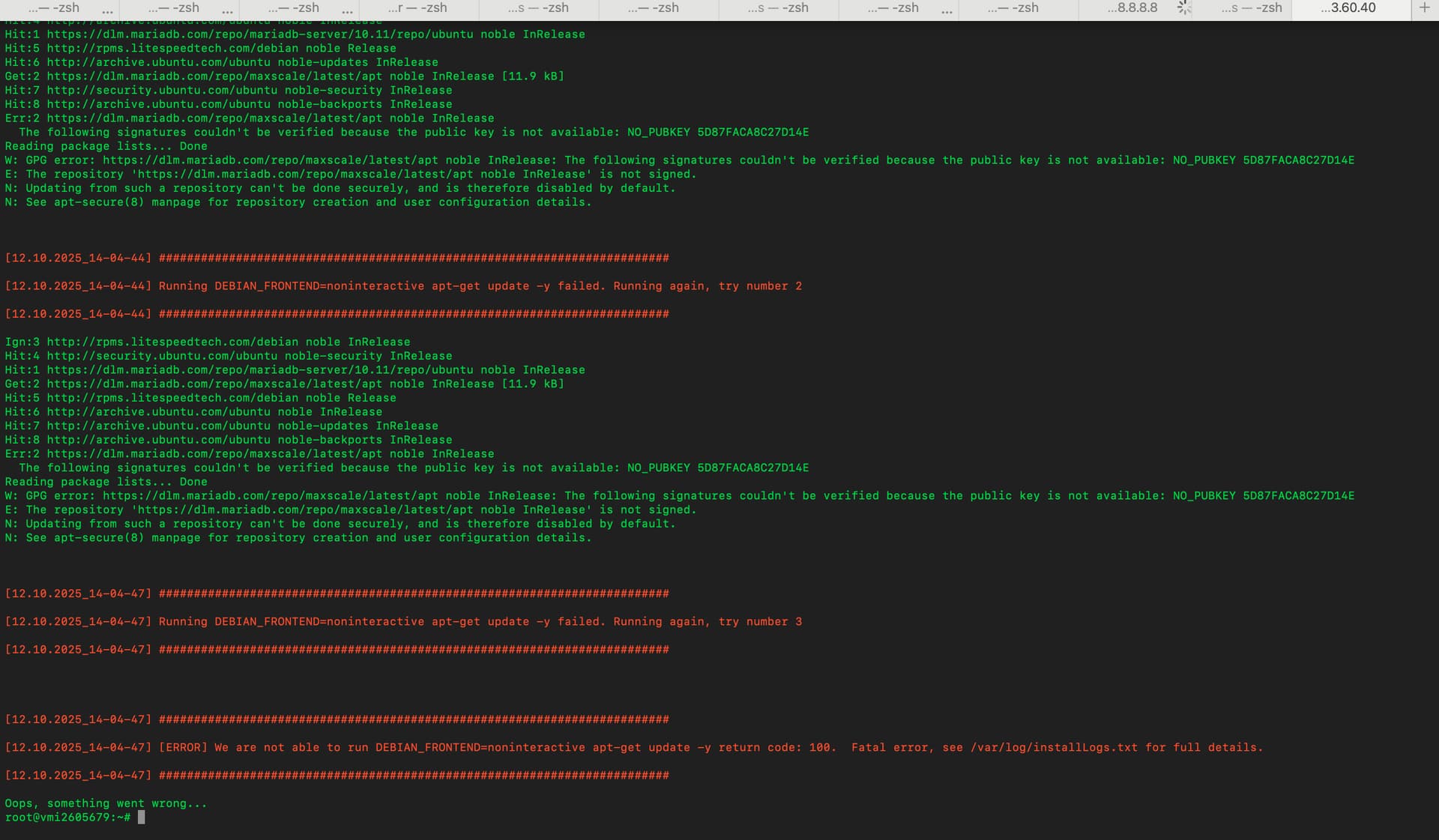
MariaDB Server repo is signed correctly, but MaxScale repo is not
Get:8 https://dlm.mariadb.com/repo/maxscale/latest/apt noble InRelease [11.9 kB]
Err:8 https://dlm.mariadb.com/repo/maxscale/latest/apt noble InRelease
The following signatures couldn’t be verified because the public key is not available: NO_PUBKEY 5D87FACA8C27D14E
Reading package lists… Done
W: GPG error: https://dlm.mariadb.com/repo/maxscale/latest/apt noble InRelease: The following signatures couldn’t be verified because the public key is not available: NO_PUBKEY 5D87FACA8C27D14E
E: The repository ‘https://dlm.mariadb.com/repo/maxscale/latest/apt noble InRelease’ is not signed.
N: Updating from such a repository can’t be done securely, and is therefore disabled by default.
paulie
December 10, 2025, 12:37am
2
Here is an update and how i got around this issue until MaxScale sort their shit out.
1. Remove any half-installed MaxScale packages
sudo apt purge maxscale maxscale-* -y 2>/dev/null || true
sudo apt autoremove -y
2. Delete all repo files that mention MaxScale
sudo rm -f /etc/apt/sources.list.d/maxscale /etc/apt/sources.list.d/mariadb maxscale*
sudo rm -f /etc/apt/sources.list.d/mariadb.list* 2>/dev/null || true
3. Remove the broken GPG keys we added
sudo rm -f /etc/apt/keyrings/mariadbkeyring 2>/dev/null || true
sudo rm -f /etc/apt/trusted.gpg.d/mariadb* 2>/dev/null || true
4. Clean APT cache
sudo apt update
sudo apt clean
5. (Optional but satisfying) Block the domains so nothing ever pulls from them again
echo “0.0.0.0 dlm.mariadb.com ” | sudo tee -a /etc/hosts
echo “0.0.0.0 deb.mariadb.org ” | sudo tee -a /etc/hosts
echo “0.0.0.0 mirror.mariadb.org ” | sudo tee -a /etc/hosts
echo “0.0.0.0 downloads.mariadb.com ”| sudo tee -a /etc/hosts
Yes I thought I was the only one facing this issue, I have been having headache trying to find a way around it, the installation script is problem mariadb maxscale repo is no more valid. the script needs to be fixed
I tried your solution above, but it still didn’t work.
paulie
December 10, 2025, 2:13pm
5
This appears to be a real infrastructure issue with MariaDB’s dlm.mariadb.com server. The SSL certificate error suggests the server itself might be misconfigured or experiencing problems.
Given that these issues appear to have started very recently (Dec 10), When the MariaDB’s team wake up they will likely be aware and working on fixes.
paulie
December 11, 2025, 12:49am
6
Just an update on this, and a fix.
MaxScale releases, as of yesterday, started being signed with a new key. The mariadb_repo_setup script has been updated to automatically install the new key, but for existing repositories you’ll need to:
curl -LsSO https://supplychain.mariadb.com/mariadb-keyring-2025.gpg
sudo mv mariadb-keyring-2025.gpg /etc/apt/trusted.gpg.d/
sudo apt update
On RHEL distros, you can do the following:
sudo rpm --import https://supplychain.mariadb.com/MariaDB-Enterprise-GPG-KEY-2025
You are the best, it works.
system
Closed
December 21, 2025, 8:00pm
8
This topic was automatically closed 3 hours after the last reply. New replies are no longer allowed.