I got it working, I did steps below:
- Set the OLS password and access to OpenLiteSpeed webadmin via port 7080 (need to open this port in firewall)
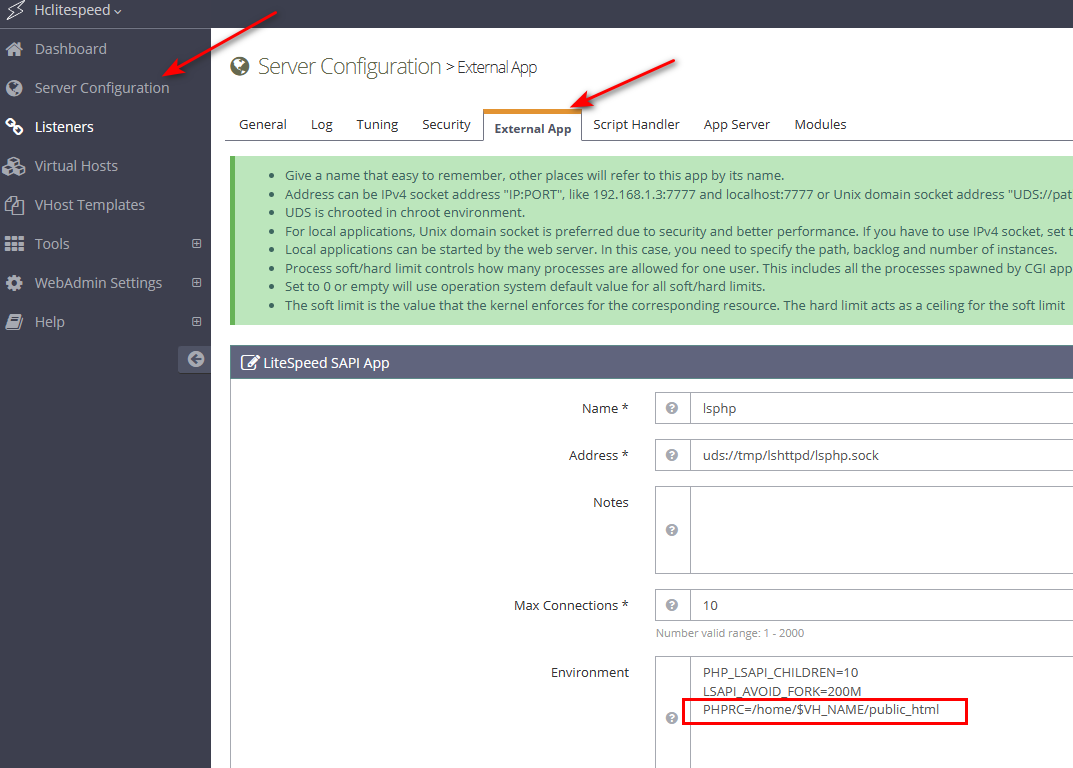
- Login to webadmin and add to **Admin Console > Configuration > Server > External App
Then: Under Environment section
**PHPRC=/home/$VH_NAME/public_html - Save it and restart OLS.
Thank you again for your support.
p/s: Of course, you need to add to vHost file the code look like below too.
phpIniOverride  {
php_value auto_prepend_file "/home/www.optimizewp.net/public_html/wp-content/nfwlog/ninjafirewall.php"
}
Replace www.optimizewp.net with your domain.