
Community

SSL menu is not available after updating to version 2.4.8

Ar
Arafat #1

Problem Description:

I recently updated my CyberPanel to version 2.4.8 after getting email notification on 12-Jun-20244.

After the update:

SSL menu is not available. My email SSL certificate needs to renew but I can't now due to this issue.

System Information:

CyberPanel Version: 2.4.8
Commit Hash: 40e262fa77dd8a41fbc02a75f8d40887a2ccf3ee
Previous version has SSL menu and it worked as expected

Questions:

Is this a known issue with CyberPanel 2.4.8?
Has SSL support been intentionally removed or disabled in this version?
Are there any official workarounds or fixes available?

Impact:
This issue is critical as it leaves my server without proper firewall protection. Any guidance or solutions would be greatly appreciated.

Additional Notes:
1. Even clicking on the Issue SSL on a specific website list is not working.
2. After Mail Server SSL generation/update needs to execute commands separately from OS user, can it be automated for both the Mail Server SSL generation and reload?
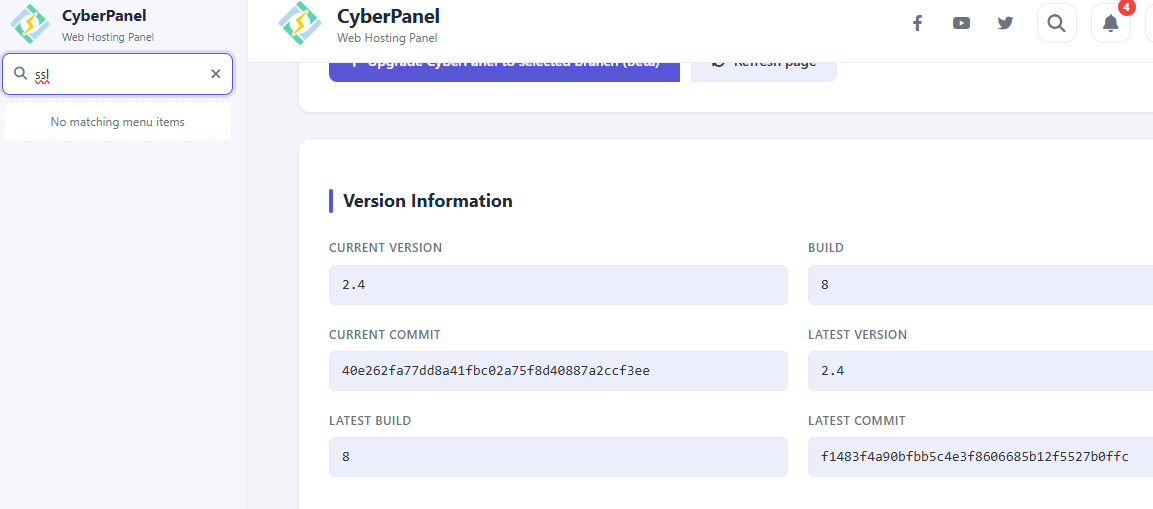
ssl_menu_missing.png

Ar
Arafat #2

Pardon me forgot to mention my OS details. Please find it below:
NAME="AlmaLinux"
VERSION="9.8 (Olive Jaguar)"
ID="almalinux"
ID_LIKE="rhel centos fedora"
VERSION_ID="9.8"
PLATFORM_ID="platform:el9"
PRETTY_NAME="AlmaLinux 9.8 (Olive Jaguar)"
ANSI_COLOR="0;34"
LOGO="fedora-logo-icon"
CPE_NAME="cpe:/o:almalinux:almalinux:9::baseos"
HOME_URL="https://almalinux.org/"
DOCUMENTATION_URL="https://wiki.almalinux.org/"
BUG_REPORT_URL="https://bugs.almalinux.org/"

ALMALINUX_MANTISBT_PROJECT="AlmaLinux-9"
ALMALINUX_MANTISBT_PROJECT_VERSION="9.8"
REDHAT_SUPPORT_PRODUCT="AlmaLinux"
REDHAT_SUPPORT_PRODUCT_VERSION="9.8"
SUPPORT_END=2032-06-01

MK
Mark Kendall #3

This is urgent for me too. I am unable to renew or issue certs anymore and I have one expiring in 1 day.

JG
Julius Gashumba #4

Why is this issue not addressed yet? I am also not able to renew SSL because I just get a screen that suggest this is a paid feature or something.

MF
Muhammad Ferdian #5

Hello,

Mee too, but you can still access that menu directly via this URL : https://<YOUR_SERVER>:8090/manageSSL/

Hope this helps..

AH
Arafat Hossain #6

Yes, I tried https://<YOUR_SERVER>:8090/manageSSL/ too, but after MailServer SSL generation and execute update command from OS user it's still not working.

MF
Muhammad Ferdian #7

Ah..,
I've facing the same issue.. I've done with manual action using root terminal access/SSH

  1. Update Acme
    wget -O - https://get.acme.sh | sh

  2. Upgrade Acme
    acme.sh --upgrade

  3. Use this command through your SSH to manual generation the ssl
    /root/.acme.sh/acme.sh --issue -d <YOUR_DOMAIN> -d www.<YOUR_DOMAIN> --cert-file /etc/letsencrypt/live/<YOUR_DOMAIN>/cert.pem --key-file /etc/letsencrypt/live/<YOUR_DOMAIN>/privkey.pem --fullchain-file /etc/letsencrypt/live/<YOUR_DOMAIN>/fullchain.pem -w /home/<YOUR_DOMAIN>/public_html --force --debug

  4. Restart OpenLitespeed
    systemctl restart lsws

  5. Restart Cyberpanel
    systemctl restart lscpd

Sign in to reply