Community

*Critical Security Alert*

jo
jompha #1

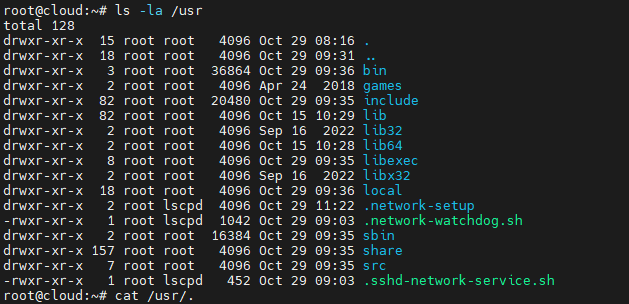
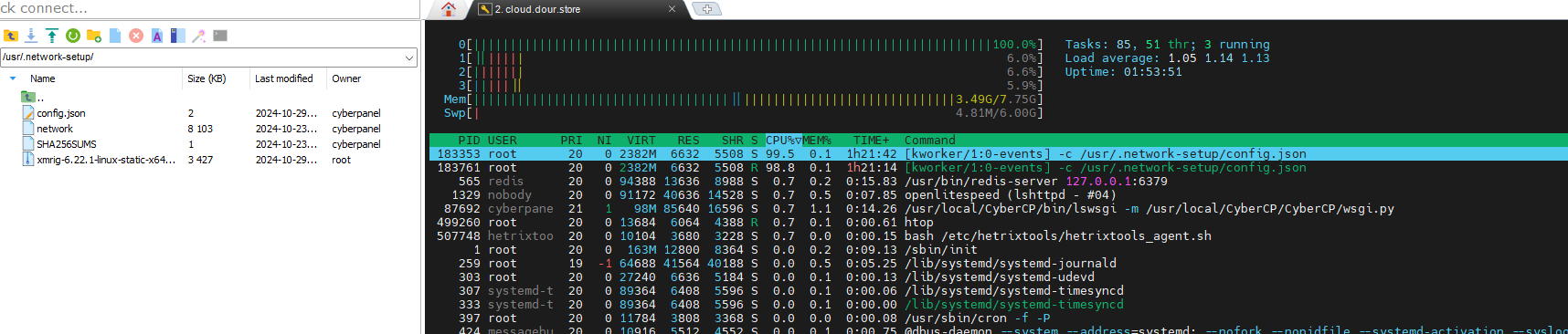
everyone using cyberpanel should check your running processes by htop & check if any process is using significant cpu. process name might be network-setup or similar. for this issue my network was having ddos as well as network down issue was occuring, vps provider could terminate my vps if i didnt notice.

there was a security issue. my cyberpanel server was also compromised and a cryptominer v-irrus was installed.

my installed version was 2.3.5, immunifyav & csf was also installed. now removed the miner manually & upgraded to latest version, lets see if it re-occurs.

attached the file screenshot for better understanding. you should take immediate action to save your server.

2024-10-29 11_35_14-cloud.dour.store

We
Weck #2

I was informed by my hoster Hetzner regarding NetscanOutLevel: scansnarf-ng detected Netscan and found the same crypto miner!
Service was owned by cyberpanel and the tar.gz file and folder was owned by lscpd.

total 8120
drwxr-xr-x  2 root       lscpd         4096 Oct 29 07:44 .
drwxr-xr-x 15 root       root          4096 Oct 29 03:30 ..
-rw-r--r--  1 cyberpanel cyberpanel    3075 Oct 29 06:16 config.json
-rwxr-xr-x  1 cyberpanel cyberpanel 8297712 Oct 23 07:55 network
-rw-r--r--  1 cyberpanel cyberpanel     150 Oct 23 07:55 SHA256SUMS

This needs to be fixed asap!

jo
jompha #3

cyberpanel already released security fix.

upgrade your setup & also remove the infections manually by backtracing.

We
Weck #4

not possible since preUpgrade fails. -_-

Collecting cloudflare==2.8.13 (from -r /usr/local/requirments.txt (line 5))
  Using cached cloudflare-2.8.13.tar.gz (65 kB)
  Preparing metadata (setup.py) ... error
  error: subprocess-exited-with-error
  
  × python setup.py egg_info did not run successfully.
  │ exit code: 1
  ╰─> [45 lines of output]
      running egg_info
      creating /tmp/pip-pip-egg-info-659cu9_l/cloudflare.egg-info
      writing /tmp/pip-pip-egg-info-659cu9_l/cloudflare.egg-info/PKG-INFO
      writing dependency_links to /tmp/pip-pip-egg-info-659cu9_l/cloudflare.egg-info/dependency_links.txt
      writing entry points to /tmp/pip-pip-egg-info-659cu9_l/cloudflare.egg-info/entry_points.txt
      writing requirements to /tmp/pip-pip-egg-info-659cu9_l/cloudflare.egg-info/requires.txt
      writing top-level names to /tmp/pip-pip-egg-info-659cu9_l/cloudflare.egg-info/top_level.txt
      writing manifest file '/tmp/pip-pip-egg-info-659cu9_l/cloudflare.egg-info/SOURCES.txt'
      reading manifest file '/tmp/pip-pip-egg-info-659cu9_l/cloudflare.egg-info/SOURCES.txt'
      reading manifest template 'MANIFEST.in'
      adding license file 'LICENSE'
      Traceback (most recent call last):
        File "<string>", line 2, in <module>
        File "<pip-setuptools-caller>", line 34, in <module>
        File "/tmp/pip-install-98zr7uwv/cloudflare_a9368bed35c441ca856bb09dfa544b70/setup.py", line 60, in <module>
          main()
        File "/tmp/pip-install-98zr7uwv/cloudflare_a9368bed35c441ca856bb09dfa544b70/setup.py", line 18, in main
          setup(
        File "/usr/local/CyberPanel/lib/python3.10/site-packages/setuptools/__init__.py", line 117, in setup
          return distutils.core.setup(**attrs)
        File "/usr/local/CyberPanel/lib/python3.10/site-packages/setuptools/_distutils/core.py", line 183, in setup
          return run_commands(dist)
        File "/usr/local/CyberPanel/lib/python3.10/site-packages/setuptools/_distutils/core.py", line 199, in run_commands
          dist.run_commands()
        File "/usr/local/CyberPanel/lib/python3.10/site-packages/setuptools/_distutils/dist.py", line 954, in run_commands
          self.run_command(cmd)
        File "/usr/local/CyberPanel/lib/python3.10/site-packages/setuptools/dist.py", line 991, in run_command
          super().run_command(command)
        File "/usr/local/CyberPanel/lib/python3.10/site-packages/setuptools/_distutils/dist.py", line 973, in run_command
          cmd_obj.run()
        File "/usr/local/CyberPanel/lib/python3.10/site-packages/setuptools/command/egg_info.py", line 315, in run
          self.find_sources()
        File "/usr/local/CyberPanel/lib/python3.10/site-packages/setuptools/command/egg_info.py", line 323, in find_sources
          mm.run()
        File "/usr/local/CyberPanel/lib/python3.10/site-packages/setuptools/command/egg_info.py", line 549, in run
          self.prune_file_list()
        File "/usr/local/CyberPanel/lib/python3.10/site-packages/setuptools/command/sdist.py", line 161, in prune_file_list
          super().prune_file_list()
        File "/usr/local/CyberPanel/lib/python3.10/site-packages/setuptools/_distutils/command/sdist.py", line 380, in prune_file_list
          base_dir = self.distribution.get_fullname()
        File "/usr/local/CyberPanel/lib/python3.10/site-packages/setuptools/_core_metadata.py", line 267, in get_fullname
          return _distribution_fullname(self.get_name(), self.get_version())
        File "/usr/local/CyberPanel/lib/python3.10/site-packages/setuptools/_core_metadata.py", line 285, in _distribution_fullname
          canonicalize_version(version, strip_trailing_zero=False),
      TypeError: canonicalize_version() got an unexpected keyword argument 'strip_trailing_zero'
      [end of output]

already tried updating pip and setup-tools, but is still failing

We
Weck #5

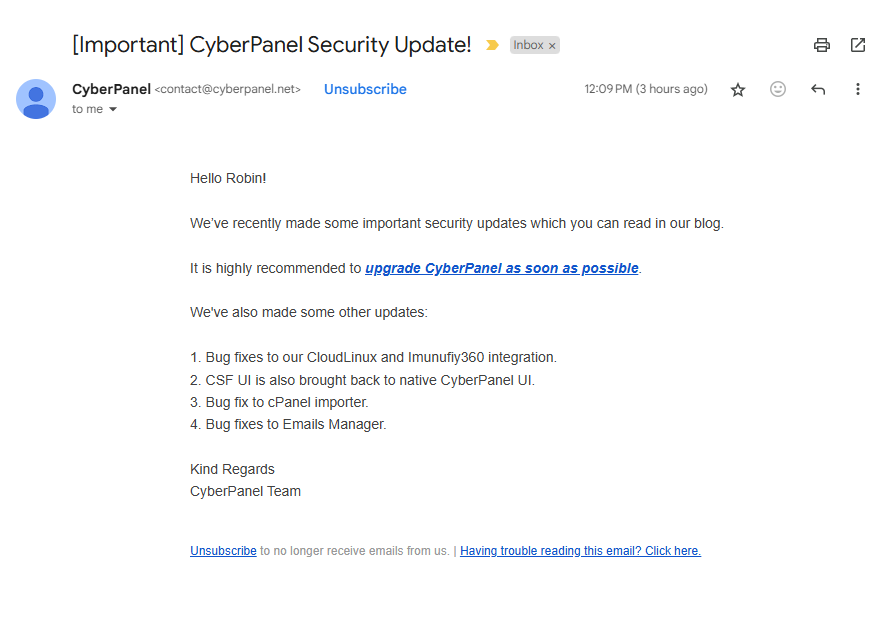
to which version, since there are no commits “Network Graph · usmannasir/cyberpanel · GitHub” within the git and I did not get any email or other notification by the cyberpanel team, that there is a security issue in version 2.x and to which version to upgrade.

To which version should I upgrade and how to fix the pip setup errors?

We
Weck #6

Where did you get this information from, I couldn’t find anything about it in the forum!

jo
jompha #7
jo
jompha #8

if you are on unsupported os and also already infected, then you must manually remove the infection. if you can’t you can email me: myusername[at]gmail[dot]com
i will try to help you.

We
Weck #9

why not inform the users via mail or within the forum or blog or github :expressionless:

I am running Ubuntu 22.04 LTS, this OS should be supported.

I will shut down the server and delete it.
I used the server and the installation as a test for our company, but such poor communication and exclusively via Facebook is not acceptable.
Especially not with such a critical problem.
Also with regard to the new EU guidelines.
NIS2 and DORA
https://eur-lex.europa.eu/eli/dir/2022/2555/oj

We
Weck #11

Strange, I have only received the notifications, that you have replied to my posts.
Did you subscribe to any other newsletter to receive this email?
I have also checked my rspamd history and there are only your notifications.

Sa
Sangram #12

Hi! Unable to upgrade and for GCP unable to SSH in.

How did you resolve this? For Digital Ocean I am able to go into recovery console - but unable to upgrade.

We
Weck #14

I was lucky and could access the server via ssh before the attacker could change/delete my ssh keyfile.
In reverse, I deleted his and blocked all access to the server and monitor the server.

On another Server “Hetzner Cloud” I have restored a Backup from before the incident and upgraded Cyberpanel via shell from 2.3.6 to 2.3.7, but even this version is 4-5 days old.

I have also searched the blog, since on facebook and the email jompha received there should have been a post regarding this issue, but nothing is there.

For 2.3.8 is a commit, but it is regarding the cpanel importer, not the security issue.

SK
SENTHIL KUMAR #15

Can you tell us how you deleted the hackers ssh keys and stopped the attack in detail. Will be useful for others.

We
Weck #16

I am very sorry but deleting the keyfile did not help, since the cyberpanel itself had a root RCE vulnerability and they came back and injected an encryption virus. All is gone/encrypted. :expressionless:

You can check here for information.


Can you tell us how you deleted the hackers ssh keys and stopped the attack in detail. Will be useful for others.

I have removed the key from the authorized_keys file, but as described above, this did not help.
Best is to block any access to port 8090 and 7080.

le
leminhthanh #18

My server was also hacked yesterday due to a Cyberpanel vulnerability, I did these steps:
-Find and delete all processes as instructed here.
-Block all incoming and outgoing internet connections from the server, only 80 and 443 are allowed.
Currently, nothing unusual has been found, luckily my server was infected with a cryptocurrency mining malware, not ransomware

be
besicbarca #19

What is fix? From yesterday i cant access via SSH. Now i can login but i dont know what to do to fix cyberpanel and access websites.

le
leminhthanh #20

you need to remove all malware, then upgrade CP to the latest version.

be
besicbarca #21

How to remove malware? I have now access via SSH. When i tried to update CP it gives me error: Cyber Panel not found.

Sign in to reply