Sh
Shahbaaz
#1
I recently upgraded to WordPress 6.3 and I am getting a recommended improvements notice “Outdated SQL server” in the WordPress site health.
How do I upgrade the SQL server?
 Community
I recently upgraded to WordPress 6.3 and I am getting a recommended improvements notice “Outdated SQL server” in the WordPress site health.
How do I upgrade the SQL server?
Yes, I have the same problem, although MariaDB is in version 10.3, which is then also recommended as a minimum. I would also be interested in a solution, but I see no one has responded yet.
Outdated SQL server
Yes, that’s why we did a manual update of MariaDB.
I checked the guide on How to update MariaDB manually but I am not sure if I can take the risk on the production server. Any news on if the devs working on an updated build to fix that?
Yes, I have snapshots but still, I don’t feel comfortable trying to upgrade it myself.
By the way, while I do feel the devs could do better, it’s not good to insult a country for something like that.
I am using version 10.11 on my production server, so yes you can upgrade MariaDB to a higher version with no worry, just follow the guidelines
Thank you very much…it seems like a very complicated process When I see the document… Modify the repository configuration, Stop MariaDB, Uninstall the old version of MariaDB, Install the new version of MariaDB., Make any desired changes, Start MariaDB. And Run mysql_upgrade… I think there’s a high possibility of crashing the existing database If someone doesn’t have much knowledge about this.
CAn some one share a video on how to update mariaDB with cyberpanel, or is something that can be done from Cyberpanel
Which os you have?
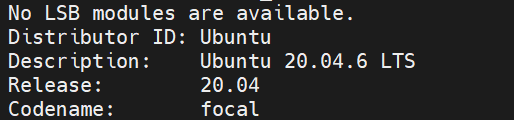
sorry for taking too long to respond, is Ubuntu 20.04.6 LTS
sorry for taking too long to respond, is Ubuntu 20.04.6 LTS