fa
fatih
#1
hi everyone
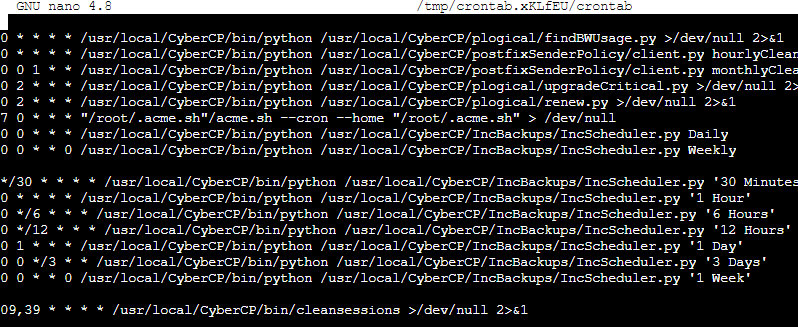
every hour high cpu and ram peaks on my server.
as you can see below
can anyone help me why this happening?
 Community
hi everyone
every hour high cpu and ram peaks on my server.
as you can see below
can anyone help me why this happening?
Hello @fatihcr
It is best practice to search the community before raising a topic. See if this is of any help Search results for 'high cpu status:solved' - CyberPanel Community
hello @josephgodwinke
I searched the community before raising this topic but I couldn’t find a similar one. I checked the link you have shared in your post but it is not about the same problem. This problem happens once in every hour and the server doesn’t respond for 10 or 15 seconds.
use htop to identify the culprit
apt install -y htop || yum install -y htop || dnf install -y htop
Reboot your server and open htop next to a browser with some of your websites open. Post a screenshot here
similar topics
This problem only happens every hour for 10-15 seconds at exactly one o’clock (01:00), two o’clock (02:00) and so on. uninstalled redis and the load issue is still happening but web server is responding now
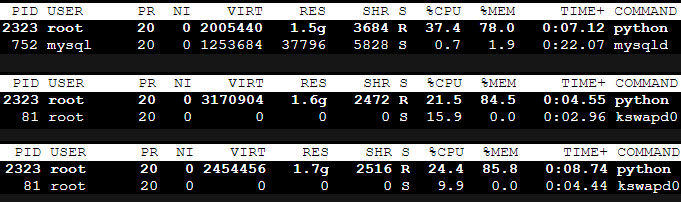
installed htop and waiting for the next hour
Do you have backups running at that hour check which cronjobs run at that hour
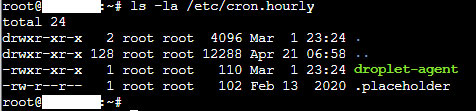
what does it mean?
No check for cronjobs that run at 00:00 or once a day at that time
I have backups running daily for google drive but there are no cronjobs running
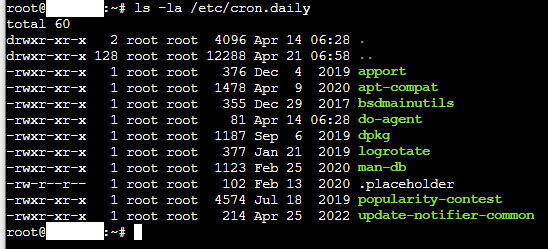
The backups are the reason why there is a spike in cpu and ram usage at that time. There is a root backup cronjob that executes a python file to run at end of each day or beginning of each day whichever way you want to put it
sudo crontab -e

#0 12 * * * /usr/local/CyberCP/bin/python /usr/local/CyberCP/IncBackups/IncScheduler.py Daily
then why the hell is there a spike in cpu at the beginning of every hour if it is a daily thing
There must be something else. I thought you meant it happens only at 01:00
Still waiting on this
No, the problem occurs on the first ten seconds of each and every hour
00:00 - 01:00 - 02:00 - 03:00 - 04:00 - 05:00 - 06:00 - 07:00 - 08:00 - 09:00 - 10:00 - 11:00 - 12:00 - 13:00 - 14:00 - 15:00 - 16:00 - 17:00 - 18:00 - 19:00 - 20:00 - 21:00 - 22:00 - 23:00
We can rule out cronjobs. Do you have many php websites running
this is the culprit
Memory and CPU usage spiked cuase from the image it barely uses any
This topic is closed to new replies.