fa
fayssal
#1
Hello,
Anybody know to how upgrade php version 8.2. I have a website does not support 8.1 so I need to upgrade the php version to 8.2.
Please can you suggest a method or help me with a topic?
 Community
Hello,
Anybody know to how upgrade php version 8.2. I have a website does not support 8.1 so I need to upgrade the php version to 8.2.
Please can you suggest a method or help me with a topic?
Ramadhan Mubarak @fayssal
To install php 8.2 on ubuntu
apt-get install lsphp82 lsphp82-common lsphp82-mysql
Prefer from source ?
$ apt-get install build-essential pkg-config openssl libssl-dev openssl-blacklist openssl-blacklist-extra  bison autoconf automake libtool re2c flex libxml2-dev libssl-dev libbz2-dev libcurl4-openssl-dev libdb5.1-dev libjpeg-dev libpng12-dev libXpm-dev libfreetype6-dev libt1-dev libgmp3-dev libc-client2007e-dev libldap2-dev libmcrypt-dev libmhash-dev freetds-dev zlib1g-dev libmysqlclient-dev libncurses5-dev libpcre3-dev unixODBC-dev libsqlite0-dev libaspell-dev libreadline6-dev librecode-dev libsnmp-dev libtidy-dev libxslt-dev libt1-dev
$ cd /tmp
$ wget https://www.php.net/distributions/php-8.2.4.tar.gz
$ tar -xf php-8.2.4.tar.gz
$ cd php-8.2.4
## It is absolutely required to run ./configure with --with-litespeed since we have to build PHP with LSAPI
$ ./configure  '--prefix=/usr/local/lsws/lsphp82' '--with-libdir=lib64' '--with-zlib' '--with-gd' '--enable-shmop' '--enable-sockets' '--enable-sysvsem' '--enable-sysvshm' '--with-curl' '--with-openssl' '--with-gettext' '--with-mcrypt' '--enable-mbstring=all' '--enable-mbregex' '--with-png-dir=/usr' '--with-jpeg-dir=/usr' '--with-kerberos' '--enable-ftp' '--with-imap=/usr' '--with-imap-ssl' '--with-mysql=/usr' '--with-mysqli=/usr/bin/mysql_config' '--enable-pcntl' '--with-freetype-dir=/usr' '--with-pdo-mysql=/usr' '--with-litespeed'
$ make
$ make install
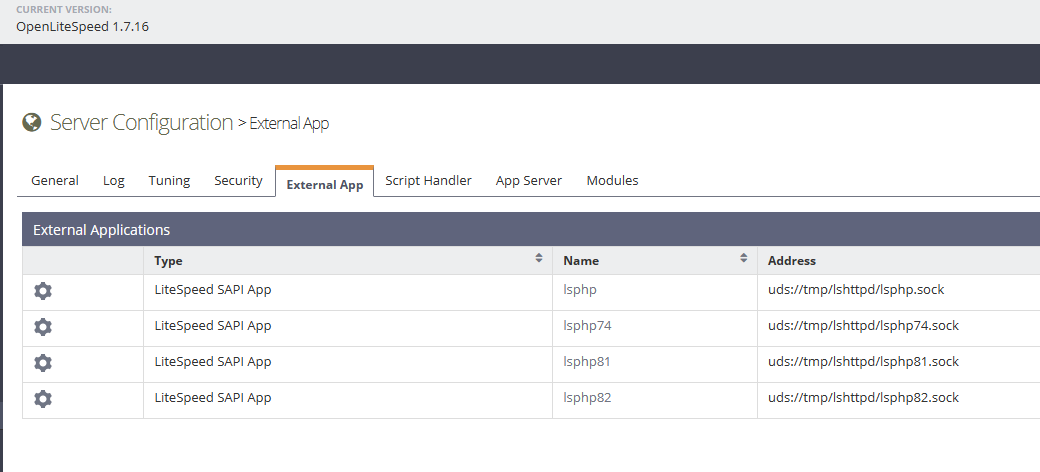
Then configure PHP 8.2 in WebAdmin console to be used as SAPI app
You need to restart lsws service for these changes to be effected.
service lsws reload
thank you @ josephgodwinke
You too Ramadan Mubarak Bro.
I install ubuntu method but it does’t work with me. please can help me?
i don’t understand the second case prefer from source?
compiling PHP with LSAPI from source
Which part are you stuck ?
apt-get install lsphp82 lsphp82-common lsphp82-mysql
What is the error ?
it installed but it dones’t appear in the php version
It will not appear under CyberPanel until a future release. For now you can use it like this:
i’m sorry i don’t understand you i’m a beginner in that field. please can you explain me step by step.
i login to litespeed webadmin panel console what next step can i do?
Click Virtual Hosts → myphp8.2website → External App → Add new LSAPI app with address uds://tmp/lshttpd/lsphp82.sock
this command is not work for me. is there any problem?
What error do you get ?
message appear:
E: Invalid operation build-essential
Run sudo apt-get update && sudo apt-get install build-essential first if that works revert back here
the command works: sudo apt-get update && sudo apt-get install build-essential
what is the next step?
This whole command - run it
it doesn’t work sir
Did your run
$ apt-get build-essential pkg-config openssl libssl-dev openssl-blacklist openssl-blacklist-extra bison autoconf automake libtool re2c flex libxml2-dev libssl-dev libbz2-dev libcurl4-openssl-dev libdb5.1-dev libjpeg-dev libpng12-dev libXpm-dev libfreetype6-dev libt1-dev libgmp3-dev libc-client2007e-dev libldap2-dev libmcrypt-dev libmhash-dev freetds-dev zlib1g-dev libmysqlclient-dev libncurses5-dev libpcre3-dev unixODBC-dev libsqlite0-dev libaspell-dev libreadline6-dev librecode-dev libsnmp-dev libtidy-dev libxslt-dev libt1-dev
yes i did but it doesn’t work