CyberPanel Community

ClosedAuto-prepending php file in cyberpanel the correct way

To
Tom #1

Hi
I am using Ninjafirewall plugin on my WordPress and it’s asking me put the rule into to php.ini file but I am not sure which file to edit.

Log in to your Openlitespeed admin dashboard, click on “Virtual Host”, select your domain, add the following instructions to the “php.ini Override” section in the “General” tab, and restart Openlitespeed:

php_value auto_prepend_file "/home/www.optimizewp.net/public_html/wp-content/nfwlog/ninjafirewall.php"

Please help
Thanks
13 replies
jo
josephgodwinke #2

Ramdhan Mubarak @webmasteroffers

Using OLS you use List Websites → optimizewp.net → Manage → vHost

Add the phpIniOverride or use it if its there

phpIniOverride  {
php_value auto_prepend_file "/home/www.optimizewp.net/public_html/wp-content/nfwlog/ninjafirewall.php"
}

Sometimes you have to reboot the server or restart php for you to see changes have been effected

To
Tom #3

Thank you for your support. However, it didn’t work

Oops! Full WAF mode is not enabled yet.
Make sure you followed the instructions and restarted Openlitespeed.

I put that code into vHost, save and reboot the server. I also tried with .htaccess file from this topic Cannot activate Full Waf ! | WordPress.org

But still not working.

Please help

jo
josephgodwinke #4

Try add the directive to .htaccess using Rewrite Rules

Go to List websites → optimizewp.net → ReWrite Rules

To
Tom #5

Yes, I did but didn’t work as well

# BEGIN NinjaFirewall
<IfModule Litespeed>
php_value auto_prepend_file "/home/www.optimizewp.net/public_html/wp-content/nfwlog/ninjafirewall.php"
</IfModule>
# END NinjaFirewall
jo
josephgodwinke #6

Did you do this

To
Tom #7

Sure, I did

jo
josephgodwinke #8

Try fix file permissions under that path

To
Tom #9

I checked and all files and folders have the same owner - user:group (wwwop9555:wwwop9555), 644 for files

So I am not sure what file permissions you mention.

To
Tom #11

Thank you for your reply. Clicked “Fix Permissions” but no luck

jo
josephgodwinke #13

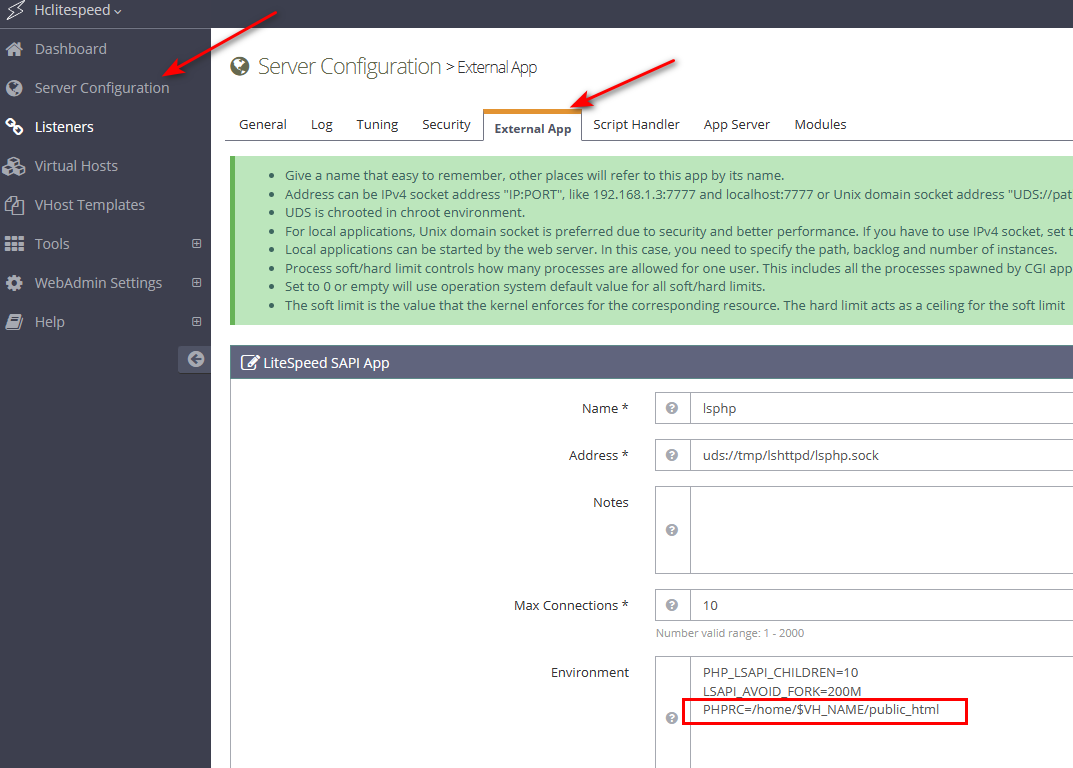
Go to WebAdmin Console → Virtual Host optimizewp.net → External App

Add it as instructed here:

https://community.cyberpanel.net/uploads/default/original/1X/7cab687cbaabf4a727b6ee68103a9ee8e5ae7a32.png

To
Tom #14

I got it working, I did steps below:

  1. Set the OLS password and access to OpenLiteSpeed webadmin via port 7080 (need to open this port in firewall)
  2. Login to webadmin and add to **Admin Console > Configuration > Server > External App
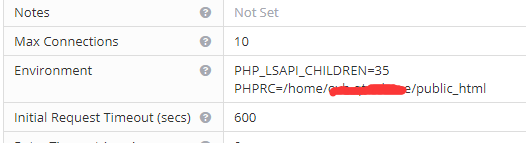
    Then: Under Environment section
    **PHPRC=/home/$VH_NAME/public_html
  3. Save it and restart OLS.

Thank you again for your support.

p/s: Of course, you need to add to vHost file the code look like below too.

phpIniOverride  {
php_value auto_prepend_file "/home/www.optimizewp.net/public_html/wp-content/nfwlog/ninjafirewall.php"
}

Replace www.optimizewp.net with your domain.

Sign in to reply