Community

Problem to deploy Laravel app on Cyberpanel

le
level #1

I am quite frustrated to the point of evaluating if cyberpananel is the best option for my project

I have a Laravel web/app and I’m trying to deploy it on a cloudserver with Ubuntu 20.04 and CyberPanel

I already followed all the steps of the tutorial in this forum
*Copy the files from the public folder to public_html

*chmod -R 777 bootstrap/cache
chmod -R 777 storage

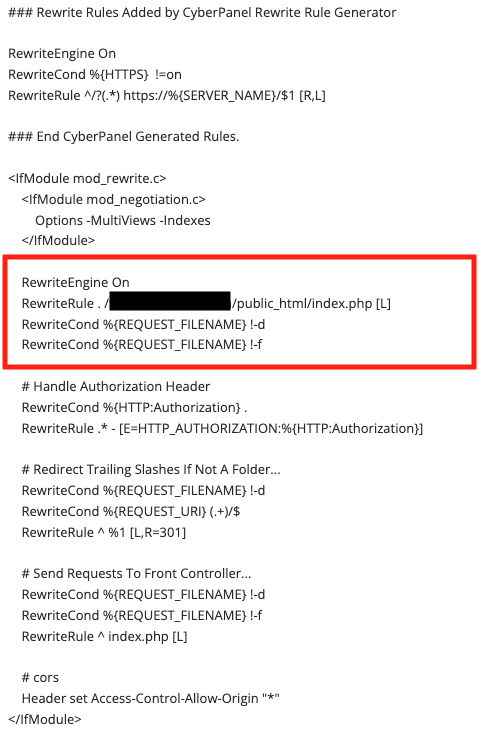
*Add the Rewrite Rules
Rewrite Engine On
RewriteRule . /myweb/public_html/index.php [L]
RewriteCond %{REQUEST_FILENAME} !-d
RewriteCond %{REQUEST_FILENAME} !-f

And it doesn’t work properly.
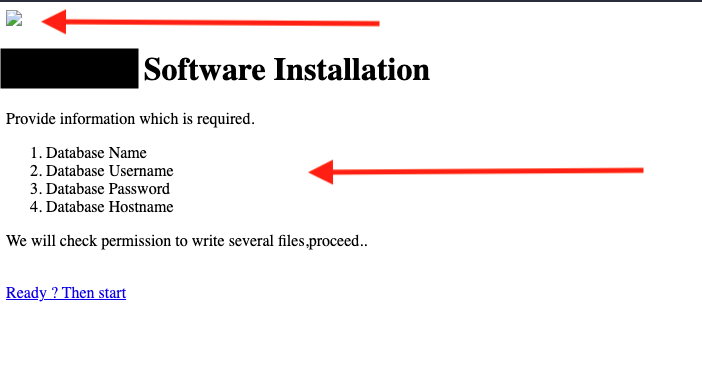

This is how it looks when I enter the page, without styles and without loading the assets.

this is my public.php

if (file_exists(__DIR__.'/../storage/framework/maintenance.php')) {
    require __DIR__.'/../storage/framework/maintenance.php';
}
require __DIR__.'/../vendor/autoload.php';
$app = require_once __DIR__.'/../bootstrap/app.php';

What am I doing wrong?
thanks for your help

PS: If i put the complete proyecy on public_html work fine, but this is insecure right?
SD
SaJeTek Developer #6

What I do is put all files in the public_html folder and edit the vHost Conf docRoot.

change docRoot $VH_ROOT/public_html to docRoot $VH_ROOT/public_html/public
No need for any htaccess rules in the public_html folder

le
level #8

First of all thanks for the help

I just tried what you told me but unfortunately I get the same result

With $VH_ROOT/public_html → works fine.

With $VH_ROOT/public_html/public → apparently it works but they don’t load the images and styles, as in the image of the first post(I also tried Fix Permissions)

SD
SaJeTek Developer #9

From public_html in you putty session or cli:

php artisan storage:link

you may have to specify your php location if your cli uses a different version than your project.
e.g.
/usr/local/lsws/lsphp81/bin/php artisan storage:link

SD
SaJeTek Developer #11

Can you show the errors you get in the console.
I once had this issue but cannot remember the solution at the moment.

This is a laravel issue and not cyberpanel but we’ll see if we can get a fix.

le
level #12

No errors logs in console.

For me it is an .htaccess config error.

Because if I create the web page from scratch and put the whole project in public_html it works correctly but that leaves security gaps because if I do a GET to myweb.site/.env this file is downloaded without problems and that’s a big problem

le
level #14

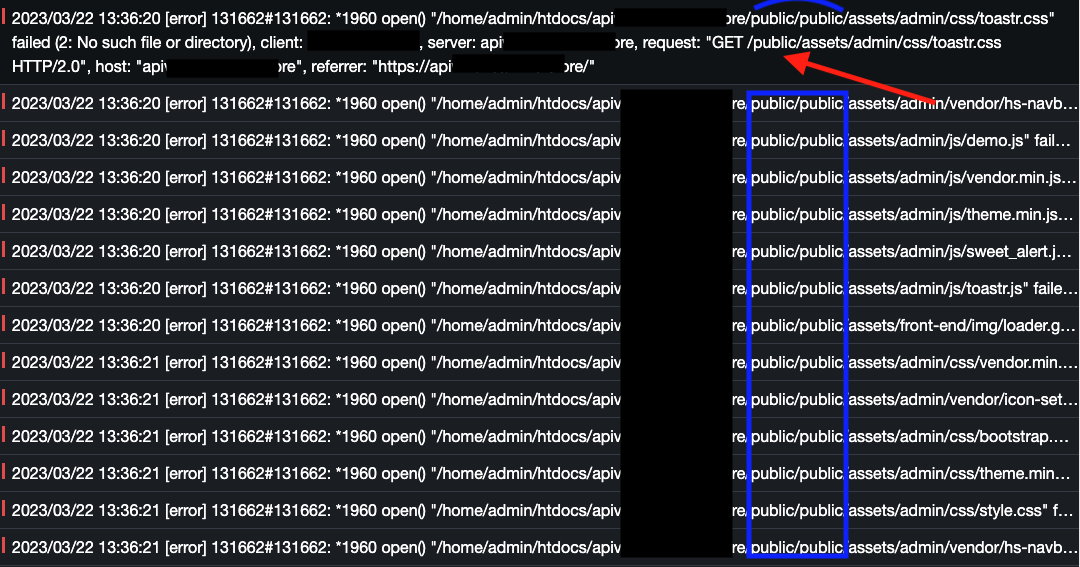
ok, i find the bug that makes some files not load, the server makes a GET request to public/bla/bla but for it to work I should do it to /bla/bla (without the public)

jo
josephgodwinke #15

I dont think you are using the cyberpanel ecosystem. How is your laravel app file paths at /home/admin ?

le
level #16

That capture is from another panel that I tried to try to see what the problem was, since cyberpanel was not able to show me those logs.

any help you can give?

SD
SaJeTek Developer #17

Your application should be using e.g. {{asset('img/imagename.png')}} which should point to /home/domain.com/public_html/public/img/imagename.png in your Cyberpanel setup with your laravel files in the public_html folder.

Check /home/domain.com/public_html/storage/logs folder for your laravel logs.
These errors pertain to laravel and not Cyberpanel. Your application does not access the assets correctly if these errors are what you are getting.

Sign in to reply