
CyberPanel Community

ClosedNot receiving emails on my server mailboxes but can send emails

py
pyel #1

Hi everybody,

my postfix email didnt send the email out, but can receive email sent from somewhere else. Until the ISP allowed SMTP port 25. Now I can send emails - great ! But suddenly I cant receive any email lol… how is this possible ?
19 replies
jo
josephgodwinke #2

Happy New Year @pyel

Where ? on snappymail or through your email client ?

py
pyel #3

Both. The client and Snappy mail are sending emails, but I cant receive any. My domain is pyel.cz, my MX looks like this, which is I guess correct (based on some tutorials for cyberpanel mail setup)

jo
josephgodwinke #4

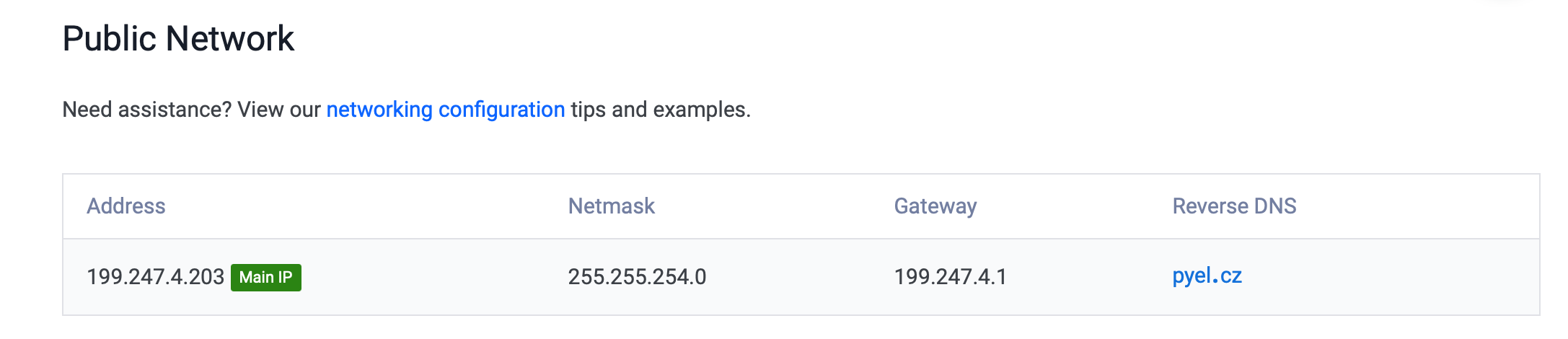
You have not setup a rDNS ptr record. You need to set this up where you are renting your server

py
pyel #7

Ah, okay, but then comes the second problem… what about the other domains, what I am hosting on my VPS ?

jo
josephgodwinke #8

You are setting that record for your mailserver not domain so all the domains that are served by same mailserver will not need any tweaking or changes

py
pyel #9

okay, thanks for explanation, but if I create new mail, which have different domain, lets say fancybottles.cz (which is hosted on the server too), I also need to create mail.fancybottles.cz as mailserver, so how to set it up then ?..I mean, maybe I am doing it wrong, but in the tutorials is everytime said, that you should create new website, which is in format mail.domain.tld. Then I create mailbox for that new domain, so i automatically got smtp and imap server as mail.domain.tld. Am I doing something wrong ?

jo
josephgodwinke #10

CyberPanel creates this automatically.

py
pyel #13

Okay Ill test it

Pe
Peter #14

Can you clarify what exactly would be the correct steps to get a emails with correct rDNS server with mutlitple domains working?

Steps:

  1. Create serverdomain.com with SSL, Mail Domain and DKIM (this would automatically give me mail.serverdomain(dot)com)
  2. Do I set the rDNS next do serverdomain.com oder mail.serverdomain(dot)com ?
  3. Create clientdomain(dot)com with SSL, Mail Domain and DKIM - no rDNS changes are needed
  4. Configure mail clientdomain(dot)com mail client (Thunderbird) with serverdomain(dot)com IMAP and SMTP settings

Can you spot any issues?

Thanks in advance

jo
josephgodwinke #15

rDNS should be mail.serverdomain.com

Before this step issue mailserver ssl from the cyberpanel admin dahsboard

Yes correct after issuing mailserver domain ssl i.e mail.serverdomain.com

Pe
Peter #16

rDNS should be mail.serverdomain.com

Would that lead to any problems for the serverdomain if the rDNS points to a subdomain?

Pe
Peter #18

I just checked the post you linked above but there he set up serverdomain(dot)com for the rDNS and not mail(dot)serverdomain(dot)com. See Step 3
However the guide how to setup same domain as a hostname on the mailserver is broken. Is there a way to have the rDNS set to the serverdomain and still having mail(dot)serverdomain working?

jo
josephgodwinke #19

No you can only have one record i recommend mail.serverdomain.com

Sign in to reply