pb
pc buklider
#1

I cannot put my license key because it says not found and also i cannot install it via ssh
 Community
I cannot put my license key because it says not found and also i cannot install it via ssh
Welcome @pcbuilding Happy New Year
Using SSH client run these commands:
$ cd /usr/local/CyberCP/public/imunifyav
$ chmod +x ./bin/execute.py
$ service imunify360 stop && service imunify360 start
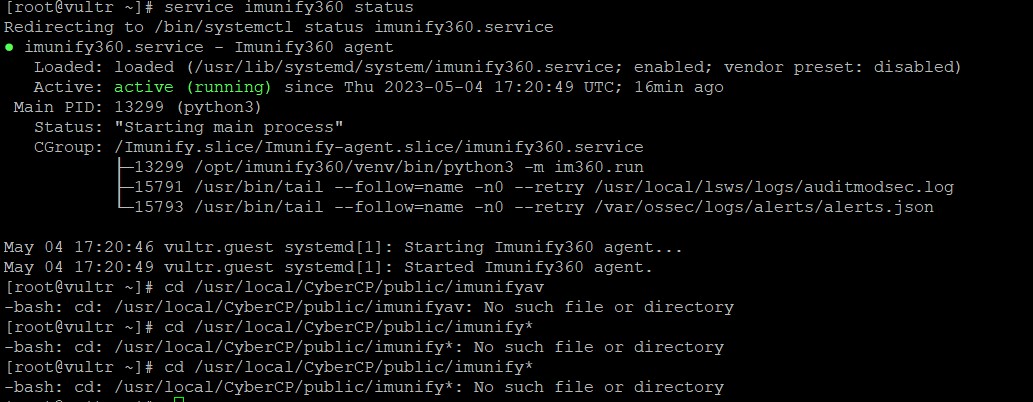
Same problem and our server don’t have imunifyav or imunify folder path
cd /usr/local/CyberCP/public/imunifyav
-bash: cd: /usr/local/CyberCP/public/imunifyav: No such file or directory
cd /usr/local/CyberCP/public/imunifyav
-bash: cd: /usr/local/CyberCP/public/imunifyav: No such file or directory
How can I fix it ?
Thank you !
Hello @anonymous
Run the commands
cd /usr/local/CyberCP/public/imunify*
chmod +x ./sbin/execute.py
chmod +x ./bin/execute.py
cd /usr/local/CyberCP/public/imunifyav
root@bursanetws:/usr/local/CyberCP/public/imunifyav# chmod +x ./bin/execute.py
root@bursanetws:/usr/local/CyberCP/public/imunifyav# service imunify360 stop && service imunify360 start
Failed to stop imunify360.service: Unit imunify360.service not loaded.
@josephgodwinke any update on this issue? i receive the same error. No imunify folder under /usr/local/cybercp/public. But service imunify360 status shows it is running.
Hi, everyone!
@usmannasir Thank you for your awesome work!
Unfortunately, for me, the fix doesn’t work. I tried on both:
After installation the IMF360 service seems to be running fine, but there is no folder /usr/local/CyberCP/public/imunify(*).
I noticed the following errors during the installation:
sed: can’t read /usr/local/CyberCP/public/imunify/assets/js/config.js: No such file or directory
…
No supported panel detected
…
WARNING: /usr/local/CyberCP/public/imunify is not a directory (it should be created by the imunify deploy script). UI will not be installed.
I tried the install trough regular from CyberPanel, trough the new re-install option and trough SSH.
The server is a bare metal OVH dedicated server.
Hope you can help me out!
Thank you in advance.
PS: I also tried everything that @josephgodwinke proposed, but as seen in the error as well, there is no folder (starting with) imunify in that location at all.
Failed to stop imunify360.service: Unit imunify360.service not loaded.
I accidentally clicked the reinstall button because I thought it was to update the license…
Of course now it’s all broken and I get the same message. Did anyone figure this out?
Just like the others, there is no /usr/local/CyberCP/public/imunify
There are two imunify.old.xxxxx though. Should I do anything with that?
For anyone with the same issue:
Renamed the imunify.old.xxxxx folders to imunify one by one. The oldest folder turned out to be the correct one and the UI is working again
For anyone having the same problem, the way to fix it is:
Go to where you install imunify…
https://myserver.com:8090/firewall/imunify
put the key and ask to install.
When it is running log in as root go to:
/usr/local/CyberCP/public (cd /usr/local/CyberCP/public/)
and create the imunify folder
mkdir immunify
or if you want to do it before installing it is also ok.