Community

Error when updating CyberPanel

Lu
Lucas #2

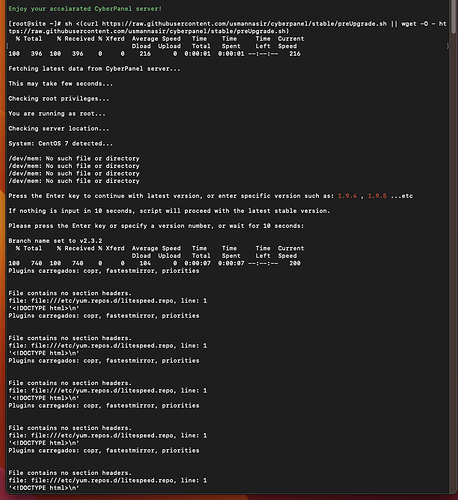
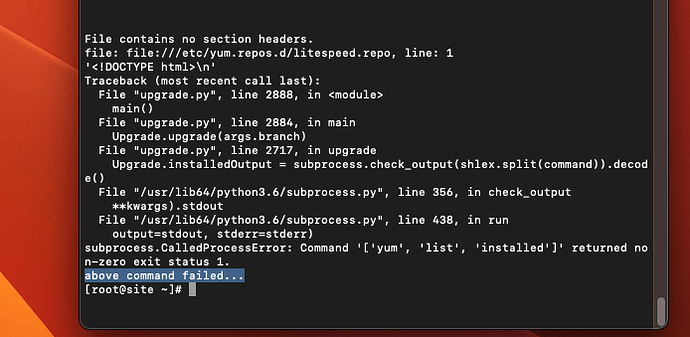
It ends up giving an error at the end!

image

jo
josephgodwinke #3

Hello @lucasromeiro Happy you are here

I always tell my clients to avoid Centos and RockyLinux when it comes to CyberPanel. Use AlmaLinux 8.4 instead. I know this is not a solution but I have never seen anyone running centos here get a solution with any issue for the last 2 months.

Lu
Lucas #4

Hello, thanks for the reply.
My server only provides me with the image of CENTOS with CyberPanel. There are other versions but none with CyberPanel. What do you recommend?

jo
josephgodwinke #5

Hello buddy choose the images with clean os no cyberpanel. Prefer Ubuntu 20.04LTS X64

Then install cyberpanel by using ssh terminal and run this command

$ sh <(curl https://cyberpanel.net/install.sh || wget -O - https://cyberpanel.net/install.sh)

https://community.cyberpanel.net/docs?topic=82

Lu
Lucas #6

Hi, nice.
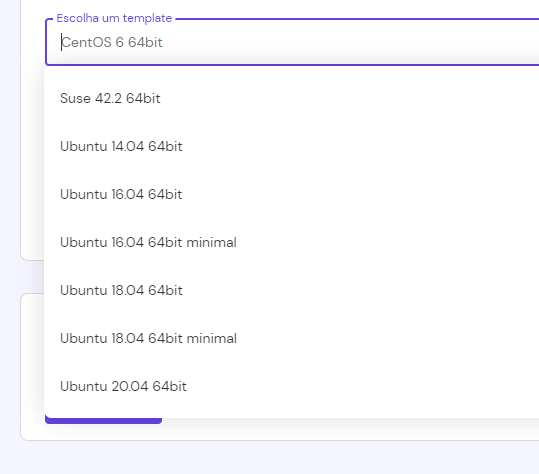
But i have only this options:

image

What is the best choice?

jo
josephgodwinke #7

UBuntu 20.04 64bit. If this is hostinger always go with that.

Lu
Lucas #8

NICE!! I Will try this now.
after installing, how do i open the panel?

jo
josephgodwinke #9

https://<your server’s IP address>:8090

Lu
Lucas #10

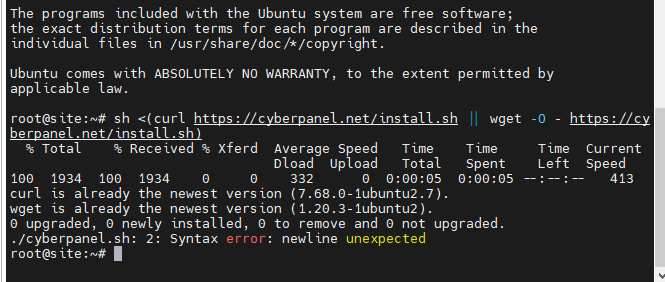
I receive one error:

image

Lu
Lucas #12

I tried again and the error remains the same.
What should I do?

Can u help me?

jo
josephgodwinke #13

Sidenote i do not recommend hostinger for any use at all. However, can you try this copy to see if it installs

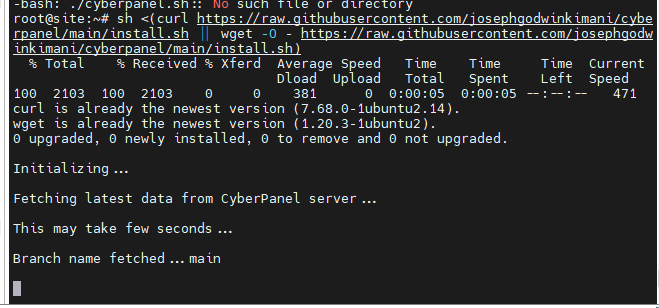
sh <(curl https://raw.githubusercontent.com/josephgodwinkimani/cyberpanel/main/install.sh || wget -O - https://raw.githubusercontent.com/josephgodwinkimani/cyberpanel/main/install.sh)
Lu
Lucas #15

Hi Joseph,

I chose hostinger because it won the award for the best cost-benefit VPS in 2022.
Why not recommend them?

jo
josephgodwinke #16

With cyberpanel it doesn work as expected because they have software or setups behind the os that prevent you from actually using the os as yours.

From experience I have never been able to setup a cyberpanel vps preinstalled properly there is always an issue

Lu
Lucas #17

:open_mouth:

What is your recomendation? Cost x benefit.

Lu
Lucas #18

The instalation freeze here. 1 hour…

image

jo
josephgodwinke #19

SOmething is stopping it from proceeding probably some firewall by hostinger, cause I just setup a server for a client now and all went well. Ask hostinger support

GM
Guilherme Matheus #20

I also tried to use your version, same as @lucasromeiro, but the installation freezed as well.
From the original version of http://cyberpanel.net/install.sh from yours https://raw.githubusercontent.com/josephgodwinkimani/cyberpanel/main/install.sh, there are some differences on the code allowed (“normal”)?

I’m asking that because that’s my first time trying to setup a panel on Ubuntu, and I am also using Hostinger with Ubuntu 20.04 64bit. I also had the same error as before, but seems like nobody have a solution for it and I didn’t find anything online as well.

jo
josephgodwinke #21

Which service provider are you using?

GM
Guilherme Matheus #22

Hostinger. I was trying to create the panel using a VPS with Ubuntu 20.04 64bit.

Sign in to reply