CyberPanel Community

FTP not working - 530 Login authentication failed

sa
savors.map #1

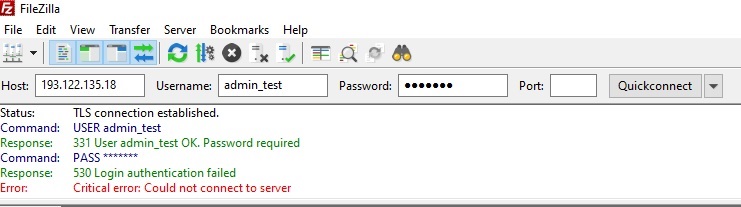
I installed a fresh copy of Ubuntu 22.04 and installed the CyberPanel. I created a website and I added an ftp account. But when I try to login with my ftp information I am getting error message, “530 Login authentication failed”. I checked to make sure, my user name and password is correct. I also have these following ports open for TCP, 21-22, 40000-50000 and 990.

I don’t know what I am doing wrong here… So I created a test server at this URL
https://193.122.135.18:8090/. The username and password is the default. I am still getting the same error message on the test server also.

Please help you out here.
Thank you!

50 replies
jo
josephgodwinke #2

Welcome @savors.map Happy you are here

530 Login authentication failed occurs when you are using either a wrong username, password, port or hostname

Go to https://SERVER_URL:8090/ftp/listFTPAccounts change password and confirm username

I see you are using FIleZilla - a crude workaround is go to the settings in the “Encryption” section and set “Use simple FTP” .

Also try another client see if you will find any success

sa
savors.map #3

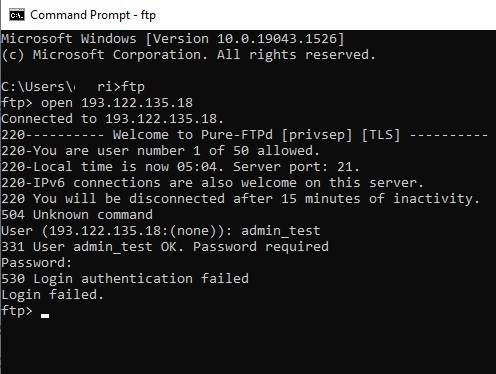
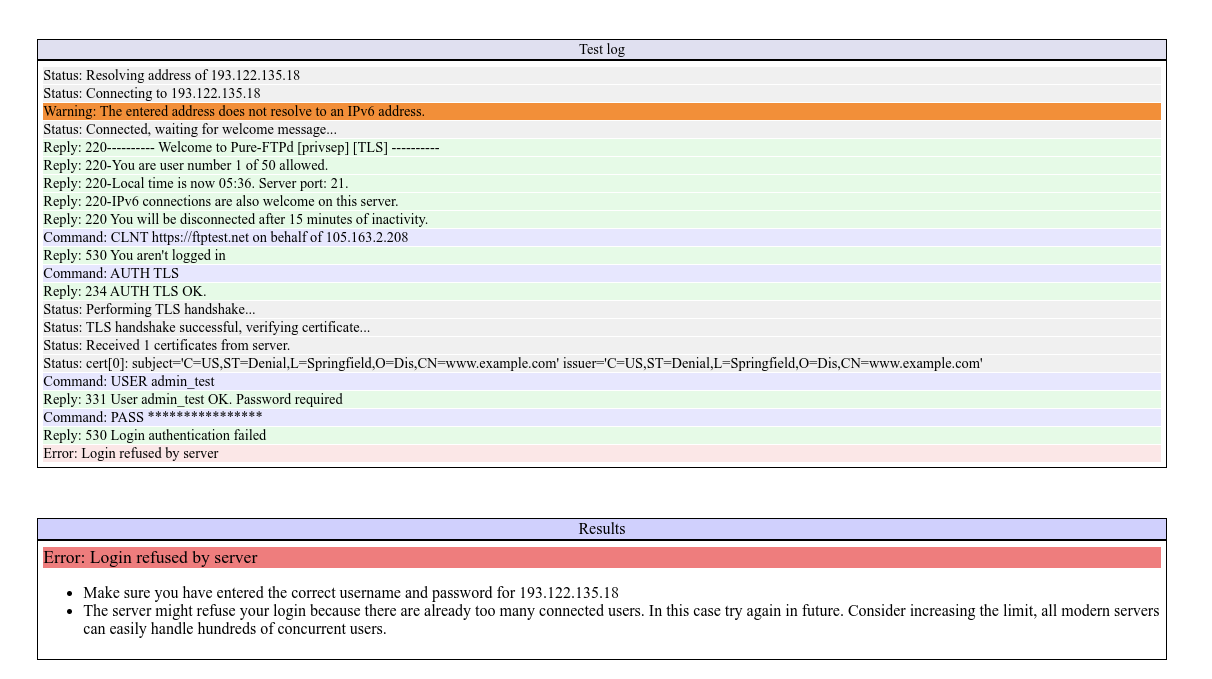
I know it is not wrong password because I have tried different passwords and am getting the same error message. I also tried using “Only use Plain FTP” in FileZilla and it doesn’t work. I also tried to connect to the ftp server through the command prompt and I am getting the same error message.
ftpDOSError01

jo
josephgodwinke #4

Post the contents of https://SERVER_IP:8090/serverlogs/ftplogs

jo
josephgodwinke #6

I recommend we reinstall it seems like password db is corrupt. Which os is this?

sa
savors.map #7

The OS is UBUNTU 22.04. This is a fresh install. The same error happened on my previous fresh install. So I ran up another server and installed in brand new on the new server. And I got the same error message on both the servers.

jo
josephgodwinke #8

Seems to be reoccuring on almost all new installations. However, the only way to fix this is reinstall pureftpd or install CyberPanel without ftp.

Run this to remove pure-ftpd software package and reinstall it again just to eliminate any package and conf corruptions:

# create a snapshot of your server
# stop the service
systemctl stop pure-ftpd
# remove package and leftovers
sudo apt-get purge --auto-remove pure-ftpd
sudo apt install pure-ftpd -y
groupadd -g 2001 ftpgroup
useradd -u 2001 -s /bin/false -d /bin/null -c "pureftpd user" -g ftpgroup ftpuser
systemctl start pure-ftpd
mkdir /etc/ssl/private
openssl req -newkey rsa:1024 -new -nodes -x509 -days 3650 -subj "/C=US/ST=Denial/L=Springfield/O=Dis/CN=www.example.com" -keyout /etc/ssl/private/pure-ftpd.pem -out /etc/ssl/private/pure-ftpd.pem
rm -R /etc/pure-ftpd
mkdir /etc/pure-ftpd
cp /usr/local/CyberCP/install/pure-ftpd-one/* /etc/pure-ftpd/
systemctl restart pure-ftpd

If you get an error that Access denied for user ('cyberpanel' @ 'localhost' ... run the following command nano pureftpd-mysql.conf and change the password to correct cyberpanel user password you can find it here /usr/local/CyberCP/CyberCP/settings.py under DATABASES =

sa
savors.map #9

I ran all those commands and I am getting follow error message.


I rebooted the entire machine. Now the FTP service is not running and I am not able to connect to the server.

jo
josephgodwinke #10

What is the results of

$ journalctl -u pure-ftpd --no-pager |sed -e "s|$(hostname)|hostname|g"

Try run
systemctl start pure-ftpd.service

jo
josephgodwinke #12

Kindly just copy paste the following commands:

journalctl -u pure-ftpd --no-pager |sed -e "s|$(hostname)|hostname|g"
# on new line <= this is just a comment to guide you
systemctl status pure-ftpd.service

and copy paste the results here not screenshot

Dr
Dreamer #13

Not really fix but use SFTP by creating on site manager SSH account for site. That will be much more secure option than FTP.

sa
savors.map #14

ubuntu@instance-test:~$ journalctl -u pure-ftpd --no-pager |sed -e “s|$(hostname)|hostname|g”
Dec 13 06:22:29 hostname systemd[1]: Starting pure-ftpd.service…
Dec 13 06:22:30 hostname pure-ftpd[12185]: Starting ftp server:
Dec 13 06:22:30 hostname pure-ftpd[12193]: Running: /usr/sbin/pure-ftpd -p 40110:40210 -A -P 193.122.135.18 -Y 1 -B
Dec 13 06:22:30 hostname systemd[1]: Started pure-ftpd.service.
Dec 13 06:25:06 hostname systemd[1]: Stopping pure-ftpd.service…
Dec 13 06:25:06 hostname pure-ftpd[12354]: Stopping ftp server: pure-ftpd.
Dec 13 06:25:06 hostname systemd[1]: pure-ftpd.service: Deactivated successfully.
Dec 13 06:25:06 hostname systemd[1]: Stopped pure-ftpd.service.
Dec 13 06:25:06 hostname systemd[1]: Starting pure-ftpd.service…
Dec 13 06:25:06 hostname pure-ftpd[12364]: Starting ftp server:
Dec 13 06:25:06 hostname pure-ftpd[12372]: /usr/sbin/pure-ftpd-wrapper: Couldn’t examine directory /etc/pure-ftpd/conf: No such file or directory
Dec 13 06:25:06 hostname systemd[1]: pure-ftpd.service: Control process exited, code=exited, status=2/INVALIDARGUMENT
Dec 13 06:25:06 hostname systemd[1]: pure-ftpd.service: Failed with result ‘exit-code’.
Dec 13 06:25:06 hostname systemd[1]: Failed to start pure-ftpd.service.
– Boot 47dd6ab6a8b34dbe96e766f59aead0c4 –
Dec 13 06:26:24 hostname systemd[1]: Starting pure-ftpd.service…
Dec 13 06:26:26 hostname pure-ftpd[1067]: Starting ftp server:
Dec 13 06:26:26 hostname pure-ftpd[1095]: /usr/sbin/pure-ftpd-wrapper: Couldn’t examine directory /etc/pure-ftpd/conf: No such file or directory
Dec 13 06:26:26 hostname systemd[1]: pure-ftpd.service: Control process exited, code=exited, status=2/INVALIDARGUMENT
Dec 13 06:26:26 hostname systemd[1]: pure-ftpd.service: Failed with result ‘exit-code’.
Dec 13 06:26:26 hostname systemd[1]: Failed to start pure-ftpd.service.
Dec 13 06:27:50 hostname systemd[1]: Starting pure-ftpd.service…
Dec 13 06:27:51 hostname pure-ftpd[1763]: Starting ftp server:
Dec 13 06:27:51 hostname pure-ftpd[1771]: /usr/sbin/pure-ftpd-wrapper: Couldn’t examine directory /etc/pure-ftpd/conf: No such file or directory
Dec 13 06:27:51 hostname systemd[1]: pure-ftpd.service: Control process exited, code=exited, status=2/INVALIDARGUMENT
Dec 13 06:27:51 hostname systemd[1]: pure-ftpd.service: Failed with result ‘exit-code’.
Dec 13 06:27:51 hostname systemd[1]: Failed to start pure-ftpd.service.
– Boot 0366046163bf4a37b650ef403c8658b7 –
Dec 13 06:29:06 hostname systemd[1]: Starting pure-ftpd.service…
Dec 13 06:29:07 hostname pure-ftpd[1001]: Starting ftp server:
Dec 13 06:29:07 hostname pure-ftpd[1020]: /usr/sbin/pure-ftpd-wrapper: Couldn’t examine directory /etc/pure-ftpd/conf: No such file or directory
Dec 13 06:29:07 hostname systemd[1]: pure-ftpd.service: Control process exited, code=exited, status=2/INVALIDARGUMENT
Dec 13 06:29:07 hostname systemd[1]: pure-ftpd.service: Failed with result ‘exit-code’.
Dec 13 06:29:07 hostname systemd[1]: Failed to start pure-ftpd.service.
– Boot f6e348b90da94adeaf7cfbbb927e1eb6 –
Dec 13 06:36:14 hostname systemd[1]: Starting pure-ftpd.service…
Dec 13 06:36:16 hostname pure-ftpd[1067]: Starting ftp server:
Dec 13 06:36:16 hostname pure-ftpd[1103]: /usr/sbin/pure-ftpd-wrapper: Couldn’t examine directory /etc/pure-ftpd/conf: No such file or directory
Dec 13 06:36:16 hostname systemd[1]: pure-ftpd.service: Control process exited, code=exited, status=2/INVALIDARGUMENT
Dec 13 06:36:16 hostname systemd[1]: pure-ftpd.service: Failed with result ‘exit-code’.
Dec 13 06:36:16 hostname systemd[1]: Failed to start pure-ftpd.service.
Dec 13 06:42:19 hostname systemd[1]: Starting pure-ftpd.service…
Dec 13 06:42:19 hostname pure-ftpd[2696]: Starting ftp server:
Dec 13 06:42:19 hostname pure-ftpd[2706]: Running: /usr/sbin/pure-ftpd -l pam -O clf:/var/log/pure-ftpd/transfer.log -u 1000 -J HIGH -E -B
Dec 13 06:42:19 hostname systemd[1]: Started pure-ftpd.service.
Dec 13 06:44:45 hostname systemd[1]: Stopping pure-ftpd.service…
Dec 13 06:44:45 hostname pure-ftpd[2847]: Stopping ftp server: pure-ftpd.
Dec 13 06:44:45 hostname systemd[1]: pure-ftpd.service: Deactivated successfully.
Dec 13 06:44:45 hostname systemd[1]: Stopped pure-ftpd.service.
Dec 13 06:44:45 hostname systemd[1]: Starting pure-ftpd.service…
Dec 13 06:44:45 hostname pure-ftpd[2857]: Starting ftp server:
Dec 13 06:44:45 hostname pure-ftpd[2865]: /usr/sbin/pure-ftpd-wrapper: Couldn’t examine directory /etc/pure-ftpd/conf: No such file or directory
Dec 13 06:44:45 hostname systemd[1]: pure-ftpd.service: Control process exited, code=exited, status=2/INVALIDARGUMENT
Dec 13 06:44:45 hostname systemd[1]: pure-ftpd.service: Failed with result ‘exit-code’.
Dec 13 06:44:45 hostname systemd[1]: Failed to start pure-ftpd.service.
– Boot 793462e16b7c43b0adfc58496aa14b5d –
Dec 13 06:48:39 hostname systemd[1]: Starting pure-ftpd.service…
Dec 13 06:48:40 hostname pure-ftpd[1048]: Starting ftp server:
Dec 13 06:48:40 hostname pure-ftpd[1073]: /usr/sbin/pure-ftpd-wrapper: Couldn’t examine directory /etc/pure-ftpd/conf: No such file or directory
Dec 13 06:48:40 hostname systemd[1]: pure-ftpd.service: Control process exited, code=exited, status=2/INVALIDARGUMENT
Dec 13 06:48:40 hostname systemd[1]: pure-ftpd.service: Failed with result ‘exit-code’.
Dec 13 06:48:40 hostname systemd[1]: Failed to start pure-ftpd.service.
Dec 13 06:57:49 hostname systemd[1]: Starting pure-ftpd.service…
Dec 13 06:57:49 hostname pure-ftpd[1994]: Starting ftp server:
Dec 13 06:57:49 hostname pure-ftpd[2002]: /usr/sbin/pure-ftpd-wrapper: Couldn’t examine directory /etc/pure-ftpd/conf: No such file or directory
Dec 13 06:57:49 hostname systemd[1]: pure-ftpd.service: Control process exited, code=exited, status=2/INVALIDARGUMENT
Dec 13 06:57:49 hostname systemd[1]: pure-ftpd.service: Failed with result ‘exit-code’.
Dec 13 06:57:49 hostname systemd[1]: Failed to start pure-ftpd.service.
Dec 13 06:58:32 hostname systemd[1]: Starting pure-ftpd.service…
Dec 13 06:58:32 hostname pure-ftpd[2103]: Starting ftp server:
Dec 13 06:58:32 hostname pure-ftpd[2111]: /usr/sbin/pure-ftpd-wrapper: Couldn’t examine directory /etc/pure-ftpd/conf: No such file or directory
Dec 13 06:58:32 hostname systemd[1]: pure-ftpd.service: Control process exited, code=exited, status=2/INVALIDARGUMENT
Dec 13 06:58:32 hostname systemd[1]: pure-ftpd.service: Failed with result ‘exit-code’.
Dec 13 06:58:32 hostname systemd[1]: Failed to start pure-ftpd.service.
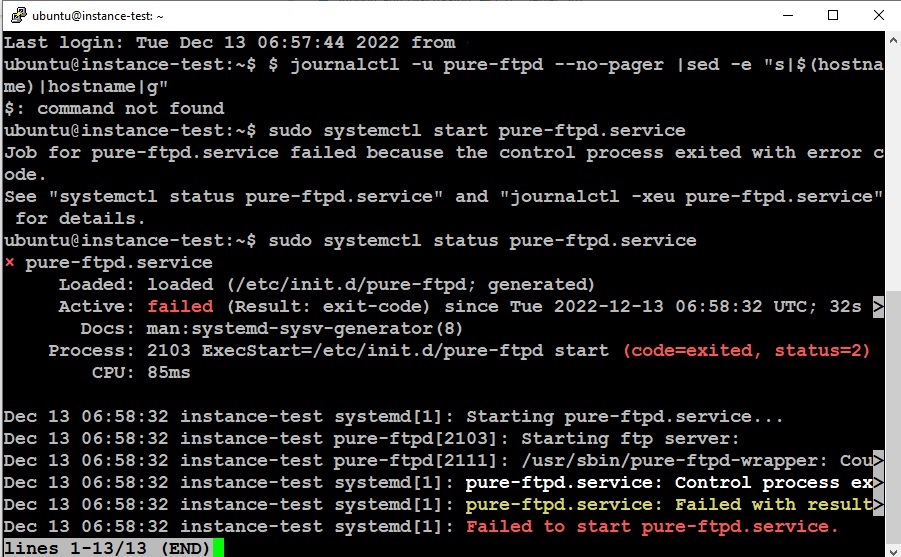
ubuntu@instance-test:~$ sudo systemctl status pure-ftpd.service
× pure-ftpd.service
Loaded: loaded (/etc/init.d/pure-ftpd; generated)
Active: failed (Result: exit-code) since Tue 2022-12-13 06:58:32 UTC; 12mi>
Docs: man:systemd-sysv-generator(8)
Process: 2103 ExecStart=/etc/init.d/pure-ftpd start (code=exited, status=2)
CPU: 85ms

Dec 13 06:58:32 instance-test systemd[1]: Starting pure-ftpd.service…
Dec 13 06:58:32 instance-test pure-ftpd[2103]: Starting ftp server:
Dec 13 06:58:32 instance-test pure-ftpd[2111]: /usr/sbin/pure-ftpd-wrapper: Cou>
Dec 13 06:58:32 instance-test systemd[1]: pure-ftpd.service: Control process ex>
Dec 13 06:58:32 instance-test systemd[1]: pure-ftpd.service: Failed with result>
Dec 13 06:58:32 instance-test systemd[1]: Failed to start pure-ftpd.service.
lines 1-13/13 (END)

jo
josephgodwinke #15

Well just what i thought pure-ftpd was not fully installed. I also soemthing to indicate it here FTP not working - 530 Login authentication failed - #9 by savors.map when you creating a user for pure-ftpd.

RUn this line by line dont skip

sudo apt-get remove --purge pure-ftpd pure-ftpd-common
sudo apt autoremove
sudo apt install pure-ftpd -y
groupadd -g 2001 ftpgroup
useradd -u 2001 -s /bin/false -d /bin/null -c "pureftpd user" -g ftpgroup ftpuser
systemctl start pure-ftpd
mkdir /etc/ssl/private
openssl req -newkey rsa:1024 -new -nodes -x509 -days 3650 -subj "/C=US/ST=Denial/L=Springfield/O=Dis/CN=www.example.com" -keyout /etc/ssl/private/pure-ftpd.pem -out /etc/ssl/private/pure-ftpd.pem
rm -R /etc/pure-ftpd
mkdir /etc/pure-ftpd
cp /usr/local/CyberCP/install/pure-ftpd-one/* /etc/pure-ftpd/
systemctl restart pure-ftpd
sa
savors.map #17

ubuntu@instance-test:~$ sudo apt-get remove --purge pure-ftpd pure-ftpd-common
Reading package lists… Done
Building dependency tree… Done
Reading state information… Done
The following packages were automatically installed and are no longer required:
openbsd-inetd tcpd update-inetd
Use ‘sudo apt autoremove’ to remove them.
The following packages will be REMOVED:
pure-ftpd* pure-ftpd-common*
0 upgraded, 0 newly installed, 2 to remove and 0 not upgraded.
After this operation, 992 kB disk space will be freed.
Do you want to continue? [Y/n] Y
(Reading database … 127926 files and directories currently installed.)
Removing pure-ftpd (1.0.50-2.1) …
Removing pure-ftpd-common (1.0.50-2.1) …
Processing triggers for man-db (2.10.2-1) …
(Reading database … 127858 files and directories currently installed.)
Purging configuration files for pure-ftpd-common (1.0.50-2.1) …
Purging configuration files for pure-ftpd (1.0.50-2.1) …
ubuntu@instance-test:~$ sudo apt autoremove
Reading package lists… Done
Building dependency tree… Done
Reading state information… Done
The following packages will be REMOVED:
openbsd-inetd tcpd update-inetd
0 upgraded, 0 newly installed, 3 to remove and 0 not upgraded.
After this operation, 290 kB disk space will be freed.
Do you want to continue? [Y/n] Y
(Reading database … 127842 files and directories currently installed.)
Removing openbsd-inetd (0.20160825-5) …
Removing tcpd (7.6.q-31build2) …
Removing update-inetd (4.51) …
Processing triggers for man-db (2.10.2-1) …
ubuntu@instance-test:~$ sudo apt install pure-ftpd -y
Reading package lists… Done
Building dependency tree… Done
Reading state information… Done
The following additional packages will be installed:
openbsd-inetd pure-ftpd-common tcpd update-inetd
The following NEW packages will be installed:
openbsd-inetd pure-ftpd pure-ftpd-common tcpd update-inetd
0 upgraded, 5 newly installed, 0 to remove and 0 not upgraded.
Need to get 367 kB of archives.
After this operation, 1,282 kB of additional disk space will be used.
Get:1 Index of /ubuntu jammy/main amd64 update-inetd all 4.51 [24.9 kB]
Get:2 Index of /ubuntu jammy/universe amd64 tcpd amd64 7.6.q-31build2 [25.2 kB]
Get:3 Index of /ubuntu jammy/universe amd64 openbsd-inetd amd64 0.20160825-5 [26.3 kB]
Get:4 Index of /ubuntu jammy/universe amd64 pure-ftpd-common all 1.0.50-2.1 [148 kB]
Get:5 Index of /ubuntu jammy/universe amd64 pure-ftpd amd64 1.0.50-2.1 [143 kB]
Fetched 367 kB in 1s (456 kB/s)
Preconfiguring packages …
Can’t exec “/tmp/update-inetd.config.NhvPqD”: Permission denied at /usr/lib/x86_64-linux-gnu/perl-base/IPC/Open3.pm line 178.
open2: exec of /tmp/update-inetd.config.NhvPqD configure failed: Permission denied at /usr/share/perl5/Debconf/ConfModule.pm line 59.
Selecting previously unselected package update-inetd.
(Reading database … 127816 files and directories currently installed.)
Preparing to unpack …/update-inetd_4.51_all.deb …
Unpacking update-inetd (4.51) …
Selecting previously unselected package tcpd.
Preparing to unpack …/tcpd_7.6.q-31build2_amd64.deb …
Unpacking tcpd (7.6.q-31build2) …
Selecting previously unselected package openbsd-inetd.
Preparing to unpack …/openbsd-inetd_0.20160825-5_amd64.deb …
Unpacking openbsd-inetd (0.20160825-5) …
Selecting previously unselected package pure-ftpd-common.
Preparing to unpack …/pure-ftpd-common_1.0.50-2.1_all.deb …
Unpacking pure-ftpd-common (1.0.50-2.1) …
Selecting previously unselected package pure-ftpd.
Preparing to unpack …/pure-ftpd_1.0.50-2.1_amd64.deb …
Unpacking pure-ftpd (1.0.50-2.1) …
Setting up pure-ftpd-common (1.0.50-2.1) …
Setting up update-inetd (4.51) …
Setting up tcpd (7.6.q-31build2) …
Setting up openbsd-inetd (0.20160825-5) …
Setting up pure-ftpd (1.0.50-2.1) …
Processing triggers for man-db (2.10.2-1) …
Scanning processes…
Scanning linux images…

Running kernel seems to be up-to-date.

No services need to be restarted.

No containers need to be restarted.

No user sessions are running outdated binaries.

No VM guests are running outdated hypervisor (qemu) binaries on this host.
ubuntu@instance-test:~$ sudo groupadd -g 2001 ftpgroup
groupadd: group ‘ftpgroup’ already exists
ubuntu@instance-test:~$ sudo useradd -u 2001 -s /bin/false -d /bin/null -c “pureftpd user” -g ftpgroup ftpuser
useradd: user ‘ftpuser’ already exists
ubuntu@instance-test:~$ sudo systemctl start pure-ftpd
ubuntu@instance-test:~$ sudo mkdir /etc/ssl/private
mkdir: cannot create directory ‘/etc/ssl/private’: File exists
ubuntu@instance-test:~$ sudo openssl req -newkey rsa:1024 -new -nodes -x509 -days 3650 -subj “/C=US/ST=Denial/L=Springfield/O=Dis/CN=www.example.com” -keyout /etc/ssl/private/pure-ftpd.pem -out /etc/ssl/private/pure-ftpd.pem
…++++++++++++++++++++++++++++++++++++++++++++++++++++++++++++++++
…++++++++++++++++++++++++++++++++++++++++++++++++++++++++++++++++
ubuntu@instance-test:~$ sudo rm -R /etc/pure-ftpd
ubuntu@instance-test:~$ sudo mkdir /etc/pure-ftpd
ubuntu@instance-test:~$ sudo cp /usr/local/CyberCP/install/pure-ftpd-one/* /etc/pure-ftpd/
ubuntu@instance-test:~$ sudo systemctl restart pure-ftpd
Job for pure-ftpd.service failed because the control process exited with error code.
See “systemctl status pure-ftpd.service” and “journalctl -xeu pure-ftpd.service” for details.
ubuntu@instance-test:~$ sudo systemctl status pure-ftpd
× pure-ftpd.service
Loaded: loaded (/etc/init.d/pure-ftpd; generated)
Active: failed (Result: exit-code) since Tue 2022-12-13 07:30:06 UTC; 44s >
Docs: man:systemd-sysv-generator(8)
Process: 4761 ExecStart=/etc/init.d/pure-ftpd start (code=exited, status=2)
CPU: 88ms

Dec 13 07:30:06 instance-test systemd[1]: Starting pure-ftpd.service…
Dec 13 07:30:06 instance-test pure-ftpd[4761]: Starting ftp server:
Dec 13 07:30:06 instance-test pure-ftpd[4769]: /usr/sbin/pure-ftpd-wrapper: Cou>
Dec 13 07:30:06 instance-test systemd[1]: pure-ftpd.service: Control process ex>
Dec 13 07:30:06 instance-test systemd[1]: pure-ftpd.service: Failed with result>
Dec 13 07:30:06 instance-test systemd[1]: Failed to start pure-ftpd.service.
lines 1-13/13 (END)

jo
josephgodwinke #18

I have tried on test server it wierd because it worked previously but here is what i have done and it worked:

sudo service pure-ftpd stop
sudo apt-get autoremove pure-ftpd
sudo apt-get purge pure-ftpd
sudo rm -r /etc/pure-ftpd
sh <(curl https://raw.githubusercontent.com/usmannasir/cyberpanel/stable/preUpgrade.sh || wget -O - https://raw.githubusercontent.com/usmannasir/cyberpanel/stable/preUpgrade.sh)
jo
josephgodwinke #19

COmpletely remove all traces of ftp or pureftpd from your server.

Just install vsftp for a secure ftp if you dont care about managing users on a dashboard

sh <(curl https://raw.githubusercontent.com/josephgodwinkimani/cyberpanel-mods/main/install_vsftpd.sh || wget -O - https://raw.githubusercontent.com/josephgodwinkimani/cyberpanel-mods/main/install_vsftpd.sh)

You will access ftp with user ftpuser and the password you create during the process. This user will access /home/

You can create other users by running:

# usercreatedoncyberP managed mydomain.com
sudo usermod -d /home/mydomain.com usercreatedoncyberP
sudo chown usercreatedoncyberP:usercreatedoncyberP /home/mydomain.com/public_html

I use this method on several servers and it works. Just used in test server and it works. Good luck

sa
savors.map #20

I tried to install vsftp and I got error message ftpuser already exsits. So I ran command sudo deluser --remove-home ftpuser. Then I tried to install again. But I am getting error message cannot create /etc/ssh/sshd_config: Permission denied. failed

ubuntu@instance-test:~$ sh <(curl https://raw.githubusercontent.com/josephgodwinkimani/cyberpanel-mods/main/install_vsftpd.sh || wget -O - https://raw.githubusercontent.com/josephgodwinkimani/cyberpanel-mods/main/install_vsftpd.sh)
% Total % Received % Xferd Average Speed Time Time Time Current
Dload Upload Total Spent Left Speed
100 1047 100 1047 0 0 4246 0 --:–:-- --:–:-- --:–:-- 4256

Install Very secure FTP daemon …

Reading package lists… Done
Building dependency tree… Done
Reading state information… Done
The following NEW packages will be installed:
vsftpd
0 upgraded, 1 newly installed, 0 to remove and 0 not upgraded.
Need to get 123 kB of archives.
After this operation, 326 kB of additional disk space will be used.
Get:1 Index of /ubuntu jammy/main amd64 vsftpd amd64 3.0.5-0ubuntu1 [123 kB]
Fetched 123 kB in 1s (210 kB/s)
Preconfiguring packages …
Can’t exec “/tmp/vsftpd.config.IWUHne”: Permission denied at /usr/lib/x86_64-linux-gnu/perl-base/IPC/Open3.pm line 178.
open2: exec of /tmp/vsftpd.config.IWUHne configure failed: Permission denied at /usr/share/perl5/Debconf/ConfModule.pm line 59.
Selecting previously unselected package vsftpd.
(Reading database … 127830 files and directories currently installed.)
Preparing to unpack …/vsftpd_3.0.5-0ubuntu1_amd64.deb …
Unpacking vsftpd (3.0.5-0ubuntu1) …
Setting up vsftpd (3.0.5-0ubuntu1) …
Created symlink /etc/systemd/system/multi-user.target.wants/vsftpd.service → /lib/systemd/system/vsftpd.service.
Processing triggers for man-db (2.10.2-1) …
Scanning processes…
Scanning linux images…

Running kernel seems to be up-to-date.

No services need to be restarted.

No containers need to be restarted.

No user sessions are running outdated binaries.

No VM guests are running outdated hypervisor (qemu) binaries on this host.
adduser: The user `ftpuser’ already exists.
failed

ubuntu@instance-test:~$ sudo deluser --remove-home ftpuser
Looking for files to backup/remove …
Removing user ftpuser' ... Warning: group ftpgroup’ has no more members.
Done.
ubuntu@instance-test:~$ sh <(curl https://raw.githubusercontent.com/josephgodwinkimani/cyberpanel-mods/main/install_vsftpd.sh || wget -O - https://raw.githubusercontent.com/josephgodwinkimani/cyberpanel-mods/main/install_vsftpd.sh)
% Total % Received % Xferd Average Speed Time Time Time Current
Dload Upload Total Spent Left Speed
100 1047 100 1047 0 0 5694 0 --:–:-- --:–:-- --:–:-- 5721

Install Very secure FTP daemon …

Reading package lists… Done
Building dependency tree… Done
Reading state information… Done
vsftpd is already the newest version (3.0.5-0ubuntu1).
0 upgraded, 0 newly installed, 0 to remove and 0 not upgraded.
Adding user ftpuser' ... Adding new group ftpuser’ (1005) …
Adding new user ftpuser' (1005) with group ftpuser’ …
Creating home directory /home/ftpuser' ... Copying files from /etc/skel’ …
New password:
Retype new password:
passwd: password updated successfully
Changing the user information for ftpuser
Enter the new value, or press ENTER for the default
Full Name :
Room Number :
Work Phone :
Home Phone :
Other :
Is the information correct? [Y/n] Y
/dev/fd/63: 13: cannot create /etc/ssh/sshd_config: Permission denied
failed

jo
josephgodwinke #21

Seems you did not completely remove all traces of ftp on your server

sudo killall -u ftpuser
sudo userdel -f ftpuser
sudo groupdel ftpgroup

Then run the script. Am still running my vsftpd with no errors.

I should probably add a way of completely deleting pure-ftpd on the script makes it easier.

EDIT: improved the script to wipe out the user, group, all traces of pure-ftpd and install vsftpd

sa
savors.map #22

The script stopped running and it gave me error message. " cannot remove ‘/etc/pure-ftpd’: No such file or directory failed"

ubuntu@instance-test:~$ sudo killall -u ftpuser
ubuntu@instance-test:~$ sudo userdel -f ftpuser
ubuntu@instance-test:~$ sudo groupdel ftpgroup
ubuntu@instance-test:~$ sh <(curl https://raw.githubusercontent.com/josephgodwinkimani/cyberpanel-mods/main/install_vsftpd.sh || wget -O - https://raw.githubusercontent.com/josephgodwinkimani/cyberpanel-mods/main/install_vsftpd.sh)
% Total % Received % Xferd Average Speed Time Time Time Current
Dload Upload Total Spent Left Speed
100 1292 100 1292 0 0 5598 0 --:–:-- --:–:-- --:–:-- 5617

Remove pure-ftpd …

Reading package lists… Done
Building dependency tree… Done
Reading state information… Done
Package ‘pure-ftpd’ is not installed, so not removed
0 upgraded, 0 newly installed, 0 to remove and 0 not upgraded.
Reading package lists… Done
Building dependency tree… Done
Reading state information… Done
Package ‘pure-ftpd’ is not installed, so not removed
0 upgraded, 0 newly installed, 0 to remove and 0 not upgraded.
rm: cannot remove ‘/etc/pure-ftpd’: No such file or directory
failed

jo
josephgodwinke #23

Yes rerun it on another server and got that error cause its supposed to stop if anything fails. Just added conditions however you can just run the commands here as i try to improve it for everyone

sudo apt-get autoremove pure-ftpd -y
sudo apt-get purge pure-ftpd -y
sudo rm -r /etc/pure-ftpd
sudo killall -u ftpuser
sudo userdel -f ftpuser
sudo groupdel ftpgroup
sudo apt install vsftpd
sudo adduser ftpuser
echo "DenyUsers ftpuser" >> /etc/ssh/sshd_config
sudo service sshd restart
sudo addgroup ftpgroup
sudo usermod -d /home ftpuser
sudo usermod -g ftpgroup ftpuser
sudo chown ftpuser:ftpuser /home
sudo mv /etc/vsftpd.conf /etc/vsftpd.conf.bak
sudo nano /etc/vsftpd.conf

add the following:

listen=NO
listen_ipv6=YES
anonymous_enable=NO
local_enable=YES
write_enable=YES
local_umask=022
dirmessage_enable=YES
use_localtime=YES
xferlog_enable=YES
connect_from_port_20=YES
chroot_local_user=YES
secure_chroot_dir=/var/run/vsftpd/empty
pam_service_name=vsftpd
force_dot_files=YES
pasv_min_port=40000
pasv_max_port=50000
allow_writeable_chroot=YES

FInally run

sudo systemctl restart vsftpd
sudo systemctl status vsftpd

Access ftp using username ftpuser and password you chose here sudo adduser ftpuser

sa
savors.map #24

Everything went well except the “echo “DenyUsers ftpuser” >> /etc/ssh/sshd_config” gave me a permission denied error.

ubuntu@instance-test:~$ sudo systemctl status vsftpd
● vsftpd.service - vsftpd FTP server
Loaded: loaded (/lib/systemd/system/vsftpd.service; enabled; vendor preset>
Active: active (running) since Tue 2022-12-13 12:40:53 UTC; 12min ago
Process: 825 ExecStartPre=/bin/mkdir -p /var/run/vsftpd/empty (code=exited,>
Main PID: 826 (vsftpd)
Tasks: 1 (limit: 1076)
Memory: 1016.0K
CPU: 9ms
CGroup: /system.slice/vsftpd.service
└─826 /usr/sbin/vsftpd /etc/vsftpd.conf

Dec 13 12:40:53 instance-test systemd[1]: Starting vsftpd FTP server…
Dec 13 12:40:53 instance-test systemd[1]: Started vsftpd FTP server.
lines 1-13/13 (END)

When I try to connect through filezila, I am getting the following error message.
ftpError02

I know port 22 and 990 are open.

jo
josephgodwinke #25

ftpuser can only upload files in /home/ftpuser to have users only add files at /home/somedomain.com/public_html

Add new user say you have a client at www.domain.com

sudo adduser newcustomer
sudo usermod -d /home/mydomain.com newcustomer
sudo usermod -g ftpgroup newcustomer
sudo apt install acl
setfacl -R -m u:newcustomer:rwx /home/mydomain.com
## sudo chown -R newcustomer:newcustomer /home/mydomain.com

EDIT: Allow users to see subdomains if they choose not to point them to a subdirectory inside public_html

EDIT: changing permissions should allow the owner (root/user that created website) to have same access.

jo
josephgodwinke #26

Screenshot from 2022-12-13 16.01.07

Use these settings for SSL ENCRYPTED connections

Screenshot from 2022-12-13 17.34.44

jo
josephgodwinke #27

Improved the script and tested it. Works as expected. Should allow you to manage /home/ftpuser you are free to add users as described here:FTP not working - 530 Login authentication failed - #25 by josephgodwinke

In ssh terminal run:

sh <(curl https://raw.githubusercontent.com/josephgodwinkimani/cyberpanel-mods/main/install_vsftpd.sh || wget -O - https://raw.githubusercontent.com/josephgodwinkimani/cyberpanel-mods/main/install_vsftpd.sh)

Incase of any issues with ssl/tls and you would rather live without it do the following:

sudo nano /etc/vsftpd/vsftpd.conf
# remove the following
ssl_enable=YES
allow_anon_ssl=NO
force_local_data_ssl=YES
force_local_logins_ssl=YES
ssl_tlsv1_1=YES
ssl_tlsv1_2=YES
ssl_tlsv1=NO
ssl_sslv2=NO
ssl_sslv3=NO
require_ssl_reuse=YES
ssl_ciphers=HIGH
rsa_cert_file=/etc/ssl/certs/vsftpd.crt
rsa_private_key_file=/etc/ssl/private/vsftpd.key

Restart vsftpd service

so
softman #28

after these steps, i cheked pure-ftpd status and looks like works correctly, but when i try to login from filezilla:

  1. when generated new one pure-ftpd.pem file:
    openssl req -newkey rsa:1024 -new -nodes -x509 -days 3650 -subj “/C=US/ST=Denial/L=Springfield/O=Dis/CN=example.com” -keyout /etc/ssl/private/pure-ftpd.pem -out /etc/ssl/private/pure-ftpd.pem

error:
00:21:08 Status: Resolving address of example.com
00:21:08 Status: Connecting to xx.xx.xxx.xxx:21…
00:21:08 Status: Connection attempt failed with “ECONNREFUSED - Connection refused by server”.
00:21:08 Error: Could not connect to server

  1. when i used original pure-ftpd.pem file after Cyber Panel installation:

error:
Host: example.com:21 hostname does not match certificate

what can i do?

Ph
Philipp #29

Did you ever figure this out? I am having the exact same issue. Running Cyperpanel 2.3 on a Vultr instance with Ubuntu 20.04 LTS x64 and the FTP account I create does not work. How can I test if my issue i also caused by pure-ftpd?

PS: I ran some commands I found in this and another thread and this is the output I got:

Dr
Dreamer #30

Better and more secure option is setup SFTP that seems to be more reliable.

vi
villasweb #31

I have the same problem and FTP or SFTP is not working. Any Ideas?
Failed to restart pure-ftpd.service

an
antivirusadmin #33

I did above instrauction then uesd this:

this is the result:

root@aa:~# journalctl -u pure-ftpd --no-pager |sed -e "s|$(hostname)|hostname|g"
-- No entries --
root@aa:~# systemctl status pure-ftpd.service
Unit pure-ftpd.service could not be found.
root@aa:~#

an
antivirusadmin #34
root@aa:~# sudo killall -u ftpuser
root@aa:~# sudo userdel -f ftpuser
root@aa:~# sudo groupdel ftpgroup
root@aa:~# sh <(curl https://raw.githubusercontent.com/josephgodwinkimani/cyberpanel-mods/main/install_vsftpd.sh || wget -O - https://raw.githubusercontent.com/josephgodwinkimani/cyberpanel-mods/main/install_vsftpd.sh)
  % Total    % Received % Xferd  Average Speed   Time    Time     Time  Current
                                 Dload  Upload   Total   Spent    Left  Speed
100  3140  100  3140    0     0   6157      0 --:--:-- --:--:-- --:--:--  6168

 Remove pure-ftpd ...

/dev/fd/63: 18: pure-ftpd: not found
Reading package lists... Done
Building dependency tree... Done
Reading state information... Done
Package 'pure-ftpd' is not installed, so not removed
0 upgraded, 0 newly installed, 0 to remove and 5 not upgraded.
Reading package lists... Done
Building dependency tree... Done
Reading state information... Done
Package 'pure-ftpd' is not installed, so not removed
0 upgraded, 0 newly installed, 0 to remove and 5 not upgraded.
ls: cannot access '/etc/pure-ftpd': No such file or directory
Cannot find user ftpuser
failed

an
antivirusadmin #36

Hello @josephgodwinke
Thanks for reply

I did , it was install and its runing but cannot login trought ftp again, like before…

jo
josephgodwinke #37

As a workaround and is the best secure way to transfer files - install bitvise ssh client and log into ssh on the top you will see tabs to swicth to sFTP do it. It should work. This is current workaround most people are using.

Youc an use any other client like cyberduck but bitvise is what I have tested and setup for people multiple times.

an
antivirusadmin #38

Yes , its working fine , but it I login in with my ssh credential , I don’t have access to the sites and I need to download files from there…

jo
josephgodwinke #39

What do you mean? if you access sFTP as root you see all files on the server

jo
josephgodwinke #41

On the side add username and set initial method as password to add your password. Once you log in click on SFTP tab on the sidebar on the left

jo
josephgodwinke #43

Did you access SFTP as sudo user or root

an
antivirusadmin #44

I have ubuntu so I crate user over installation of ubuntu , so yes I am sudo user not root
root user in ubuntu is disabeld by defualt

Dr
Dreamer #45

Create SFTP account on site management section for site where you need SFTP access. That’s how you wont get problems with file permissions too.

Dr
Dreamer #47

Up in the right corner.

we
weblegion #48

So many people have the same issue. I am new to cyber panel and I am thinking about getting out while I can. I have noticed so many issues from FTP - DNS - NAMESERVERS

But I like change and I will have a play for a couple of days and if I can not find a resolution then I will go back to cpanel

yo
yoon #50

I have a same issue.

I created FTP user, but cannot login.

Ubuntu 20.04.

Sign in to reply