Hi, very much a beginner and feeling totally lost. I’ve been reading articles for two days straight but none the wiser.
Coming from shared hosting, I purchased VPS hosting and have setup a Wordpress website under the domain intervalle-arts.com.
I’d like to create e-mails for this website so I checked the option “Create Website/Additional features/Create Mail Domain”. This created the domain mail.intervalle-arts.com. I then edited the DNS CNAME (map, step, etc.) and added an MX record to point to this domain. I also added a TXT record with spf. I checked DNS checker after repopulating and everything looks good.
I issued SSL records for both the main domain (intervalle-arts.com) and the child domain (mail.intervalle-arts.com) via let’s encrypt via Cyberpanel OS. Cyberpanel says SSL certs were issued and valid for 89 days.
[Fri Dec 2 04:41:43 UTC 2022] Your cert is in: /root/.acme.sh/mail.intervalle-arts.com/mail.intervalle-arts.com.cer
[Fri Dec 2 04:41:43 UTC 2022] Your cert key is in: /root/.acme.sh/mail.intervalle-arts.com/mail.intervalle-arts.com.key
[Fri Dec 2 04:41:43 UTC 2022] The intermediate CA cert is in: /root/.acme.sh/mail.intervalle-arts.com/ca.cer
[Fri Dec 2 04:41:43 UTC 2022] And the full chain certs is there: /root/.acme.sh/mail.intervalle-arts.com/fullchain.cer
[Fri Dec 2 04:41:43 UTC 2022] Installing cert to: /etc/letsencrypt/live/mail.intervalle-arts.com/cert.pem
[Fri Dec 2 04:41:43 UTC 2022] Installing key to: /etc/letsencrypt/live/mail.intervalle-arts.com/privkey.pem
[Fri Dec 2 04:41:43 UTC 2022] Installing full chain to: /etc/letsencrypt/live/mail.intervalle-arts.com/fullchain.pem
[Fri Dec 2 04:41:43 UTC 2022] _on_issue_success
The problem is, if I try to send a mail, I get a message saying that the R3 SSL certificate for mail.intervalle-arts has expired. According to my mail client:
I am totally new to this and totally lost. Have I done something wrong? Is there an option in Cyberpanel I’m missing? Is the whole mail.intervalle-arts.com domain a crazy idea and shouldn’t work?
Edit: I’m also getting the “this site is not private” message and “NET::ERR_CERT_COMMON_NAME_INVALID” when I try to logon to CP OS. This is even though I’m forcing https. Chrome says I have an R3 cert from let’s encrypt issued yesterday and expires 2023. It also says this certificate is not valid.
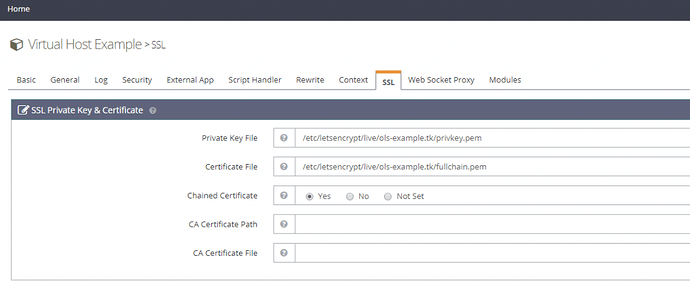
Many thanks for the tip! I out my domain in and got these results:
[000.261] Connection converted to SSL
SSLVersion in use: TLSv1_3
Cipher in use: TLS_AES_256_GCM_SHA384
Perfect Forward Secrecy: yes
Session Algorithm in use: Curve X25519 DHE(253 bits)
Certificate #1 of 4 (sent by MX): EXPIRED
Cert VALIDATION ERROR(S): certificate has expired
So email is encrypted but the recipient domain is not verified
ssl : scheme=smtp cert=94173779150800
: identity=mail.intervalle-arts.comcn=mail.intervalle-arts.com alt=2 mail.intervalle-arts.com
Cert Hostname VERIFIED (mail.intervalle-arts.com = mail.intervalle-arts.com | DNS:mail.intervalle-arts.com)
cert not revoked by OCSP
Data:
Version: 3 (0x2)
Serial Number: 04:4a:ac:b7:79:00:5e:60:63:5b:45:50:8a:09:05:b3:6c:a7
Validity:
Not Before: Jul 22 05:41:22 2022 GMT
Not After: Oct 20 05:41:21 2022 GMT
Subject:
commonName = mail.intervalle-arts.com
Issuer:
countryName = US
organizationName = Let’s Encrypt
commonName = R3
Subject Public Key Info:
Public Key Algorithm: id-ecPublicKey
Public Key Bits: (256 bit)
Modulus:
40:39:A7:32:05:57:15:D8:DC:46:45:78:42:C9:89:10
CD:17:6D:E7:B5:5F:DD:C4:53:E2:4C:7B:9B:01:4F:87
92:55:4B:17:21:81:D0:77:7E:3D:A4:7D:7F:FC:1E:1E
AE:21:D6:9D:AC:AD:96:5E:F4:51:CA:12:19:56:04:40
0
Exponent: n/a
So, the cert is out of date despite having reissued it multiple times. There are definitely issues with SSLs issued for mail.intervalle-arts.com (see above) but also the “host” as every time I logon to cyberpanel via https I’m told the connection is not private.
Edit: I tried turning mod security but it made no difference to the SSL cert being invalid. If I try to logon through https I get the message “Your connection is not private”. I’ve recently issued multiple SSLs via cyberpanel for “website”, “host”, and “mail server”.
Edit: here are my cyberpanel logs:
[12.01.2022_10-29-47] Websites matching query does not exist. [installSSLForDomain:72]
[12.02.2022_00-00-04] [Errno 2] No such file or directory: ‘/home/cyberpanel/git’. [IncScheduler.git:90]
[12.02.2022_02-00-04] Running SSL Renew Utility
[12.02.2022_02-00-04] Checking SSL for intervalle-arts.com.
[12.02.2022_02-00-04] SSL exists for intervalle-arts.com. Checking if SSL will expire in 15 days…
[12.02.2022_02-00-04] SSL exists for intervalle-arts.com and is not ready to renew, skipping…
[12.02.2022_02-00-04] Checking SSL for mail.intervalle-arts.com.
[12.02.2022_02-00-04] SSL exists for mail.intervalle-arts.com. Checking if SSL will expire in 15 days…
[12.02.2022_02-00-04] SSL exists for mail.intervalle-arts.com and is not ready to renew, skipping…
[12.02.2022_04-20-05] Trying to obtain SSL for: mail.intervalle-arts.com and: www.mail.intervalle-arts.com
[12.02.2022_04-20-05] /root/.acme.sh/acme.sh --issue -d mail.intervalle-arts.com -d www.mail.intervalle-arts.com --cert-file /etc/letsencrypt/live/mail.intervalle-arts.com/cert.pem --key-file /etc/letsencrypt/live/mail.intervalle-arts.com/privkey.pem --fullchain-file /etc/letsencrypt/live/mail.intervalle-arts.com/fullchain.pem -w /usr/local/lsws/Example/html -k ec-256 --force --server letsencrypt
[12.02.2022_04-20-11] Failed to obtain SSL for: mail.intervalle-arts.com and: www.mail.intervalle-arts.com
[12.02.2022_04-20-11] Trying to obtain SSL for: mail.intervalle-arts.com
[12.02.2022_04-20-15] Successfully obtained SSL for: mail.intervalle-arts.com
[12.02.2022_04-20-16] Websites matching query does not exist. [installSSLForDomain:72]
[12.02.2022_05-39-13] https://api.github.com/repos/usmannasir/cyberpanel/commits?sha=v2.3.2
[12.02.2022_07-43-20] https://api.github.com/repos/usmannasir/cyberpanel/commits?sha=v2.3.2
[12.02.2022_08-21-57] Trying to obtain SSL for: mail.intervalle-arts.com and: www.mail.intervalle-arts.com
[12.02.2022_08-21-57] /root/.acme.sh/acme.sh --issue -d mail.intervalle-arts.com -d www.mail.intervalle-arts.com --cert-file /etc/letsencrypt/live/mail.intervalle-arts.com/cert.pem --key-file /etc/letsencrypt/live/mail.intervalle-arts.com/privkey.pem --fullchain-file /etc/letsencrypt/live/mail.intervalle-arts.com/fullchain.pem -w /usr/local/lsws/Example/html -k ec-256 --force --server letsencrypt
[12.02.2022_08-22-02] Failed to obtain SSL for: mail.intervalle-arts.com and: www.mail.intervalle-arts.com
[12.02.2022_08-22-02] Trying to obtain SSL for: mail.intervalle-arts.com
[12.02.2022_08-22-04] Failed to obtain SSL, issuing self-signed SSL for: mail.intervalle-arts.com
[12.02.2022_08-22-04] Websites matching query does not exist. [installSSLForDomain:72]
[12.02.2022_08-22-05] Self signed SSL issued for mail.intervalle-arts.com.
[12.02.2022_08-23-45] Trying to obtain SSL for: intervalle-arts.com and: www.intervalle-arts.com
[12.02.2022_08-23-45] /root/.acme.sh/acme.sh --issue -d intervalle-arts.com -d www.intervalle-arts.com --cert-file /etc/letsencrypt/live/intervalle-arts.com/cert.pem --key-file /etc/letsencrypt/live/intervalle-arts.com/privkey.pem --fullchain-file /etc/letsencrypt/live/intervalle-arts.com/fullchain.pem -w /usr/local/lsws/Example/html -k ec-256 --force --server letsencrypt
[12.02.2022_08-23-49] Successfully obtained SSL for: intervalle-arts.com and: www.intervalle-arts.com
[12.03.2022_00-00-03] [Errno 2] No such file or directory: ‘/home/cyberpanel/git’. [IncScheduler.git:90]
[12.03.2022_02-00-03] Running SSL Renew Utility
[12.03.2022_02-00-03] Checking SSL for intervalle-arts.com.
[12.03.2022_02-00-03] SSL exists for intervalle-arts.com. Checking if SSL will expire in 15 days…
[12.03.2022_02-00-03] SSL exists for intervalle-arts.com and is not ready to renew, skipping…
[12.03.2022_02-00-03] Checking SSL for mail.intervalle-arts.com.
[12.03.2022_02-00-03] SSL exists for mail.intervalle-arts.com. Checking if SSL will expire in 15 days…
[12.03.2022_02-00-03] SSL exists for mail.intervalle-arts.com and is not ready to renew, skipping…
[12.03.2022_04-23-55] Trying to obtain SSL for: intervalle-arts.com and: www.intervalle-arts.com
[12.03.2022_04-23-55] /root/.acme.sh/acme.sh --issue -d intervalle-arts.com -d www.intervalle-arts.com --cert-file /etc/letsencrypt/live/intervalle-arts.com/cert.pem --key-file /etc/letsencrypt/live/intervalle-arts.com/privkey.pem --fullchain-file /etc/letsencrypt/live/intervalle-arts.com/fullchain.pem -w /usr/local/lsws/Example/html -k ec-256 --force --server letsencrypt
[12.03.2022_04-23-59] Successfully obtained SSL for: intervalle-arts.com and: www.intervalle-arts.com
[12.03.2022_04-27-16] Trying to obtain SSL for: mail.intervalle-arts.com and: www.mail.intervalle-arts.com
[12.03.2022_04-27-16] /root/.acme.sh/acme.sh --issue -d mail.intervalle-arts.com -d www.mail.intervalle-arts.com --cert-file /etc/letsencrypt/live/mail.intervalle-arts.com/cert.pem --key-file /etc/letsencrypt/live/mail.intervalle-arts.com/privkey.pem --fullchain-file /etc/letsencrypt/live/mail.intervalle-arts.com/fullchain.pem -w /usr/local/lsws/Example/html -k ec-256 --force --server letsencrypt
[12.03.2022_04-27-22] Failed to obtain SSL for: mail.intervalle-arts.com and: www.mail.intervalle-arts.com
[12.03.2022_04-27-22] Trying to obtain SSL for: mail.intervalle-arts.com
[12.03.2022_04-27-23] Failed to obtain SSL, issuing self-signed SSL for: mail.intervalle-arts.com
[12.03.2022_04-27-23] Websites matching query does not exist. [installSSLForDomain:72]
[12.03.2022_04-27-23] Self signed SSL issued for mail.intervalle-arts.com.
[12.03.2022_04-28-07] Trying to obtain SSL for: intervalle-arts.com and: www.intervalle-arts.com
[12.03.2022_04-28-07] /root/.acme.sh/acme.sh --issue -d intervalle-arts.com -d www.intervalle-arts.com --cert-file /etc/letsencrypt/live/intervalle-arts.com/cert.pem --key-file /etc/letsencrypt/live/intervalle-arts.com/privkey.pem --fullchain-file /etc/letsencrypt/live/intervalle-arts.com/fullchain.pem -w /usr/local/lsws/Example/html -k ec-256 --force --server letsencrypt
[12.03.2022_04-28-09] Failed to obtain SSL for: intervalle-arts.com and: www.intervalle-arts.com
[12.03.2022_04-28-09] Trying to obtain SSL for: intervalle-arts.com
[12.03.2022_04-28-12] Successfully obtained SSL for: intervalle-arts.com
Cyberpanel has one big problem, which using force SSL renew even current SSL is valid. In previous SSL renew request cyberpanel replace SSL file with self-signed SSL.
Restore the previous SSL files backup from root/.acme.sh/lookforfolder to actual path
also open the postfilx config file and add/correct SSL path.
Restart all services or restart server.
I can’t explain each point.
If you have little experience about Linux you will get success.
Hi, thanks for taking a look and for the advice. I’ll be honest, I have very little experience with Linux, but I’ll spend today researching what you advised and will try my best to solve the issue.
[Sun Dec 4 07:16:36 UTC 2022] Using CA: https://acme-v02.api.letsencrypt.org/directory
[Sun Dec 4 07:16:36 UTC 2022] Multi domain=‘DNS:intervalle-arts.com,DNS:www.intervalle-arts.com’
[Sun Dec 4 07:16:36 UTC 2022] Getting domain auth token for each domain
[Sun Dec 4 07:16:37 UTC 2022] Create new order error. Le_OrderFinalize not found. { “type”: “urn:ietf:params:acme:error:rateLimited”, “detail”: “Error creating new order :: too many certificates (5) already issued for this exact set of domains in the last 168 hours: intervalle-arts.com,www.intervalle-arts.com, retry after 2022-12-04T12:59:58Z: see Duplicate Certificate Limit - Let's Encrypt”, “status”: 429
So the SSL autorenewal run by Cyberpanel has caused Let’s Encrypt to stop issuing certs. I can’t find a button to turn it off. How do I deactivate it? Is there any way around the one week wait until I can issue an SSL cert ?
I have a couple of further questions (@josephgodwinke, perhaps you may be able to help):
Is this something Cyberpanel devs are aware of and have a workaround for? It has definitely increased the leaning curve for Cyberpanel and VPS newbies like myself!
So, both intervalle-arts.com and my mails server mail.intervalle-arts.com have self-signed SSLs, is the resolution the same for both? My mails are bouncing and every time I log onto Cyberpanel I get the “this server is not private” message.
Even if I resolve the auto-renew issue, am I going to have to play guessing games and applying fixes every time an SSL cert expires? I’d like to eventually use this domain for work and having client-facing e-mail addresses and websites stop responding is… well, not really a sustainable model.
Let’s go step by step. First disassociate CyberPanel with Let’s Encrypt this will help you solve any ssl issue.
First issue as quoted above means Let’s Encrypt Rate Limiting feature is in effect i believe at some point it was 5 issuances every week. Therefore we can see that CyberPanel has failed to reissue SSL several times but we dont know why.
Here is the issue. DNS problem for mail.intervalle-arts.com. Does this record appear in your CyberPanel DNS records ? Navigate to → https://SERVER_URL:8090/dns/addDeleteDNSRecords if not create it
Thanks! My DNS records are actually set in my Hostinger domain panel. There is an AAAA record for the IPv6 address (@) for the server. I’ve check in cyberpanel and there are also a number of entries in there too, but no AAAA record. Do I need one for mail.intervalle-arts.com? Also, should I delete all the cyberpanel DNS entries as I’m using the hostinger namesevers? There’s like a double dozen TXT records all saying the same three things.
Sidenote if you can migrate all your accounts to Cyberpnael server running on either AlmaLinux 8.4 or Ubuntu 20.04 LTS. Personally i recommend my customers to avoid Hostinger CyberPanel VPS products
EDIT: I wish I hadn’t gone with Hostinger. Unfortunately, they sold me a three year contract and I’m stuck with it. I will migrate as soon as I’m able.
I used the commands you gave in SSH and then logged out and back in again to OLS but the entries are still there. Does that mean the operation was unsuccessful? I check the files and a cert.pm files is still in (for example) the directory intervalle-arts.com
Hi! I followed the instructions you gave me until he end.
I removed the files from the folders listed by OLS. I checked they’d been removed. I then went into Cyberpanel and reissued SSLs. Unfortunately, they still result in self-signed certs (I check the folders again, and the .pem files were re-added.
I ran the previous script and got these results:
[root@taro intervalle-arts.com]# /root/.acme.sh/acme.sh --issue -d intervalle-arts.com -d www.intervalle-arts.com --cert-file /etc/letsencrypt/live/intervalle-arts.com/cert.pem --key-file /etc/letsencrypt/live/intervalle-arts.com/privkey.pem --fullchain-file /etc/letsencrypt/live/intervalle-arts.com/fullchain.pem -w /usr/local/lsws/Example/html -k ec-256 --force --server letsencrypt
[Sun Dec 4 11:56:57 UTC 2022] Using CA: https://acme-v02.api.letsencrypt.org/directory
[Sun Dec 4 11:56:57 UTC 2022] Multi domain='DNS:intervalle-arts.com,DNS:www.intervalle-arts.com'
[Sun Dec 4 11:56:57 UTC 2022] Getting domain auth token for each domain
[Sun Dec 4 11:56:58 UTC 2022] **Create new order error. Le_OrderFinalize not found. {**
**"type": "urn:ietf:params:acme:error:rateLimited",**
**"detail": "Error creating new order :: too many certificates (5) already issued for this exact set of domains in the last 168 hours: intervalle-arts.com,www.intervalle-arts.com, retry after 2022-12-04T12:59:58Z: see https://letsencrypt.org/docs/duplicate-certificate-limit/",**
**"status": 429**
**}**
[Sun Dec 4 11:56:58 UTC 2022] **Please add '--debug' or '--log' to check more details.**
[Sun Dec 4 11:56:58 UTC 2022] **See: https://github.com/acmesh-official/acme.sh/wiki/How-to-debug-acme.sh**
Hi, I’m trying to do that but it keeps duplicating the text and I can’t just use the arrow keys to move to the text and edit it. Is there an easier way to do that?
Then, how mail domain loading the parent domain SSL. Please re-run given command for mail only. also share history command output and later /usr/local/lsws/conf/httpd_config.conf content
Thanks again for all the help. Bit of an update: I’m still having issues with mail exchanges recognising the new SSL, they still show the expired one. Also, when I test on //email/testTo: I get the both results.
i was talking about SSL button not about renew cron. Also, sometimes lsws not getting restart even after sucessful renew by cron. so you can set lsws restart cron once a week.
Don’t use Cyberpanel SSL renew button showing on website listing page more than once. if first time its not working then run from commandline with --debug option for finding issue.
For now run below commands:
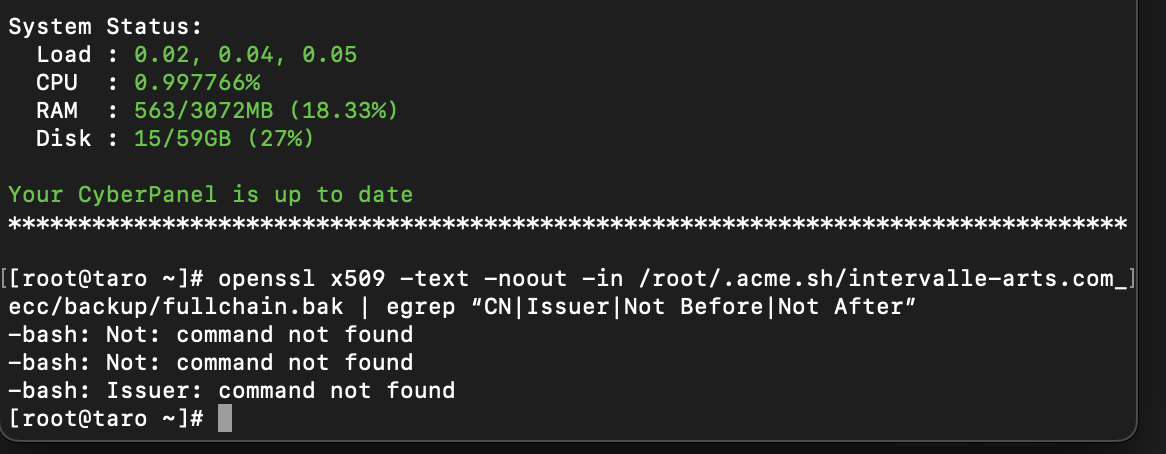
cat /root/.acme.sh/intervalle-arts.com_ecc/backup/fullchain.bak> /etc/letsencrypt/live/intervalle-arts.com/fullchain.pem
cat /root/.acme.sh/intervalle-arts.com_ecc/backup/key.bak > /etc/letsencrypt/live/intervalle-arts.com/privkey.pem
rm /etc/pki/dovecot/certs/dovecot.pem /etc/pki/dovecot/private/dovecot.pem
ln -s /etc/letsencrypt/live/mail.intervalle-arts.com/fullchain.pem /etc/pki/dovecot/certs/dovecot.pem
ln -s /etc/letsencrypt/live/mail.intervalle-arts.com/privkey.pem /etc/pki/dovecot/private/dovecot.pem
service lsws restart && service postfix restart && service dovecot restart
tail -n 4 /etc/dovecot/dovecot.conf #make sure above tail command output have without # #local_namemail.intervalle-arts.com {
if you are not able to get www SSL working, Please renew SSL after limit ban removal. or try other SSL like zero SSL instead of LE.
Hope everything will be fine.
Hi @luckyrajpurohit@josephgodwinke. Sorry to bother you again, but I’m getting some very odd errors since yesterday evening.
I received a couple of mails from Cyberpanel Log:
The first:
[12.05.2022_00-00-06] [Errno 2] No such file or directory: ‘/home/cyberpanel/git’. [IncScheduler.git:90].
The second:
[12.05.2022_02-00-04] [Errno 2] No such file or directory: ‘postmap’: ‘postmap’. [ProcessUtilities.normalExecutioner.Base].
[12.05.2022_02-00-04] Running SSL Renew Utility.
The third:
[12.05.2022_03-05-32] (421, b’4.7.0 mail.intervalle-arts.com Error: too many connections from ::1’).
[12.05.2022_03-05-32] (421, b’4.7.0 mail.intervalle-arts.com Error: too many connections from ::1’).
I exported the CYBERPANEL LOG below:
[12.05.2022_03-00-29] (421, b’4.7.0 mail.intervalle-arts.com Error: too many connections from ::1’)
[12.05.2022_03-00-29] (421, b’4.7.0 mail.intervalle-arts.com Error: too many connections from ::1’)
[12.05.2022_03-00-29] (421, b’4.7.0 mail.intervalle-arts.com Error: too many connections from ::1’)
[12.05.2022_03-00-29] (421, b’4.7.0 mail.intervalle-arts.com Error: too many connections from ::1’)
[12.05.2022_03-00-29] (421, b’4.7.0 mail.intervalle-arts.com Error: too many connections from ::1’)
[12.05.2022_03-00-29] (421, b’4.7.0 mail.intervalle-arts.com Error: too many connections from ::1’)
[12.05.2022_03-00-29] (421, b’4.7.0 mail.intervalle-arts.com Error: too many connections from ::1’)
[12.05.2022_03-00-29] (421, b’4.7.0 mail.intervalle-arts.com Error: too many connections from ::1’)
[12.05.2022_03-00-29] (421, b’4.7.0 mail.intervalle-arts.com Error: too many connections from ::1’)
[12.05.2022_03-00-29] (421, b’4.7.0 mail.intervalle-arts.com Error: too many connections from ::1’)
[12.05.2022_03-00-29] (421, b’4.7.0 mail.intervalle-arts.com Error: too many connections from ::1’)
[12.05.2022_03-00-29] (421, b’4.7.0 mail.intervalle-arts.com Error: too many connections from ::1’)
[12.05.2022_03-00-29] (421, b’4.7.0 mail.intervalle-arts.com Error: too many connections from ::1’)
[12.05.2022_03-00-29] (421, b’4.7.0 mail.intervalle-arts.com Error: too many connections from ::1’)
[12.05.2022_03-00-29] (421, b’4.7.0 mail.intervalle-arts.com Error: too many connections from ::1’)
[12.05.2022_03-00-29] (421, b’4.7.0 mail.intervalle-arts.com Error: too many connections from ::1’)
[12.05.2022_03-00-29] (421, b’4.7.0 mail.intervalle-arts.com Error: too many connections from ::1’)
[12.05.2022_03-00-29] (421, b’4.7.0 mail.intervalle-arts.com Error: too many connections from ::1’)
[12.05.2022_03-00-29] (421, b’4.7.0 mail.intervalle-arts.com Error: too many connections from ::1’)
[12.05.2022_03-00-29] (421, b’4.7.0 mail.intervalle-arts.com Error: too many connections from ::1’)
[12.05.2022_03-00-29] (421, b’4.7.0 mail.intervalle-arts.com Error: too many connections from ::1’)
[12.05.2022_03-00-29] (421, b’4.7.0 mail.intervalle-arts.com Error: too many connections from ::1’)
[12.05.2022_03-00-29] (421, b’4.7.0 mail.intervalle-arts.com Error: too many connections from ::1’)
[12.05.2022_03-00-29] (421, b’4.7.0 mail.intervalle-arts.com Error: too many connections from ::1’)
[12.05.2022_03-00-29] (421, b’4.7.0 mail.intervalle-arts.com Error: too many connections from ::1’)
[12.05.2022_03-00-29] (421, b’4.7.0 mail.intervalle-arts.com Error: too many connections from ::1’)
[12.05.2022_03-00-29] (421, b’4.7.0 mail.intervalle-arts.com Error: too many connections from ::1’)
[12.05.2022_03-00-29] (421, b’4.7.0 mail.intervalle-arts.com Error: too many connections from ::1’)
[12.05.2022_03-00-29] (421, b’4.7.0 mail.intervalle-arts.com Error: too many connections from ::1’)
[12.05.2022_03-00-29] (421, b’4.7.0 mail.intervalle-arts.com Error: too many connections from ::1’)
[12.05.2022_03-00-29] (421, b’4.7.0 mail.intervalle-arts.com Error: too many connections from ::1’)
[12.05.2022_03-00-29] (421, b’4.7.0 mail.intervalle-arts.com Error: too many connections from ::1’)
[12.05.2022_03-00-29] (421, b’4.7.0 mail.intervalle-arts.com Error: too many connections from ::1’)
[12.05.2022_03-00-29] (421, b’4.7.0 mail.intervalle-arts.com Error: too many connections from ::1’)
[12.05.2022_03-00-29] (421, b’4.7.0 mail.intervalle-arts.com Error: too many connections from ::1’)
[12.05.2022_03-00-29] (421, b’4.7.0 mail.intervalle-arts.com Error: too many connections from ::1’)
[12.05.2022_03-00-29] (421, b’4.7.0 mail.intervalle-arts.com Error: too many connections from ::1’)
[12.05.2022_03-00-29] (421, b’4.7.0 mail.intervalle-arts.com Error: too many connections from ::1’)
[12.05.2022_03-00-29] (421, b’4.7.0 mail.intervalle-arts.com Error: too many connections from ::1’)
[12.05.2022_03-00-29] (421, b’4.7.0 mail.intervalle-arts.com Error: too many connections from ::1’)
[12.05.2022_03-00-29] (421, b’4.7.0 mail.intervalle-arts.com Error: too many connections from ::1’)
[12.05.2022_03-00-29] (421, b’4.7.0 mail.intervalle-arts.com Error: too many connections from ::1’)
[12.05.2022_03-00-29] (421, b’4.7.0 mail.intervalle-arts.com Error: too many connections from ::1’)
[12.05.2022_03-00-29] (421, b’4.7.0 mail.intervalle-arts.com Error: too many connections from ::1’)
[12.05.2022_03-00-29] (421, b’4.7.0 mail.intervalle-arts.com Error: too many connections from ::1’)
[12.05.2022_03-00-31] (421, b’4.7.0 mail.intervalle-arts.com Error: too many connections from ::1’)
[12.05.2022_03-01-50] (421, b’4.7.0 mail.intervalle-arts.com Error: too many connections from ::1’)
[12.05.2022_03-02-04] (421, b’4.7.0 mail.intervalle-arts.com Error: too many connections from ::1’)
[12.05.2022_03-05-32] (421, b’4.7.0 mail.intervalle-arts.com Error: too many connections from ::1’)
[12.05.2022_03-05-32] (421, b’4.7.0 mail.intervalle-arts.com Error: too many connections from ::1’)
Aslo, if the auto-renewal is running via Cyberpanel and requesting certs from Let’s Encrypt, does that mean the limit ban will just keep continuing forever?
Outgoing emails are being rejected. Are you sendin bulk emails? Your postfix MTA is opening so many concurrent connections at a single time 03-00-29
Solution: As explained here Postfix Configuration Parameters run the command nano /etc/postfix-out/main.cf or vi /etc/postfix-out/main.cf on AlmaLinux and change
# Don't anvil(8) control the re-injection port.
#
# smtpd_client_connection_count_limit = 0
# 50 concurrent connections
smtpd_client_connection_count_limit = 50
Hi! No, I’ve only sent two or three mails out to test the new SSLs. I’ve checked all the mails and there’s nothing outgoing or stuck in a queue. What could be causing this? Maybe something I did yesterday while trying to fix the SSL issue?
I read the article on rate limits, but if Cyberpanel is requesting new SSLs every day via auto renew doesn’t that mean that the limit will be hit again an again and again?
I believe @luckyrajpurohit gave you the proper way to solve this issue rather than my delete-all-start-all-over again method. I have taken the time to look over his/her steps and they look okay to me.
Did you do anything extra out of what he/she posted?
Thanks for the reply, I haven’t done anything extra at all. I honestly wouldn’t know how!
I just want to check the below questions before I proceed with @luckyrajpurohit 's fix as things are getting a little confusing for me.
for the multiple connections issue. In cyberpanel how can I diagnose the cause of these hundreds of connections? Also, should I do the Postfix Configuration Parameters you suggested? I filled the nano command but there was no such document.
the limit ban with Let’s Encrypt. For this ban to be lifted, I mustn’t request/renew my SSL for one week. But everyday, Cyberpanel is renewing SSL automatically, so I will never escape the ban. Is this correct?
after, should I know run the fix from @luckyrajpurohit to solve the issues from my previous post?
I have new errors today. I didn’t touch anything yesterday other than look at logs, but now cyberpanel is reporting multiple errors.
My mail client was unable to connect to my e-mail sever this morning at the same time Cyberpanel was running the auto-renewal SSL function. I got a sever 500 error in Cyberpanle and the mail client error was:
I checked the EMAIL logs in cyberpanel and got this:
Dec 6 03:01:41 taro postfix/trivial-rewrite[69828]: warning: virtual_mailbox_domains lookup failure
Dec 6 03:01:47 taro postfix/trivial-rewrite[69828]: warning: virtual_mailbox_domains: proxy:mysql:/etc/postfix/mysql-virtual_domains.cf: table lookup problem
Dec 6 03:01:49 taro postfix/trivial-rewrite[69828]: warning: virtual_mailbox_domains lookup failure
Dec 6 03:01:55 taro postfix/smtpd[69900]: NOQUEUE: reject: RCPT from o19837159x89.outbound-mail.sendgrid.net[198.37.159.89]: 451 4.3.0 chris.hayes@intervalle-arts.com: Temporary lookup failure; from=bounces+5900088-83b4-chris.hayes=intervalle-arts.com@sendgrid.net to=chris.hayes@intervalle-arts.com proto=ESMTP helo=<o19837159x89.outbound-mail.sendgrid.net>
Dec 6 03:01:55 taro postfix/smtpd[69900]: using backwards-compatible default setting smtpd_relay_before_recipient_restrictions=no to reject recipient “chris.hayes@intervalle-arts.com” from client “o19837159x89.outbound-mail.sendgrid.net[198.37.159.89]”
Dec 6 03:01:55 taro postfix/smtpd[69900]: disconnect from o19837159x89.outbound-mail.sendgrid.net[198.37.159.89] ehlo=2 starttls=1 mail=1 rcpt=0/1 quit=1 commands=5/6
Dec 6 03:01:55 taro dovecot: auth-worker(70068): Error: mysql(localhost): Connect failed to database (cyberpanel): Can’t connect to local MySQL server through socket ‘/var/lib/mysql/mysql.sock’ (2 “No such file or directory”) - waiting for 125 seconds before retry
Dec 6 03:02:15 taro spamd[70019]: spamd: server killed by SIGTERM, shutting down
Dec 6 03:02:15 taro dovecot: auth-worker(70068): Error: sqlpool(mysql): Finished query ‘SELECT email as user, password FROM e_users WHERE email=‘chris.hayes@intervalle-arts.com’;’ in 60018 msecs: Query timed out (no free connections for 60 secs)
Dec 6 03:02:15 taro dovecot: auth-worker(70068): Error: conn unix:auth-worker (pid=69764,uid=0): auth-worker<1>: sql(chris.hayes@intervalle-arts.com,203.10.99.13,<QUuPAiDvI/3LCmMN>): Password query failed: Not connected to database
Dec 6 03:02:15 taro dovecot: auth: Error: auth-worker: Aborted PASSV request for chris.hayes@intervalle-arts.com: Lookup timed out
Dec 6 03:02:15 taro dovecot: imap-login: Login: user=chris.hayes@intervalle-arts.com, method=PLAIN, rip=86.48.13.251, lip=93.188.165.29, mpid=70138, TLS, session=<w9uf/x/v0PRWMA37>
Dec 6 03:02:15 taro dovecot: imap-login: Login: user=chris.hayes@intervalle-arts.com, method=PLAIN, rip=86.48.13.251, lip=93.188.165.29, mpid=70141, TLS, session=<1BHGByDvK/VWMA37>
Dec 6 03:02:15 taro dovecot: imap-login: Login: user=chris.hayes@intervalle-arts.com, method=PLAIN, rip=86.48.13.251, lip=93.188.165.29, mpid=70143, TLS, session=
Dec 6 03:02:16 taro dovecot: imap-login: Login: user=chris.hayes@intervalle-arts.com, method=PLAIN, rip=86.48.13.251, lip=93.188.165.29, mpid=70145, TLS, session=
Dec 6 03:02:16 taro dovecot: imap(chris.hayes@intervalle-arts.com)<70145>: Disconnected: Logged out in=36 out=555 deleted=0 expunged=0 trashed=0 hdr_count=0 hdr_bytes=0 body_count=0 body_bytes=0
Dec 6 03:02:17 taro dovecot: imap-login: Login: user=chris.hayes@intervalle-arts.com, method=PLAIN, rip=203.10.99.13, lip=93.188.165.29, mpid=70146, TLS, session=<QUuPAiDvI/3LCmMN>
Dec 6 03:02:21 taro spamd[70149]: logger: removing stderr method
Dec 6 03:02:21 taro spamd[70153]: spamd: server started on IO::Socket::IP [127.0.0.1]:783, IO::Socket::IP [::1]:783 (running version 3.4.0)
Dec 6 03:02:27 taro spamd[70153]: spamd: server pid: 70153
Dec 6 03:02:27 taro spamd[70153]: spamd: server successfully spawned child process, pid 70155
Dec 6 03:02:27 taro spamd[70153]: spamd: server successfully spawned child process, pid 70156
Dec 6 03:02:27 taro spamd[70153]: prefork: child states: IS
Dec 6 03:02:27 taro spamd[70153]: prefork: child states: II
Dec 6 03:02:27 taro dovecot: imap-login: Login: user=chris.hayes@intervalle-arts.com, method=PLAIN, rip=203.10.99.13, lip=93.188.165.29, mpid=70157, TLS, session=<kdQ5CCDvK/3LCmMN>
Dec 6 03:02:27 taro dovecot: imap(chris.hayes@intervalle-arts.com)<70143>: Disconnected: Logged out in=697 out=6699 deleted=0 expunged=0 trashed=0 hdr_count=0 hdr_bytes=0 body_count=0 body_bytes=0
Dec 6 03:02:58 taro postfix/smtpd[69900]: connect from o19837159x89.outbound-mail.sendgrid.net[198.37.159.89]
Dec 6 03:02:58 taro postfix/smtpd[69900]: NOQUEUE: reject: RCPT from o19837159x89.outbound-mail.sendgrid.net[198.37.159.89]: 451 4.3.0 chris.hayes@intervalle-arts.com: Temporary lookup failure; from=bounces+5900088-83b4-chris.hayes=intervalle-arts.com@sendgrid.net to=chris.hayes@intervalle-arts.com proto=ESMTP helo=<o19837159x89.outbound-mail.sendgrid.net>
Dec 6 03:02:58 taro postfix/smtpd[69900]: using backwards-compatible default setting smtpd_relay_before_recipient_restrictions=no to reject recipient “chris.hayes@intervalle-arts.com” from client “o19837159x89.outbound-mail.sendgrid.net[198.37.159.89]”
Dec 6 03:02:58 taro postfix/smtpd[69900]: disconnect from o19837159x89.outbound-mail.sendgrid.net[198.37.159.89] ehlo=2 starttls=1 mail=1 rcpt=0/1 quit=1 commands=5/6
Dec 6 03:02:58 taro postfix/smtpd[69900]: connect from localhost[::1]
Dec 6 03:02:58 taro postfix/smtpd[69900]: NOQUEUE: reject: RCPT from localhost[::1]: 451 4.3.0 Chris.Hayes@intervalle-arts.com: Temporary lookup failure; from=root@taro.intervalle-arts.com to=Chris.Hayes@intervalle-arts.com proto=ESMTP helo=<taro.intervalle-arts.com>
Dec 6 03:02:58 taro postfix/smtpd[69900]: using backwards-compatible default setting smtpd_relay_before_recipient_restrictions=no to reject recipient “Chris.Hayes@intervalle-arts.com” from client “localhost[::1]”
Dec 6 03:02:58 taro postfix/smtpd[70165]: connect from localhost[::1]
Dec 6 03:02:58 taro postfix/smtpd[70165]: 827FDC00A2: client=localhost[::1]
Dec 6 03:02:58 taro postfix/cleanup[70170]: 827FDC00A2: message-id=20221206030257.827FDC00A2@mail.intervalle-arts.com
Dec 6 03:02:58 taro opendkim[496]: 827FDC00A2: no signing table match for ‘root@taro.intervalle-arts.com’
Dec 6 03:02:58 taro opendkim[496]: 827FDC00A2: no signature data
Dec 6 03:02:59 taro postfix/qmgr[68174]: 827FDC00A2: from=root@taro.intervalle-arts.com, size=605, nrcpt=1 (queue active)
Dec 6 03:03:00 taro postfix/smtpd[70165]: disconnect from localhost[::1] ehlo=1 mail=1 rcpt=1 data=1 commands=4
Dec 6 03:03:00 taro postfix/smtpd[69900]: lost connection after RSET from localhost[::1]
Dec 6 03:03:00 taro postfix/smtpd[69900]: disconnect from localhost[::1] ehlo=1 mail=1 rcpt=0/1 rset=1 commands=3/4
Dec 6 03:03:00 taro postfix/pipe[70172]: 827FDC00A2: to=chris.hayes@intervalle-arts.com, relay=dovecot, delay=0.11, delays=0.09/0.01/0/0.01, dsn=2.0.0, status=sent (delivered via dovecot service)
Dec 6 03:03:00 taro postfix/qmgr[68174]: 827FDC00A2: removed
Dec 6 03:03:07 taro dovecot: imap-login: Login: user=chris.hayes@intervalle-arts.com, method=PLAIN, rip=203.10.99.13, lip=93.188.165.29, mpid=70190, TLS, session=
Dec 6 03:03:56 taro dovecot: imap(chris.hayes@intervalle-arts.com)<70157><kdQ5CCDvK/3LCmMN>: Disconnected: Logged out in=320 out=1940 deleted=0 expunged=0 trashed=0 hdr_count=0 hdr_bytes=0 body_count=0 body_bytes=0
Dec 6 03:04:26 taro dovecot: imap(chris.hayes@intervalle-arts.com)<70146><QUuPAiDvI/3LCmMN>: Disconnected: Logged out in=1424 out=3264 deleted=0 expunged=0 trashed=0 hdr_count=0 hdr_bytes=0 body_count=0 body_bytes=0
I received this error in an e-mail report from Cyberpanel at the same time it was running the SSL auto-renewal function:
I also received this error in a separate report at the same time as (2):
[12.06.2022_02-00-03] [Errno 2] No such file or directory: ‘postmap’: ‘postmap’. [ProcessUtilities.normalExecutioner.Base].
earlier this morning I received this error report:
[12.06.2022_00-00-05] [Errno 2] No such file or directory: ‘/home/cyberpanel/git’. [IncScheduler.git:90].
I’ve been getting regular Server 500 errors while logged onto Cyberpanel.
I’m still getting the “too many connections errors” In Cyberpanel main log. It’s about the same time as yesterday, could there be a process causing this?:
[12.06.2022_03-34-28] (421, b’4.7.0 mail.intervalle-arts.com Error: too many connections from ::1’)
[12.06.2022_03-34-28] maximum recursion depth exceeded while calling a Python object
DKIM errors (see below)
I really, really appreciate the help from you both, but I feel like I might be making things worse!!!
If I go into DKIM manager in Cyberpanel it says “key successfully fetched” and displays key, but when I look at the Cyberpanle error log it says
[12.06.2022_04-49-06] We had errors while creating DKIM record for: intervalle-arts.com. Error message: Command '[‘cat’, ‘/etc/opendkim/keys/intervalle-arts.com/default.txt’]’ returned non-zero exit status 1…
Yes the ssl was valid but for some reason CYberPanel chose to renew the certificate. I have removed the cronjob and added my own - nothing special just added a sink and different timing
I think at this stage it’s a delete the server and start again after a week or so. That way Cyberpanel doesn’t request any more SSL certs, the LE ban resets and all these connected errors will hopefully go away. Something in the above fixes that I’ve applied has caused a whole bunch of new but connected problems. This is too much work for just a simple Wordpress site and e-mail server.
Thanks both for all your help over the last few days.