Welcome @Andreas1 Happy you are here
Check if you have leftover certificates and chains for hostname e.g. if your hostname is mydomain.net using ssh terminal you will see them here ls /etc/letsencrypt/live/
If the folder mydomain.net exists:
You need to remove private keys and certificates at the Virtual Host Level
Go to OLS WebAdmin Console of your server i.e https://SERVER_URL:7080 use admin and password you chose for CyberPanel admin panel
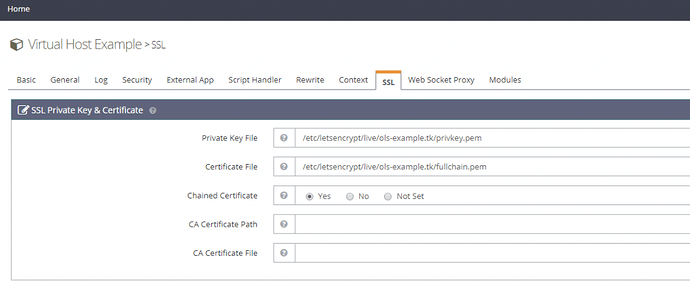
Then you delete all private keys and certificates for respective website and hostname from server:
$ rm -f /etc/letsencrypt/live/mydomain.net/privkey.pem && rm -f /etc/letsencrypt/live/mydomain.net/fullchain.pem

$ rm -f /etc/letsencrypt/live/mail.mydomain.net/privkey.pem && rm -f /etc/letsencrypt/live/mail.mydomain.net/fullchain.pem

$ rm -f /etc/letsencrypt/live/ssl.mydomain.net/privkey.pem && rm -f /etc/letsencrypt/live/ssl.mydomain.net/fullchain.pem
Then resissue hostname SSL the CyberPanel way:
- Go to https://server.mydomain.net:8090/manageSSL/sslForHostName
- Choose
mydomain.net
- Click on Issue SSL
If its not hostname domain
- Go to https://server.mydomain.net:8090/manageSSL/manageSSL
- Choose
mydomain.net
- Click on Issue SSL
$ sudo su - -c "sh <(curl https://raw.githubusercontent.com/usmannasir/cyberpanel/stable/cyberpanel_upgrade.sh || wget -O - https://raw.githubusercontent.com/usmannasir/cyberpanel/stable/cyberpanel_upgrade.sh)"
## if successful
$ sudo reboot
## if fails
$ nano /var/log/upgradeLogs.txt
