DT
Hello,
How can i install ioncube loader on PHP 8.1 and ubuntu 20.04
Thank you
 Community
Hello,
How can i install ioncube loader on PHP 8.1 and ubuntu 20.04
Thank you
Hello @digitaltasweq
Try this:
sh <(curl https://raw.githubusercontent.com/josephgodwinkimani/cyberpanel-mods/main/php_ioncube_install.sh || wget -O - https://raw.githubusercontent.com/josephgodwinkimani/cyberpanel-mods/main/php_ioncube_install.sh)
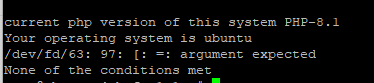
i got this error
root@vps:~# cp ioncube/ioncube_loader_lin_8.1.so /usr/local/lsws/lsphp81/lib64/php/modules/ioncube_loader_lin_8.1.so
cp: cannot create regular file '/usr/local/lsws/lsphp81/lib64/php/modules/ioncube_loader_lin_8.1.so': No such file or directory
Check there was error with that command just fixed it
I had same error, I made a bash script for this. You can run with this command.
bash <(curl -Ls https://raw.githubusercontent.com/erenaksoy/lsws-ioncube-installer/main/install.sh)
@Zang @josephgodwinke @digitaltasweq
Hi
Is it possible to install the ioncube for php 8 on cyberpanel?
is it work with new wordpress plugins that are compatible with new version of ioncube?
and is it important if I’m runing the openlitespeed?
Follow said instructions here How to install ioncube loader extension on php 8.1 - #5 by Zang
Hi
Thanks for respond
I just want for php 8 not 8.1
these are not the same
most of plugins are not compatible with php 8.1
sh <(curl https://raw.githubusercontent.com/josephgodwinkimani/cyberpanel-mods/main/php_ioncube_install.sh || wget -O - https://raw.githubusercontent.com/josephgodwinkimani/cyberpanel-mods/main/php_ioncube_install.sh)
A direct answer would be:
cd /usr/local/
sudo apt install wget -y
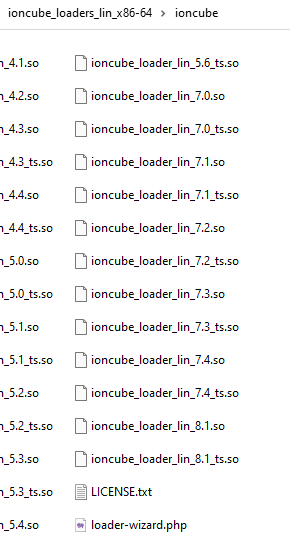
wget https://downloads.ioncube.com/loader_downloads/ioncube_loaders_lin_x86-64.tar.gz
tar -xvf ioncube_loaders_lin_x86-64.tar.gz -C /usr/local
cp ioncube/ioncube_loader_lin_8.0.so /usr/local/lsws/lsphp80/lib/php/20200930/
echo "extension=ioncube_loader_lin_8.0.so" >> /usr/local/lsws/lsphp80/etc/php/8.0/mods-available/01-ioncube.ini
systemctl restart lsws
Sorry man i just stumbled upon the fact that Ioncube is usually skipping x.0 version of PHP, so, if you need loader, you need to upgrade to PHP 8.1 or downgrade to PHP 7.4
Hi
Thanks a lot,
In fact the new version of php is better than other versions but I have limitation on using new php
Thanks
I installed the ioncube with the ioncube installer and it gives me these warnings
Download one of the following archives of Loaders for Linux x86-64:
tar.gz
zip
Put the Loader files in /usr/local/lsws/lsphp81/lib/php/20210902
Edit the file /usr/local/lsws/lsphp81/etc/php/8.1/litespeed/php.ini and before any other zend_extension lines ensure that the following is included:
zend_extension = /usr/local/lsws/lsphp81/lib/php/20210902/ioncube_loader_lin_8.1.so
Restart the server software.
When the server software has restarted, click here to test the Loader.


Open basedir restrictions are in effect. This may affect the operation of this Loader Wizard.


Please note that the following problems currently exist with the ionCube Loader installation:
The following ini files could not be found by the Wizard: /usr/local/lsws/lsphp81/etc/php/8.1/litespeed/php.ini,/usr/local/lsws/lsphp81/etc/php/8.1/mods-available/20-timezone.ini,/usr/local/lsws/lsphp81/etc/php/8.1/mods-available/40-apcu.ini,/usr/local/lsws/lsphp81/etc/php/8.1/mods-available/40-igbinary.ini,/usr/local/lsws/lsphp81/etc/php/8.1/mods-available/40-imagick.ini,/usr/local/lsws/lsphp81/etc/php/8.1/mods-available/40-msgpack.ini,/usr/local/lsws/lsphp81/etc/php/8.1/mods-available/50-memcached.ini,/usr/local/lsws/lsphp81/etc/php/8.1/mods-available/50-redis.ini,/usr/local/lsws/lsphp81/etc/php/8.1/mods-available/curl.ini,/usr/local/lsws/lsphp81/etc/php/8.1/mods-available/imap.ini,/usr/local/lsws/lsphp81/etc/php/8.1/mods-available/intl.ini,/usr/local/lsws/lsphp81/etc/php/8.1/mods-available/ldap.ini,/usr/local/lsws/lsphp81/etc/php/8.1/mods-available/mysqli.ini,/usr/local/lsws/lsphp81/etc/php/8.1/mods-available/opcache.ini,/usr/local/lsws/lsphp81/etc/php/8.1/mods-available/pdo_dblib.ini,/usr/local/lsws/lsphp81/etc/php/8.1/mods-available/pdo_mysql.ini,/usr/local/lsws/lsphp81/etc/php/8.1/mods-available/pdo_pgsql.ini,/usr/local/lsws/lsphp81/etc/php/8.1/mods-available/pdo_sqlite.ini,/usr/local/lsws/lsphp81/etc/php/8.1/mods-available/pgsql.ini,/usr/local/lsws/lsphp81/etc/php/8.1/mods-available/pspell.ini,/usr/local/lsws/lsphp81/etc/php/8.1/mods-available/snmp.ini,/usr/local/lsws/lsphp81/etc/php/8.1/mods-available/sqlite3.ini,/usr/local/lsws/lsphp81/etc/php/8.1/mods-available/tidy.ini
This may be due to server restrictions in place.
The necessary zend_extension line could not be found in the configuration.
after fixed the, the Ioncube was installed and worked for me
Thanks for your script @Zang
And thanks to you @josephgodwinke
To day I got error , when I active the plugins that code by ioncube , I got this:
PHP Fatal error: The file /home/oldsite.com/public_html/wp-content/plugins/plus/app/Providers/RTL_License_7fd36fd6ae51be17.php encoded as type [1/72] cannot be decoded by this version of the ionCube Loader.
Kindly share which wordpress plugin you are using and the version. This looks like an ioncube mismatch which can only be solved by downgrading ioncube versions or plugin version. I would not recommend the latter option
These are plugins that cuse the error
th ahutor of plugins told me should work in php 8.1 and Ioncube 12
please test them
When I active them. the wordpress show me the error 500
Hi @josephgodwinke
How are you?
Did you got time to test the plugins?
Do you gave any Idea how install ioncube in cyberpanel to work on php 8.1 and upgrade the ioncube in php 7.4?
Thanks
Hello @av_admin Sorry buddy
I forgot to get back to you here. I managed to install but have not tested yet.
OR
use this script so long as php 8.1 is default php version
sh <(curl https://raw.githubusercontent.com/josephgodwinkimani/cyberpanel-mods/main/php_ioncube_install.sh || wget -O - https://raw.githubusercontent.com/josephgodwinkimani/cyberpanel-mods/main/php_ioncube_install.sh)
Hello @josephgodwinke
Fine
I will test and will back here again
Thank you