
Community

Error: cURL error 28: Operation timed out after X milliseconds

id
ideveloppro #1

I mostly face this error in all my WordPress admin panels in plugin updates or any other external operation
I have seen many community threads but couldn’t find any useful

It would be greatly appreciated if someone could get this solved and let me know how actions to take in cyberpanel admin panel

Errors:
jo
josephgodwinke #2

Hello @ideveloppro

cURL operation timed out. Check PHP memory limit, PHP timeout settings, WordPress timeout settings, Firewall settings e.g. CSF or Imunify settings

id
ideveloppro #3

These are the PHP settings, I guess they are fine. Let me know your view

I am using CSF not imunify
These are the following settings, let me know if you can find anything wrong

Also, it would be great if you can share what security settings are best to set in cyberpanel so that I don’t face these types of problem next

jo
josephgodwinke #4

Hello @ideveloppro

It could also be caused by a plugin. Check your wordpress plugins. To check for a plugin conflict you can temporarily deactivate all other plugins, and then see if it Screenshot by Lightshot this works like try to update wordpress core.

  • First disable all security modules - CSF, modsecurity etc

  • Secondly disable all plugins

  • Test if you can update WordPress core

  • Activate plugins one by one testing editing a post or page/ updating core/ leveraging WP-REST API etc

Post here if you need more clarification

id
ideveloppro #5

Till I know, the firewall is the one conflicting because this is happening in all WordPress accounts and they have been built for 2 3 years running on other servers and now on cyberpanel so it’s not about plugins

Can you share with me the best settings for cyberpanel firewall CSF/ModSecurity etc

jo
josephgodwinke #6

@ideveloppro

Personally I do not use CyberPanel ModSecurity because development stopped long time ago. And i do not recommend it for any of my customers. Prefer CloudFlare WAF, Imunify

As for CSF its just a packet inspection app that from experience only stops intrusions such as bruteforce exploitations such as wordpress XMLRPC. The default configuration is sufficient enough. Install as is and csf will do the rest. Prefer CrowdSec

jo
josephgodwinke #8

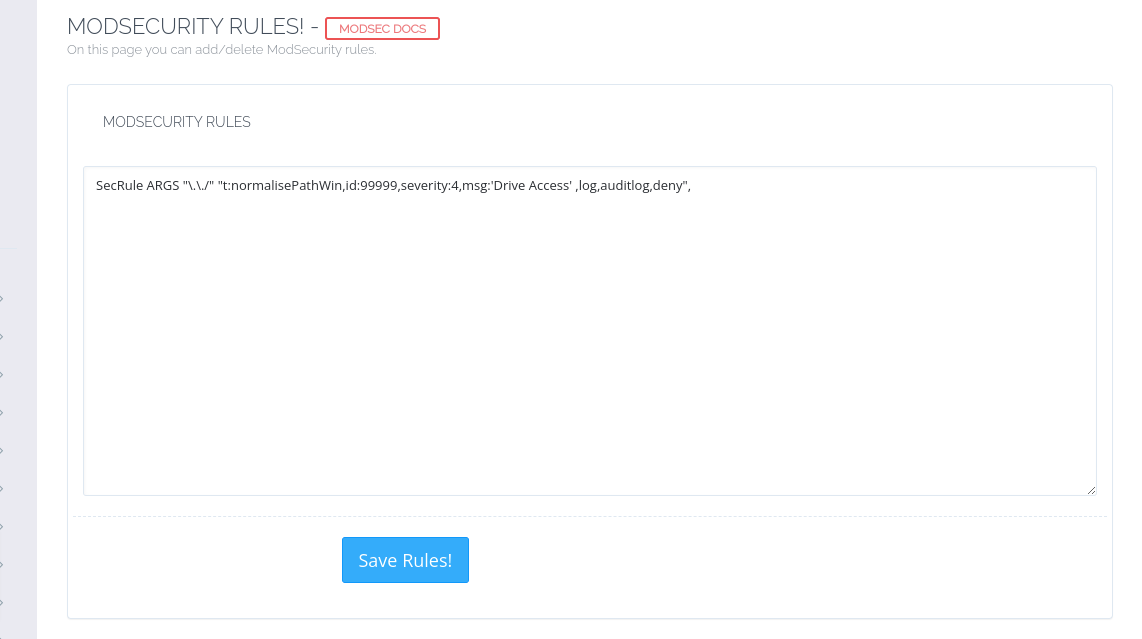
I see you have an extra rule in the ModSecurity rules. The default is sually modsecurity SecRule 99999

SecRule ARGS "\.\./" "t:normalisePathWin,id:99999,severity:4,msg:'Drive Access' ,log,auditlog,deny",

and nothing else. WordPress should run as expected

We
WebPop #9

i saw this problem also my websites. so i changed my dns resolver addresses to google dns

nameserver 8.8.8.8
nameserver 8.8.4.4

u can do this on your vps dashboard if u are using vps. like hostinger.

also another solution is change nameservers directly server files.

/etc/resolv.conf file.

backup file and after delete inside and write new nameservers like up.

now my website working veryfast

id
ideveloppro #10

So do you mean to say I remove

sudo: unable to resolve host cloud2: Name or service not known,SecRule ARGS "\.\./" "t:normalisePathWin,id:99999,severity:4,msg:'Drive Access' ,log,auditlog,deny",

& replace it with
SecRule 99999

id
ideveloppro #11

I am using digital ocean and Cloudflare as DNS
My current view of /etc/resolv.conf is as follows

nameserver 1.1.1.1
nameserver 8.8.8.8

Let me know if I can change the records as per what you mentioned

jo
josephgodwinke #12

Kindly check the directive in code block above its rule 99999. That is the only line that should be there on first install

id
ideveloppro #15

I have never changed ModSecurity rules, this is all by default

I am learning it so can you please tell me the steps I need to follow

jo
josephgodwinke #16

Go to https://SERVER_URL:8090/firewall/modSecRules and check if this is only line there

id
ideveloppro #18

Yes its the same

jo
josephgodwinke #19

Hello @ideveloppro Sorry you still experiencing the same issue.

Can you disable all firewalls, security modules and WAFs

id
ideveloppro #21

Same problem :frowning:

jo
josephgodwinke #22

Do you have a firewall wp plugin?

Try deactivate all plugins and try update wp core

Post a screenshot of Tools => Site Health >> Info

JM
Jonaylton Moura de Sousa #23

Thanks bro, I was experiencing the same problem, all my wordpress websites were slow and in the Query Monitor it was showing cURL error 28, after I changed the the DNS resolver it was back to normal. So much thanks!

Sign in to reply