Ri
Rituraj
#1
After enabling mod security when I am trying to go to website>list website>domain.com>manage
the url is dashboard.domain.com/website/domain.com
I am getting 403 forbidden error.
 Community
After enabling mod security when I am trying to go to website>list website>domain.com>manage
the url is dashboard.domain.com/website/domain.com
I am getting 403 forbidden error.
Hello @RitZz
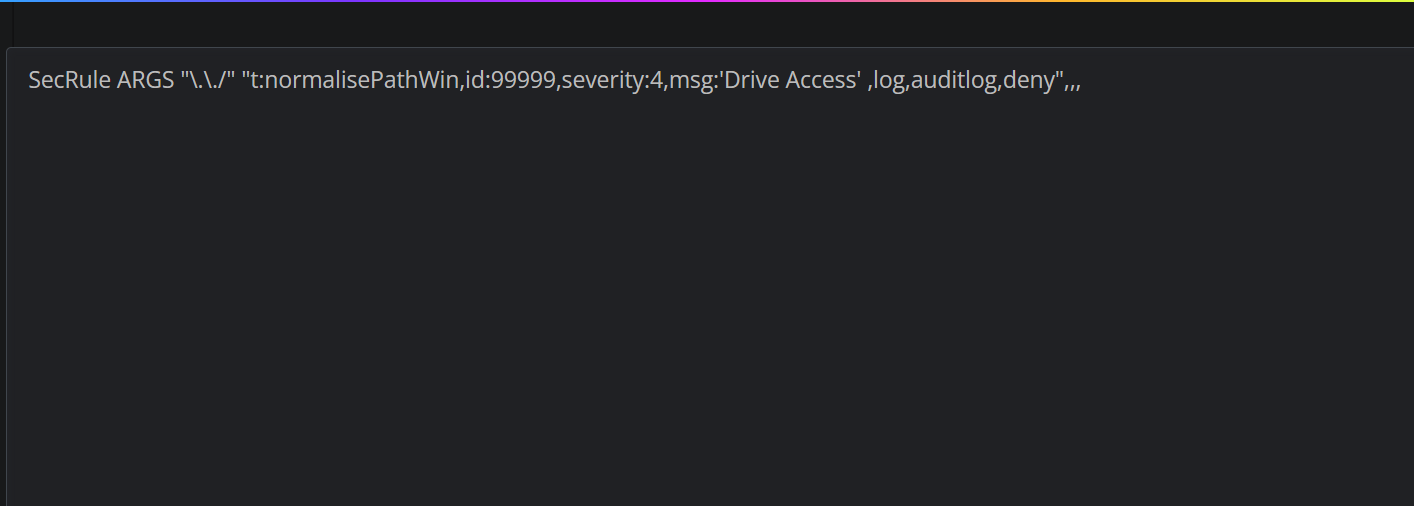
https://SERVER_URL:8090/firewall/modSecRules?9 restart LSWS, visit said link and post contents of server’s error logtouch /usr/local/CyberCP/debug && reboot and reissue the ssl for hostname and post the contents of nano /home/cyberpanel/error-logs.txt
Let’s start from the beginning the error is 403 forbidden error after your enabled modsecurity.
Sorry didnt see this https://community.cyberpanel.net/uploads/default/original/2X/e/e2601dbafb058487deca8f4f7678c12b2d5c9961.png
One of those rules is causing that issue.
Reboot your server
Doesn’t help. 403 forbidden
Disable imunify360 and test
Not sure how to do that, In the control panel it only gives a button to access imunify 360
Run systemctl stop imunify-antivirus OR RHEL based service imunify-antivirus stop
imunify stopped. still 403-
You receive 403 forbidden error because Modsecurity is protecting you when the Inbound Anomaly Score Exceeds the number.
In your LOG file (/usr/local/lsws/logs/error.log) you will see:
...[INFO] ...HTTP2-1#dashboard.domain.com] [Module:mod_security] ModSecurity: Warning. Matched "Operator `... against variable `TX:EXTENSION' (Value: `.com/' ) [file "/usr/local/lsws/conf/modsec/owasp-modsecurity-crs-3.0-master/rules/REQUEST-920-PROTOCOL-ENFORCEMENT.conf"] [line "1015"] [id "920440"] [rev ""] [msg "URL file extension is restricted by policy"] [data ".com"] ... [hostname "dashboard.domain.com"] [uri "/websites/domain.com"]...
...[INFO] ...HTTP2-1#dashboard.domain.com] [Module:mod_security]Intervention status code triggered: 403
...[INFO] ...HTTP2-1#dashboard.domain.com] [Module:mod_security]Log Message: [client 223.73.114.21] ModSecurity: Access denied with code 403 (phase 2). Matched "Operator `Ge' with parameter `5' against variable `TX:ANOMALY_SCORE' (Value: `5' ) [file "/usr/local/lsws/conf/modsec/owasp-modsecurity-crs-3.0-master/rules/REQUEST-949-BLOCKING-EVALUATION.conf"] [line "80"] [id "949110"] [rev ""] [msg "Inbound Anomaly Score Exceeded (Total Score: 5)"] [data ""] [severity "2"] ...[tag "attack-generic"] [hostname "dashboard.domain.com"] [uri "/websites/domain.com"]...
To solve this, you need to override the ModSecurity Rules activated in the OWASP package:
Goto Cyberpanel > Security > ModSecurity Rules, add into the next line:
SecRule REQUEST_BASENAME "@beginsWith /websites" "id:920440, phase:2,allow"
Save the rule and you will be allowed to manage your websites.
Yes, this should be something Cyberpanel can add automatically after adding Owasp Rule Pack.
Have a happy management.
I added this line but it still doesn’t work.
SecRule REQUEST_BASENAME “@beginsWith /websites” “id:920440, phase:2,allow”
Hi, I recommend you use these two.
SecRule REQUEST_URI "@beginsWith /websites/" "id:10000,phase:1,nolog,pass,ctl:ruleRemoveById=920440"

SecRule REQUEST_URI "@beginsWith /filemanager/" "id:10001,phase:1,nolog,pass,ctl:ruleRemoveById=920440"
Still can’t. Below are my error details recorded in the log:
[Module:mod_security] ModSecurity: Warning. Matched "Operator
Within' with parameter.asa/ .asax/ .ascx/ .axd/ .backup/ .bak/ .bat/ .cdx/ .cer/ .cfg/ .cmd/ .com/ .config/ .conf/ .cs/ .csproj/ .csr/ .dat/ .db/ .dbf/ .dll/ .dos/ .htr/ .htw/ .ida/ .idc/ .idq/ .inc/ .ini/ .key/ .licx/ .ln (150 characters omitted)’ against variableTX:EXTENSION' (Value:.com/’ ) [file “/usr/local/lsws/conf/modsec/owasp-modsecurity-crs-3.0-master/rules/REQUEST-920-PROTOCOL-ENFORCEMENT.conf”] [line “1015”] [id “920440”] [rev “”] [msg “URL file extension is restricted by policy”] [data “.com”] [severity “2”] [ver “OWASP_CRS/3.3.2”] [maturity “0”] [accuracy “0”] [tag “application-multi”] [tag “language-multi”] [tag “platform-multi”] [tag “attack-protocol”] [tag “paranoia-level/1”] [tag “OWASP_CRS”] [tag “capec/1000/210/272”] [tag “PCI/6.5.10”] [hostname “subdomain.vn-t.com”] [uri “/websites/vn-t.com”] [unique_id “170106424650.002166”] [ref “o4,4o5,3v14,8o71,5t:urlDecodeUni,t:lowercase”]
[Module:mod_security]Intervention status code triggered: 403
[Module:mod_security]Log Message: [client id] ModSecurity: Access denied with code 403 (phase 2). Matched "OperatorGe' with parameter5’ against variableTX:ANOMALY_SCORE' (Value:5’ ) [file “/usr/local/lsws/conf/modsec/owasp-modsecurity-crs-3.0-master/rules/REQUEST-949-BLOCKING-EVALUATION.conf”] [line “80”] [id “949110”] [rev “”] [msg “Inbound Anomaly Score Exceeded (Total Score: 5)”] [data “”] [severity “2”] [ver “OWASP_CRS/3.3.2”] [maturity “0”] [accuracy “0”] [tag “application-multi”] [tag “language-multi”] [tag “platform-multi”] [tag “attack-generic”] [hostname “subdomain.vn-t.com”] [uri “/websites/vn-t.com”] [unique_id “170106424650.002166”] [ref “”]
Help me. Thanks you!
There is a syntax error, post the entire contents of your ModSecurity rules here.