
Community

Closed /tmp folder full breaks website

sv
svenms #1

I get errors of full disk usage because /tmp folder is full every day.
Error Disk full (/tmp/#sql_325_3.MAI)

What can be happening? What makes /tmp folder get full?
How could I debug it?

It seems like /tmp/lshttpd/swap is the sub folder that keeps increasing.

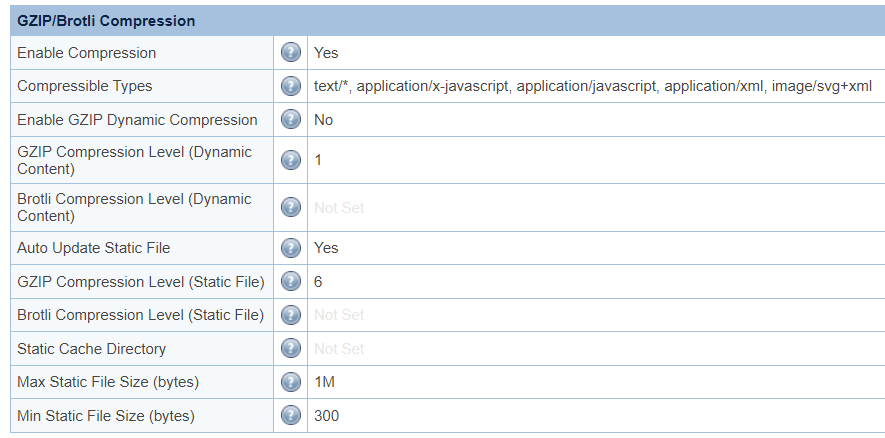
I’ve disabled Gzip dynamic compression
Cyberpanel 2.3.2
Php 8.0
/tmp folder size is 1.5G

sh
shoaibkk #2

where you are storing sessions?

sv
svenms #3

I haven’t changed where sessions are stored by default in Cyberpanel, so I guess it is inside
/var/lib/lsphp/session/lsphp8.0

I found out that the folder that increases size rapidly is:
/tmp/lshttpd/swap

The only way to stop it was to completely Disable Compression option in Tunning LiteSpeed. Would this affect website performance?

I don’t know if it can be related, but also we’ve found that this folder is around 40GB:
/home/site/public_html/wp-content/litespeed/css

Best regards!

sv
svenms #4

Well finally found the culprit.

Flatsome theme creates random css ids, so when having enabled “Combine Internal and External CSS” it creates a lot of content and Gzip starts storing a new file each time.
Best option in this case is to disable that option and it should be OK.

This topic is closed to new replies.