Hi,
I successfully removed port :8090 from my url using this tutorial: https://community.cyberpanel.net/t/how-to-remove-port-8090-from-cyberpanel/30648
Then I wanted to create webmail.example1.net and webmail.example2.net so it is easier to access email.
I followed this tutorial: CyberPanel Custom Rainloop Webmail Address | DimensionQuest - Burke’s Blog!
Now I got everything working from webmail.example1.net and webmail.example2.net
But there was one last thing I wanted to make webmail users life easier. I wanted to give them ability to change their password. And for that I found this tutorial: Cyberpanel – Change password at snappymail – Tierri Lopes – Linux and WordPress DevOps
I got that working also, BUT now I cannot access from webmail.example1.net or webmail.example2.net. It gives me error 500. Then I tried to access my webmail through https://server.example.net:8090/rainloop/ but it didn’t work(error 500). This actually works before that change password extension and if i disable that extension it works. https://server.example.net:8090/snappymail/ works.
So I figured out I have to just edit that rewrite rule rainloop → snappymail, but that doesn’t work either.
My rewrite rule is:
RewriteEngine on
RewriteCond %{HTTP_HOST} ^webmail.example.net$
RewriteRule ^(.*)$ HTTP://cyberpanel/snappymail/$1 [P]
this gives me following error:
An error occurred.
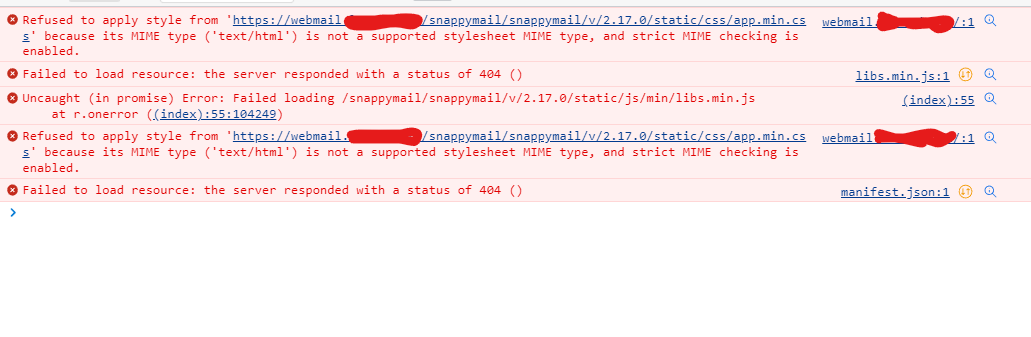
Please refresh the page and try again. Error: Failed loading /snappymail/snappymail/v/2.17.0/static/js/min/libs.min.js
I’m not good with rewrite rules, so if somebody could help me why that url gives /snappymail/snappymail
here is console errors of that page: