lM
leader_Me
#1
Has ssl stopped working in cyberpanel?
I need help please.
As the mail is received and not sent final?
 Community
Has ssl stopped working in cyberpanel?
I need help please.
As the mail is received and not sent final?
Please provide some more info
What information do you want?
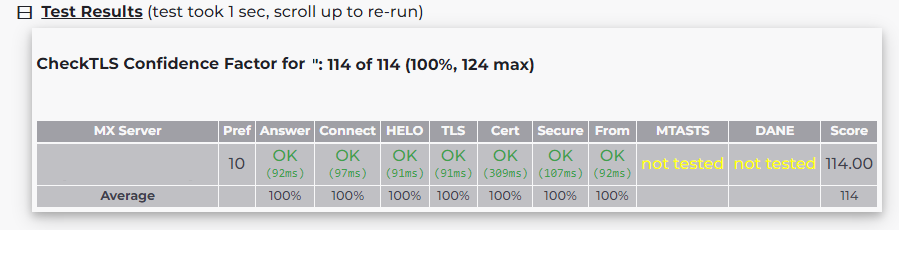
Check your domain at checktls.com and post the result here.
Email is received
But if you send to Gmail, it does not receive the message
If you send and receive another email, but from the same domain, it will be received, for example
info@dd.com
admin@dd.com
It is sent and received without problems
Try check your gmail spam folder?
I already did that I didn’t find anything
The strange thing is, if I disable the firewall when installing a site, it sends me a message from the panel, and when it activates, it does not send
how u know about it ?
you can received email but you cant sent ?
did you try this from webmail or mail client ?
Hi, glad you are trying to help
Regarding ssl I disabled ModSecurity Status at the time of release and now it works
To send an email, use Access Webmail
I found the problem
I have to turn off the firewall in order for the messages to be sent
Is there a solution to this problem?
Surely there are firewall settings
check the firewall port
blocking SMTP port or not
unsecure port (usually 25)
SSL port
TLS port
How do I add port 25 to the firewall?
What firewall do you use?
ConfigServer Security & Firewall - csf v14.16 firewall
sudo nano /etc/csf/csf.conf
Find line like below and add your port:
TCP_IN = "20,21,22,25,53,80,110,143,443,465,587,993,995"

# Allow outgoing TCP ports
TCP_OUT = "20,21,22,25,53,80,110,113,443,587,993,995"

# Allow incoming UDP ports
UDP_IN = "20,21,53,80,443"

# Allow outgoing UDP ports
# To allow outgoing traceroute add 33434:33523 to this list
UDP_OUT = "20,21,53,113,123"
After done adding, save and close the file and restart csf using the following command:
sudo csf -r
This ports already exists
There should be no problem if port already open. Have any error on the logs?
what is your VPS provider ? some provider doesnt allow smtp, some of them only block 25. etc
I have the same problem. But I want to clarify something very important when you turn off the firewall, messages are sent and received, so I rule out the problem of vps
This topic is closed to new replies.