Community

No space left on device

le
leros2004 #1

Dear all i am facing a storage problem.
i cannot receive or sent or delete any mail
i get logs:
Jul 11 12:35:55 vmi690388 postfix/postdrop[4412]: warning: mail_queue_enter: create file maildrop/977093.4412: No space left on device
Jul 11 12:36:00 vmi690388 postfix/cleanup[4383]: warning: mail_queue_enter: create file incoming/326262.4383: No space left on device
Jul 11 12:36:05 vmi690388 postfix/postdrop[4412]: warning: mail_queue_enter: create file maildrop/977647.4412: No space left on device
Jul 11 12:36:10 vmi690388 postfix/cleanup[4383]: warning: mail_queue_enter: create file incoming/327137.4383: No space left on device
Jul 11 12:36:15 vmi690388 postfix/postdrop[4412]: warning: mail_queue_enter: create file maildrop/978077.4412: No space left on device
Jul 11 12:36:20 vmi690388 postfix/cleanup[4383]: warning: mail_queue_enter: create file incoming/330699.4383: No space left on device
Jul 11 12:36:25 vmi690388 postfix/postdrop[4412]: warning: mail_queue_enter: create file maildrop/978460.4412: No space left on device
Jul 11 12:36:30 vmi690388 postfix/cleanup[4383]: warning: mail_queue_enter: create file incoming/331072.4383: No space left on device
Jul 11 12:36:35 vmi690388 postfix/postdrop[4412]: warning: mail_queue_enter: create file maildrop/978892.4412: No space left on device

The strange is that i have almost 50% free space in my contabo vps server.
I also have some errors due to no space left:
2022-07-11 12:43:44.804036 [ERROR] [999] [:HTTP2-1#] [CACHE] createEntry failed for update stale.
2022-07-11 12:44:10.470692 [ERROR] [998] [:HTTP2-9#] [CACHE] createEntry failed for update stale.
2022-07-11 12:44:20.133767 [ERROR] [1003] [
:HTTP2-1#] [CACHE] createEntry failed for update stale.
2022-07-11 12:44:22.338434 [ERROR] [997] [:HTTP2-1#] [CACHE] createEntry failed for update stale.
2022-07-11 12:44:54.644071 [ERROR] [1003] [:HTTP2-1#] [CACHE] createEntry failed for update stale.
Any idea ?
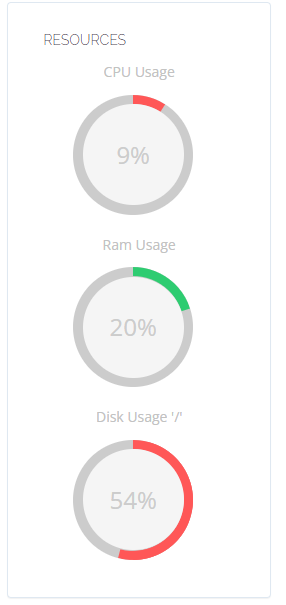
tb
tbaldur #4

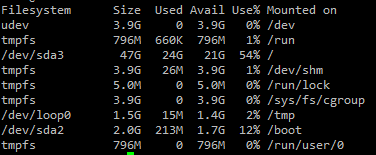
run this command:

df -h

show print here.
Most providers give a partition layout with just low amount of storage on the /home partition.

I recommend that in the future you install the OS manually, setting your partition sizes as you need.

le
leros2004 #5

Its a vps plan from contabo. They deliver blank and I manualy install the OS (Ubuntu) according to the cyberpanel instructions.
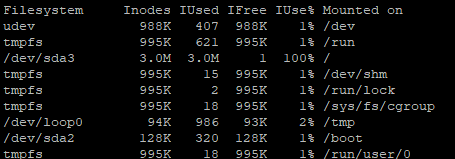
df -h
image

lu
luckyrajpurohit #6

Check inodes using below commands
df -ih

le
leros2004 #9

image

The dev/sda3 is full …
What should i do ?

Al
Alex #10

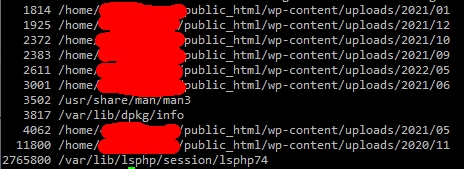
you can do { find / -xdev -printf '%h\n' | sort | uniq -c | sort -k 1 -n; } 2>/dev/null to list the directory with the most inode at the bottom. Show last 5 lines.

le
leros2004 #11

1
These are the last lines.
So the biggest size is the lsphp74, is this the LITESPEED caching?

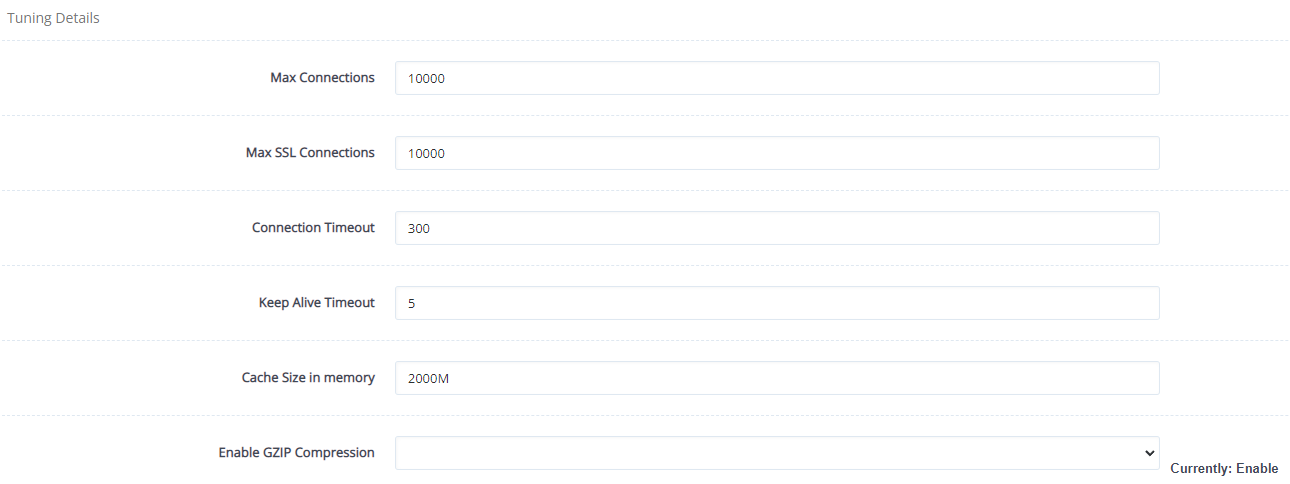
maybe if i reduce the cach size memory from here it will help ?

Al
Alex #12

No, that’s the php session folder, there’s a cron job to delete php session ( /usr/local/CyberCP/bin/cleansessions run it now ) but it’s not really that aggressive at deleting, some people here divide the time by 60, which should be the default and is the easy fix, I guess very few people run high traffic sites if they never hit that problem.

It’s better to move that stuff in /tmp or /dev/shm ( which is in RAM/SWAP ). Check your php.ini the OS will take care of cleaning /tmp.

I never understood that decision since cyberpanel already use /tmp for php sockets, and ols use /dev/shm for it’s socket.

You can probably delete everything in /var/lib/lsphp/session/lsphp74, it depends on your use case obviously. If you need very long session or very fast session, you can save them to mysql/redis for that.

Cache has nothing to do with it, or size, it’s just 2.7 millions very small files that should have been deleted.

le
leros2004 #13

So is it the correct to run the order: rm -r /var/lib/lsphp/session/lsphp74/*

Al
Alex #14

sure, right now you don’t have much choice anyway.

le
leros2004 #15

I get this message:
-bash: /usr/bin/rm: Argument list too long
i also tried the: rm -rf /var/lib/lsphp/session/lsphp74/*
same message: -bash: /usr/bin/rm: Argument list too long

Al
Alex #16

… I mean I can’t give a full linux class, you can google those things, you can delete the whole folder and recreate it, or just go inside that folder and type :

find . -type f -delete

will depend on your distro and how they view things, find might need inodes to work too.

le
leros2004 #17

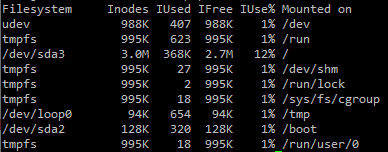
i have just deleted the folder with : rm -rf lsphp74 and recreated.
Now the inodes are perfect:
image

As for the future is there a way to resize the dev/sda3 that is only 3mb ?

Al
Alex #18

As for the future, you need to check what’s wrong with deleting session, because 2.7 millions files in a single folder is not sustainable, at all, it’s a major performance bottleneck and increasing inodes will just make it worse and you’ll always run out of inodes.

At the core of it, there’s a logic bug in the cleansessions file that you can see here
cyberpanel cleansession crontab

This :

session_time=$(/usr/local/lsws/${version}/bin/php -i |grep -Ei 'session.gc_maxlifetime'| grep -Eo "[[:digit:]]+"|sort -u); find -O3 "/var/lib/lsphp/session/${version}" -ignore_readdir_race -depth -mindepth 1 -name 'sess_*' -type f -cmin "${session_time}

It gets session_time from php.ini ( which is set to 14400 ) which is in SECONDS.

And then it looks for files older using find -cmin which is in MINUTES.

14400 seconds is 4 hours, 14400 minutes is 10 days. So sessions don’t get deleted until 10 days. For low traffic, that’s not really an issue, but high traffic that’s a killer. Dividing session time by 60 fix the issue. I’m too lazy to file a bug report @usmannasir

Sign in to reply