
CyberPanel Community

Server message: Can't connect to host "tcp://localhost:143"

Em
Emils #1

Hello,

I am trying to access webmail to verify that everything is working properly, but for some reason I cant connect. I get an error : Server message: Can’t connect to host “tcp://localhost:143”.
I have verified the firewall, the port is open:
143/tcp ALLOW Anywhere

I dont see any service listening on the port tho:
netstat -tulpn | grep LISTEN
tcp 0 0 127.0.0.1:8891 0.0.0.0:* LISTEN 295/opendkim
tcp 0 0 127.0.0.1:11211 0.0.0.0:* LISTEN 308/lsmcd
tcp 0 0 0.0.0.0:8090 0.0.0.0:* LISTEN 320/lscpd (lscpd -
tcp 0 0 0.0.0.0:7080 0.0.0.0:* LISTEN 362/openlitespeed (
tcp 0 0 0.0.0.0:587 0.0.0.0:* LISTEN 750/master
tcp 0 0 0.0.0.0:443 0.0.0.0:* LISTEN 362/openlitespeed (
tcp 0 0 0.0.0.0:465 0.0.0.0:* LISTEN 750/master
tcp 0 0 0.0.0.0:25 0.0.0.0:* LISTEN 750/master
tcp 0 0 0.0.0.0:22 0.0.0.0:* LISTEN 327/sshd: /usr/sbin
tcp 0 0 0.0.0.0:21 0.0.0.0:* LISTEN 661/pure-ftpd (SERV
tcp 0 0 0.0.0.0:53 0.0.0.0:* LISTEN 566/pdns_server
tcp 0 0 0.0.0.0:80 0.0.0.0:* LISTEN 362/openlitespeed (
tcp 0 0 127.0.0.1:3306 0.0.0.0:* LISTEN 420/mysqld
tcp6 0 0 :::587 :::* LISTEN 750/master
tcp6 0 0 :::465 :::* LISTEN 750/master
tcp6 0 0 :::25 :::* LISTEN 750/master
tcp6 0 0 :::22 :::* LISTEN 327/sshd: /usr/sbin
tcp6 0 0 :::21 :::* LISTEN 661/pure-ftpd (SERV
tcp6 0 0 :::53 :::* LISTEN 566/pdns_server
/home/emils# telnet localhost 143
Trying 127.0.0.1…
telnet: Unable to connect to remote host: Connection refused
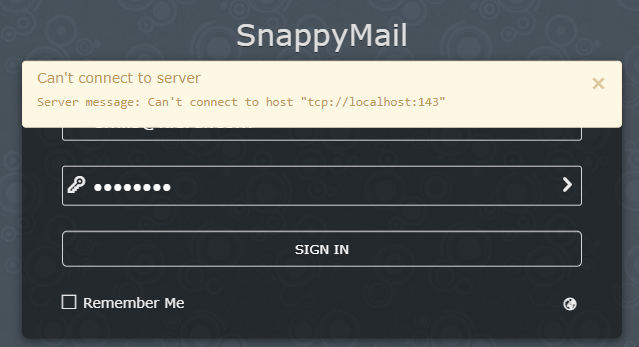
webmail

VPS service: webdocks
I tried to check with them as well, they said they are not blocking anything.

Any ideas?

Regards,
Emīls

7 replies
su
sulthan #2

hi rockets115

i see from your netstat port 143 its not listening
can you run this command

systemctl status dovecot -l

that should be run and your port 143 will listen again

an
andres #3

Hi,

I have the same issue when i run systemctl status dovecot -l i recive this message:

Jul 15 20:24:19 docker systemd[1]: Dependency failed for Dovecot IMAP/POP3 email server.
Jul 15 20:24:19 docker systemd[1]: dovecot.service: Job dovecot.service/start failed with result 'dependency'.
Jul 15 20:29:23 docker systemd[1]: Dependency failed for Dovecot IMAP/POP3 email server.
Jul 15 20:29:23 docker systemd[1]: dovecot.service: Job dovecot.service/start failed with result 'dependency'.
Jul 16 07:20:09 docker systemd[1]: Dependency failed for Dovecot IMAP/POP3 email server.
Jul 16 07:20:09 docker systemd[1]: dovecot.service: Job dovecot.service/start failed with result 'dependency'.
Jul 16 07:24:43 docker systemd[1]: Dependency failed for Dovecot IMAP/POP3 email server.
Jul 16 07:24:43 docker systemd[1]: dovecot.service: Job dovecot.service/start failed with result 'dependency'.
Jul 16 07:26:20 docker systemd[1]: Dependency failed for Dovecot IMAP/POP3 email server.
Jul 16 07:26:20 docker systemd[1]: dovecot.service: Job dovecot.service/start failed with result 'dependency'.

The server is Ubuntu Server 20

Solved running sudo chmod 1777 /tmp

SM
Standley Moise #4

i have the same issue, and i am using centos. help please

SI
SSG IT #5

Hello dear,
Could you please your cert.key and key.pem file? and check dovecot status.You can try reinstall your ssl cert for your domain and mailserver from control panel.

Ro
RogelioGranados #7

Hello, I am asking you if there is any method or solution for this port error on Localhost.
I am particularly working on a VPS with Ubuntu 22.04 and installing CyberPanel. It did not open port 143 and I suppose that is why I cannot access the emails with SnappyMail.

AB
ABV #8

Hello,

Same problem, I get same error in CyberPanel on Litespeed and Ubuntu 22.04, can’t access Webmail.

systemctl status dovecot -l
and
sudo chmod 1777 /tmp
and
SSL certs reissue don’t help…

Maybe someone knows any decisions?

Thank you.

Di
Didi #9

A year later… anyone?

Sign in to reply