CyberPanel Community

How to Access MySQLi Database Remotely?

MK
Maxwell Kobina Gyamfi #1

Hello guys,

Please who has any idea how i can access MySQLi database remotely.

i tried the following but still didnt work.

  • i changed root host in PHPMyAdmin from ‘localhost’ to ‘%’
  • i opened port 3306 in cyberpanel firewall

Still am not able to connect.

i have a desktop app and would like to connect to same database.

Am using aaPanel and this works great but want to implement same method in CP.

Any help will be great.

Thanks
20 replies
sh
shoaibkk #2

you want for whole server or for one site?

MK
Maxwell Kobina Gyamfi #3

for now i need it for just one site but if there’s a way for whole server that will also be great deal to me

Ob
Obu #4

That’s a good question. I have the same issue. Has anyone know how you fix that?

Ob
Obu #5

Does anyone know a fix?

Ob
Obu #6

This is important for me cause a customer needs that option

Ob
Obu #7

HELLOW? Knows anyone this issue?

tb
tbaldur #8

Hello.

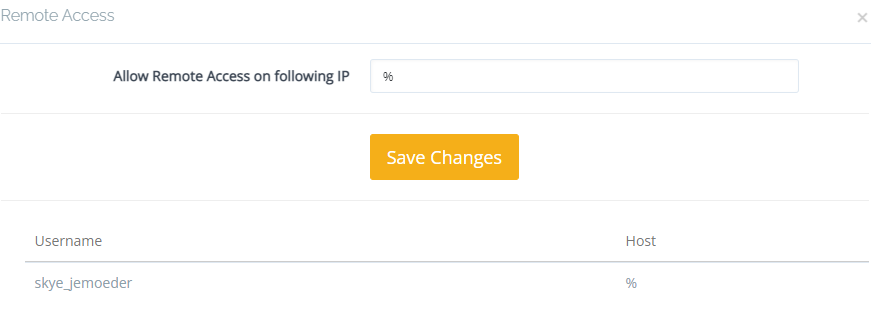
Go to the cyberpanel admin page.
Databases → List Databases
Choose the domain.
In from of the database you want to access remotely, click the “Manage” button.

At “Allow Remote Access on following IP” write “%” and then click save changes, as in the image bellow.

After that, you can use a software like MySQL Workbench or a paid one like Navicat to manage your databases.

Ob
Obu #9

Pls read first the thread i cant connect anyways

tb
tbaldur #10

What error does it give you when connecting?
Is it a connection time out? If so, have you made sure your firewall port is open?
Are you connecting directly by IP or using the domain name? The domain name runs by cloudflare or anything similar in that case?
Have you also tried to whitelist your IP at the firewall?
Are you using CSF aswell? If so, have you tried whitelisting your ip there also?

If everything above failed, disable firewall and attempt to connect, then reply here if with firewall disabled it works or not (then re-enable firewall after testing)

tb
tbaldur #12

port

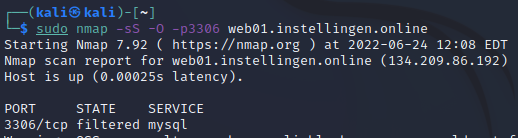
Looks like the port was filtered when you replied.

But i tried again before sending this message and now it shows as “open”.
Was that the issue?

Ob
Obu #14

iptables -A INPUT -i eth0 -s 0.0.0.0 -p tcp --destination-port 3306 -j ACCEPT
iptables -A INPUT -i eth0 -s IP -p tcp --destination-port 3306 -j ACCEPT

firewall-cmd --zone=public --add-port=3306/tcp --permanent

Restart vps and done Thank you <3

MK
Maxwell Kobina Gyamfi #15

I have done that, not working.

this is the message i get " Warning : mysqli_connect(): (HY000/2002): No connection could be made because the target machine actively refused it."

Dr
Dreamer #16

Look from logs why your server block connection. Try also disable CSF and modsecurity to see if those blocking.

tb
tbaldur #19

/etc/mysql/mariadb.conf.d
check if you have

bind-address=127.0.0.1

Comment it

#bind-address=127.0.0.1

Restart mysql:

systemctl restart mysql
ti
timbr #21

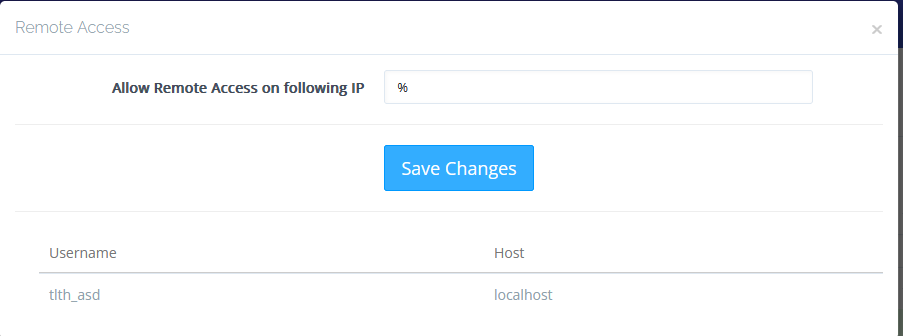
Do you know if it’s possible to only whitelist our own (or a few) IPs? I assume % opens it up to the world and that’s not necessary. I was expecting the “Remote Access” dialog to let us add multiple IPs, but it just overrides the default “localhost”.

(edit 1)

I suppose the firewall could do the whitelisting for us, for anyone interested who is also using UFW (that’s not the default CP firewall):

ufw allow from LOCAL_DEV_IP to any port 3306 proto tcp comment 'MariaDB'

But I’m still curious about my first question.

(edit 2)

Disabling bind-address seems to be required. Without it, setting % doesn’t help, and if you have bind-address disabled you don’t need %.

Minimal setup summary so far:

  • Disable bind-address.
  • Allow your local dev ip through the firewall to 3306/tcp.
tb
tbaldur #24

If you have a mysql user that you want to be only accessible from some IPs, instead of all IPs using the % like you said, you can do it like this:

GRANT ALL PRIVILEGES ON database_name.* TO 'username'@'85.85.85.85' IDENTIFIED BY 'password';
GRANT ALL PRIVILEGES ON database_name.* TO 'username'@'84.84.84.84' IDENTIFIED BY 'password';

That allows the “username” with the “password” to be accessible only from 85.85.85.85 and 84.84.84.84.
To add another layer of security yes you should also use the firewall for it to be sure.

Bind-address is where the MySQL server will listen to connections. If it’s 127.0.0.1 it will only listen to local connections, if it is commented then it’s the same as having:
bind-address=0.0.0.0
This will listen to all the IP addresses associated with the server.
So for example if your server has the following IPs:

123.123.123.123
456.456.456.456
789.789.789.789

If you have bind-address commented, it will listen for connections coming from all of those IPs. If you setup:
bind-address=456.456.456.456

It will only listen for connections coming through that IP, any connection coming from the other IPs is rejected.

Sign in to reply