
CyberPanel Community

Disable port 7080 - CSF Firewall/LiteSpeed

Ap
Apostolis #1

Hi all,

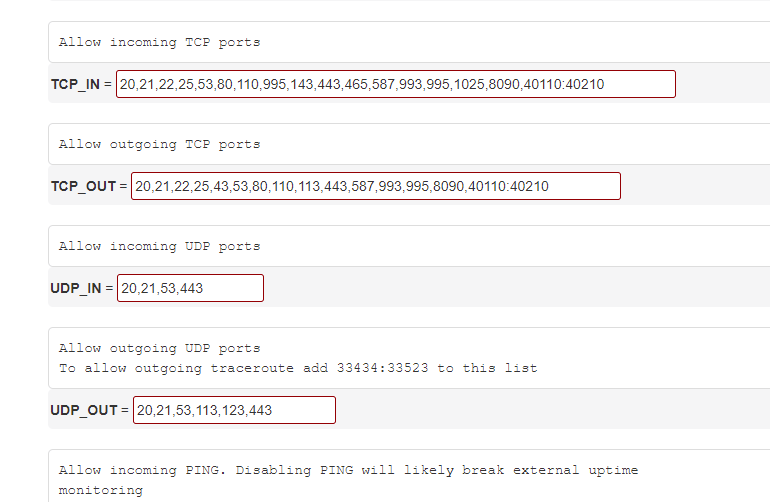
I have installed a latest version CyberPanel. CSF is also enabled.

I just run a vulnerability assessment and LiteSpeed Panel is using older php version and I get some high security flags.

I removed the port 7080 from CSF but I’m still able to access the the LiteSpeed panel. UFW is disabled.

I also tried to disable incoming ICMP from CFS but the server still responds to ICMP requests. I also run the flush command from SSH. How can I block this port?

6 replies
Dr
Dreamer #2

Try restarting csf with csf -r command on ssh and try again.

Ap
Apostolis #4

Even upgraded and everything still port 7080 is accessible. A bug maybe?

GT
Georgi Tanchev #5

Hey guys, I am having the same issue from the last upgrade.
It is obviously a bug or something so how to fix this?

Ap
Apostolis #6

I even disabled CSF and the default firewall didn’t stop it either. I had to enable Firewall on the provider to cut the access.

SA
Said Ali #7

Hallo!

Am just seeing this today.
If you still haven’t been able to fix this from firewall settings.
You can do so by changing litespeed listening port to something like 7070, inside litespeed portal webAdmin - listeners
Then add 7070 to your cyberpanel firewall when you wish to access.

Thanks

Sign in to reply
