CyberPanel Community

ClosedServer Error (500) no access to the panel

AM
AMDark #1

Hello. Today when accessing the control panel of my site in Wordpress I received an error of connection problems with the database. The site is working partially, but the search field always returns a database error.
I tried to enter the cyber panel and I get the server error (500) error. I don’t know what’s going on, it just came out of nowhere.

I viewed some previous threads and tried to update the distro and cyberpanel. I have restarted the server as well. I also tried the commands:
systemctl restart lsws
systemctl restart lscpd

Both to no avail. can anybody help me?
16 replies
NK
Nitesh Kunnath #2

Private message me the domain name

sh
shoaibkk #3

show me output of df

AM
AMDark #4

How do I do that?

AM
AMDark #5

awaiting. How can I provide this data? I need to solve, I’m losing visits.

thank you for the attention

NK
Nitesh Kunnath #6

connect your ssh and type this command

df
AM
AMDark #7

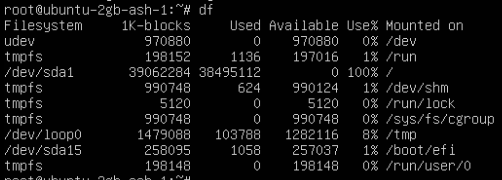
Captura de Tela 2022-05-12 às 08.04.14
df…

I got confused with the language and I didn’t realize that it would be this simple command. I’m sorry.
@shoaibkk @die2mrw007

NK
Nitesh Kunnath #9

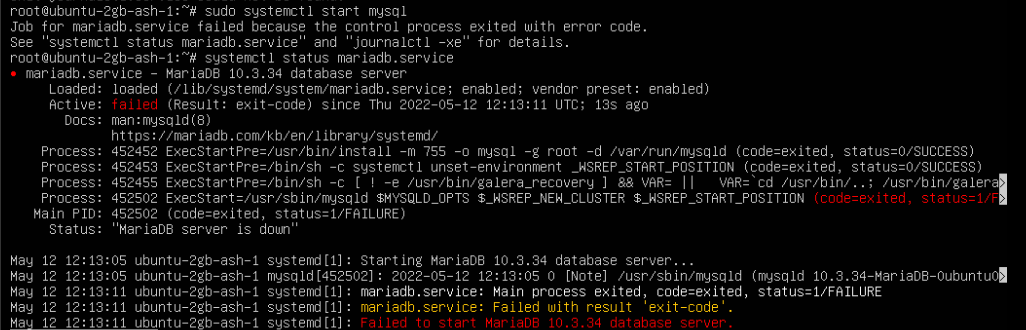
Your mysql is down and hence cyberpanel and sites will not function without mysql

Try to restart server and see if it works. Or else try to upgrade cyberpanel and see.

To reboot server

sudo reboot

To upgrade cyberpanel

sh <(curl https://raw.githubusercontent.com/usmannasir/cyberpanel/stable/preUpgrade.sh || wget -O - https://raw.githubusercontent.com/usmannasir/cyberpanel/stable/preUpgrade.sh)
AM
AMDark #10

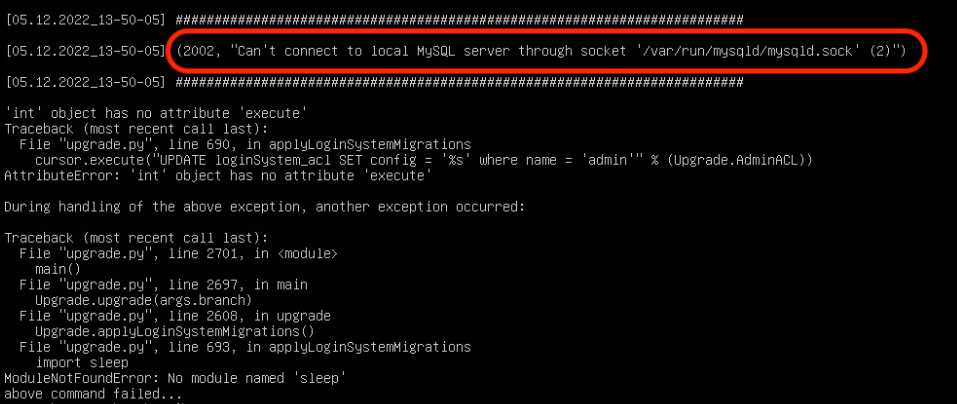
Restarting and updating the cyberpanel were the first actions I took right after having the problems. Unfortunately it didn’t. I tried again now but the problem persists.

I received this warning that it is not possible to connect to mysql, I leave the print below.

Is there anything else I can do to try to fix this?

sh
shoaibkk #11

it seem disk is full. now run

du -s -h /*

lets find what is using space

AM
AMDark #12

the disk is really full. 29gb in the /usr folder. I used the commands:

rm -rf /usr/local/lsws/logs/*
rm -rf /usr/local/lsws/cachedata

I freed up the space and restarting the site already worked normally accessing the DB. I was very inattentive not to notice the disk full.

I will stay tuned and monitor disk usage.

Thank you all for your attention. So far everything is ok.

MK
Mirza Khadnezar S [sick] #13

is that posible to make cyberpanel giving warning if services stop, or space was almost full

NK
Nitesh Kunnath #14

It do sends email when disk is using more than 50-60% consumed.

MK
Mirza Khadnezar S [sick] #15

i will test it… created multiple backup hahahaha and test on new test vps

AM
AMDark #16

I didn’t receive an email, but I’ll start following up better, backup had about 2 weeks, but I thought about restoring and then having the same problem, so I looked for a solution. Thanks to everyone for the help.

sh
shoaibkk #18

Great.

Mostly the disk or inodes are the main reason for the MariaDB failed but if you check that first before doing any thing that will be a quick fix

Sign in to reply