
Community

Closed Logs in Litespeed folder / dev/sda2 is 100 percent full

an
antivirusadmin #1

Hi

At moment, right now, my server was crashed and show me the error 500 and in my logs I saw there was problem to renew the SSL , and UsmanNasir told to someone to upgrade cyberpanel

I did and failed because I found there were no free space

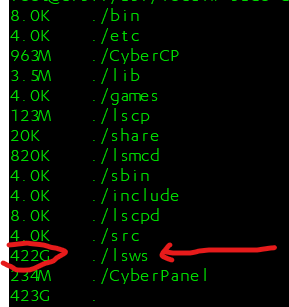
with df -h I found the dev/sda2 is 100 percent full and with sudo du -h --max-depth=1 -x I found this folder is responsible for that
image

with command rm -r ./logs I removed that folder and tried to upgrade the cyberpanel
and upgrade was did,
Now there is no problem ,
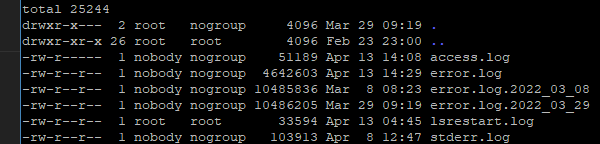
But I want to know why Litespeed logs folder tacks 500gb of my hard disk ?
an
antivirusadmin #2

Hi
Agin this happen after 8 hours…
The compleat path :

cd ./usr
cd ./local
cd ./lsws
cd ./logs
rm -r ./logs
sh
shoaibkk #3

LiteSpeed never deletes old logs that’s why if your logs are generating too much they will take too much space. check logs and try to resolve them.
There is no auto-deletion of logs from LiteSpeed yet

an
antivirusadmin #4

With nano command the log file show nothing
How to cheek them?

MK
Mirza Khadnezar S [sick] #5

what path of the log that we should delete ?

MK
Mirza Khadnezar S [sick] #8

so. if i have same problem
i just need clean this path ?

#i wish cyberpanel have “cleaning log” tools

an
antivirusadmin #9

Yes , you need to remove the logs to let CyberPanel work…

MK
Mirza Khadnezar S [sick] #10

all is here
/usr/local/lsws/logs
?

thank you

This topic is closed to new replies.