CyberPanel Community

Cyberpanel uses self-signed example.com SSL instead of Let's Encrypt hostname SSL

te
terminus #1

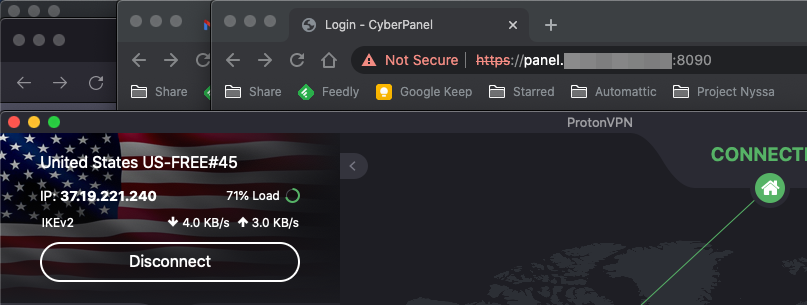
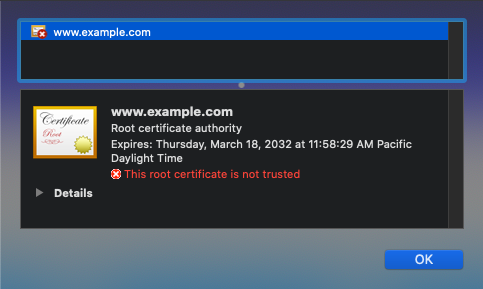
I successfully created a hostname SSL for panel.mydomain.com to use for accessing Cyberpanel, registered an A record for it (without using Cloudflare proxying), and restarted Litespeed. But when I access https://panel.mydomain.com, I get a browser security error, and when I inspect the certificate that the browser receives, it’s an invalid self-signed cert for www.example.com. I found this forum post, but it did not help.

Any advice? Thanks.

24 replies
NK
Nitesh Kunnath #3

If DNS is issued correctly and DNS is fully propagated then SSL issue will not have any issues.

Under Logs option inside Cyberpanel there will be an option named Cyberpanel main logs…click on it and find the SSL error there for your domain… you can use the same command from there which is related to issuing SSL (copy paste it) and execute that command in SSH by connecting to your Server using putty or any SSH tool.

te
terminus #4

I can’t find that log (the only options are Server Mail, Access Log, Error Logs, Email Log, FTP Logs and ModSec Audit Logs). But anyway, I connected to the server and checked that the cert was issued by looking in /etc/letsencrypt/live/ and yes, it’s there. When I check its details using openssl x509 -in cert.pem -text -noout, those details are correct. But the browser (Chrome) isn’t using it and won’t let me proceed to load the page when I try, instead it uses an example.com cert (I can proceed by typing “thisisunsafe” into the browser which tells Chrome to bypass cert validation).

NK
Nitesh Kunnath #5

What is the domain in question? I will check at my end how it pass through.

te
terminus #6

Will DM you, because I don’t want to put my Cyberpanel URL on the public web. Thanks!

NK
Nitesh Kunnath #7

I checked and its working perfectly fine for me with green padlock. You just have to clear your browser cache, cookies and rest options and then try again. Or else download some other browser and try to open the link there…

MK
Mirza Khadnezar S [sick] #8

if all green and the chain correct
then he only need to

  1. close browser
  2. change dns…try 1.1.1.1
  3. clear dns
    C:/> ipconfig /flushdns
  4. open private mode
  5. test re open the web
te
terminus #9

I don’t understand, because it’s still not working for me even after clearing cache and trying a different browser, and also trying on my phone with a different Internet connection, and I even tried using Tor browser. In all of these cases it still presenting a self-signed www.example.com certificate on the 8090 port used by Cyberpanel.

MK
Mirza Khadnezar S [sick] #10

can you PM me the domain name ? i will recheck and compare with @die2mrw007

im not developer or official staff
i just community member.
so dont pm me if you think im staff or im a part of cyberpanel
but pm me the domain name if you trust me

MK
Mirza Khadnezar S [sick] #11

Thankyou
i already check your domain
everything look good…
SSL is working
The chain is good
just like @die2mrw007 said

try this

  1. close your browser
    (include from task manager / background process)
  2. change your computer’s dns to 1.1.1.1
  3. open cmd *(better use administrator right)
  4. type c:> ipconfig /flushfdns
  5. wait 10second
  6. re open your browser with private mode
te
terminus #12

Many thanks. Well, I’ll just have to forget about this issue for now because I still can’t resolve it even after following your instructions, and there’s no point in wasting your time any more.

By the way, the DNS flush command on Mac is:

sudo dscacheutil -flushcache;sudo killall -HUP mDNSResponder

MK
Mirza Khadnezar S [sick] #13

i never use mac
:frowning: cannot confirm it

im currious about this

i use many tools and some browser, and the result (all) is green…
it’s more like client side.

have you try change your mac’s DNS ?

te
terminus #14

Yes I tried changing it to both 1.1.1.1 and 8.8.8.8 and it didn’t help. And using two different browsers (Safari and Tor Browser - which doesn’t even use the local computer’s DNS settings), and on my phone, and on a Chromebook. So I am completely baffled about how it is working for both of you but not for me.

MK
Mirza Khadnezar S [sick] #15

Your ISP must be forward *:53 to their dns server

try VPN (not browser vpn) like WARP (i dont know is warp available for mac or not)

NK
Nitesh Kunnath #20

I have sent your personal message @terminus with screenshot of the SSL certificate and how it works at my end.

You need not have to worry about this problem as its specific to your system or ISP. Its a DNS cache issue technically which your Mac or ISP isn’t clearing or not able to flush older cache.

You can try some sites likes https://www.proxysite.com to check how it looks from different country.

te
terminus #21

It looks fine on port 80 as in your screenshot, but not on port 8090 which is where the problem lies.

NK
Nitesh Kunnath #22

Make sure port 8090 is opened in your hosting firewall. Some hosting providers like amazon aws, google cloud and others have additional firewall mechanism and hence ports needs to be declared in their own firewall too.

I checked and with port number 8090 the SSL is not showing secured. This is because of firewall block which you will need to be addressed with the help of your hosting provider support.

Also, when checked I got to know that you are using a very old version of cyberpanel and I recommend you to update your cyberpanel to the latest.

te
terminus #23

There is no firewall active, so that can’t be the problem… if it was, presumably I couldn’t access the control panel at all. I can access it once I bypass the security warning. It seems to me that Cyberpanel’s built-in web server on port 8090 is just presenting the wrong SSL certificate to the browser.

NK
Nitesh Kunnath #24

There will be many possibilities of this incident and finding the root cause can take quite a lot time debugging it. As we dont have access to your server, its not possible for us to debug and let you know the root cause of this error.

Please try the cyberpanel upgrade command and restart the server. Most of the issues get resolved with upgrade operation.

I am running numerous cyberpanel servers for myself and clients and none have this kind of issue so far. Hence I am not sure about the issue unless I check and debug it myself to understand the issue.

te
terminus #25

Thanks, I did the upgrade but it didn’t help. I will be subscribing to a Cyberpanel Cloud Professional package so I’ll be able to get ticket support that way.

Sign in to reply