
Community

Staging site tool ignores most files and folders from the parent site

Ni
Nick #1

I just created a staging site of a wordpress site and the wp-config file for the staging site does not contain any of my custom code to configure various plugins, such as Redis.

I appreciate that it generates new credentials, but it seems like it should leave the rest of wp-config as-is.

Have I done something wrong or can I change the configuration somehow? Or am I stuck replicating the changes manually?
NK
Nitesh Kunnath #2

Honestly I don’t depend on inbuilt installers for staging or even for installing wordpress. I do it manually to have full control of the table name, database name and other values to be created by me for security reasons. I never install wordpress with default database table prefix (wp_) and instead I use something different on each of my wordpress installation.

I will test this staging script from cyberpanel and see if its working fine in my test server and report you back.

Ni
Nick #3

I have no idea how to do this (or anything) manually. Can you share any tips on how to set up a staging site manually?

Do you create a subdomain manually (using the Gui in the parent site or via ssh?) then install WordPress there (again, how)? Then copy a site backup over using something like duplicator?

Ni
Nick #4

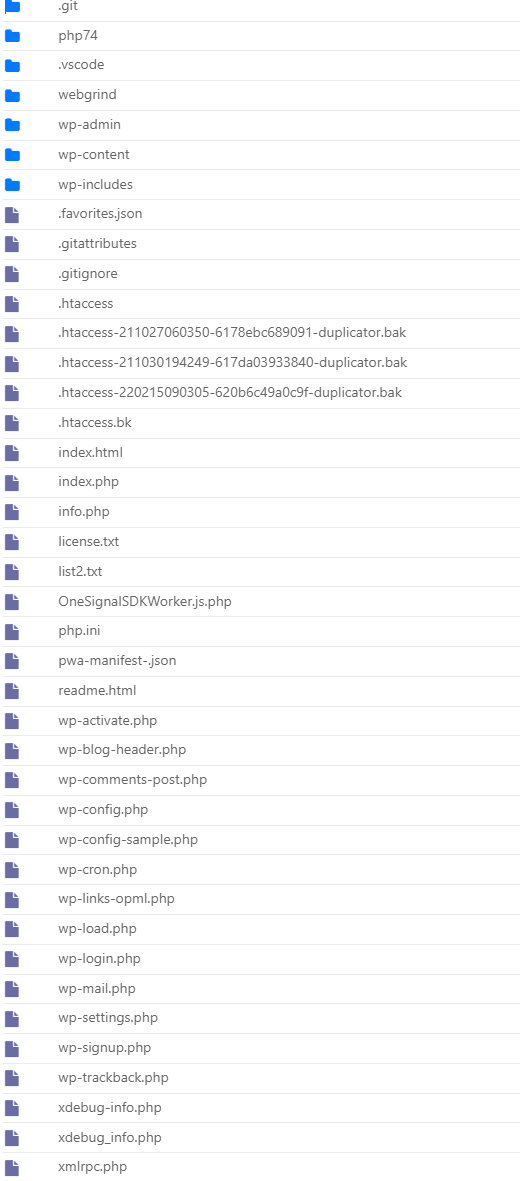
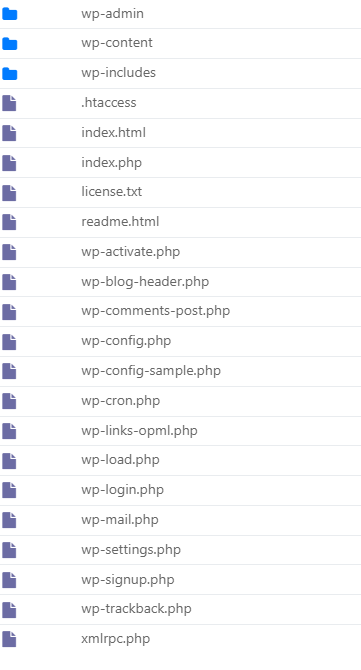
Actually, I’m now realizing that the staging function doesn’t copy many files and folders from the parent site.

Here’s the contents of the parent public_html folder:

And of a staging site created from it:

It is as if it is installing a fresh WordPress site and then just copying the wp-content folder…

Shouldn’t it be making a complete copy of the site’s contents? If not, what’s the point? I’m going to have to manually do it via ssh and fix permissions etc…

Am I missing something? Or should this be made a feature request

Sign in to reply