
Community

Closed After Upgrade Cyberpanel all site haves’ problems

an
antivirusadmin #1

From this tutorial I try to update my cyber panel

after that all of my sites have probelms and I cannot fix theme

An unexpected error occurred. Something may be wrong with WordPress.org or this server’s configuration. If you continue to have problems, please try the [support forums](https://wordpress.org/support/forums/).
an
antivirusadmin #3

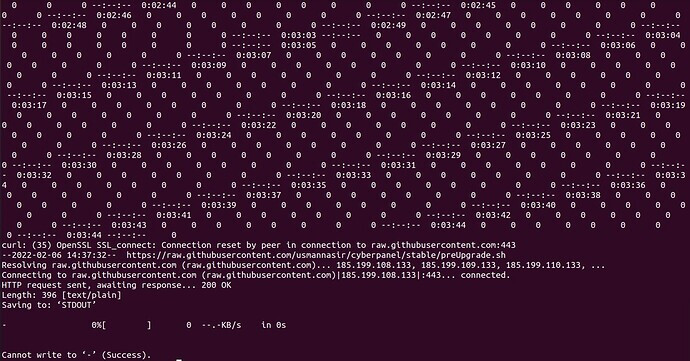
Now I got this error Redirecting output to ‘wget-log.6’.

--2022-02-08 07:00:58--  https://raw.githubusercontent.com/usmannasir/cyberpanel/stable/preUpgrade.sh
Resolving raw.githubusercontent.com (raw.githubusercontent.com)... failed: Temporary failure in name resolution.
wget: unable to resolve host address ‘raw.githubusercontent.com’

and this was occured when the first time I tryed to update
image

and the version of my panel is 2.1.1 , is there any new update and version comes after mine?

Dr
Dreamer #4

Check ip 185.199.109.133 not blocked, some reason you cant connect to github. You can try ping: ping -c 4 raw.githubusercontent.com see what you get.
If you can ping try run upgrade again.

Dr
Dreamer #5

Latest one is 2.1.2

an
antivirusadmin #6

No , I dont have ping and access to this ip address , I already sent email to my ISP and waiting for respond
I will keep you in posted.

Dr
Dreamer #7

Try white list that ip on on cyberpanel firewall or turn off firewall and try again

an
antivirusadmin #8

if my upgrade will succeed , do I need install cyberpanel from 0 again?

Dr
Dreamer #9

No all sites and settings stay same.

Ka
Kais #10

To disable firewall try

systemctl stop csf

an
antivirusadmin #11

The firewall was disabled by default but I got the same error ,

in that server I have windows os , and trace the ip from windows and got time out.

not the ISP try to fix that.

Thanks

NK
Nitesh Kunnath #12

Windows? I believe Cyberpanel works only on linux platforms

an
antivirusadmin #13

not windows , I have machin that is runing windows on that server …

NK
Nitesh Kunnath #14

Connect your server via SSH and login as root

sudo su -

Then try to upgrade using this command

sh <(curl https://raw.githubusercontent.com/usmannasir/cyberpanel/stable/preUpgrade.sh || wget -O - https://raw.githubusercontent.com/usmannasir/cyberpanel/stable/preUpgrade.sh)

Let me know if there is any error.

an
antivirusadmin #15

I was removed my server and try to install it from 0 and now I get this:

--2022-02-09 10:17:08--  https://cyberpanel.net/install.sh
Resolving cyberpanel.net (cyberpanel.net)... 172.67.203.238, 104.21.44.216, 260>
Connecting to cyberpanel.net (cyberpanel.net)|172.67.203.238|:443... connected.
HTTP request sent, awaiting response... 200 OK
Length: 1802 (1.8K) [application/x-sh]
Saving to: ‘STDOUT’

^M-                     0%[                   ]       0  --.-KB/s              >

2022-02-09 10:17:09 (23.4 MB/s) - written to stdout [1802/1802]

NK
Nitesh Kunnath #16

You should not use install command if your server already has cyberpanel installed.

Try to do as I suggested above and let me know what happens.

an
antivirusadmin #17

I know that , I have installed new ubuntu and try to install cyberpanel with install command and that server no longer exist anymore.
This is what I got

What should I do now?
it’s not runing the installation…

NK
Nitesh Kunnath #18

Which hosting provider? you need not have to install GUI supported ubuntu version. That usually gives many issues.

If you could send me the server SSH login details, I will try it and guide you.

an
antivirusadmin #19

and if I installed the Ubuntu server with no graphical interface , is that going to install ?

NK
Nitesh Kunnath #20

See, I cannot say anything unless I get to know the real reason behind your issue. If you could send me the login access, I will check it directly and examine what exactly is going wrong with your setup.

This topic is closed to new replies.