
I have created a cloud VPS on Hetzner, it has 2GB RAM, 2 vCPUs, and 40GB Disk running on Ubuntu 20.04 LTS version.
For the past few days, I am not able to install Cyberpanel in it.
After running the following command as root user
sh <(curl https://cyberpanel.net/install.sh || wget -O - https://cyberpanel.net/install.sh)
It gets stuck at the following screen
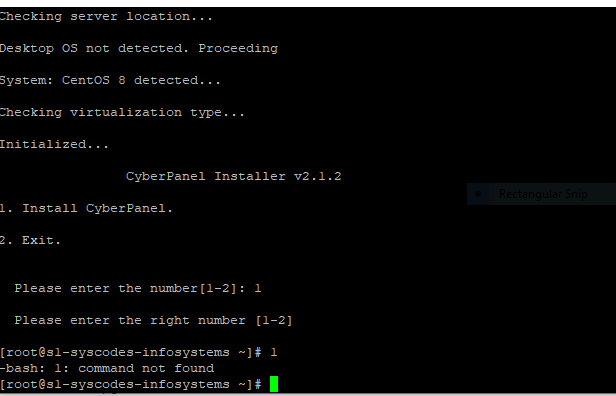
No matter, which option I click it returns an error and the installation doesn’t even begin. Even if I type “1”, it returns with “-bash: 1 command not found”. I have tried countless times.
I have tried checking the issues with my friend’s Hetzner account, even though I face the same issue and this installer doesn’t run.
However, If I use AWS, I can install cyberpanel flawlessly using the script. So what’s wrong with my Hetzner cloud server? Any lead?
Need some advice.
