CyberPanel Community

ClosedUnable to issue SSL for mailserver

BS
Bijja Saibabu #1

When I try to issue SSL fro my mail server I get the following error.

Cannot issue SSL. Error message: [Tue 07 Dec 2021 06:09:04 AM UTC] Registering account: https://acme.zerossl.com/v2/DV90 [Tue 07 Dec 2021 06:09:07 AM UTC] Already registered [Tue 07 Dec 2021 06:09:07 AM UTC] ACCOUNT_THUMBPRINT=‘jh1-1A7fNELA5CsKQAu3j2_Jq7eGFRkkqPb3Ft9XtP4’ [Tue 07 Dec 2021 06:09:10 AM UTC] Create new order error. Le_OrderFinalize not found. { “type”: “urn:ietf:params:acme:error:rateLimited”, “detail”: “Error creating new order :: too many certificates (5) already issued for this exact set of domains in the last 168 hours: budgetershopy.com,www.budgetershopy.com: see Rate Limits - Let's Encrypt”, “status”: 429 } [Tue 07 Dec 2021 06:09:10 AM UTC] Please add ‘–debug’ or ‘–log’ to check more details. [Tue 07 Dec 2021 06:09:10 AM UTC] See: How to debug acme.sh · acmesh-official/acme.sh Wiki · GitHub [Tue 07 Dec 2021 06:09:13 AM UTC] Create new order error. Le_OrderFinalize not found. { “type”: “urn:ietf:params:acme:error:rateLimited”, “detail”: “Error creating new order :: too many certificates (5) already issued for this exact set of domains in the last 168 hours: budgetershopy.com: see Rate Limits - Let's Encrypt”, “status”: 429 } [Tue 07 Dec 2021 06:09:13 AM UTC] Please add ‘–debug’ or ‘–log’ to check more details. [Tue 07 Dec 2021 06:09:13 AM UTC] See: How to debug acme.sh · acmesh-official/acme.sh Wiki · GitHub Generating a RSA private key …+++++ …+++++ writing new private key to ‘/etc/letsencrypt/live/budgetershopy.com/privkey.pem’ ----- 0,[Errno 2] No such file or directory: ‘/etc/dovecot/dovecot.conf’

As per the guides I found that we can issue only 5 SSL certificates in a week but when can I issue SSL again. I waited for one week and the issue still persists.

I am not even able to issue SSL for my host name.

My website URL www.budgetershopy.com

OS cyberpanel with ubuntu 20.04

37 replies
sh
shoaibkk #2

DNS are hosted with cloudflare?

BS
Bijja Saibabu #3

Yes, DNS are hosted with cloudflare

BS
Bijja Saibabu #4

I issued SSL on my hostname too but was unable to issue SSL on my host name too brother.

Any resolution here?

sh
shoaibkk #5

Please remove proxy from the mail domain and also the domain where you want to issue hostname SSL it will work

sh
shoaibkk #7

copy the command from cyberpanel main logs and paste it on terminal and show me the results

BS
Bijja Saibabu #8

Cannot issue SSL. Error message: [Tue 07 Dec 2021 07:13:12 AM UTC] Sleep 10 and retry. [Tue 07 Dec 2021 07:13:23 AM UTC] Registering account: https://acme.zerossl.com/v2/DV90 [Tue 07 Dec 2021 07:13:26 AM UTC] Already registered [Tue 07 Dec 2021 07:13:26 AM UTC] ACCOUNT_THUMBPRINT=‘jh1-1A7fNELA5CsKQAu3j2_Jq7eGFRkkqPb3Ft9XtP4’ 0,[Errno 2] No such file or directory: ‘/etc/dovecot/dovecot.conf’

This is the error code I got when I issued SSL on my mail.budgetershopy.com

sh
shoaibkk #9

can you please attach your server with cloud open a ticket and let me know

BS
Bijja Saibabu #10

Sorry for asking I am new to cyberpanel and may I know the command I need to use to get the details on terminal?

I can provide the information

sh
shoaibkk #11

can you please open a ticket and let me check

BS
Bijja Saibabu #12

Thanks for the quick reply and I created a ticket on support.

Ticket #MUJCZDG0S - Unable to issue SSL on my mail server and Host name

sh
shoaibkk #13

check reply and keep in touch there

NK
Nitesh Kunnath #15

Your error logs clearly mentions that you have reached Letsencrypt Rate limit.
If your DNS settings are correct you should be able to issue SSL successfully without issues. There is something wrong somewhere and SSL is being not issued for your Domain (mainly because of DNS and proxy), correct those and wait for rate limit to expire. I heard, rate limits are reset every Monday.

BS
Bijja Saibabu #16

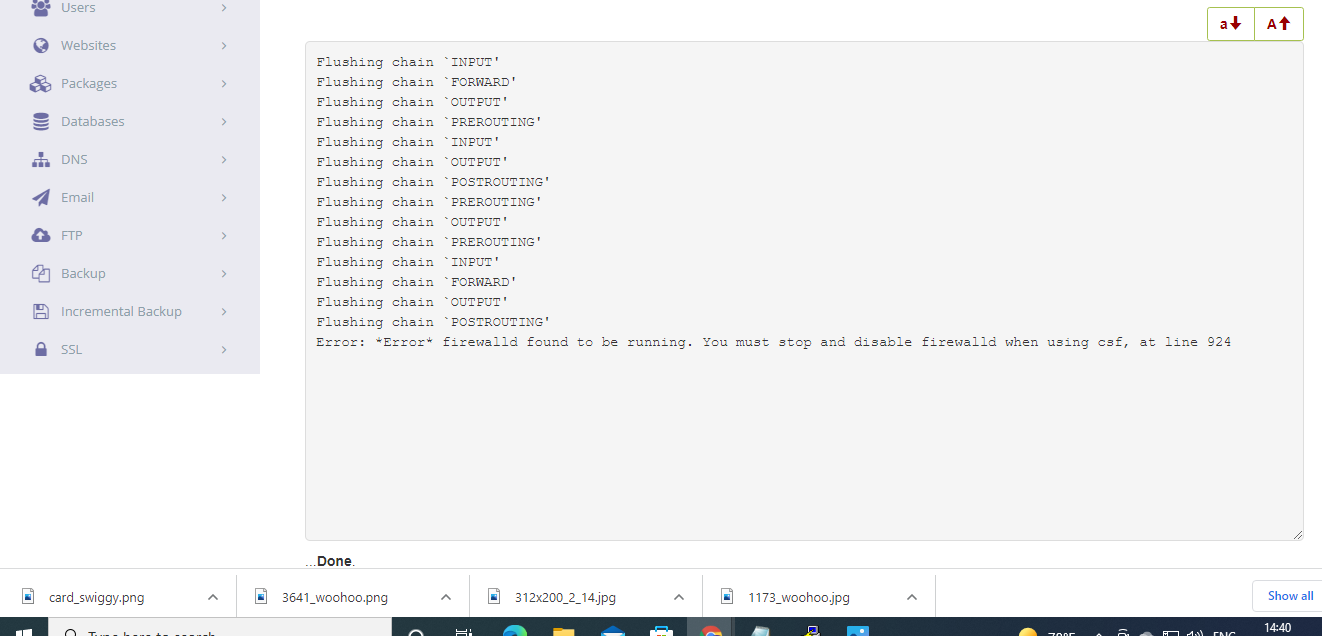
Thank you for responding, actually due to all these issues I had to change the OS to centOS with cyberpanel and I was able to issue ssl for my domain successfully but when I issued ssl for mail server and hostname it doesn’t reflect the change, one more thing I tried install CSF security on my cyberpanel and I lost an access to cyberpanel now, I can login via putty, any command line to fix this issue?

Any help will be appreciated. Thanks :slight_smile:

BS
Bijja Saibabu #17

Here is the error when I try to access cyberpanel port, I am using cloudflare so I changed the port to 8443, I am trying to access the cyberpanel at 8443

This site can’t be reached

156.67.220.85 took too long to respond.

Try:

ERR_CONNECTION_TIMED_OUT

NK
Nitesh Kunnath #18

login to ssh and first check if firewall is activated on cyberpanel using this command

sudo systemctl status firewalld

It will display whether firewall service is running or stopped. If not stopped, run this command to stop it

sudo systemctl stop firewalld

Or

sudo systemctl disable firewalld

If you have hosting level firewall too, then whitelist the port from there or disable the firewall. Hosting providers like Amazon AWS, Google Cloud, Oracle has their own firewall apart from the cyberpanel firewall.

NK
Nitesh Kunnath #20

Please disable the default firewalld services using this code:

sudo systemctl disable firewalld

Just Restart the server to make sure everything is back in order.

nu
nukapop92 #21

this post is really very good, thank you for sharing this information with us

BS
Bijja Saibabu #22

I was able to enable firewall back on but unable to send emails again, when we enable firewall that is causing issues with emails, I use thirdparty plugin to handle email delieries and before I created a ticket here emails working fine and they suddenly stopped working after enabling the firewall and I have taken your support and disabled firewall and issued SSL for mail server and emails worked for the firewall was disabled, now as I turned firewall back on it is is doing the same thing, I need your help in fixing this too, one more thing I issued ssl for domain and host name and mail server but only the domain has ssl padlock, mail server and host name do not have ssl padlocks is this a known issue or have I done something wrong?

BS
Bijja Saibabu #23

I just enable 465 and 587 ports for mail server TCP out ports, they were not in the list, shall I re-issue SSL for mail sever to take care of this or anything that I can do?

NK
Nitesh Kunnath #24

The reason your mail subdomain and hostname subdomain didnt work must be from DNS. You may have not configured the DNS properly. Make sure you add A record of these subdomains in your DNS pointing to the server IP without any proxy.

After doing the above steps, try to issue SSL and see the results.

BS
Bijja Saibabu #25

Okay, I checked and they point to cloudflare and everything correctly configured. I am worried about not having SSL padlock for both hostname and email server, I was able to issue SSL for mailserver in the past and was able to send emails. If you wish I can share the screenshot for cloudflare DNS records for the reference.

I need your help in getting this taken care. Thanks

NK
Nitesh Kunnath #26

If you are using Cloudflare for DNS, then you must disable orange cloud proxy for mail subdomain otherwise mails will not work in proxy. Also, disable orange cloud proxy for whatever domain you need to issue SSL and enable it back only after successfull issue of SSL from letsencrypt except the mail sub domain.

BS
Bijja Saibabu #27

I understand, actually everything works fine but just SSL padlock is not showing after issuing SSL for host name mailserver, I removed proxy from all the DNS, I will issue SSL for hostname and mailserver on Monday and keep you updated.

BS
Bijja Saibabu #29

I issued SSL for my mailserver and can handle emails fine now but only the issue is rainloop and host name do not have SSL padlock.

Dr
Dreamer #30

I’m not expert on DNS but those records looks bit funky for me. Never seen CAA record in use or even heard what its for… Maybe try check cyberpanel DNS and copy settings from there.

BS
Bijja Saibabu #31

@die2mrw007 , please look into this brother, I am stuck with this. I followed other tutorial and could take care of all the issues and I need your help in fixing this, only host name and mailserver are not having SSL padlock, I have done the same thing while issuing ssl for domain and it got SSL padlock.

BS
Bijja Saibabu #33

mail server url has SSL padlock but rainloop doesn’t have a padlock, I attached the screenshot.

My bad hostname has a ssl padlock I tried today and it is working fine.

BS
Bijja Saibabu #34

I must appreciate your time and patience here, you are the best :slight_smile:

BS
Bijja Saibabu #35

Please ignore the last question brother, everything looks great, my last question is do we have to issue SSL for domain, hostname, mail server for every 90 days or will the cyberpanel handle everything for us? I see SSL is valid for 90 days…

NK
Nitesh Kunnath #36

SSL cannot be issued to a naked IP address. It should be a domain as far as I am aware.

NK
Nitesh Kunnath #37

Cyberpanel runs cron time to time and issues SSL which are about to expire all automatically

BS
Bijja Saibabu #38

Thanks for the information and you helped me fix all the issue that I had, I was worried when I started this chat but you made me super cool in terms of learning about cyberpanel, thanks again @die2mrw007

Sign in to reply