ET
my back up always shows 0MB i dont know why even it was created successfully ?
also i see 0MB in gDrive backups too
 Community
my back up always shows 0MB i dont know why even it was created successfully ?
also i see 0MB in gDrive backups too
Which version of CyberPanel are you using and how did you install it ?
Can you share logs from CyberPanel main log file.
thank you for the kind reply
v 2.1 build 2
which log file you want me to provide you
look at the picture all scheduled backups are 0MB
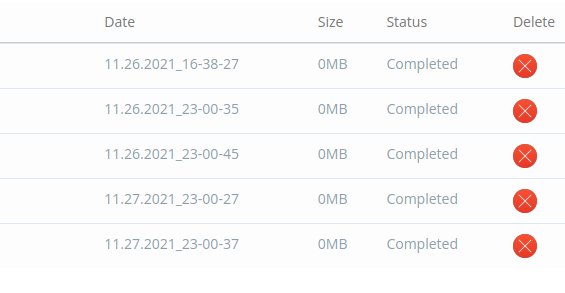
im waiting for the help please
I will have a check in my test server and let you know if I could reproduce this same error. If not, will you be able to share your server login to check the issue?
i found the problem its only backup the public_html files but im using laravel which files needs to be on the root folder which is home/domain.com
any soulution to change backup destination ?
CyberPanel > Websites > List Websites > Your Site Manage > CONFIGURATIONS TAB in > vHost Conf open.
//First Line
docRoot                   $VH_ROOT/public_html
CHANGE
//First Line
docRoot                   $VH_ROOT/yourlaravelfolder/public
This is how you should create your folder structure. If you are using Cyberpanel with Openlitespeed after this process; You should try to take a backup by restarting the services.